
On this page
Start here
Quick answer
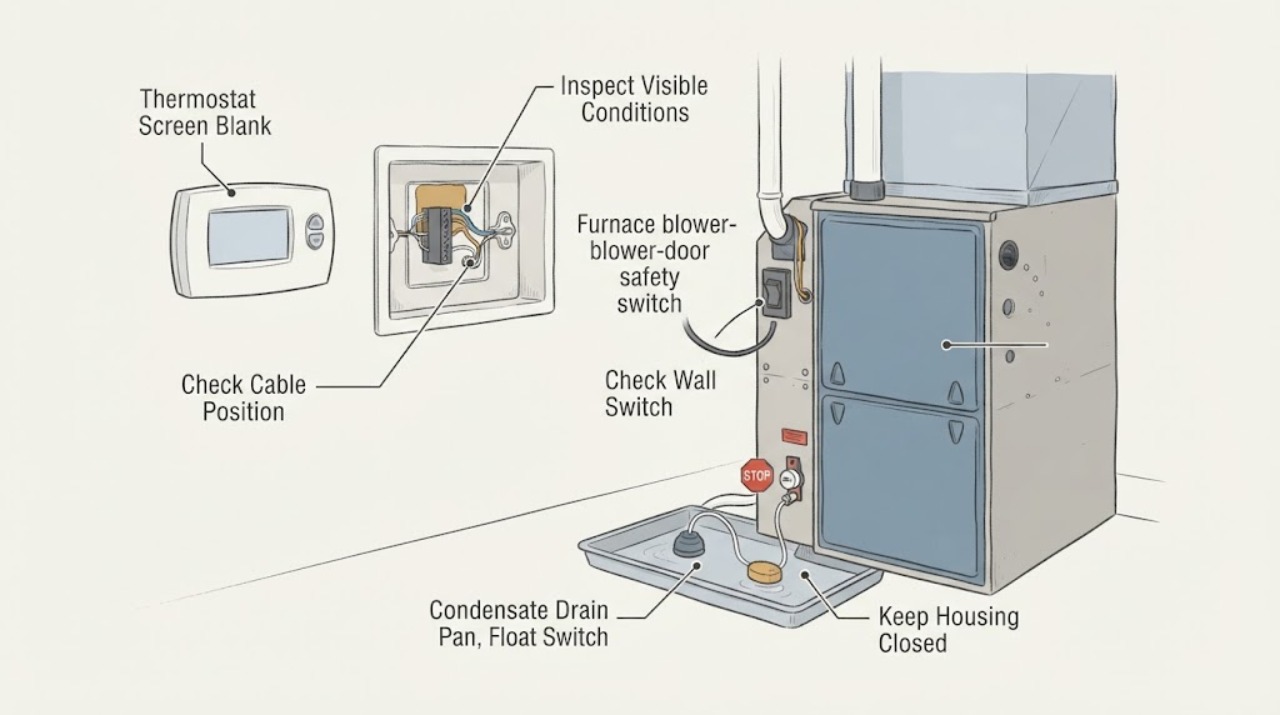
A blank thermostat usually means the thermostat has lost its low-voltage power, but the cause can be upstream of the wall display. Check only the user-accessible basics first: replace batteries if the thermostat uses them, confirm the HVAC breaker and furnace service switch are on, and make sure the furnace blower/access door is fully seated. A loose door can open the furnace's safety interlock and interrupt operation. If the system has a condensate float or overflow switch, standing water from a backed-up drain can trip it and shut down equipment to prevent overflow; depending on the installation, that switch may also interrupt the thermostat circuit. Look for water around an accessible pan or drain without bypassing the switch or opening the furnace. If the breaker trips again, the screen stays blank after power is restored, a door switch will not engage, the float keeps tripping, or there is gas odor, burning smell, exposed wiring, water near electrical parts, or a carbon-monoxide alarm, stop and arrange qualified HVAC service or emergency help. Never bridge thermostat terminals, defeat a blower-door switch, work on live wiring, open a gas burner compartment, or reset a safety device repeatedly.
Work through in order
Diagnostic checks
Use only checks that match the exact appliance or system and its official guide.
-
Check 1
Look at the thermostat without removing it: note whether the screen is completely dark, faint but backlit, frozen, or showing any icon, and record whether the furnace, blower, or air conditioner stopped at the same time.
Expected result: The display is fully dark with no response, the backlight is faint, the display returns intermittently, or the HVAC equipment is also silent.
Next step: Record the model and timing, then continue only with the external battery, breaker, service-switch, door, and condensate observations below. Do not pull the thermostat from its wall plate.
Why this matters
Why: A fully dark or unresponsive display points first to lost thermostat power, while a faint display can have a different battery or display condition. Equipment stopping at the same time makes an upstream power or safety interruption more likely than a screen-only fault.
-
Check 2
If the thermostat is battery-powered, replace its batteries with the type and orientation specified by that thermostat's manual; if it is hardwired, do not open the thermostat or touch terminals.
Expected result: The display returns immediately, remains blank, returns only briefly, or the thermostat has no user-replaceable battery compartment.
Next step: If the display stays blank, leave the thermostat closed and check the HVAC breaker and furnace service switch once. Do not insert a wire, jumper, or tool into the thermostat base.
Why this matters
Why: A display that returns after correct battery replacement supports a battery-power interruption. A hardwired or still-blank thermostat needs an HVAC power-path check rather than a guessed thermostat replacement.
-
Check 3
Check the HVAC breaker or fuse and the user-accessible furnace service switch; reset or turn on a device only once if it is clearly off and there is no smell, smoke, water near electricity, or visible wiring damage.
Expected result: A breaker or fuse is open, the furnace switch is off, power restores and the display returns, or the breaker trips again immediately.
Next step: If power returns, wait and observe without repeated cycling. If a breaker trips again, a fuse opens again, or the screen remains blank, leave the system off and arrange qualified HVAC or electrical service.
Why this matters
Why: Carrier and Resideo list a tripped breaker, blown fuse, or furnace switch as common causes of a blank display. A repeat trip indicates an unresolved electrical or equipment fault, not permission to keep resetting it.
-
Check 4
From outside the furnace, check that the blower or front access door is present, straight, and fully seated in its normal position; do not remove the panel, defeat its switch, or reach into the burner or blower compartment.
Expected result: The door is visibly ajar, shifted, recently removed, or difficult to seat; the door is secure but the screen remains blank; or the door switch or wiring is visible and damaged.
Next step: If the door was simply mis-seated, close it fully once and observe. If it will not latch, the display stays blank, or any switch or wire is damaged, keep the furnace off and request service; never tape or hold the switch closed.
Why this matters
Why: Resideo directs blank-display troubleshooting to make sure the furnace door is closed securely, and Carrier identifies a safety switch triggered by a loose front panel as a reason a furnace may not start. A damaged switch or wiring is not a user adjustment.
-
Check 5
Look only at accessible condensate equipment near the furnace or air handler for standing water, a full pan, a wet drain outlet, or a float that appears raised; do not open the drain, remove a pump cover, or bypass the switch.
Expected result: Water is standing in or around the pan, the drain is visibly backed up, the float is raised, the area is dry, or the condensate equipment is hidden and inaccessible.
Next step: If water or a raised float is visible, turn the HVAC system and water-producing equipment off as safely possible and arrange HVAC service to correct the drain condition. Do not lift, tape, or electrically bypass the float.
Why this matters
Why: Trane explains that a float switch trips when condensate reaches its level and shuts down equipment; Lennox identifies a drain backup and float trip as a cause of no thermostat power. A dry visible area does not rule out a hidden pan, drain, pump, or switch fault.
-
Check 6
After one safe correction, wait for the thermostat to power up and make one normal call for heat only if the display is stable and no gas, smoke, electrical, or water hazard exists; do not repeatedly start and stop the furnace.
Expected result: The screen stays on and the furnace starts normally, the screen returns but the furnace does not respond, the screen goes blank again, or the furnace starts and stops with a fault indication.
Next step: Stop for a recurring blank screen, no response, fault indication, short cycling, or abnormal sound. Provide the technician with the exact timing, breaker status, door condition, condensate evidence, and any displayed codes.
Why this matters
Why: A stable display and normal call after a correctly seated door or restored power supports a temporary power interruption. A recurring blank screen or unresponsive furnace suggests a continuing door-interlock, float, low-voltage, control, or wiring problem.
-
Check 7
If the display remains blank after the external checks, record the full thermostat and furnace model numbers, system type, recent maintenance or drain work, and whether the outage follows cooling or humid weather; do not test voltage or replace a low-voltage part yourself.
Expected result: The screen is still blank with power apparently on, the problem follows condensate production, the issue began after a filter or panel service, or no pattern is clear.
Next step: Keep the HVAC system off or in the safest available state and arrange qualified HVAC service. Do not bridge R-C/Y terminals, replace a fuse with a larger value, bypass a safety switch, or open the furnace control compartment.
Why this matters
Why: The remaining possibilities include a low-voltage fuse or transformer, wiring, thermostat, door safety circuit, or float-switch path. The symptom pattern can guide a technician but cannot select a compatible part safely.
Use your observations
Decision map
Find the observation that best matches what you see, then follow the next safe action.
-
PATH 01Next step
What you see
Do this next
Seat the exterior door fully once without defeating its switch. If it will not latch or the display does not return, leave the furnace off and arrange qualified HVAC service.
-
PATH 02Next step
What you see
Do this next
Turn the HVAC system and water-producing equipment off as safely possible and have a qualified technician clear and inspect the drain, pan, pump, and float-switch wiring. Do not bypass or hold the float down.
-
PATH 03Next step
What you see
Do this next
Restore an obviously off breaker or switch once. If it trips again or the screen remains blank, keep the system off and call qualified HVAC or electrical service.
-
PATH 04Next step
What you see
Do this next
Stop user troubleshooting and arrange qualified HVAC service for low-voltage measurements and safety-circuit diagnosis. Do not remove the thermostat, bridge terminals, or open the furnace control compartment.
-
PATH 05Next step
What you see
Do this next
Do not touch switches or relight equipment if gas is suspected; leave the area and contact the gas utility or emergency services. For smoke, burning odor, exposed wiring, or wet electrical equipment, keep clear and arrange emergency-qualified service.
Helpful context
Understand the symptom
The blank screen is a power symptom, not proof the thermostat failed
Carrier and Resideo both begin a blank-display check with power: thermostat batteries where applicable, the HVAC breaker or fuse, the system power switch, and a securely closed furnace door. A furnace access door is part of the safety chain on many installations, so a panel that is open, crooked, or not fully latched can leave the equipment and thermostat without the expected control power. Do not remove the thermostat from its base or expose wiring just to confirm this.
A condensate float trip can stop equipment when water backs up
Trane explains that a condensate float switch responds when water reaches its trip level and signals the HVAC system to shut down so it does not continue producing condensation. Lennox likewise lists a float switch triggered by a backed-up drain line as a cause of no power at a thermostat. This is an installation-dependent circuit: some switches interrupt cooling or the air-handler fan, while others are wired into a control path that affects the thermostat. A visible pan or drain backup is useful evidence, but it is not a reason to jumper the switch.
Use external checks and leave low-voltage diagnosis to a technician
After one safe correction, allow the system to settle and observe whether the display returns and whether the furnace responds normally. A recurring blank screen can involve a low-voltage fuse, transformer, wiring fault, thermostat, door interlock, or a float switch that has not been reset by correcting the underlying drain condition. Those components are not identified safely by shorting terminals or repeatedly resetting a breaker.
Gas and electrical warnings override troubleshooting
If you smell gas, do not operate switches or try to relight anything; leave the area and contact the gas utility or emergency services. A burning smell, exposed or frayed wire, water at electrical equipment, a carbon-monoxide alarm, or a breaker that trips again requires immediate professional attention. Keep the furnace and thermostat out of service until the hazard is assessed.
Safety boundary
Stop conditions
- Gas odor, carbon-monoxide alarm, smoke, burning smell, or visible arcing
- Breaker or fuse trips again, exposed or frayed wiring, or water reaches electrical equipment
- Blower-door or furnace access switch will not engage, is damaged, or would need to be bypassed
- Condensate pan or drain is backed up, the float repeatedly trips, or the drain and pump are inaccessible
- The next step would require removing the thermostat, opening a furnace compartment, testing live voltage, or bridging a safety circuit
When checks do not resolve it
Need a professional?
Stop and arrange qualified HVAC service for a recurring or persistent blank screen, a furnace door switch that will not engage, standing condensate water or a repeatedly tripping float, an open low-voltage fuse, exposed wiring, a breaker that trips again, or an HVAC unit that remains unresponsive after one safe power restoration. Leave immediately and contact the gas utility or emergency services for gas odor or a carbon-monoxide alarm; keep clear of smoke, burning odors, and wet electrical equipment.
Common questions
FAQ
Why is my thermostat screen blank when the furnace blower door was removed?
A furnace access door that is open, shifted, or not fully seated can leave a safety interlock open and stop the furnace control circuit. Seat the exterior door once if it is visibly misaligned, without holding the switch closed. If the screen stays blank, arrange qualified HVAC service.
Can a condensate float switch make a thermostat go blank?
It can, depending on how the HVAC installer wired it. Trane says a float switch trips when condensate reaches its level and shuts down equipment, while Lennox lists a drain-line backup and float trip as a cause of no thermostat power. Look for accessible standing water, but never bypass the switch.
What should I check first for a completely blank thermostat?
If applicable, replace the thermostat batteries. Then check the HVAC breaker or fuse, the furnace service switch, and whether the furnace door is fully seated. Reset a clearly off breaker or switch only once when there is no hazard; a repeat trip or persistent blank screen needs service.
Should I jumper the float switch or blower-door switch to restore heat?
No. Both are safety devices, and bypassing them can allow overflow, electrical damage, blower injury, overheating, or unsafe furnace operation. Keep the system off and have a qualified HVAC technician diagnose the underlying door, drain, float, or control problem.
What if the thermostat display returns but the furnace still will not start?
A restored display does not prove the furnace safety circuit is healthy. Check only that the mode and set point call for heat, then stop for a door, float, low-voltage, ignition, gas-supply, or control diagnosis if the furnace remains unresponsive. Do not open the burner compartment or test wiring.
When is a blank thermostat an emergency?
Treat gas odor, a carbon-monoxide alarm, smoke, burning smell, exposed wiring, water at electrical equipment, or a breaker that trips again as an emergency or immediate service boundary. Do not operate switches if gas is suspected; leave and contact the gas utility or emergency services.
Read the exact guide
Official sources
- Troubleshooting the HVAC Air Handler Overflow SwitchTrane · Official Trane explanation of condensate overflow switches; not every air handler has one and circuit behavior depends on installation.
- Why Is There No Power to My Thermostat?Lennox · Official Lennox consumer explanation; float-switch wiring and thermostat power paths vary by HVAC installation.
- Common Thermostat Issues and How to TroubleshootCarrier · Official Carrier consumer guidance for common thermostat symptoms; exact thermostat and furnace wiring vary by installation.
- Furnace Troubleshooting GuideCarrier · Official Carrier consumer furnace guidance; exact furnace safety switches, gas controls, and service procedures vary by model.
- 69-2485EFS-05 - TH8320ZW Z-Wave ThermostatResideo · Official Resideo manual for the named thermostat family; used for the general power and securely closed furnace-door boundary, not for universal wiring or switch behavior.
Community feedback
Share a repair observation
Share a plain-text repair observation. Accepted observations are published automatically; this page may take a moment to update.