
On this page
Start here
Quick answer
Check the grounded outlet and fuse box, make sure the safety lock and basket or pot are correctly seated, and set a cooking time or preset. Frigidaire's official air-fryer guide uses these checks for no power, no start, and no heat. Do not operate with a damaged cord, exposed heater, smoke, or abnormal odor. Persistent failure after one correct setup needs service.
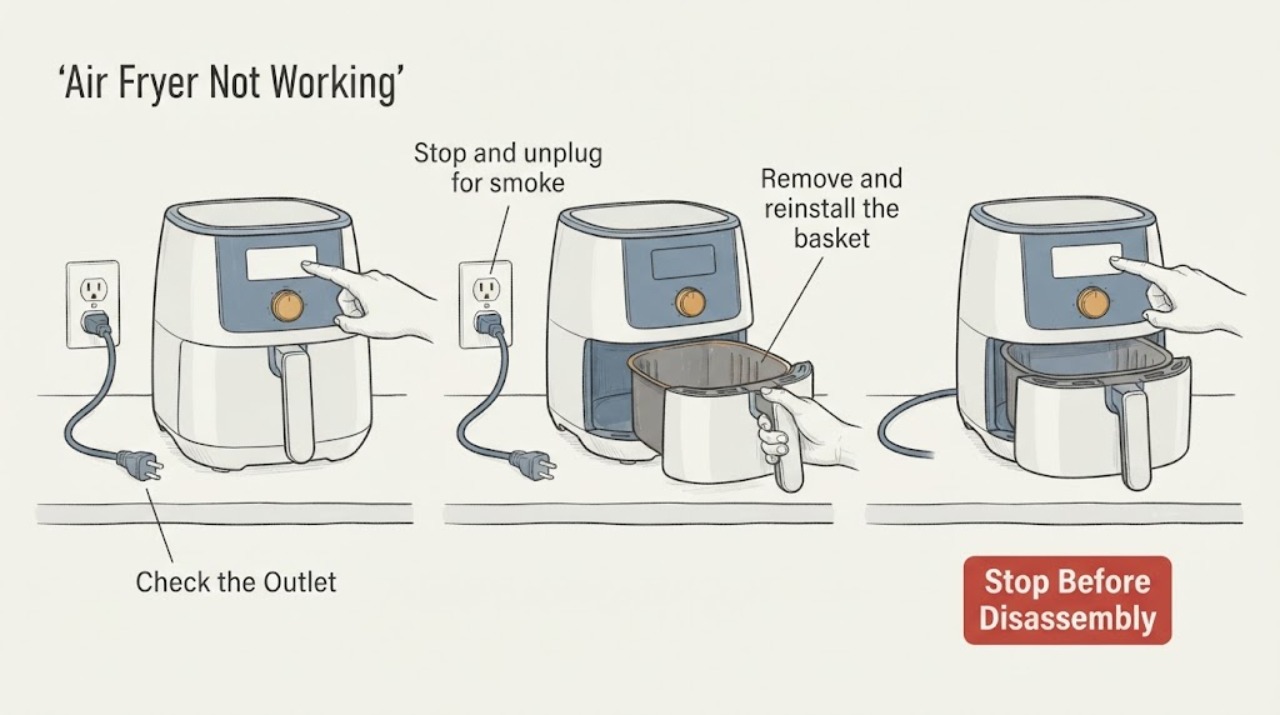
Work through in order
Diagnostic checks
Use only checks that match the exact appliance or system and its official guide.
-
Check 1
Stop and unplug for smoke, burning odor, damaged cord, exposed heater, or unusual heat.
Expected result: A safety warning exists or not.
Next step: Arrange service.
Why this matters
Why: Safety symptoms require shutdown.
-
Check 2
Check the plug, grounded outlet, fuse box, and power indicator.
Expected result: Power is absent or present.
Next step: Restore one obvious supply condition and retry once.
Why this matters
Why: No display points to supply or internal power.
-
Check 3
Remove and reinstall the basket or pot until it clicks and the safety lock registers.
Expected result: Basket is misseated or correctly seated.
Next step: Correct visible seating; never defeat the lock.
Why this matters
Why: The interlock can prevent start or heat.
-
Check 4
Set a cooking time or preset and verify controls respond.
Expected result: Time is absent, display shows an error, or command is accepted.
Next step: Run one supervised short test.
Why this matters
Why: An unset program can look like no heat.
-
Check 5
Check accessible air inlets, outlet, basket, and heater area for food or grease buildup after cooling.
Expected result: Airflow or heater area is restricted, or clear.
Next step: Clean as the manual directs and dry fully.
Why this matters
Why: Restriction can inhibit heating and fan operation.
-
Check 6
Stop for a repeated no-start, no-heat, code, fan failure, or odor after the external checks.
Expected result: Unit works or fault recurs.
Next step: Arrange service with model and observations.
Why this matters
Why: Internal control, heater, fan, or sensor diagnosis is needed.
Use your observations
Decision map
Find the observation that best matches what you see, then follow the next safe action.
-
PATH 01Next step
What you see
No display and the outlet or fuse is abnormal.
Do this next
Correct once and service recurrence.
Why this path and its safety boundary
Why it matters: Supply is likely.
-
PATH 02Next step
What you see
Display works but basket is not seated or lock is active.
Do this next
Reseat correctly and retest.
Why this path and its safety boundary
Why it matters: Safety interlock is preventing operation.
-
PATH 03Next step
What you see
Basket and time are correct but fan or heater remains inactive.
Do this next
Arrange service.
Why this path and its safety boundary
Why it matters: Internal component fault is likely.
-
PATH 04Next step
What you see
Smoke, odor, damaged cord, or abnormal heat occurs.
Do this next
Unplug if safe and obtain service.
Why this path and its safety boundary
Why it matters: Unsafe operation is present.
Helpful context
Understand the symptom
Separate no display from a display that refuses to start. Remove food and record whether the fan, heater, or timer responds.
Use the exact manual for basket interlock and cleaning. Never bypass a safety switch.
When checks do not resolve it
Need a professional?
A technician may test power, interlock, control, fan, heater, and temperature sensor.
Common questions
FAQ
Why does an air fryer have power but not start?
Check the safety lock, basket or pot seating, and cooking time.
Can a basket interlock stop heating?
Yes. Reseat the basket until it clicks and never bypass the lock.
Should I test it with the basket removed?
No. Use the intended basket or pot and follow the manual.
When should I unplug it?
For smoke, burning odor, damaged cord, exposed heater, or abnormal heat.
Read the exact guide
Official sources
- Air Fryer - Does not turn on or heat upFrigidaire · General countertop air-fryer guidance; exact brand/model manual controls vary.
Community feedback
Share a repair observation
Share a plain-text repair observation. Accepted observations are published automatically; this page may take a moment to update.