
On this page
Start here
Quick answer
On the Thermador T36FT820NS, do not treat an E4 display as proof of a failed water valve, filter, or control board. The exact T36FT series Use and Care Manual opened for this platform explains water-dispenser checks and says that a generic “E” or “d” on the temperature display means the electronics detected a fault, but it does not define a dedicated E4 communication code. First record the complete model suffix and market, capture the exact display and whether only water fails or the whole control is unresponsive, then perform only safe external checks: confirm the water shutoff is open, look for a kink or leak, check the filter status and seating without disconnecting a pressurized line, and verify that a mode or lock is not disabling dispensing. If E4 remains, the display format is different from the manual, or the dispenser is still dead after these checks, stop selecting parts and arrange qualified Thermador service for model-specific diagnosis.
Before you begin
Safety first
- Limit owner checks to the display, rating label, settings, accessible shutoff, visible hose routing, filter cover/status, and visible leaks. Do not disconnect a pressurized water line, open the control or rear panels, probe live wiring, bypass a filter or lock, reach into the ice maker, or select a board or valve from E4 alone.
Work through in order
Diagnostic checks
Use only checks that match the exact appliance or system and its official guide.
-
Check 1
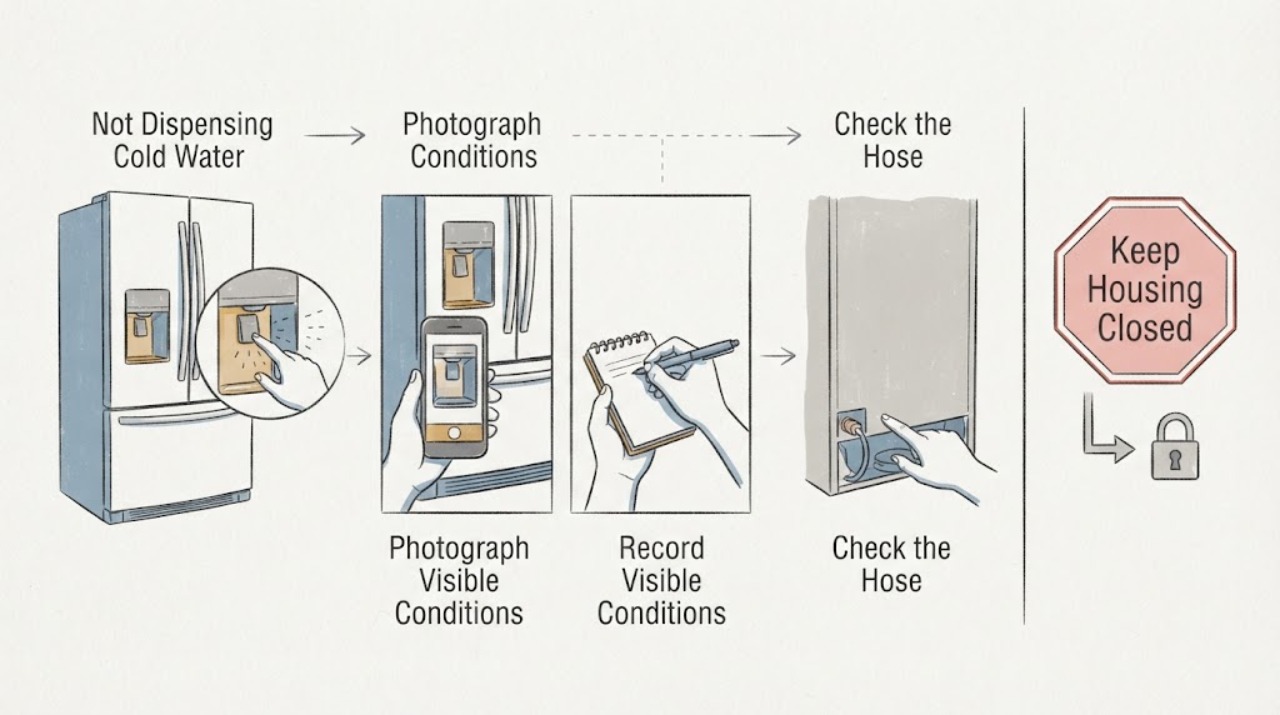
Photograph the display and record the exact characters, spacing, blinking pattern, and when E4 appears. Also record whether the internal lights, temperature controls, water button, and other panel functions respond. Do not keep pressing the dispenser or force the paddle while the display is unresponsive.
Expected result: The display clearly shows E4, shows E or d instead, shows a different code, or the characters are incomplete; the water function alone fails or the whole control is unresponsive.
Next step: Keep the exact display record and use it when contacting Thermador service. Do not borrow an E4 definition from another Thermador product or another refrigerator family.
Stop if: Stop for smoke, burning odor, water near electrical parts, a hot plug, exposed wiring, repeated breaker operation, or an appliance that becomes unsafe to touch.
Why this matters
Why: The opened T36FT manual has a generic E/d electronics-fault entry but no dedicated E4 entry. Water-only failure with a responsive control leaves supply, filter, mode, and dispenser paths open; a whole-panel failure makes an electronics or communication issue more plausible without identifying a specific board.
-
Check 2
Read the rating label and record the complete model suffix, serial number, country or market, and any service-document identifier. Confirm that the appliance is the Thermador T36FT820NS freestanding French-door bottom-mount refrigerator, not a T36FT810NS sibling or a built-in T36/T42 platform.
Expected result: The label matches T36FT820NS and a regional suffix such as /07 can be selected, or the suffix and market cannot be matched to the available manual.
Next step: Give the complete label and display photo to Thermador or a qualified technician and ask which manual and error-code path applies to that unit before any part is ordered.
Stop if: Do not use a T36FT810NS, built-in column, dishwasher, freezer, or third-party code table to interpret E4.
Why this matters
Why: Thermador exposes model-specific service pages and several T36FT820NS suffixes. The opened manual is labeled for the T36FT series, but a missing suffix can change the applicable display or service record; identity uncertainty is not evidence for a water valve or control board.
-
Check 3
With the dispenser idle and without disconnecting tubing, confirm that the household water shutoff is open and inspect only the accessible hose and connection area for a kink, crushed routing, drip, or wet floor. Keep hands and tools away from electrical parts and do not loosen a water fitting.
Expected result: The shutoff is closed, the hose is kinked, a connection is leaking, or the visible supply path looks open and dry.
Next step: Open the valve only if it is safely accessible and no leak is present; stop and arrange service for a leak, damaged hose, or persistent failure. Do not perform a flow or live-valve test.
Stop if: Stop for active leaking, water near the power connection, a damaged hose, or any need to move the refrigerator or disconnect a pressurized line.
Why this matters
Why: The manual identifies no water supply and a kinked hose as direct explanations for a non-functioning water dispenser, while a visible leak changes the priority to water containment. An open, dry line does not prove that the internal valve or electronics are good or bad.
-
Check 4
Check the internal filter cover and filter-change indication from the normal user-access area. Confirm that the filter is seated as the exact manual shows and note whether dispensing started failing after a filter change or first installation. Do not remove the filter or fit a bypass while the water connection is pressurized or the correct procedure is uncertain.
Expected result: The filter is due, visibly not seated, the symptom began after filter work, or the filter cover and indication appear normal.
Next step: Use only the exact manual's filter procedure after safe water isolation if a filter service is necessary. If the filter is correctly seated and E4 or no dispensing remains, move to service rather than bypassing the filter or selecting a valve.
Stop if: Stop for spray, a stuck filter, a cracked housing, an active leak, or any need to pry, twist forcefully, or open an internal water path.
Why this matters
Why: The manual says a blocked filter can reduce water output and warns that the filter is under pressure during removal; it also says air can remain after a new filter or connection. These observations support a documented filter or air-path check, not a conclusion that E4 identifies a filter or valve.
-
Check 5
Review the visible appliance settings for Vacation mode, a dispenser or child lock, and any water or ice function setting documented for the exact model. Do not enter an unverified service menu or use a reset sequence copied from another platform.
Expected result: Vacation mode or a lock is active, the dispenser setting is disabled, or all documented settings appear normal while the display still shows E4.
Next step: Correct only a clearly documented user setting and observe once. If E4 or the dispensing failure remains, save the display and setting record and request model-specific Thermador service.
Stop if: Do not repeatedly reset power, defeat a lock, bypass an interlock, or open the control panel to test communication.
Why this matters
Why: The T36FT manual states that Vacation mode switches off the water dispenser and ice production. A normal setting with a persistent E4 leaves the code unresolved; it does not distinguish a communication module, control input, wiring, or water actuator without service evidence.
-
Check 6
Separate the water path result from the code result before the service call: note whether ice production, cooling, lighting, Home Connect notifications, and the water dispenser fail together or independently. Do not reach into or underneath the ice maker and do not use live measurements.
Expected result: Only cold water fails, water and ice fail, the full appliance control is unresponsive, or water works but E4 remains.
Next step: Provide the symptom matrix, exact model suffix, display photo, filter history, water-line observations, and setting history to qualified Thermador service. Keep the dispenser unused if there is a leak or electrical concern.
Stop if: Stop for rotating ice-maker parts, exposed wiring, water near electrics, repeated breaker trips, or any need to dismantle the dispenser or control system.
Why this matters
Why: A single water symptom supports checking supply, filter, air, and settings first. Water plus ice or a whole-control failure raises the need to assess shared control or communication paths; an E4 with working water remains an unresolved display fault. None of these patterns names a replacement board or valve.
Use your observations
Decision map
Find the observation that best matches what you see, then follow the next safe action.
-
PATH 01Safety boundary
What you see
Only cold-water dispensing fails, the display and controls respond, the shutoff is open, the hose is dry and unkinked, and the filter or mode check finds a clear issue.
Do this next
Correct only the documented external condition under the exact manual, then observe once. If dispensing remains absent or E4 returns, stop and request Thermador service.
Why this path and its safety boundary
Why it matters: The accessible water path or a documented mode is more likely than a proven communication-board fault. The manual lists supply, hose, filter, air, and Vacation mode as distinct paths.
Safety stop: Do not order a valve or board from E4 alone, disconnect a pressurized hose, or bypass the filter.
-
PATH 02Safety boundary
What you see
E4 is accompanied by an unresponsive control, failure of water and ice together, a Home Connect or panel communication symptom, or a display that does not match the opened manual.
Do this next
Keep the appliance safe and arrange qualified Thermador service with the exact suffix, display photo, and symptom timeline. Do not open the panel or make live tests.
Why this path and its safety boundary
Why it matters: A shared control or communication path needs model-specific diagnosis, but the opened documentation does not prove which board, harness, actuator, or module is responsible.
Safety stop: Do not substitute an E4 meaning from another appliance category or authorize a control-board replacement without a model-specific diagnosis.
-
PATH 03Safety boundary
What you see
The model suffix or market is incomplete, E4 cannot be reproduced or transcribed exactly, or the available T36FT manual shows only E/d rather than E4.
Do this next
Treat E4 as an unresolved display observation, obtain the exact label and regional documentation, and use only the manual that matches before applying a reset or code procedure.
Why this path and its safety boundary
Why it matters: The code-level claim is not verified for the user's exact display and variant. A generic E4 table could misidentify a water path, temperature issue, communication fault, or another appliance platform.
Safety stop: Do not clear the code repeatedly, choose a part, or publish a specific E4 component meaning from the current evidence.
-
PATH 04Safety boundary
What you see
There is a water leak, moisture at electrical parts, damaged power cord, exposed wiring, burning odor, smoke, abnormal heat, or a breaker trip.
Do this next
Stop using the dispenser, shut off the water only if the valve is safely accessible, isolate electrical power only if safe, and obtain qualified appliance or electrical service.
Why this path and its safety boundary
Why it matters: The situation has crossed the safe external-check boundary and may involve shock, fire, or water damage in addition to the dispensing complaint.
Safety stop: Do not touch wet electrical parts, move the appliance across a leak, reset power to test E4, or open panels.
Helpful context
Understand the symptom
What the E4 evidence does and does not establish
The user-reported E4 is important, but the opened T36FT series manual does not contain a dedicated E4 entry. Its troubleshooting table instead says that an E or d on the temperature display means the electronics detected a fault, and it directs the owner to a documented power-off/reconnect sequence followed by customer service if the message remains. That is not enough evidence to call E4 a water-valve, filter, or control-board failure on this model. Capture the exact characters and complete rating-label identity before applying any code meaning.
Why cold-water dispensing can fail without proving a valve fault
The T36FT820NS product specification lists an internal water dispenser, a water tank, and a water-filter replacement indicator. The matching manual separately discusses air after a new connection or filter installation, the shutoff valve and water hose, low water pressure, a blocked filter, and Vacation mode. Those are distinct observations. A water-only failure with responsive controls points first to the accessible water path; E4 together with an unresponsive control or a display that the manual cannot match raises a communication or electronics question for service, not a part guess.
When checks do not resolve it
Need a professional?
Use Thermador customer service or a qualified appliance technician for persistent E4, an unresponsive dispenser or control, multiple functions failing, an unverified model suffix, or any internal water, electrical, communication, or control diagnosis. Use qualified electrical service when the receptacle, cord, grounding, moisture, or breaker is involved.
Safety scope: Limit owner checks to the display, rating label, settings, accessible shutoff, visible hose routing, filter cover/status, and visible leaks. Do not disconnect a pressurized water line, open the control or rear panels, probe live wiring, bypass a filter or lock, reach into the ice maker, or select a board or valve from E4 alone.
Have this ready
- Provide T36FT820NS, the complete suffix and market, serial number, exact E4 transcription or photo, which functions fail, filter installation/change history, water shutoff and hose observations, active modes or locks, leak history, and whether cooling and lighting remain normal.
Common questions
FAQ
Does E4 mean the Thermador water inlet valve is bad?
Not from the opened evidence. The T36FT manual does not define a dedicated E4 entry. It lists water supply, a closed valve, a kinked hose, low pressure, a blocked filter, air, and Vacation mode as separate dispenser paths. A valve should be considered only after model-specific testing proves it is the failed path.
Why does the manual mention E or d instead of E4?
The opened T36FT series manual's troubleshooting table says an E or d on the temperature display means the electronics detected a fault; it does not show a dedicated E4 definition. The exact display characters, full suffix, market, and source manual must be matched before using a code procedure.
Can I remove the water filter to test the dispenser?
Do not improvise that test. The manual says the filter is under pressure during removal and describes a specific installation and flushing procedure. Check only the accessible cover and status first; if the filter is stuck, leaking, or the procedure is uncertain, leave it in place and call service.
Could a setting stop the water dispenser?
Yes. The T36FT manual states that Vacation mode switches off the water dispenser and ice production. Check only the documented user settings and locks for the exact model. If settings are normal and E4 remains, do not infer a board or valve; request model-specific service.
Read the exact guide
Official sources
- T36FT820NS Freestanding French Door Bottom Mount Refrigerator | THERMADOR USThermador · Directly applicable to the base model identity and visible product features, including internal water dispensing, filter, Home Connect, and refrigerator category; it does not define E4.
- Appliance Information - Freestanding French Door Bottom Mount Refrigerator | T36FT820NS/07Thermador · Directly applicable to the model-family service-document boundary; the task's complete suffix and market may differ from /07, so it is not used to define E4.
- T36FT820NS 36-Inch Stainless Steel Freestanding French Door Bottom Freezer Professional HandlesThermador / BSH Home Appliances · Directly applicable to T36FT820NS product features and electrical/installation class, not to the E4 code meaning or an internal repair diagnosis.
- Use and Care Manual T36FT.. | ThermadorThermador / BSH Home Appliances · Opened official T36FT series manual. It is directly applicable to safe user-level water-dispenser, filter, mode, power, and service-boundary guidance. The manual contains no dedicated E4 entry; it says an E or d display indicates an electronics fault.
Community feedback
Share a repair observation
Share a plain-text repair observation. Accepted observations are published automatically; this page may take a moment to update.