
On this page
Start here
Quick answer
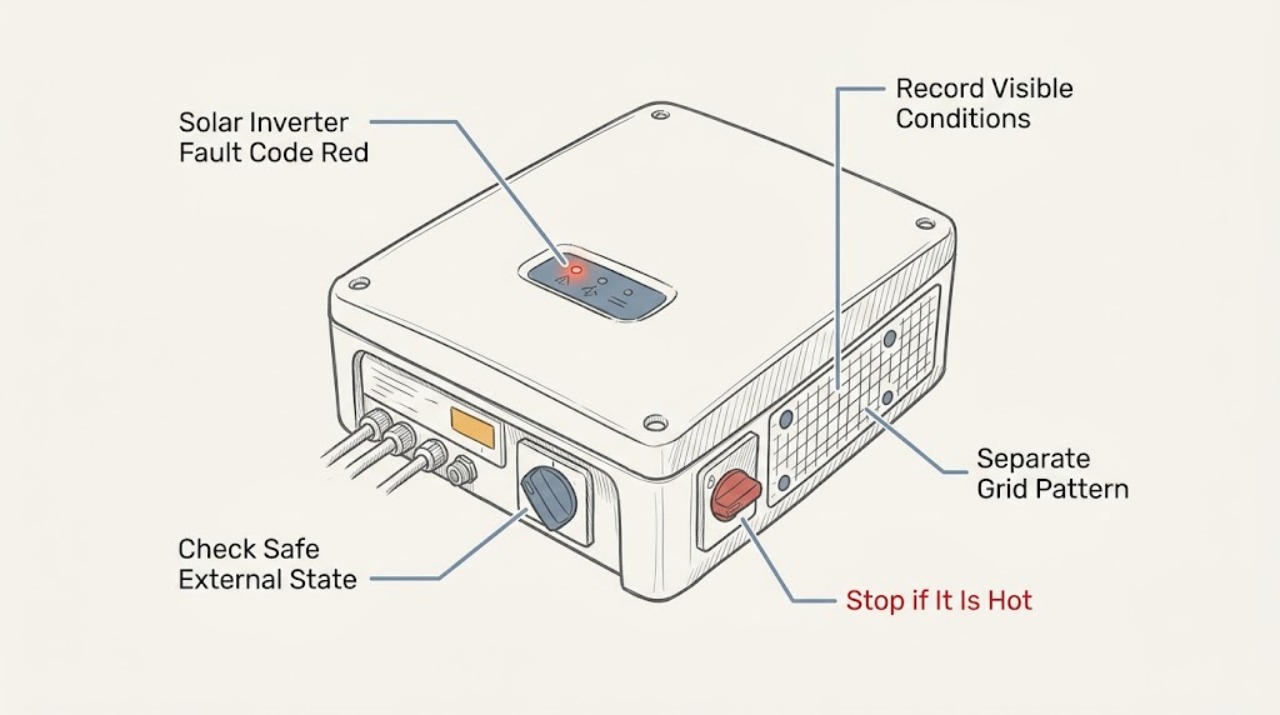
A red inverter light with a grid-voltage or isolation message means the system has stopped or limited production for a protective reason, but the light and wording are not universal across manufacturers. Record the exact model, displayed event text or number, LED pattern, time, weather, and whether other system devices show the same condition. Use only the external display, monitoring app, owner manual, and safe visual observations. Do not open the inverter, measure live AC or PV DC, disconnect energized conductors, defeat isolation protection, change grid settings, or attempt electrical repair. Give the record to the installer or qualified solar electrician; contact the utility when the documented message points to utility voltage or repeated grid conditions.
Before you begin
Safety first
- This article is limited to safe display review, visual context, and service handoff. Qualified solar and electrical personnel determine isolation, grid, DC, AC, protection, configuration, and repair procedures.
Work through in order
Diagnostic checks
Use only checks that match the exact appliance or system and its official guide.
-
Check 1
From the normal user interface, monitoring app, or a safe external display, record the inverter brand and model, exact fault text or event number, LED color and pattern, timestamp, and whether production is zero, reduced, or unknown; do not remove covers or enter a service menu that requests technician credentials.
Expected result: The display gives a specific grid-voltage, isolation/ground, communication, or other event, or it shows only a generic red fault with no event detail.
Next step: Save a screenshot or photograph of the display and send the exact wording to the installer or qualified solar service provider; include the model manual if the event is not clear.
Stop if: Do not open the inverter, remove covers, enter technician settings, clear event history, or follow a live-test instruction intended for qualified personnel.
Why this matters
Why: A specific event determines which qualified party should receive the handoff, but a generic red light is not enough to identify the cause. Manufacturer LED meanings are product-specific, so do not map one brand's code to another brand.
-
Check 2
From a dry, stable position, visually note the labeled external AC/DC disconnects, conduit, enclosure, visible cables, and monitoring gateway without operating switches or touching equipment.
Expected result: A disconnect appears different from its usual labeled position, the enclosure or conduit shows impact, water, heat, corrosion, or animal damage, or no external abnormality is visible.
Next step: Photograph the external condition from a safe distance and leave all controls and covers in place for the installer or electrician.
Stop if: Stop for smoke, burning odor, arcing, buzzing, exposed conductors, water inside or around equipment, heat, damaged enclosure, or any need to touch a cable or switch.
Why this matters
Why: Visible damage or an unusual external state is useful evidence for the service call but does not identify whether the fault is grid-side, PV-side, or internal. A normal appearance does not prove the conductors are de-energized; PV equipment may remain energized from sunlight.
-
Check 3
Use the monitoring view and safe household observations to record whether the fault coincided with an outage, flicker, storm, utility work, high or low production, or the same event on other inverters; do not measure voltage at a panel, disconnect, receptacle, or inverter.
Expected result: The event appears on multiple inverters or follows a utility event, occurs repeatedly at similar times, or is isolated to one inverter with no known grid event.
Next step: Send the timeline and screenshots to the installer; ask whether the utility should investigate only after the qualified provider identifies a grid-side condition.
Stop if: Do not change country/grid-profile settings, adjust voltage limits, bypass anti-islanding protection, or perform any electrical measurement.
Why this matters
Why: A shared or utility-timed event supports notifying the installer and possibly the utility, while an isolated event still needs qualified diagnosis. Neither pattern proves that the grid is outside its allowed range or that an inverter component has failed.
-
Check 4
Review only the normal event history and safe environmental context for moisture, rain, condensation, damaged PV wiring visible from ground, animal activity, or recent roof/electrical work; do not touch modules, frames, connectors, conduit, or the inverter interior.
Expected result: The event follows wet weather or visible system damage, an isolation/ground-fault message appears, recent work preceded the fault, or there is no safe physical clue.
Next step: Keep the array and inverter untouched, document the timing and visible context, and request installer service with the event record.
Stop if: Do not disconnect PV connectors, handle array frames or conductors, enter the roof, open junction boxes, or attempt an insulation-resistance test.
Why this matters
Why: Moisture and physical damage can be relevant to an insulation fault, but a visual clue cannot locate a DC fault or establish that a component is safe to handle. SMA warns that ground faults can leave system parts live, so testing and correction belong to qualified personnel.
-
Check 5
Observe whether the inverter returns to normal on its own after the documented grid or weather event, using only the normal display or monitoring app; do not repeatedly restart, acknowledge, or clear the fault unless the exact owner manual explicitly identifies that control as a normal user action.
Expected result: The fault clears and production resumes, clears then returns, remains present, or production status cannot be confirmed.
Next step: Record the recovery time and any repeat event and send the sequence to the installer; leave the system in its current state until the provider advises otherwise.
Stop if: Do not force a restart, bypass an interlock, alter protection thresholds, or continue testing after smoke, heat, arcing, or an isolation/ground-fault warning.
Why this matters
Why: A temporary recovery does not prove the cause is fixed: manufacturers may reconnect after grid values return to range, while recurring events still require investigation. A persistent fault means the protective condition remains or another issue exists.
-
Check 6
Prepare the service handoff with the model and serial information, exact event text or number, LED pattern, screenshots, production timeline, weather, external visual notes, recent work, and whether other inverters or monitoring devices show the event.
Expected result: The record identifies the affected inverter and a repeatable event, or key identity/timing information is missing.
Next step: Contact the installer or qualified solar electrician for diagnosis; contact the utility when that provider identifies a utility-voltage or service-quality issue.
Stop if: Do not perform electrical repair, live voltage testing, DC isolation testing, firmware/configuration changes, or protective-device bypasses.
Why this matters
Why: A complete record lets the installer choose the correct manufacturer procedure and decide whether the grid operator, solar electrician, or another qualified party is needed. Missing identity or event detail is a reason to collect only safe display information, not to open the equipment.
Use your observations
Decision map
Find the observation that best matches what you see, then follow the next safe action.
-
PATH 01Safety boundary
What you see
Smoke, burning odor, arcing, exposed conductors, water entering electrical equipment, heat, or physical damage is present.
Do this next
Keep people away, do not touch or operate the equipment, and request urgent qualified electrical/solar service; use emergency or utility procedures if there is an immediate fire or shock hazard.
Why this path and its safety boundary
Safety stop: Do not open the enclosure, pull connectors, or attempt to make the system safe by touching a disconnect.
-
PATH 02Next step
What you see
The event explicitly identifies grid voltage or repeats with a utility outage, flicker, or a shared event across inverters.
Do this next
Preserve the event history and timeline, contact the installer or qualified provider, and involve the utility when the provider confirms a grid-side condition. Do not measure or change settings yourself.
-
PATH 03Next step
What you see
The display identifies isolation, insulation, ground, residual-current, or PV-array fault, especially after wet weather or visible damage.
Do this next
Leave the array, conductors, connectors, and inverter closed and arrange qualified solar service. The system may remain electrically hazardous even when production is stopped.
-
PATH 04Next step
What you see
Only a red light or generic fault is available and no exact manufacturer event can be confirmed.
Do this next
Photograph the normal display, identify the model, and send the record to the installer; do not infer a grid or isolation cause from the LED alone.
-
PATH 05Next step
What you see
The fault clears temporarily but returns or production remains unreliable.
Do this next
Provide the repeat timing and conditions to the installer for qualified diagnosis; an automatic restart is not proof that the underlying condition is resolved.
Helpful context
Understand the symptom
Do not diagnose the code from the red light alone
A red status light is not one universal fault code. SolarEdge describes a red LED as a system error, while the exact event is read from that product's display or monitoring system. Grid-voltage errors and PV insulation or ground faults are different diagnostic paths, and a generic phrase such as “grid voltage error” cannot establish the measured voltage, the failed component, or the safe repair. The model manual and the exact event record are the starting point.
Separate grid conditions from PV isolation conditions
Manufacturer event guidance commonly treats an out-of-range utility voltage as a grid-side condition that can disconnect the inverter and may require utility or service investigation. Insulation or ground-fault messages concern the PV DC side and can leave parts of the system energized even when production has stopped. Those distinctions affect who should test the system, so do not substitute a reset, a setting change, or a visual guess for diagnosis.
What a useful service handoff contains
The installer can work faster when the handoff includes the exact display text, event history, model and serial information, LED behavior, production change, timing, weather, and whether another inverter or monitoring device reports the same event. Keep the equipment closed and the external disconnects in their current state unless the owner manual gives a normal user control instruction that does not expose conductors; never bypass a protective trip.
Safety boundary
Stop conditions
- Do not open the inverter, remove covers, expose terminals, or perform electrical repair.
- Do not measure live AC grid voltage or PV DC voltage, perform insulation testing, disconnect energized conductors, or handle PV connectors or array frames.
- Do not defeat isolation monitoring, anti-islanding protection, disconnect interlocks, or protective trips; do not change grid profile, country, voltage, or frequency settings.
- Stop for smoke, arcing, burning odor, heat, water ingress, exposed conductors, or damaged equipment and request urgent qualified help.
When checks do not resolve it
Need a professional?
Contact the installer or qualified solar electrician for any persistent, recurring, isolation, ground-fault, grid-voltage, unexplained red-light, or production-loss event. Request urgent service for smoke, arcing, burning odor, exposed conductors, water ingress, heat, physical damage, or any shock/fire concern. Contact the utility when the qualified provider identifies a utility-side voltage or service-quality issue.
Safety scope: This article is limited to safe display review, visual context, and service handoff. Qualified solar and electrical personnel determine isolation, grid, DC, AC, protection, configuration, and repair procedures.
Have this ready
- Inverter brand, model, serial information, and system location
- Exact event text or number, LED color/pattern, and screenshots from the display or monitoring app
- Date/time, weather, outage or flicker context, production change, and recovery or recurrence pattern
- Safe external photos of the enclosure, labeled disconnects, conduit, and visible damage
- Recent roof, PV, electrical, firmware, or utility work and whether other inverters show the event
Common questions
FAQ
Does a red inverter light always mean a grid-voltage fault?
No. LED meanings are manufacturer-specific. A red light can represent a generic system error, while the exact event may be grid-related, an isolation or ground fault, communication trouble, or another condition. Read the exact event from the normal display or monitoring app and send it to the installer.
Can I measure the grid voltage to confirm the error?
No. Do not measure live AC at the inverter, disconnect, panel, or receptacle as a homeowner troubleshooting step. Give the event record to a qualified solar electrician or installer, who can use the correct procedure and equipment.
Is an isolation fault the same as a grid-voltage fault?
No. A grid-voltage event concerns the utility connection or monitored AC conditions; an isolation or ground-fault event concerns the PV side and can leave parts energized. The exact model event determines the qualified diagnostic path.
What if the inverter starts working again?
Record when it recovered and whether the fault returns. Some systems reconnect when grid conditions return to range, but an intermittent or recurring event still needs installer review; automatic recovery does not prove the cause is fixed.
Should I reset the inverter or change grid settings?
Do not repeatedly reset the system or change country, grid-profile, voltage, frequency, or protection settings. Follow only a clearly identified normal user control in the exact owner manual, and defer all electrical or protection changes to qualified personnel.
Read the exact guide
Official sources
- Checking the PV System for Ground FaultsSMA Solar Technology AG · Supports the isolation/ground-fault safety boundary, the possibility of live system components, and qualified-person testing requirements.
- Event 3701SMA Solar Technology AG · Supports the conditional relationship between residual-current/insulation events, weather context, and qualified checks; it does not diagnose an unbranded inverter.
- Inverter Status and System Performance IndicationsSolarEdge · Supports the limited, manufacturer-specific interpretation that a red LED indicates a system error in SolarEdge equipment; it is not a universal code for all inverter brands.
- Event MessagesSMA Solar Technology AG · Supports the conditional distinction between grid voltage outside permitted range, inverter disconnection, recurrence, utility contact, and service escalation; values and procedures are model-specific.
- Envoy Communications Gateway Installation and Operation ManualEnphase Energy · Supports the general conditional explanation that a utility-voltage out-of-range condition can stop production until voltage returns within applicable limits; the exact thresholds and device behavior are product- and region-specific.
- High-Performance Home Technologies: Solar Thermal & Photovoltaic Systems; Volume 6U.S. Department of Energy · Supports the existence of PV disconnects between array, inverter, and service equipment and the need for qualified service boundaries; it is not a homeowner testing procedure.
Community feedback
Share a repair observation
Share a plain-text repair observation. Accepted observations are published automatically; this page may take a moment to update.