
On this page
Start here
Quick answer
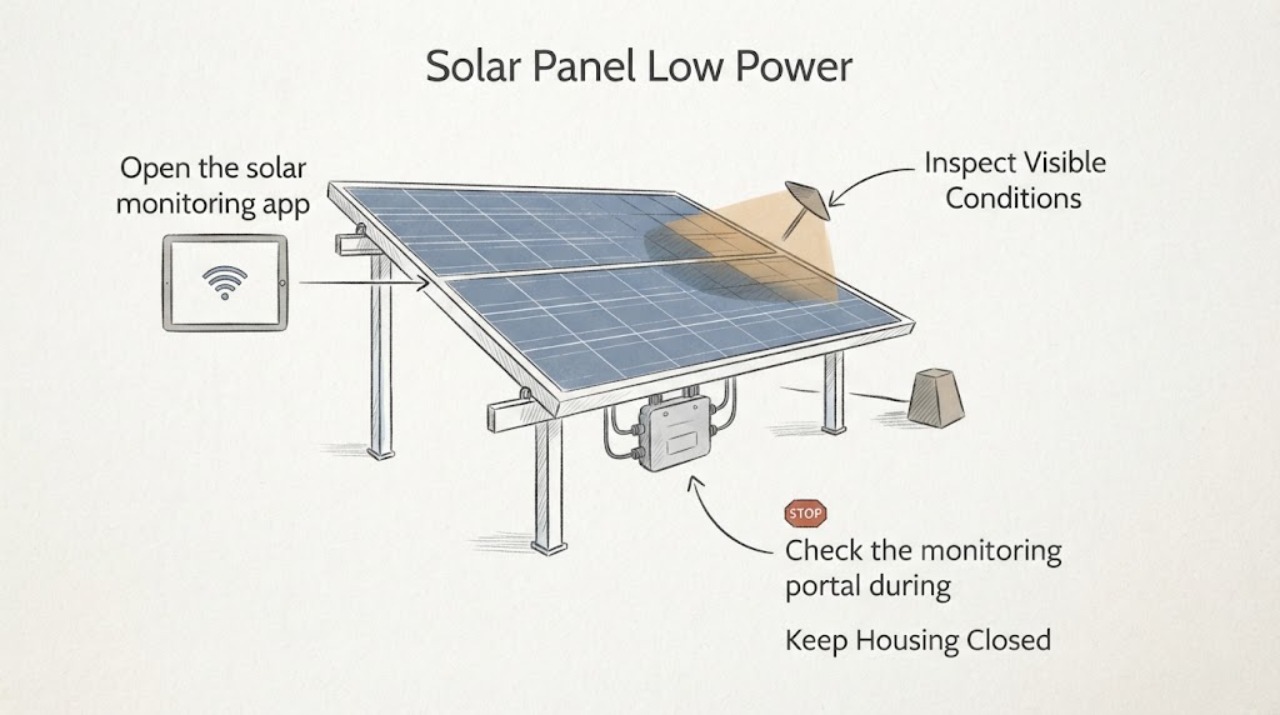
A low-power alert with microinverter communication loss can mean two different things: the panel or microinverter is producing less, or the gateway is simply missing the device's data. First compare the monitoring pattern with daylight and shade from the ground. A repeatable drop at the same time each day near a tree, chimney, antenna, or other obstruction supports shading. A device marked not communicating while nearby devices report normally points to a communication or device issue, but some microinverter systems can continue producing while their data is not reaching the portal. Do not climb onto the roof, touch panel cables, measure DC voltage, open an inverter, or swap equipment; give the timestamps and device pattern to a qualified solar installer.
Work through in order
Diagnostic checks
Use only checks that match the exact appliance or system and its official guide.
-
Check 1
Open the solar monitoring app or portal and compare the affected panel or microinverter's production graph with a nearby reporting device on the same clear-day time window. Check whether the low output is visible only during daylight and whether the system is showing an explicit no-communication state.
Expected result: The device reports no data but nearby devices produce, the device reports low watts while still communicating, or the whole site has no current data.
Next step: Save a screenshot and the time window. For one device, continue with the shade and pattern checks; for whole-site missing data, check only the portal's gateway or network status and contact the installer if it remains offline.
Why this matters
Why: No data is a communication-path symptom and does not by itself prove that the panel is not producing. Low watts with current data is a production symptom. Whole-site missing data keeps the gateway, network, or site-level state in focus rather than one panel.
-
Check 2
From the ground or a safe window, observe the array's surroundings at the times shown in the graph. Look for shadows from trees, chimneys, antennas, nearby structures, snow, or debris without climbing, touching a module, or moving an obstruction.
Expected result: A shadow reaches the affected panel at roughly the same time each day, the shade moves with the sun, or no visible obstruction corresponds to the low-power period.
Next step: Record the panel location and shade timing for the installer. Do not trim trees, walk on the roof, clean the modules, or alter wiring as a diagnostic experiment.
Why this matters
Why: A repeatable time-of-day match supports environmental shading rather than a random communication failure. No visible shade does not clear the equipment, because a panel, microinverter, connector, or monitoring path can still require installer testing.
-
Check 3
Check the monitoring portal during a clearly lit daytime period for the gateway heartbeat, last-report time, and the count or list of microinverters marked not communicating. Use only the portal or app; do not press equipment buttons or cycle a solar breaker.
Expected result: The gateway has a current heartbeat but one or a few microinverters are not reporting, or the gateway itself has not reported for the current period.
Next step: Document the affected device labels and last-report times, then ask the installer to diagnose the communication path and production data.
Stop if: If the gateway is current and all devices report but one remains low, treat it as a panel or microinverter production issue and request professional testing rather than a roof inspection.
Why this matters
Why: A current gateway connection with isolated missing devices points toward the device-to-gateway communication path or a panel-level issue. A stale gateway heartbeat points toward gateway, network, or site-level reporting and can make every panel appear abnormal in the app.
-
Check 4
Compare the affected device's output with nearby devices across several similar daylight periods, noting whether the same panel is always low, several adjacent panels change together, or the difference appears only under a moving shadow.
Expected result: The same panel remains low without a shade pattern, several devices on one branch change together, or output differences follow the moving shade.
Next step: Send the comparison and screenshots to a qualified solar installer. Only trained personnel should perform any device swap, connector inspection, AC/DC measurement, or inverter diagnostic.
Why this matters
Why: A persistent single-device difference keeps that panel or microinverter in focus. A group change can point to a branch, grid, or communication issue. A moving, repeatable difference is consistent with shade or another environmental condition, not enough evidence for a component replacement.
-
Check 5
From a safe distance, look for emergency signs around the array, inverter, and visible conduit: smoke, flame, arcing, a hot or discolored enclosure, broken module glass, exposed wiring, or a burning odor. Do not approach the roof or touch any solar equipment to verify a suspected sign.
Expected result: Any emergency sign is present, or the system is near a fire, storm damage, flooding, or a fallen overhead line.
Next step: Move away, keep others away, call emergency responders for fire or immediate danger, and notify the solar installer or utility from a safe location. Do not spray water, disconnect cables, or attempt a shutdown sequence unless directed by trained responders following the system's site-specific procedure.
Why this matters
Why: PV components can remain electrically hazardous in daylight and can create shock or arc hazards during fire or damage response. A normal app status cannot make damaged roof equipment safe.
Use your observations
Decision map
Find the observation that best matches what you see, then follow the next safe action.
-
PATH 01Next step
What you see
The same panel drops at the same time each day and a ground-visible shadow reaches it
Do this next
Treat shading as the leading explanation, document the time and obstruction, and ask a solar professional about an approved shading or tree-management solution. Do not climb or alter the array yourself.
-
PATH 02Next step
What you see
One or a few microinverters show no communication while the gateway and nearby devices report
Do this next
Save the device labels, last-report times, and production graphs and contact the installer for device-to-gateway and panel-level diagnosis. Communication loss does not alone prove a failed microinverter.
-
PATH 03Next step
What you see
The gateway is stale or many devices stop reporting during daylight
Do this next
Treat the issue as a gateway, network, branch, or site-level fault and contact the installer. Do not cycle solar breakers or open electrical equipment to restore monitoring.
-
PATH 04Next step
What you see
Output remains low for one device without shade or the same device is persistently below peers
Do this next
Request qualified installer testing of the panel and microinverter. Do not swap units, disconnect DC connectors, or measure rooftop wiring yourself.
-
PATH 05Next step
What you see
There is smoke, arcing, heat, fire, broken glass, exposed wiring, flooding, or storm damage
Do this next
Move away and keep people clear; call emergency responders for immediate danger and notify the solar installer or utility. Treat the array as electrically hazardous until trained responders make it safe.
Helpful context
Understand the symptom
Why the app alert is not the diagnosis
A monitoring portal reports what the gateway received, not necessarily the instantaneous electrical state of every panel. APsystems describes a communication issue as missing data from microinverters that may still be producing, while a production issue is low or absent generation. Separately, shade changes with the sun and can lower one panel's output without indicating a failed microinverter. Use the timeline and panel-level pattern to decide which professional follow-up is needed.
Stay off the roof
All homeowner checks here are remote or from the ground. Solar modules can generate electricity in daylight, and rooftop work adds fall, shock, and arc hazards. Do not lift panels, move shade, wash the array, unplug connectors, open an inverter or combiner, or use a meter on DC wiring. If there is smoke, arcing, a hot component, broken glass, or a burning smell, move away and contact emergency responders and the solar installer.
Only after diagnosis
Potential parts
- microinverter communication gateway
Consider this only if the installer confirms that the gateway or its communication path is the source of a site-level reporting loss after network and system checks.
The installer must confirm the solar system family, gateway generation, communication method, and local electrical requirements before selecting or installing a replacement. - solar microinverter
Consider this only if qualified testing shows that low production follows the microinverter rather than the panel, shade, branch, or monitoring path.
Confirm the installed panel electrical characteristics, microinverter model family, grid requirements, and approved installer procedure; do not use a generic substitute.
When checks do not resolve it
Need a professional?
Use professional solar service for persistent panel-level low output, microinverter communication loss in daylight, gateway or branch-level reporting loss, roof access, DC testing, connector work, or any damaged or overheated equipment.
Common questions
FAQ
Does microinverter communication loss mean the solar panel is not producing?
Not necessarily. A microinverter can continue producing while its data is not reaching the monitoring portal. Compare the affected device's production and last-report pattern with nearby devices and ask the installer to diagnose it.
How can I tell whether shade is causing low panel output?
Look from the ground for a shadow reaching the affected panel at the same time the graph drops. A repeatable time-of-day match supports shading, but no visible shadow does not rule out a panel, microinverter, or communication fault.
Can I climb onto the roof to inspect a microinverter?
No. Keep the investigation remote or from the ground. Solar equipment can be electrically hazardous in daylight, and roof work adds fall risk; use a qualified solar installer for rooftop, DC, connector, or inverter checks.
What should I do if several microinverters stop reporting?
Save the gateway last-report time and the list of affected devices, then contact the installer. A site-level gateway, network, branch, or communication issue can affect many devices; do not cycle solar breakers or open equipment to restore monitoring.
Read the exact guide
Official sources
- A Guide to Fire Safety with Solar SystemsU.S. Department of Energy · Rooftop PV fires, arcs, hot spots, live components, water exposure, and emergency responder boundaries
- Professional Installers Trouble Shooting GuideAPsystems · Module-level low power, no communication states, gateway heartbeat, and shading-aware microinverter diagnosis
- Homeowner’s Guide to SolarU.S. Department of Energy · Tree cover or roof conditions that affect rooftop solar output and the need for qualified installers
- PV Production and System IssuesSolarEdge · Solar production changes caused by shade, weather, grid conditions, communication state, or system errors
- Quick Install Guide: Installing the Enphase IQ Commercial EnvoyEnphase Energy · Microinverter-to-gateway power-line communication and daylight reporting behavior
- Green Job Hazards - Solar Energy: ElectricalOccupational Safety and Health Administration · Solar panel electrical work, rooftop fall risk, shock, burns, arc flash, and qualified worker safety practices
Community feedback
Share a repair observation
Share a plain-text repair observation. Accepted observations are published automatically; this page may take a moment to update.