
On this page
Start here
Quick answer
First define what “not starting” means: a dark display and no interior light, a powered refrigerator whose compressor or fans have not begun, or a refrigerator that is running but has not yet reached temperature. From outside the appliance, check the breaker, securely seated plug, indicator lights, and interior light; Frigidaire also lists an OFF control setting, a tripped breaker, an unplugged cord, and a recent outage as reasons a freezer or refrigerator may not run. If power was just restored or the unit was newly installed, do not mistake the time needed for temperature stabilization for an immediate cooling failure, but there is no single Frigidaire restart interval that applies to every model. Check the exact Owner's Manual for OFF, Sabbath Mode (Sb), Demo Mode, temperature controls, and any restart behavior. If the display and lights work, the control is calling for cooling, and there is still no compressor or fan activity with a warm cabinet, or if the breaker trips again, stop resetting it and arrange qualified service. Do not remove covers or perform live electrical tests.
Before you begin
Safety first
- This article covers external power checks, control/mode identification, model-specific recovery guidance, accessible door and airflow observation, and one documented reset. Internal start devices, compressor, fans, sensors, controls, sealed-system parts, electrical compartments, and live tests require qualified service.
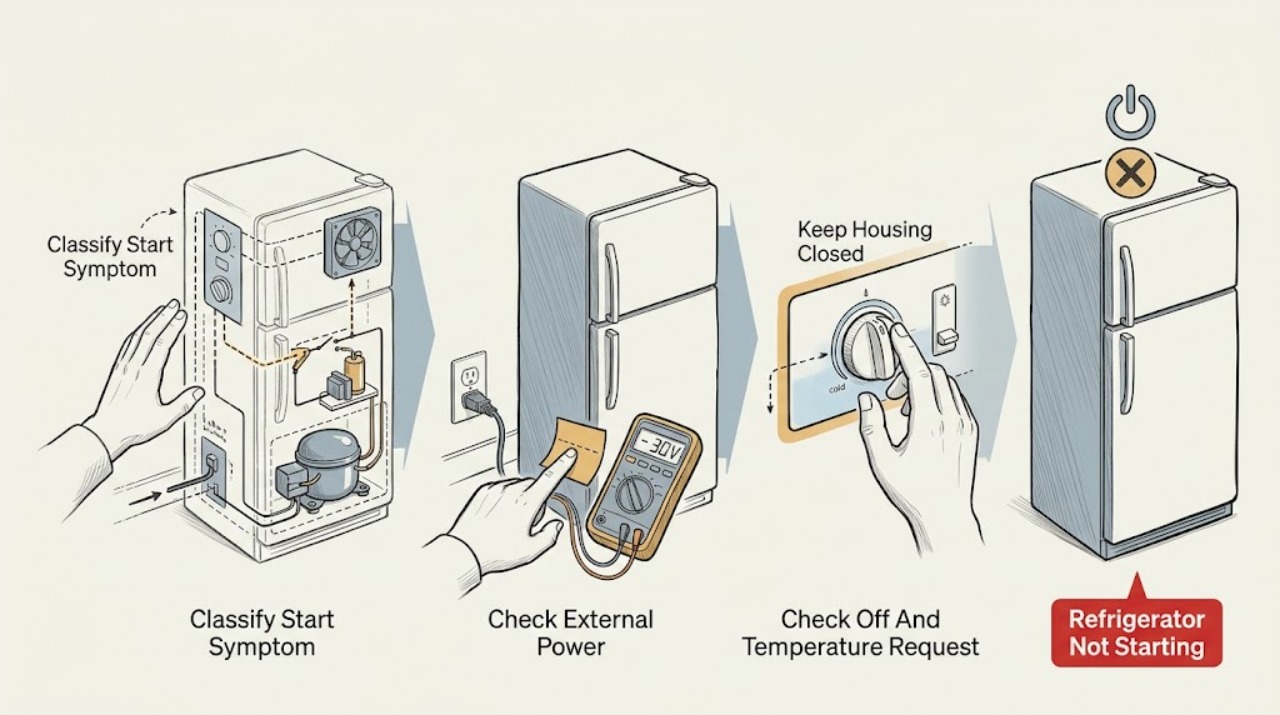
Work through in order
Diagnostic checks
Use only checks that match the exact appliance or system and its official guide.
-
Check 1
Without moving the refrigerator or opening any cover, record whether the control display is lit, the interior light works, the temperature buttons respond, the compressor can be heard or felt starting, and any fan sound or airflow is present. Write down the complete model number, the time since installation or power restoration, and whether the cabinet is warm or simply still stabilizing.
Expected result: The display and interior light are both dark; the display is lit but the compressor and fans are quiet; a fan or compressor runs; the control is unresponsive; or an alert/mode is visible.
Next step: Follow the matching branch below and preserve the observation before pressing a reset or changing a setting.
Stop if: Do not pull out an installed refrigerator, remove a rear cover, or use a meter or probe to test the appliance.
Why this matters
Why: A dark display and light select the external power branch. A lit display with no activity selects control, mode, temperature-request, or start-circuit checks. Any compressor or fan activity means the appliance has started, so a warm-cabinet diagnosis is no longer the same as a no-start diagnosis.
-
Check 2
If the display and interior light are dark, check from outside that the plug is seated in its intended wall outlet and that the refrigerator's breaker or safely accessible GFI protection has not tripped. Restore a breaker or outlet only once when there is no smoke, heat, water, cord damage, or repeated-trip history; do not use an extension cord or move a built-in unit.
Expected result: The breaker or outlet was tripped and the lights return; the plug was loose; the household outlet is dead; the breaker trips again; or the refrigerator remains dark with stable household power.
Next step: If power returns normally, continue to the mode and start-request checks. If the unit stays dark, the outlet is dead, the cord is damaged, or the breaker trips again, leave it off and arrange qualified appliance or electrical service.
Stop if: Stop for smoke, sparking, burning smell, a hot or damaged plug/cord, water at the outlet, or any repeated breaker trip. Do not keep cycling the breaker.
Why this matters
Why: Frigidaire lists an OFF control, blown fuse/tripped breaker, unplugged cord, and power outage among reasons a refrigerator or freezer may not run. A repeated trip or a dark appliance with sound external power points beyond an owner power check.
-
Check 3
With the display powered, check whether a mechanical control is set to OFF or whether the electronic display is locked, paused, or set to a temperature or operating state that does not request cooling. Use the exact Owner's Manual for the complete model; do not assume a button label or menu sequence from another Frigidaire family.
Expected result: The control is OFF or locked; a setting was recently changed; the display accepts a documented operating setting; or controls respond but no start request is apparent.
Next step: Return only the exact model's control to its documented operating state, then observe one start attempt. If the control is already correct and no compressor or fan activity begins, continue to the mode and power-recovery checks.
Stop if: Do not enter a service menu, defeat a control lock, alter wiring, or repeatedly change temperature settings to force a start.
Why this matters
Why: An OFF or locked state can make a powered refrigerator appear not to start. A recent temperature change may not create an immediate compressor response, and the visible control layout varies by model. Correcting a documented operating state is different from proving a failed start component.
-
Check 4
Look for a mode or display state that applies to the exact model, including Sb or Sabbath Mode and, where the manual documents it, Demo Mode. Frigidaire says Sabbath Mode can disable portions of the lights, dispenser, and controls and can persist after power-failure recovery; its alarm guide describes 77 77 as a model-dependent Demo Mode indication.
Expected result: The exact manual confirms Sb/Sabbath Mode; the panel shows a documented Demo Mode indication; no special mode is shown; or the observed display does not match the model manual.
Next step: Deactivate a documented mode only with the exact manual's external controls, then observe one start request. If no applicable mode exists or the refrigerator remains inactive, move to power-recovery and service branches.
Stop if: Do not copy a mode sequence from another model, open a control panel, bypass a door or control switch, or force the compressor to run.
Why this matters
Why: A documented mode can explain why cooling controls or visible functions appear inactive without identifying a failed compressor. A mismatched code or missing manual entry cannot be safely interpreted using another model's button sequence.
-
Check 5
If the refrigerator was just installed, unplugged, reset, or restored after an outage, note the exact elapsed time and whether the display and interior light have returned. Keep the doors closed as much as practical and observe whether a compressor or fan begins without repeatedly cycling power. Use the exact Owner's Manual for any documented restart or alarm-clear procedure.
Expected result: The unit is within the installation or power-recovery period; display/lights work but there is no sound yet; the compressor or fan has started; or the cabinet is warm and no activity appears after the documented recovery guidance.
Next step: Follow the exact model guidance and monitor one recovery cycle without repeated resets. If the controls call for cooling but no compressor or fan activity appears and the cabinet is warming, arrange service rather than waiting indefinitely.
Stop if: Do not repeatedly unplug/replug the unit, cycle the breaker, or leave food in a warming appliance while testing a restart theory.
Why this matters
Why: Frigidaire says a refrigerator may need up to 24 hours for temperature to stabilize after installation or a power event. That is a temperature-recovery statement, not a universal promise that a silent compressor for any period is normal. Evidence of actual compressor/fan operation means the problem has shifted toward cooling performance rather than not starting.
-
Check 6
If you can hear the refrigerator running but expected cooling has not begun, check only accessible conditions: doors close and seal, vents inside are not blocked, and the rear vent area is not visibly clogged or pressed against a wall. Do not confuse this result with a no-start complaint; the purpose is to establish whether a start has already occurred.
Expected result: A compressor or fan is running; interior vents are blocked; a door is held open or the gasket does not seal; the rear vent is obstructed; or none of these conditions is present.
Next step: Clear only accessible food or dust obstructions and ensure doors close, then use the exact model's cooling guidance. If the unit is silent despite a valid cooling request, return to the no-start service branch.
Stop if: Do not move a built-in refrigerator, remove rear panels, scrape coils, or reach near a fan or compressor while powered.
Why this matters
Why: Frigidaire says blocked vents and a non-sealing door prevent proper cooling, while its running guidance notes that airflow and installation affect compressor operation. If the compressor or fan is active, the refrigerator has started and needs a warm-temperature or airflow diagnosis, not a start-command diagnosis.
-
Check 7
After recording the symptom and ruling out power, OFF/lock, and documented modes, perform at most one reset that the exact model manual supports. If the guide permits a power reset, use only a dry, safely accessible plug or the matching breaker; then check whether the display, compressor/fan activity, and temperature response return.
Expected result: The refrigerator starts and remains stable; it stays powered but silent; the display becomes abnormal or dark; the breaker trips; or it starts briefly and stops with repeated alerts.
Next step: Leave the unit off when electrical or safety symptoms persist and arrange qualified Frigidaire service. Provide the model, power history, mode/display result, elapsed recovery time, compressor/fan observation, and temperature behavior.
Stop if: Do not remove covers, test live wiring, bypass a switch, replace a start device, or continue resetting a unit with smoke, heat, abnormal noise, water near electrical parts, or repeated power trips.
Why this matters
Why: Stable recovery supports a transient power or mode state. A powered unit that remains silent, repeatedly stops, trips power, or returns an alert has an unresolved control, sensor, start, compressor, fan, or electrical problem that a reset cannot identify.
Use your observations
Decision map
Find the observation that best matches what you see, then follow the next safe action.
-
PATH 01Safety boundary
What you see
The display and interior light are both dark.
Do this next
Check the accessible plug, outlet, and breaker once. If the unit stays dark or the breaker trips again, leave it off and arrange qualified service.
Why this path and its safety boundary
Why it matters: External supply, OFF control, cord, breaker, or internal power protection is more likely than a cooling-request or compressor-delay issue.
Safety stop: Do not move an installed unit or remove electrical covers.
-
PATH 02Safety boundary
What you see
The display and lights work, but the control is OFF/locked or the exact model shows Sb, a documented Demo Mode state, or another mode that suppresses normal functions.
Do this next
Restore normal operation only with the exact manual, then observe one start attempt. Escalate if the unit remains inactive or the display does not match the manual.
Why this path and its safety boundary
Why it matters: A mode or control state is more likely than a failed compressor, but only the matching manual establishes the mode and its controls.
Safety stop: Do not copy another model's button sequence or defeat a control/door switch.
-
PATH 03Safety boundary
What you see
The refrigerator was recently installed, reset, or restored after an outage; display and lights work, but cooling has not yet been observed.
Do this next
Follow the exact model guidance, keep doors closed, and observe for actual compressor or fan activity. If the cabinet warms and no activity appears after the documented recovery path, arrange service.
Why this path and its safety boundary
Why it matters: Recovery and temperature stabilization remain possible. Frigidaire says temperature stabilization can take up to 24 hours, but this does not define a universal silent-compressor delay.
Safety stop: Do not wait indefinitely with perishable food in a warming cabinet or repeatedly cycle power.
-
PATH 04Safety boundary
What you see
Power is stable, controls are in an operating state, no documented mode applies, and the cabinet is warm while no compressor or fan activity begins.
Do this next
Stop owner checks and arrange qualified Frigidaire service with the exact model and all observations. Do not open the rear or control compartment.
Why this path and its safety boundary
Why it matters: A temperature request, sensor, control, start device, compressor, fan, or internal electrical fault is more likely than a normal recovery pause. The symptom cannot identify a compatible part.
Safety stop: Do not perform live tests, bypass controls, or replace electrical start components as a DIY repair.
-
PATH 05Safety boundary
What you see
A compressor or fan is running, but the refrigerator has not reached its expected temperature.
Do this next
Check accessible airflow and door sealing, then follow the exact model's cooling guidance. Call service if cooling remains inadequate or an H/HI alarm persists.
Why this path and its safety boundary
Why it matters: The appliance has started; blocked vents, a door/seal issue, installation or ambient condition, or a cooling-system problem is more likely than not starting. This is a separate warm-temperature diagnosis.
Safety stop: Do not remove panels or handle the compressor, fans, sealed system, or electrical wiring.
Helpful context
Understand the symptom
Not starting is narrower than not cooling
A refrigerator may be powered and running while the cabinet is still warm, especially after installation, a long door opening, or an outage. This page focuses on the start request: whether the appliance has power, is set to operate, is allowed to start by its current mode, and shows any compressor or fan activity. Once the compressor or fans are operating, use a model-specific warm-temperature diagnosis rather than treating the symptom as a start failure.
There is no universal Frigidaire restart timer
Frigidaire refrigerator families use different controls, compressor designs, and display options. The official guidance describes model-specific settings and says temperature stabilization can take time after installation or power recovery, but it does not provide one restart-delay number for every refrigerator. Record the model and the exact time since power was restored instead of copying a delay from another model.
A mode can look like a dead refrigerator
An OFF setting, Sabbath Mode, or applicable Demo Mode can suppress normal functions without proving that a component has failed. Check the display and exact Owner's Manual before changing a mode. If the display is abnormal, the mode is not documented for the model, or the refrigerator remains inactive after one documented correction, stop owner troubleshooting.
Safety boundary
Stop conditions
- Stop and leave the refrigerator off for smoke, sparks, burning smell, a hot or damaged cord/plug, water near electrical parts, abnormal electrical noise, or a breaker that trips again.
- Do not remove electrical or rear covers, open the control housing, probe live wiring, bypass a door or control switch, or replace a compressor-start or other electrical part as a user.
- Do not repeatedly cycle the breaker or unplug/replug the refrigerator to force a start. Protect perishable food if the cabinet is warming while the appliance remains inactive.
- If power is stable, the controls request cooling, no documented mode applies, and compressor/fan activity never begins, stop owner diagnosis and arrange qualified service.
When checks do not resolve it
Need a professional?
Arrange qualified Frigidaire refrigerator service when the display and lights remain dark with sound household power, a breaker trips again, the controls are correct but no compressor or fan activity begins after the model-specific recovery path, an unknown mode or alert persists, the refrigerator starts and stops repeatedly, or diagnosis would require the start circuit, compressor, fan, sensor, control, sealed system, electrical compartment, or live testing.
Safety scope: This article covers external power checks, control/mode identification, model-specific recovery guidance, accessible door and airflow observation, and one documented reset. Internal start devices, compressor, fans, sensors, controls, sealed-system parts, electrical compartments, and live tests require qualified service.
Common questions
FAQ
How long does a Frigidaire refrigerator take to start after being plugged in?
There is no single restart interval for every Frigidaire model. First confirm that the display and interior light work, the control is not OFF or in a documented special mode, and note whether a compressor or fan has started. Frigidaire says temperature may take up to 24 hours to stabilize after installation or a power event; if the cabinet is warming and no activity begins with a valid cooling request, arrange service instead of repeatedly resetting it.
Why is my Frigidaire refrigerator lit up but not starting?
A lit display proves power to some controls, not that a cooling request is active. Check the exact model for OFF, lock, Sabbath Mode, Demo Mode, temperature settings, and an alert after an outage. If the controls are correct and the compressor and fans remain silent while the cabinet warms, stop and call qualified service.
Can Sabbath Mode make a Frigidaire refrigerator seem not to start?
On applicable models, yes. Frigidaire says Sabbath Mode can disable portions of the refrigerator and its controls, shows Sb, and can remain active after power-failure recovery. Confirm the complete model and deactivate the mode only with that model's documented control sequence; do not copy a sequence from another panel.
What should I check if my Frigidaire refrigerator has no lights or display?
From outside the appliance, check the securely seated plug, the refrigerator's breaker, and any safely accessible GFI protection. Frigidaire also lists an unplugged cord, a tripped breaker, an outage, and an OFF control among possible causes of a unit that does not run. If power is sound but the unit stays dark, or the breaker trips again, arrange service and do not remove covers.
Is a warm Frigidaire refrigerator always a not-starting problem?
No. If you can hear the compressor or a fan running, the refrigerator has started and the symptom is closer to not cooling. Check accessible door sealing and vent obstructions, then use the exact model's cooling guidance. If the unit is warm and completely silent with a valid cooling request, the no-start branch is more appropriate.
Should I keep resetting a Frigidaire refrigerator that will not start?
No. Record the model, display, power history, and whether the compressor or fans start. Use at most one reset supported by the exact Owner's Manual and only from a dry, safely accessible connection. A dark display, repeated breaker trip, persistent silence, abnormal smell/noise, or warming cabinet requires qualified service.
Read the exact guide
Official sources
- What should I do if my freezer isn't running?Frigidaire · Official Frigidaire support article listed for freezers and refrigerators; exact controls and installation details remain model-specific.
- Refrigerator Error Codes and Alarms GuideFrigidaire · Official Frigidaire owner-support guide for refrigerators; examples and controls must not be generalized to another model.
- Refrigerators - Why does my refrigerator run most of the time? Is this normal?Frigidaire · Official Frigidaire support article for refrigerators and named refrigerator configurations; compressor behavior is model- and condition-dependent.
- Refrigerators - Not CoolingFrigidaire · Official Frigidaire owner-support article for all refrigerators; its warm-temperature checks should not be used to infer a universal compressor restart delay.
- Refrigerator Error Code SB SB - Sabbath ModeFrigidaire · Official Frigidaire refrigerator support article; the displayed mode and button sequence must be confirmed for the complete model.
- Refrigerators - How do I use the features and functions on my French-Door refrigerator display?Frigidaire · Official Frigidaire display-support article for French-door, side-by-side, and top-freezer refrigerator families; available features vary by model.
Community feedback
Share a repair observation
Share a plain-text repair observation. Accepted observations are published automatically; this page may take a moment to update.