
On this page
Start here
Quick answer
First open the fresh-food door and note whether the interior light and any control or dispenser display are working. No light can mean the refrigerator is not receiving power; a lit refrigerator with a quiet compressor can instead be in automatic defrost or waiting after a power interruption. GE says the compressor and fans stop during defrost, and post-outage overload protection can wait for the refrigerant system to equalize, so do not repeatedly unplug and reconnect it. If lights and controls work but cooling does not start, confirm the temperature control is on and check the exact model for Demo/Showroom mode; that mode can leave normal lights and controls active while disabling cooling. A locked or unresponsive dispenser panel can also appear to be a no-start because some GE models use that panel for temperature or appliance power. Record the model, display text, light state, sounds, and elapsed time. If the unit remains dark with a live outlet, stays warm after the model's normal pause, has a persistent or unknown code, or protection trips again, arrange qualified service. Stop for smoke, burning or electrical odor, a hot or damaged cord/outlet, water near electrical parts, severe vibration, or repeated breaker trips; do not open electrical, compressor, or sealed-system compartments.
Before you begin
Safety first
- Keep checks to the accessible plug/outlet, documented controls, lock/demo state, door closure, display, and timing. Do not open control or rear panels, pull door harnesses, bypass locks or overloads, puncture refrigerant tubing, make live tests, or service the compressor or sealed system. Stop for smoke, burning/electrical odor, sparks, abnormal heat, water near electrical parts, hot/damaged power hardware, severe vibration, cabinet damage, or repeated breaker trips.
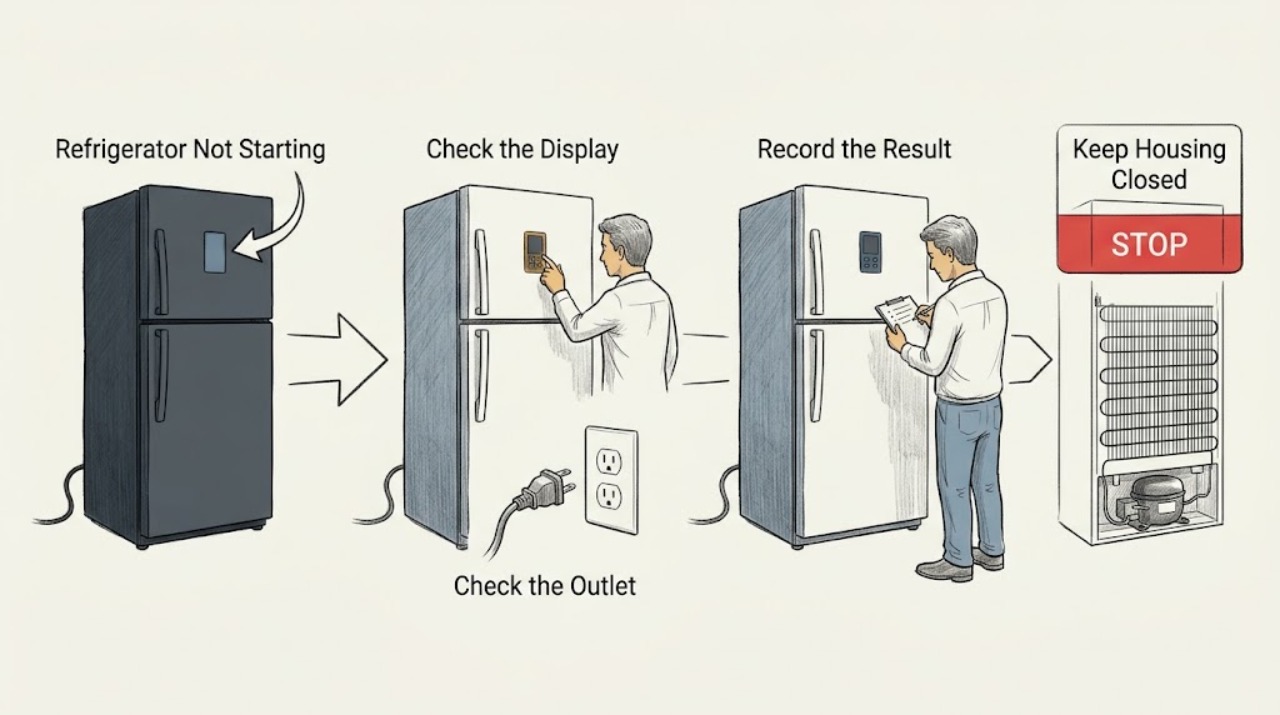
Work through in order
Diagnostic checks
Use only checks that match the exact appliance or system and its official guide.
-
Check 1
Open the fresh-food door and note the interior light, external or internal display, dispenser response, fan sound, compressor sound, temperature, alarm, and any exact code. Record whether the unit is completely dark, lit but quiet, or operating without cooling.
Expected result: No light or display is available; the light works but the controls do not; the controls work but the compressor is quiet; fans run; or a code/demo message is visible.
Next step: Write down the exact model and display before trying a reset. Continue only with checks that match the observed pattern.
Stop if: Stop for smoke, burning/electrical odor, sparks, abnormal heat, water near electrics, a hot/damaged cord or outlet, severe vibration, or repeated breaker trips.
Why this matters
Why: The remaining active features select the next branch: household/appliance power, control lock, defrost or outage recovery, demo mode, or an internal cooling fault. GE specifically uses interior-light state to begin this distinction.
-
Check 2
For a dark refrigerator, verify from a dry position that the plug is fully seated and the accessible wall outlet has power. Check the model rating plate or installation instructions for the required grounded supply; do not open the outlet or change its breaker.
Expected result: The plug was loose; the outlet is dead; the outlet is live but the refrigerator remains dark; or the light/display works.
Next step: Correct only a normal loose plug or household supply issue. Arrange appliance service for a dark GE refrigerator on a verified live outlet; arrange qualified electrical service for outlet/circuit damage.
Stop if: Do not use an extension cord or adapter, remove grounding, increase breaker size, open the receptacle, or perform live voltage/continuity testing.
Why this matters
Why: A loose plug or household supply explains a dark unit. A live outlet with no refrigerator response points to the appliance power/control path. A lit unit should not be treated as a no-power case.
-
Check 3
If lights are on but the dispenser or electronic panel does not respond, check for a visible lock indicator and use only the exact Owner's Manual's unlock instruction. For a newly installed refrigerator or one whose doors were removed, note that history without pulling the door harness.
Expected result: The panel is locked; a documented brief reset restores it; the refrigerator is newly installed after door removal; or the panel remains unresponsive with appliance power present.
Next step: Unlock or reset once using the exact model procedure. If the panel remains unresponsive, arrange service and provide the model and installation history; do not remove trim or wiring.
Stop if: Do not bypass the lock, pull a door harness, replace a control board, or work on a wet, cracked, hot, or energized panel.
Why this matters
Why: GE says many dispensers have child lockout, some panel states recover after a brief power reset, and a door wiring harness can matter after installation. On applicable models the same panel controls temperature or appliance power, so non-response can look like no-start.
-
Check 4
When lights and controls work but refrigeration does not begin, compare every display character with the exact model manual and GE's code guidance. Check for a model-specific Demo/Showroom state, PF, DE, dE, CC, FF, CI, or normal tC/tF function indicator; do not copy a button sequence from another model.
Expected result: A documented demo/showroom mode is present; a power, defrost, temperature, icemaker, or other code appears; tC/tF appears after a feature selection; or no documented display explains the missing cooling.
Next step: Exit demo or interpret a documented code once using the exact model procedure, then allow the specified stabilization time. Escalate any unknown or recurring display.
Stop if: Do not enter service diagnostics, guess code meanings, bypass sensors or locks, or change wiring.
Why this matters
Why: Demo mode can keep normal lights and controls active while disabling cooling. GE also distinguishes normal TurboCool/TurboFreeze indicators from faults and says its code list is not exhaustive.
-
Check 5
If the refrigerator is lit, controls are normal, and no hazard is present, note whether a power outage, recent unplugging, or an expected defrost period preceded the quiet state. Leave it powered and observe the elapsed pause without repeatedly cycling power.
Expected result: The compressor/fans resume; the unit remains quiet but temperatures stay stable; repeated clicking follows an outage; or the refrigerator remains quiet and warms beyond the model's expected recovery.
Next step: Record the timing and temperature trend. Arrange service if operation does not resume or cooling does not recover; do not move the refrigerator or force a restart.
Stop if: Do not touch the compressor, fan, wiring, or rear panels; stop for abnormal clicking, smoke, odor, heat, sparks, water near electrics, or repeat breaker operation.
Why this matters
Why: GE says compressor and fans stop during defrost, while overload protection can delay compressor operation after an outage until pressure equalizes. A persistent warm/no-run condition is less consistent with either normal pause.
-
Check 6
Prepare the exact model, cabinet style, light/display state, code photo, outlet result, lock/demo status, installation or outage history, elapsed timing, temperature trend, sounds, and one documented reset for service. Keep the appliance powered only when there is no hazard and preserving the symptom is appropriate.
Expected result: The GE refrigerator is dark on a live outlet; controls remain dead; demo or a fault code returns; it stays warm after a normal pause; or protection trips again.
Next step: Arrange qualified GE refrigerator service, or electrical service for a damaged outlet/circuit, with the recorded evidence. Do not order a board, compressor, or other part from the symptom alone.
Stop if: Stop using the refrigerator for smoke, burning/electrical odor, sparks, abnormal heat, water near electrics, hot/damaged power hardware, severe vibration, cabinet damage, or repeated breaker trips.
Why this matters
Why: The remaining possibilities include appliance power, control, door harness, fan, defrost, compressor, or sealed-system faults. External checks cannot safely identify a compatible part or internal cause.
Use your observations
Decision map
Find the observation that best matches what you see, then follow the next safe action.
-
PATH 01Safety boundary
What you see
The fresh-food light and displays are dark, and the accessible outlet is confirmed live without cord, plug, heat, odor, or water damage.
Do this next
Verify the plug is seated once and arrange qualified appliance service if the refrigerator stays dark. Use electrical service for outlet/circuit defects.
Why this path and its safety boundary
Why it matters: An appliance power or control-path fault is more likely than demo mode or defrost, which normally leave some controls or lights available.
Safety stop: Do not open the outlet, alter breaker protection, or keep reconnecting a hot or damaged cord.
-
PATH 02Safety boundary
What you see
Lights and controls are available, but the panel does not respond or cooling is disabled while a lock, 0F 0F, dE no, Showroom Mode, or similar model-documented state is shown.
Do this next
Use the exact manual to unlock or exit the mode once. Escalate a returning indication or dead panel without opening controls or door wiring.
Why this path and its safety boundary
Why it matters: A control lock, installation panel state, or demo mode can mimic a failed start; demo specifically leaves normal lights/controls active while disabling cooling.
Safety stop: Do not guess button combinations, bypass lockouts, pull harnesses, or change control boards.
-
PATH 03Safety boundary
What you see
The refrigerator is lit and controls are normal, but compressor and fans are quiet after a defrost interval or short outage, with no hazard.
Do this next
Leave it powered and monitor the exact model's pause and temperature trend. Arrange service if it stays warm or quiet beyond the documented recovery.
Why this path and its safety boundary
Why it matters: GE describes both defrost and post-outage equalization as temporary protections. The refrigerator should resume without consumer intervention; repeated unplugging is not required.
Safety stop: Stop for smoke, odor, sparks, abnormal heat, water near electrics, severe vibration, or repeat breaker operation.
-
PATH 04Safety boundary
What you see
A documented or unknown code remains, the display/panel is abnormal, or the refrigerator has lights but no cooling after mode, control, and normal-pause checks.
Do this next
Record the exact characters and arrange model-specific service; do not enter diagnostics or order a part from the code alone.
Why this path and its safety boundary
Why it matters: A fault in the control, sensor, defrost circuit, fan, compressor, or another internal system becomes more likely. GE's common code list is not exhaustive and cannot identify a safe replacement part for an unspecified model.
Safety stop: Do not open panels, make live tests, bypass protectors, or continue with heat, odor, sparks, water near electrics, or a repeat trip.
-
PATH 05Safety boundary
What you see
The refrigerator repeatedly trips protection, has a hot/damaged cord or outlet, smoke, burning odor, sparks, water near electrical parts, severe vibration, cabinet damage, or remains dark on verified power.
Do this next
Disconnect power when safe, keep the unit off, and arrange qualified electrical or GE refrigerator service with the recorded symptoms.
Why this path and its safety boundary
Why it matters: The condition exceeds safe user diagnosis and may involve household wiring or an internal electrical, compressor, or sealed-system fault.
Safety stop: Do not reset repeatedly, open the cabinet, remove rear covers, or perform a live test.
Helpful context
Understand the symptom
“Not starting” has several GE refrigerator patterns
A refrigerator can be completely dark, lit but quiet, lit with a locked panel, or running fans without cooling. These patterns do not share one reset. GE's own guidance starts with the fresh-food light, then separates controls, defrost, post-outage protection, demo mode, and service. Capture the symptom before moving the refrigerator or changing settings.
Choose by what remains active
No light and no display sends the diagnosis toward the plug, outlet, breaker, or appliance power path. Lights and controls with no compressor sound can be a normal defrost or post-outage pause. Lights and controls with no cooling but a visible demo indication point to a mode issue. A panel that will not respond may be locked or affected by installation wiring. A recurring code, persistent warmth, or repeat power trip moves beyond user-level checks.
Stay on the accessible side of the refrigerator
User checks are limited to a dry, accessible plug and outlet, visible controls, model-documented lock or demo state, door closure, and elapsed time. Do not open the control panel, pull a door harness, remove rear covers, bypass overload or thermal protection, puncture refrigerant tubing, or make a live electrical test. Stop for smoke, burning/electrical odor, sparks, abnormal heat, water near electrical parts, a hot or damaged cord/outlet, severe vibration, or repeated breaker trips.
When checks do not resolve it
Need a professional?
Call qualified GE refrigerator service for a no-start condition that persists after the accessible power, control, demo, and normal-pause checks, for an unknown or recurring code, an unresponsive panel, or suspected internal electrical/cooling fault. Use electrical service for outlet or circuit damage. Stop immediately for smoke, burning odor, sparks, abnormal heat, water near electrics, damaged power hardware, severe vibration, cabinet damage, or repeat breaker trips.
Safety scope: Keep checks to the accessible plug/outlet, documented controls, lock/demo state, door closure, display, and timing. Do not open control or rear panels, pull door harnesses, bypass locks or overloads, puncture refrigerant tubing, make live tests, or service the compressor or sealed system. Stop for smoke, burning/electrical odor, sparks, abnormal heat, water near electrical parts, hot/damaged power hardware, severe vibration, cabinet damage, or repeated breaker trips.
Have this ready
- Exact model and cabinet style, interior-light and display state, all displayed characters, dispenser/lock status, plug and outlet result, installation or door-removal history, outage/defrost timing, temperature trend, compressor/fan sounds, any one reset attempted, and odor, heat, spark, water, vibration, cord, or breaker observations.
Common questions
FAQ
Why is my GE refrigerator not running but the light is on?
A lit refrigerator is receiving at least some power, so check whether the compressor is in a normal defrost or post-outage pause, whether temperature controls are active, and whether Demo mode is disabling cooling. GE says demo can leave lights and controls active. If it remains warm after the model's documented recovery, arrange service.
Can a GE refrigerator be quiet during defrost?
Yes. GE says the compressor and fans do not run during defrost, which can make the refrigerator seem stopped. The cycle should end automatically; do not repeatedly unplug the refrigerator. If it stays quiet and warms beyond the exact model's expected pause, call service.
What should I do if my GE refrigerator display says Demo or Showroom?
Identify the exact model and use its Owner's Manual because GE lists different displays and button sequences for different control layouts. Exit the mode once as documented, then allow stabilization. Do not use another model's sequence or open the control panel; a persistent indication needs service.
Read the exact guide
Official sources
- Refrigerator - Error, Fault or Function CodesGE Appliances · GE refrigerators with applicable electronic dispenser controls; not every code appears on every model
- Refrigerator - Not RunningGE Appliances · GE refrigerators; displayed demo indicators and button sequences vary by model
- Refrigerator - Dispenser Control Panel Not WorkingGE Appliances · GE refrigerators with electronic dispenser panels; exact Café, Profile, and GE layouts vary
- Refrigerator - Does Not Run or CoolGE Appliances · General GE refrigerators; exact model controls and timing vary
- Refrigerator - Electrical Requirements and Breaker SizeGE Appliances · GE refrigerators and related refrigeration appliances; exact model installation instructions control
Community feedback
Share a repair observation
Share a plain-text repair observation. Accepted observations are published automatically; this page may take a moment to update.