
On this page
Start here
Quick answer
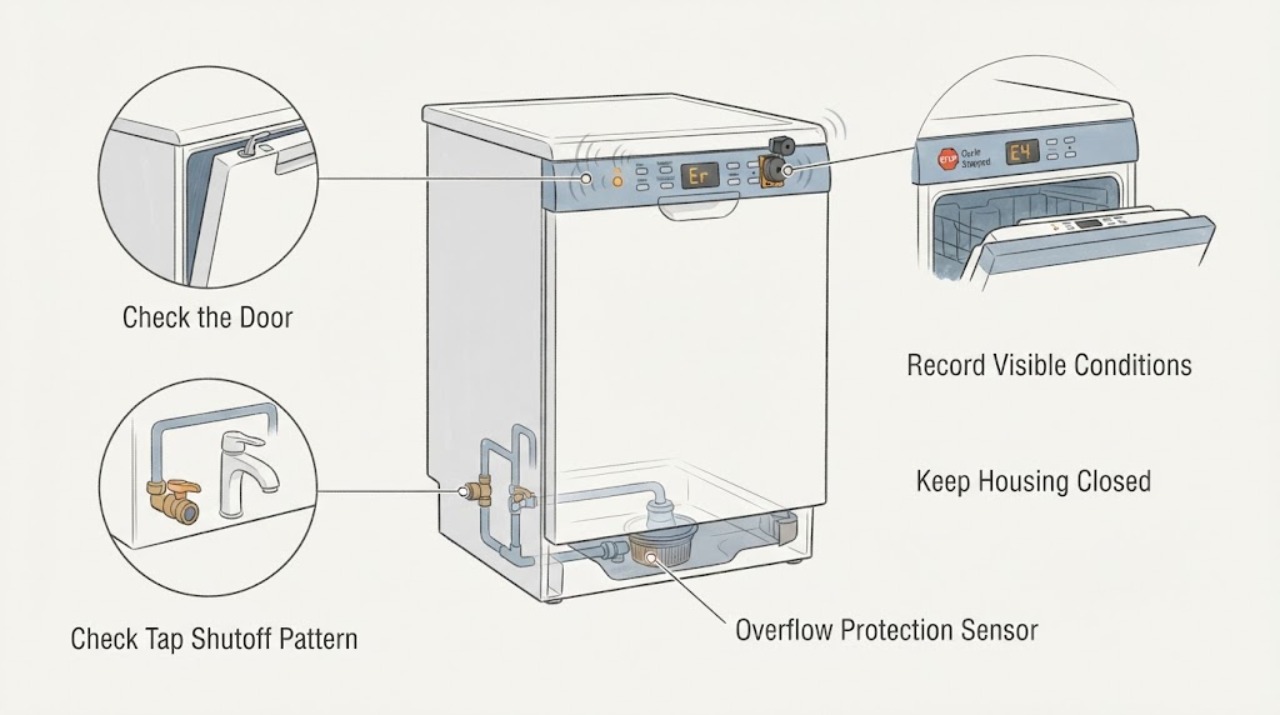
Do not treat every beep as the same fault. First record the complete Hotpoint model, when the sound occurs, whether a cycle completes, and any display letter or flashing-light pattern. The opened Hotpoint LTF8B019UK manual says its dishwasher uses a buzzer or set of tones for commands and events such as power-on and cycle end, so a single familiar tone can be normal. The same manual documents a tap-shut-off alarm: beeps with H on the display, a flashing ON/OFF indicator, and number 6 can mean the dishwasher is not taking in water; it directs the user to check that mains water is present, the inlet hose is not bent, and the tap is on, then switch off, open the tap, switch on again, reprogram, and restart. Hotpoint's official error-code guidance separately lists model-family codes such as F01 anti-flooding overflow, F03 drain failure, F06 water-fill timeout, and F10 heating-element fault; do not assign one of those meanings from a beep alone or transfer it to another model. With power and water made safe, check only the exact model's accessible tap, visible hose, door closure, filter, and drain-path conditions. If a leak, active overflow, repeated fault, heating or pump issue, damaged cord, smoke, burning odor, or internal access is involved, stop and arrange qualified Hotpoint service. Do not repeatedly reset an alarm, remove panels, or perform live electrical tests.
Before you begin
Safety first
- The user may identify the model, observe normal tone timing, check a safely accessible water tap and visible inlet hose, follow one model-specific restart, and inspect a model-permitted filter or visible drain route with power isolated. Qualified service must handle the base or door panels, valves, pumps, heaters, sensors, controls, wiring, float protection, hidden hoses, and live testing.
Work through in order
Diagnostic checks
Use only checks that match the exact appliance or system and its official guide.
-
Check 1
Record the complete Hotpoint model, whether the beeps are single, repeating, or continuous, when they begin, whether the program completes, and every display letter, number, or flashing-light sequence. Note whether the sound follows a button press, power-on, cycle end, door closure, or a stopped cycle.
Expected result: The tone is a single familiar event, repeated beeps accompany H and number 6, a documented F-code or LED pattern appears, or there is only a beep with no display information.
Next step: Follow the matching normal-tone, water-inlet, code, drain, or safety branch. If the model or pattern is unknown, retrieve the exact manual before applying a code meaning.
Stop if: Stop and isolate power from a dry, safe position for smoke, burning odor, a hot or damaged cord, active flooding, or water near electrical parts.
Why this matters
Why: The cited manual describes normal buzzer events such as commands and cycle end, while its H/6 pattern is a model-specific tap-shutoff alarm. Hotpoint's F-code meanings also require the actual code or LED arrangement; a beep alone cannot identify a component.
-
Check 2
Check whether the dishwasher has reached cycle end and whether the door is fully closed and latched without forcing it. Look for a paused or unstarted program, an option or button that was just pressed, and steam or hot water before opening the door carefully.
Expected result: The beeps occur only at power-on or cycle end, the cycle resumes after correct door closure, the program is stopped with water inside, or the sound repeats despite a closed door and no displayed code.
Next step: For a normal event, no repair is needed. For a stopped cycle, continue to the water, drain, and code checks; avoid repeatedly pressing Start or opening a hot door.
Stop if: Do not force the latch, reach into a running or hot tub, or continue operation if the door, seal, or machine leaks.
Why this matters
Why: A command or cycle-end tone can be normal on the cited Hotpoint manual. A cycle that cannot resume, water left inside, or repeated beeps without the expected event points toward a door, water, drain, control, or model-specific alarm condition.
-
Check 3
If the exact model shows the cited H/6-style tap-shutoff pattern, check from a dry position that the dishwasher water tap is open, the household water supply is present, and the visible inlet hose is not bent or crushed. Do not disconnect the hose or reach behind a built-in unit.
Expected result: Water is unavailable, the tap is closed, the inlet hose is visibly kinked, or the supply and visible hose appear normal while the H/6 alarm persists.
Next step: Restore only the tap or visible hose condition permitted by the exact manual, then follow its restart procedure once. For a persistent pattern or hidden plumbing, keep the dishwasher off and arrange service.
Stop if: Do not pull out a built-in dishwasher, remove the inlet valve, disconnect hidden plumbing, or repeatedly reset the alarm.
Why this matters
Why: For LTF8B019UK, the manual links the beeps and H display to failure to take in water and lists no mains water, a bent hose, or a closed tap as checks. A normal visible supply with a persistent alarm can indicate a valve, filter, sensor, control, or hidden hose issue.
-
Check 4
Only after the exact model's water-supply condition is corrected and the door is safely closed, use the manual's restart sequence once. For the cited LTF8B019UK manual, switch the machine off, turn on the tap, switch it back on after a few seconds, re-program the appliance, and restart the wash cycle.
Expected result: The alarm clears and the cycle starts, the beeps return immediately, the dishwasher fills but stops again, or a different code or light sequence appears.
Next step: Record the new pattern and use its exact manual or Hotpoint's code table. Arrange qualified service for recurrence or any code that routes to an engineer.
Stop if: Do not repeat restart cycles, defeat the door or water protection, or restore power while a leak or overflow is present.
Why this matters
Why: A single successful restart supports a temporary or accessible tap condition. Recurrence, a new code, or a fill that stops again points to a model-specific inlet, drain, sensor, control, or protection fault rather than a reason to keep resetting.
-
Check 5
If beeping accompanies an unfinished cycle or standing water, turn off and isolate power as the exact manual permits before checking only the accessible filter, visible drain hose, and under-sink drain connection for food residue, a kink, or a blockage. Do not remove the pump protection or hidden panels.
Expected result: Water remains, the filter is clogged, the visible drain route is kinked or blocked, the drain path is clear, or a model-specific F03 drain-timeout code is present.
Next step: Correct only an accessible, model-permitted filter or visible hose issue, refit parts, and perform no more than one model-approved check. Escalate for persistent water, F03 recurrence, hidden plumbing, or pump access.
Stop if: Do not use drain chemicals, reach into an unseen pump, tip or pull out a built-in dishwasher, or operate without a correctly fitted filter.
Why this matters
Why: The cited manual lists a blocked drain duct, clogged food-residue filter, or a bent hose among no-drain causes. Hotpoint's code page identifies F03 as water-drain failure or timeout and directs a drain-pipe and under-sink check; a clear path with persistent failure makes the pump, wiring, or control more likely.
-
Check 6
Look from a dry, safe position for water on the floor, around the door, under the accessible edge, or near the supply and drain connections. If the exact model shows an anti-flood or overflow indication, close the water tap and isolate power only when it is safe to do so.
Expected result: There is active filling, a visible leak, water near the cord or outlet, a documented F01 anti-flooding pattern, or no visible leak and only a beep.
Next step: Keep the tap closed and the dishwasher off for active fill, leak, overflow, or wet-electrical conditions, and arrange qualified appliance or electrical service. For no visible leak, continue only with the model-specific code path.
Stop if: Do not reset an overflow alarm repeatedly, tilt the machine, remove its base, touch wet electrical connections, or run a leak test with panels removed.
Why this matters
Why: Hotpoint identifies F01 as anti-flooding overflow and lists water leaks among the checks for an anti-flood condition. Water near electrical parts or active filling is an immediate stop, not a normal beep or reset problem.
-
Check 7
Stop owner troubleshooting when the tone is not a documented normal event, the exact model's accessible tap, hose, door, filter, and visible drain checks are correct, or the alarm returns after one model-approved restart.
Expected result: A documented F-code routes to service, the pump or valve is silent or abnormal, a heating or control fault appears, the beeps recur without an accessible cause, or internal access would be needed.
Next step: Leave the dishwasher out of use and arrange qualified Hotpoint service. Provide the model, beep timing, display or LED pattern, cycle phase, water and drain observations, and any leak or electrical symptom.
Stop if: No cabinet disassembly, live electrical testing, heater or pump bypass, float bridging, or deliberate overflow test.
Why this matters
Why: A valve, pump, heater, sensor, control board, wiring, latch, float, or other internal component may be involved. The beep pattern alone cannot safely select a part or justify live testing.
Use your observations
Decision map
Find the observation that best matches what you see, then follow the next safe action.
-
PATH 01Safety boundary
What you see
The dishwasher gives a familiar single tone only after a command, power-on, or cycle end, with no stopped cycle, flashing fault pattern, leak, or abnormal behavior.
Do this next
Continue normal operation and use the exact model manual if the tone changes or begins repeating.
Why this path and its safety boundary
Why it matters: A normal buzzer event is more likely than a fault; the cited Hotpoint manual explicitly describes tones for commands and events such as power-on and cycle end.
Safety stop: Stop if the sound becomes continuous, accompanies a fault pattern, or occurs with water, smoke, odor, heat, or cord damage.
-
PATH 02Safety boundary
What you see
The exact model shows beeps with H, a flashing ON/OFF indicator, and number 6, or an equivalent documented tap-shutoff display.
Do this next
Check the tap, household supply, and visible inlet hose, then follow the model's restart once. Escalate if the alarm returns.
Why this path and its safety boundary
Why it matters: For LTF8B019UK, failure to take in water is more likely than a drain or heater fault; the manual lists absent supply, a bent inlet hose, and a closed tap.
Safety stop: Do not disconnect hidden hoses, pull out the built-in unit, or repeatedly reset the alarm.
-
PATH 03Safety boundary
What you see
The beep accompanies an F-code or the exact LED sequence shown in Hotpoint's code guide.
Do this next
Follow only the documented accessible check for that exact code. Use qualified service for F01 overflow, F10 heating, F11 wash-pump, F12 communication, F13 board, F15 sensor, or any recurring fault.
Why this path and its safety boundary
Why it matters: The code, LED layout, and model family—not the beep itself—determine whether Hotpoint identifies overflow, drain, water-fill, heating, pump, or control trouble.
Safety stop: Do not borrow a code meaning from another Hotpoint model or bypass a protection circuit.
-
PATH 04Safety boundary
What you see
Beeping occurs after the machine stops with water remaining, and the accessible filter, visible drain hose, or sink connection is clogged or kinked, or an F03 drain-timeout pattern is documented.
Do this next
Isolate power, correct only the visible model-permitted obstruction, refit the filter, and make one check. Use service for persistent water or hidden pump access.
Why this path and its safety boundary
Why it matters: A drain-path restriction is more likely than a normal command tone. Hotpoint's manual and code guide both identify filter, drain hose, or under-sink restrictions as checks for no-drain conditions.
Safety stop: Do not use chemicals, reach into the pump, tilt the appliance, or run without the filter.
-
PATH 05Safety boundary
What you see
The dishwasher leaks, actively fills, shows an anti-flood pattern, repeatedly alarms after accessible checks, or requires heater, pump, valve, control, sensor, latch, wiring, or base access.
Do this next
Close the water tap for active fill, isolate power only from a dry safe position, leave the dishwasher off, and arrange qualified appliance or electrical service.
Why this path and its safety boundary
Why it matters: An anti-flood or internal component fault is more likely and can create water or electrical danger. Hotpoint routes the relevant documented faults to qualified service.
Safety stop: No repeated resets, base removal, live tests, protection bypass, or deliberate leak or overflow recreation.
Helpful context
Understand the symptom
A beep can be a normal event or an alarm
Hotpoint's opened LTF8B019UK manual says the buzzer or set of tones can report a command, power-on, or cycle end. That is different from beeps that repeat while the program is stopped, accompany a display letter, or occur with a flashing indicator. Note whether the cycle reached its end, whether the door is closed, and whether the sound follows a button press before trying to reset anything. Use the complete model manual because tone patterns and indicators vary.
Water alarms have a distinct decision path
In the cited manual, beeps plus H, a flashing ON/OFF indicator, and number 6 identify a tap-shutoff or water-inlet condition. Hotpoint directs checks of the water supply, tap, and inlet hose, followed by a model-specific restart. A beep without that pattern is not enough to call it a fill fault. F01, F03, F06, and other code meanings on Hotpoint's online table likewise require the documented code or LED arrangement and the appropriate model family.
Keep overflow, drain, and heating faults separate
A stopped cycle with water remaining, a leak, or an overflow indication can make the dishwasher beep for a reason different from a water-fill alarm. The Hotpoint error-code page routes anti-flooding and heating faults to service and permits only limited model-specific checks for a drain timeout. Do not remove a base, bridge a float, or test a heater or pump while energised.
Safety boundary
Stop conditions
- Record the exact Hotpoint model and full display or LED pattern; a beep alone is not a universal error code.
- For active filling, overflow, a leak, or water near electrical parts, close the water tap and isolate power only from a dry safe position; leave the dishwasher off.
- Do not repeatedly reset an alarm, remove a built-in dishwasher or base panel, bridge a float or door switch, use drain chemicals, or perform live tests.
- Use the exact model manual for filter, hose, restart, and code instructions. Heater, pump, valve, sensor, control, wiring, and hidden plumbing work requires qualified service.
Only after diagnosis
Potential parts
- inlet hose or inlet filter
Consider this category only when the exact model's documented water-fill alarm persists or the visible inlet hose or accessible filter is damaged or blocked after the tap check.
Hose fittings and inlet protection vary by model and installation. Hidden plumbing and inlet-valve access require qualified service. - dishwasher filter or drain hose
Consider this category only when the exact model has a clogged, damaged, or leaking accessible filter or visible drain hose after a documented no-drain pattern.
Confirm the complete model and routing. A clear visible drain path does not establish a pump or control fault. - door latch or control interface
Consider this category only when the exact model's normal tone or door-state check fails repeatedly and qualified diagnosis identifies a latch, switch, or user-interface fault.
Latch and control wiring are model-specific and may be in the door. Do not remove the door panel or bypass the switch. - inlet valve, drain or wash pump, heater, sensor, control, or wiring service
Consider these service categories only when a documented code or recurring beep remains after the exact model's accessible supply, door, filter, and visible drain checks.
These are internal electrical, hydraulic, or heating diagnoses. Qualified service must identify the failed component and verify model compatibility; do not live-test or bypass protection.
When checks do not resolve it
Need a professional?
Arrange qualified Hotpoint dishwasher service when a documented alarm or code returns after its exact accessible checks, when water remains after the model-permitted filter and visible drain checks, or when a valve, pump, heater, sensor, control, latch, wiring, or hidden hose needs access. Stop immediately for active filling, flooding, a leak near electrical parts, smoke, burning odor, a hot or damaged cord, or repeated protective shutdown.
Safety scope: The user may identify the model, observe normal tone timing, check a safely accessible water tap and visible inlet hose, follow one model-specific restart, and inspect a model-permitted filter or visible drain route with power isolated. Qualified service must handle the base or door panels, valves, pumps, heaters, sensors, controls, wiring, float protection, hidden hoses, and live testing.
Common questions
FAQ
Why is my Hotpoint dishwasher beeping?
First record the exact model, beep timing, cycle phase, and display or LED pattern. A single tone after a command or cycle end can be normal on the cited Hotpoint manual. Repeated beeps with H, a flashing ON/OFF indicator, and number 6 indicate a model-specific tap-shutoff alarm; check the water supply, tap, and visible inlet hose. A documented code, leak, or recurring alarm needs the exact code path or service.
Are beeps at the end of a Hotpoint dishwasher cycle normal?
They can be. The opened LTF8B019UK manual says the dishwasher uses a buzzer or tones for implemented commands and events including cycle end. If the sound is new, repeats while the machine is stopped, or accompanies a display or flashing-light pattern, use the exact model troubleshooting path.
What does H and number 6 with beeps mean on a Hotpoint dishwasher?
For the cited LTF8B019UK manual, beeps with H, a flashing ON/OFF indicator, and number 6 are a tap-shutoff alarm associated with the dishwasher not taking in water. Check that water is available, the tap is open, and the visible inlet hose is not bent, then follow the manual's single restart procedure. Confirm the model before applying this meaning.
Can a drain problem make a Hotpoint dishwasher beep?
A stopped or unfinished cycle with water remaining can accompany an alarm, but a beep alone does not prove a drain fault. With power safely isolated, check only the exact model's accessible filter and visible drain route. Hotpoint identifies F03 as water-drain failure or timeout for the applicable code and LED arrangement; persistent water or a recurring code needs service.
When should I stop resetting a beeping Hotpoint dishwasher?
Stop after one model-approved restart if the alarm returns, a documented code routes to service, water remains, or the dishwasher leaks or actively fills. Also stop for water near electrical parts, smoke, burning odor, abnormal heat, a damaged cord, or repeated protective shutdown. Do not open panels or perform live electrical tests.
Read the exact guide
Official sources
- Hotpoint Service Help and AdviceHotpoint · Official Hotpoint UK support hub covering slimline and integrated dishwashers and other appliances; it supports the need to use appliance-specific manuals and qualified service, not universal beep meanings.
- Hotpoint Dishwasher Error CodesHotpoint · Official Hotpoint UK error-code guide for applicable dishwasher model families and LED arrangements; code meanings and displays are not universal across all Hotpoint dishwashers.
- Instructions for useHotpoint · Official Hotpoint manual for the specific LTF8B019UK model; use its H/6 pattern, restart sequence, and tone details only as model-specific evidence.
Community feedback
Share a repair observation
Share a plain-text repair observation. Accepted observations are published automatically; this page may take a moment to update.