
On this page
Start here
Quick answer
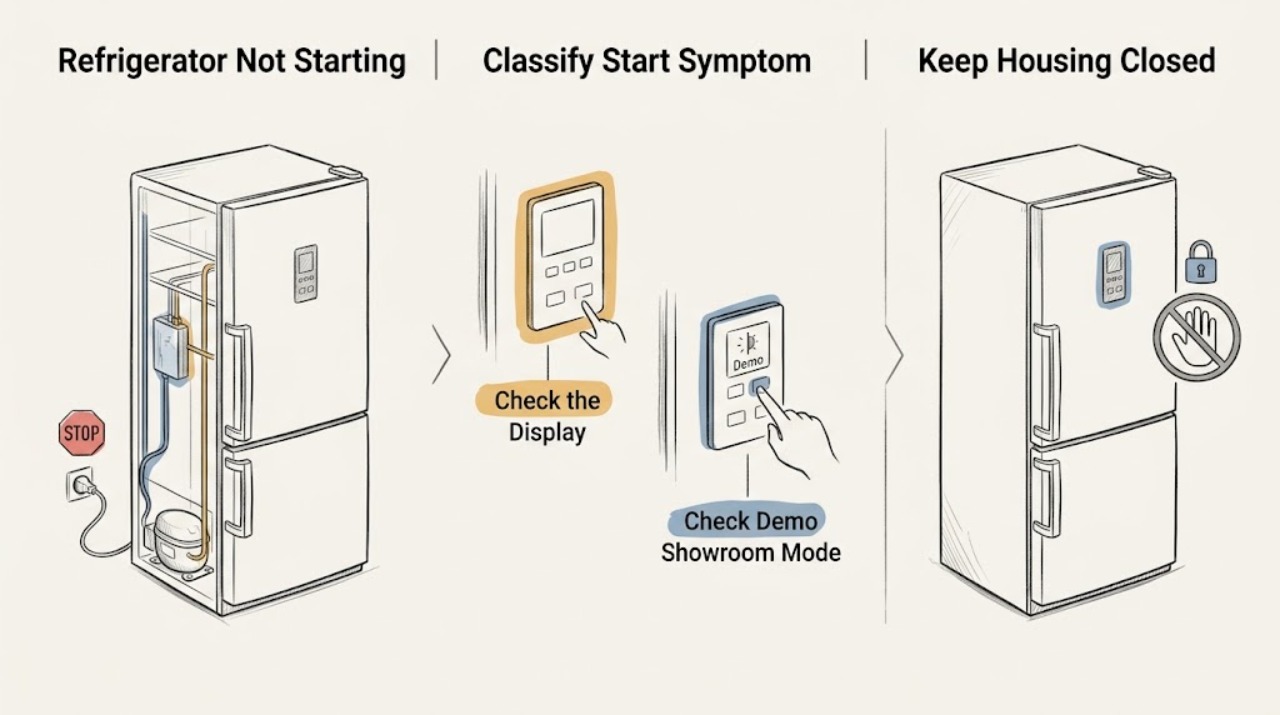
Define the symptom before touching a control. If the interior light, display, or other functions are completely dead, this is a not-turning-on/power problem. If the compressor or fans run but food is warm, this is a not-cooling problem. This page is for a Hotpoint refrigerator that has power or visible controls but the cooling system does not appear to start. Record the full model number because Hotpoint models and control layouts differ. Check the plug and outlet from a dry, safe position, confirm the temperature control is on, and look for a model-specific Demo/Showroom indication such as 0F 0F or dE no. Do not apply another model's button combination. A refrigerator can also be silent during its automatic defrost cycle, and after a short power outage its compressor overload protection may wait while the refrigerant system equalizes; official support says this recovery is automatic and does not require repeated power cycling. Listen and observe from outside without opening panels. If the unit still will not start after the documented mode, power, and normal-cycle checks, or if it has smoke, sparks, burning odor, a hot cord/plug, damaged wiring, or abnormal repeated clicking, stop and arrange qualified Hotpoint/GE service. Do not test a compressor, capacitor, relay, control board, refrigerant circuit, or live wiring yourself.
Before you begin
Safety first
- The owner may classify the symptom, identify the model, check a dry accessible plug/outlet, verify a documented control state, identify a documented Demo Mode, and observe normal defrost or post-outage recovery from outside. Qualified personnel must handle panels, compressors, capacitors, relays, fans, controls, wiring, refrigerant, sealed systems, and hazardous electrical connections.
Work through in order
Diagnostic checks
Use only checks that match the exact appliance or system and its official guide.
-
Check 1
Open the fresh-food door once and note whether the interior light, display, control panel, and any normal sounds are present. Record whether the complaint is that the whole refrigerator is dead, the compressor/fans are silent, or the refrigerator runs but does not cool. Do not move the cabinet or touch wet power hardware.
Expected result: There is no light/display; lights or display work but no compressor/fan starts; the unit is running but food is warm; or abnormal clicking, odor, smoke, sparks, or heat is present.
Next step: Use the matching branch below. For a hazard, keep clear and isolate power only from a safe dry point; otherwise continue with model and normal-cycle checks.
Stop if: Stop for smoke, sparks, burning odor, a hot or damaged plug/cord/outlet, exposed wiring, water near electricity, or repeated harsh clicking.
Why this matters
Why: No response is a not-turning-on/power branch. Running but warm is a not-cooling branch. Power with no expected startup is the not-starting symptom. Odor, smoke, sparks, or hot power hardware is an immediate safety event.
-
Check 2
Read the Hotpoint model/product code from its rating label and use the exact owner manual. From a dry, safe position, confirm the plug is seated, the outlet has ordinary power, and the refrigerator temperature control is on. Do not unplug and immediately reconnect repeatedly as a test.
Expected result: The outlet or plug is not powered/secure; the control is off; the model manual identifies a different control location; or power and control state are normal.
Next step: Correct only a safe, obvious plug or control condition and follow the exact manual. If the outlet, plug, cord, or control is damaged or wet, stop and arrange qualified electrical/appliance help.
Stop if: Do not use a wet outlet, touch a damaged cord, remove covers, test voltage inside the cabinet, or substitute a different model's settings.
Why this matters
Why: A power or off-control condition can prevent startup without an internal refrigerator failure. Normal power and an on control shift concern toward Demo Mode, defrost, post-outage protection, or a service fault.
-
Check 3
Look at the display or control panel for the exact model's Demo, Showroom, or 0F 0F/dE no indication. Compare the visible control layout with the model manual; do not guess a button sequence from a similar refrigerator.
Expected result: A documented Demo/Showroom indication is present; the display is normal; the model has no such display; or the code/controls do not match the available documentation.
Next step: Use only the exact manual's Demo/Showroom procedure. After clearing it, set the documented temperatures and allow stabilization. If no documented mode matches, proceed to the normal-cycle branch or service.
Stop if: Do not hold random button combinations, enter diagnostics, bypass a lock, or repeatedly power-cycle a unit to clear an unknown code.
Why this matters
Why: Demo Mode can make a refrigerator appear not to start while display functions remain active. Its clearing sequence varies by model, and an unmatched code is not safe to interpret generically.
-
Check 4
Note whether the silence began during a normal cycle, after a short power interruption, or immediately after unplugging/replugging. Observe from outside whether the refrigerator resumes without intervention; do not open panels or force a restart.
Expected result: The pause fits a model-documented defrost period; it follows a short outage or immediate reconnection; the unit resumes; or it remains silent, repeatedly clicks, or never resumes.
Next step: Allow the documented automatic cycle or protection to complete once. If the unit resumes, monitor normally. If it does not, preserve the symptom for qualified service rather than cycling power again.
Stop if: Do not bypass overload protection, force the compressor, restore power to reproduce clicking, or touch a hot cabinet or power connection.
Why this matters
Why: Official support says compressor/fans stop during defrost and overload protection can delay compressor startup while refrigerant pressure equalizes after an outage. A pause that never resolves or repeats abnormally is not established as normal.
-
Check 5
If the compressor or fan is audibly or visibly running, check actual food temperature and the control setting instead of treating the issue as a startup fault. Use the exact model's not-cooling guidance for door closure, airflow, load, and temperature measurement; do not set the controls colder repeatedly.
Expected result: The unit is running and food is warm; there is no running sound and food temperature is rising; the center food temperature is normal; or the model/temperature cannot be established.
Next step: Follow the separate model-specific cooling checks only when the unit is running. For no startup after the normal-cycle branch, arrange service and protect perishable food.
Stop if: Do not remove panels, test compressor components, alter refrigerant, or keep operating through smoke, odor, sparks, or electrical heat.
Why this matters
Why: Running but warm is a not-cooling investigation, not not-starting. No running sound with power and controls present preserves the startup/defrost/service branch. A normal food temperature may reflect a normal compressor cycle.
-
Check 6
After the model, power, control, Demo/Showroom state, defrost/outage timing, and running-versus-cooling distinction have been documented, classify the remaining event and keep the refrigerator accessible for diagnosis without opening it.
Expected result: The refrigerator starts after a documented mode or normal delay; it remains silent with power; it repeatedly clicks; it has no power; it runs but does not cool; or a hazard sign is present.
Next step: Use the refrigerator only when it starts, cycles, and maintains safe food temperature normally. Otherwise arrange qualified Hotpoint/GE appliance service and provide the model, indicators, timing, sounds, and safe observations.
Stop if: Stop immediately for smoke, sparks, burning odor, hot/damaged power hardware, exposed wiring, water near electricity, or any need to remove a panel or test live components.
Why this matters
Why: A resolved mode or timing condition supports a normal state. Persistent silence or clicking with power can involve an overload, relay, control, compressor, fan, or wiring fault; no power and not-cooling symptoms need their distinct service routes.
Use your observations
Decision map
Find the observation that best matches what you see, then follow the next safe action.
-
PATH 01Safety boundary
What you see
The interior light, display, and other controls are all dead, or the outlet/plug is not safely powered.
Do this next
Use safe household power checks and qualified electrical/appliance service. Do not touch wet or damaged connections or open the refrigerator.
Why this path and its safety boundary
Why it matters: This is a power/not-turning-on symptom, not a compressor startup diagnosis.
Safety stop: Stop for water near electricity, a damaged cord/plug/outlet, smoke, sparks, or burning odor.
-
PATH 02Safety boundary
What you see
The compressor or fans run, but food temperature is high or the refrigerator is not cooling adequately.
Do this next
Use the exact model's not-cooling checks for settings, airflow, doors, load, and stable food temperature, then arrange service if unresolved.
Why this path and its safety boundary
Why it matters: This is a not-cooling symptom. Startup has occurred, so changing Demo Mode or waiting for a start delay is unlikely to address the primary complaint.
Safety stop: Do not access sealed-system, fan, control, or electrical components.
-
PATH 03Safety boundary
What you see
The display shows a model-documented 0F 0F, dE no, Showroom, or other Demo Mode indication while lights/controls remain active.
Do this next
Use only the matching Hotpoint manual to clear the mode, restore temperatures, and allow stabilization. If the code does not match the manual, call service.
Why this path and its safety boundary
Why it matters: The control state can make cooling appear not to start without proving a hardware fault. Button sequences vary by Hotpoint model.
Safety stop: Do not guess button combinations or enter an unverified diagnostic mode.
-
PATH 04Safety boundary
What you see
The unit has power and controls but is silent during a plausible defrost cycle or immediately after a short outage/reconnection, then resumes normally.
Do this next
Allow the normal cycle or equalization delay once and monitor. Escalate if silence persists, clicking repeats, or food temperatures rise abnormally.
Why this path and its safety boundary
Why it matters: Defrost stops the compressor and fans temporarily, while overload protection can delay restart after an outage; both are documented automatic behaviors.
Safety stop: Do not repeatedly cycle power or force the compressor to start.
-
PATH 05Safety boundary
What you see
Power and controls are present, no documented Demo/defrost/outage explanation fits, and the refrigerator remains silent or repeatedly clicks.
Do this next
Keep the appliance out of service as needed and arrange qualified Hotpoint/GE diagnosis with the model and event record.
Why this path and its safety boundary
Why it matters: An overload, relay, compressor, fan, control, wiring, or sealed-system fault is possible and cannot be selected safely from sound alone.
Safety stop: Do not remove panels, test capacitors/relays/live wiring, bypass overload protection, or restore power to reproduce a hazardous sound.
Helpful context
Understand the symptom
Not starting is not the same as no power or not cooling
A Hotpoint refrigerator with no light, display, or other electrical response has a power/not-turning-on symptom. A refrigerator whose compressor or fans run but whose food stays warm has a not-cooling symptom. The narrower not-starting symptom is a unit with power or controls that does not begin its expected cooling run, or that appears to pause after an outage or command. Confirm which observation is true before choosing a procedure.
Hotpoint model identity controls the buttons
Official Hotpoint product pages show different top-mount and side-by-side refrigerator layouts and link model-specific manuals and support. A display code or button combination from one platform cannot be assumed for another. Record the model/product code, then use its manual for temperature controls, Demo/Showroom mode, diagnostics, and service information.
Demo mode can look like a failed start
Official support says a new refrigerator may be in Demo Mode. Depending on the display and control location, indicators can include 0F 0F, dE no, or Showroom Mode, and the button sequence varies. Use only the exact model's documented sequence. When Demo Mode is cleared, the unit may need its desired temperatures set and time to stabilize; do not keep cycling power or guessing button combinations.
Defrost and short-outage protection are normal pauses
The compressor and fans do not run during an automatic defrost cycle, so a working refrigerator can briefly seem not to start. After a short power interruption or an immediate unplug/replug, overload protection can cycle while the refrigerant system equalizes; official guidance says no consumer intervention is required. These timing explanations apply only when there is no electrical hazard and the appliance resumes normally.
Check a control state before diagnosing a compressor
If the interior light or display works, verify that the temperature control was not turned off and that the model is not in a showroom/demo state. A control display alone does not prove the compressor circuit is healthy. If the unit runs but cannot reach temperature, use the not-cooling path rather than repeatedly changing the start control.
Persistent failure to start belongs to service
Once power, control state, Demo Mode, defrost timing, and an automatic post-outage delay have been reasonably separated, a refrigerator that remains silent or clicks without starting may have a relay, overload, control, compressor, fan, wiring, or sealed-system fault. Those parts are not safe to identify by live testing or panel removal. Keep the model and symptom record for qualified Hotpoint/GE service.
Safety boundary
Stop conditions
- Stop for smoke, sparks, burning odor, a hot or damaged plug/cord/outlet, exposed wiring, water near electrical parts, repeated harsh clicking, or a damaged cabinet.
- This page is for power/controls present but cooling does not appear to start. Route a dead light/display to not-turning-on/power troubleshooting and a running-but-warm unit to not-cooling troubleshooting.
- Do not remove panels, test a compressor, capacitor, relay, control board, fan, thermostat, or live wiring; do not alter refrigerant or the sealed system.
- Do not guess Demo/Showroom button combinations, enter diagnostics, bypass locks or overload protection, or repeatedly unplug/replug to force startup.
- Keep the exact Hotpoint model and manual in scope. Defrost, controls, displays, and startup delays differ by model; do not generalize another platform's code or timing.
Only after diagnosis
Potential parts
- Hotpoint refrigerator start relay or overload assembly
Consider only after qualified diagnosis confirms a persistent no-start or repeated-clicking fault and the exact model uses the identified assembly.
Relay and overload characteristics vary by compressor and model. Do not test or replace this live or select it from a sound alone. - Hotpoint refrigerator control board or temperature control
Consider only after model-specific diagnosis rules out Demo Mode, normal defrost, power, and post-outage protection and confirms a control fault.
Control logic, connectors, and fit vary by exact Hotpoint model; do not substitute a board or bypass a control. - Hotpoint refrigerator compressor or fan assembly
Consider only after qualified service confirms a compressor or fan failure rather than a normal cycle or a control/relay issue.
Compressor, fan, electrical ratings, refrigerant, and sealed-system service are model-specific and professional-only.
When checks do not resolve it
Need a professional?
Arrange qualified Hotpoint/GE appliance service when the refrigerator has power and controls but remains silent after the exact model's Demo/Showroom, control, defrost, and post-outage checks; when it repeatedly clicks, fails to resume, or food temperatures rise. Use the not-turning-on route for no light/display or outlet power and the not-cooling route for a compressor/fan that runs without cooling. Stop immediately for smoke, sparks, burning odor, hot/damaged power hardware, exposed wiring, water near electricity, or any need to open panels or test live components.
Safety scope: The owner may classify the symptom, identify the model, check a dry accessible plug/outlet, verify a documented control state, identify a documented Demo Mode, and observe normal defrost or post-outage recovery from outside. Qualified personnel must handle panels, compressors, capacitors, relays, fans, controls, wiring, refrigerant, sealed systems, and hazardous electrical connections.
Common questions
FAQ
What does Hotpoint refrigerator not starting mean?
It means the refrigerator appears to have power or active controls but the compressor or fans do not begin an expected cooling run. A dead light/display is a power/not-turning-on issue, while a running refrigerator that stays warm is a not-cooling issue.
Can Demo Mode stop a Hotpoint refrigerator from starting?
Yes. Official support says Demo/Showroom Mode can make a refrigerator appear inactive and may show codes such as 0F 0F or dE no on applicable displays. The button sequence depends on the exact model, so use its manual and do not guess combinations.
Why is my Hotpoint refrigerator silent after a power outage?
The compressor and fans can be temporarily stopped by defrost, and overload protection can delay compressor startup after a short outage or immediate reconnection while the refrigerant system equalizes. Official guidance says this is automatic; repeated clicking or failure to resume needs service.
Should I keep changing the temperature controls if my Hotpoint refrigerator will not start?
No. First confirm that the control is on and the exact model is not in Demo Mode. If the refrigerator runs but food is warm, use the not-cooling path. If power and controls are normal but startup never occurs after a normal delay, arrange service rather than repeatedly changing settings.
When should I stop using a Hotpoint refrigerator that will not start?
Stop for smoke, sparks, burning odor, hot or damaged power hardware, exposed wiring, water near electricity, or repeated harsh clicking. Isolate power only from a safe, dry point and arrange qualified Hotpoint/GE service; do not open panels or test compressor parts.
Read the exact guide
Official sources
- Hotpoint CTX16HABAA 15.6 Cu. Ft. Top-Mount No-Frost RefrigeratorHotpoint / GE Appliances · Official product page for CTX16HABAA; used to establish Hotpoint model variation and support, not universal control behavior.
- Hotpoint CSX26MRDAA 25.6 Cu. Ft. Side-by-Side Refrigerator with DispenserHotpoint / GE Appliances · Official side-by-side product page; dispenser and layout details do not apply to every Hotpoint refrigerator.
- Refrigerator - Not Cooling EnoughGE Appliances support for Hotpoint/GE refrigerator platform · Official manufacturer cooling guidance; used here only to distinguish a running refrigerator from a startup complaint.
- Refrigerator - Measuring Internal TemperaturesGE Appliances support for Hotpoint/GE refrigerator platform · Official general measurement guidance; exact Hotpoint display and manual instructions control.
- Refrigerator - Adjusting Temperature ControlsGE Appliances support for Hotpoint/GE refrigerator platform · Official control overview; labels, button direction, and settings vary by model.
- Refrigerator - Not RunningGE Appliances support for Hotpoint/GE refrigerator platform · Official manufacturer support hosted by GE Appliances; exact Hotpoint model controls and codes must be followed.
- Refrigerator - Normal Cycle TimesGE Appliances support for Hotpoint/GE refrigerator platform · Official general cycle guidance; exact Hotpoint cycle length depends on model and conditions.
- Refrigerator - Does Not Run or CoolGE Appliances support for Hotpoint/GE refrigerator platform · Official manufacturer startup guidance; it is a platform overview and does not authorize internal repair.
Community feedback
Share a repair observation
Share a plain-text repair observation. Accepted observations are published automatically; this page may take a moment to update.