
On this page
Start here
Quick answer
First decide whether the problem is the device or the power feeding it: stop immediately for smoke, burning odor, sparks, heat, shock, water exposure, or a damaged cord; then check the plug, outlet, GFCI, and breaker only from a dry, safe position. If the outlet works but the device stays dead, or a breaker or fuse trips again, leave internal diagnosis to an authorized repair center or qualified electrician.
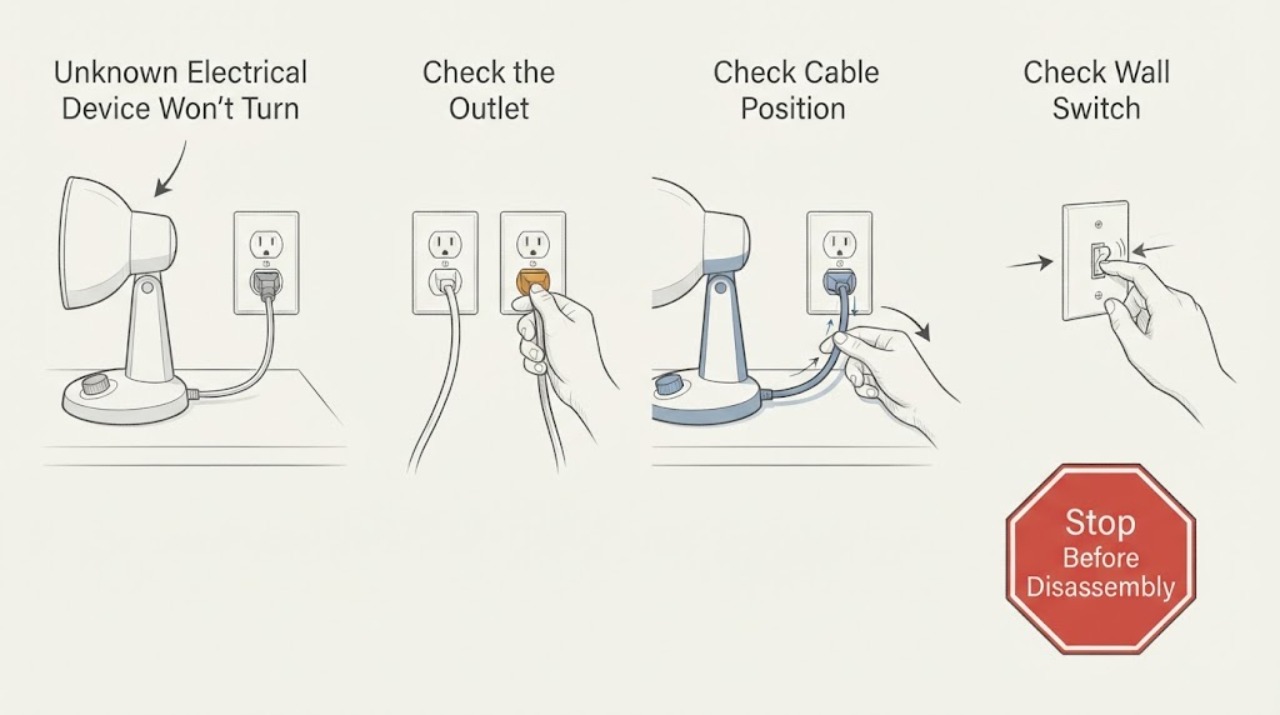
Work through in order
Diagnostic checks
Use only checks that match the exact appliance or system and its official guide.
-
Check 1
Stop trying to start the device and inspect only from the outside. Look and listen for smoke, a burning or hot-insulation odor, crackling, sparks, a hot or discolored plug or outlet, a shock or tingle, a wet device, or a cut, crushed, frayed, or melted cord.
Expected result: Any of those warning signs is present, or the device was dropped into water or became wet.
Next step: Do not touch a wet device or exposed electrical parts. If it is safe to do so without reaching through water or touching damaged hardware, switch the device off and disconnect power; otherwise leave it alone and turn off the relevant circuit only from a safe, dry position. Keep it out of service and arrange qualified electrical or authorized repair. Do not test it by plugging it in again.
Why this matters
Why: The symptom may involve an energized fault, overheating, damaged insulation, or a ground-fault risk rather than a simple loss of power.
-
Check 2
Determine whether power is available at the receptacle without opening it. With the area dry and the receptacle undamaged, plug in a small known-working device that does not create a new hazard, or compare with another receptacle whose operation is known. For a hardwired device, skip this step and do not remove covers.
Expected result: The known-working device also stays off, or several nearby lights and receptacles are dead.
Next step: Continue to the GFCI and panel check only if those controls are accessible and dry. If the receptacle is hot, loose, scorched, buzzing, or visibly damaged, stop and call a qualified electrician instead of using another test device.
Why this matters
Why: The fault is more likely upstream at the receptacle, GFCI, branch circuit, or building supply than inside the unknown device.
-
Check 3
If the receptacle appears normal and the device uses a cord and plug, inspect that cord, plug, and any accessible power switch or standby control. Confirm the plug is fully seated and that the device is set to its documented on or start control; do not bend blades, bypass an interlock, or use a damaged extension cord.
Expected result: The cord or plug is damaged, loose in the receptacle, unusually warm, or the device's documented control still gives no response despite a known-good supply.
Next step: Stop using a damaged or hot cord or plug and have the cord or device repaired by an authorized repair center. If the cord is intact but the device remains dead, do not open it; record the model and arrange service for internal diagnosis.
Why this matters
Why: A cord or plug can be the failed power path, while a known-good receptacle with no device response points toward the device's control or internal power path.
-
Check 4
Check for a tripped GFCI or circuit breaker only after turning off or unplugging the affected device and other loads on that circuit. If a nearby receptacle has test and reset buttons, press reset once; at the panel, identify the tripped breaker and follow the panel's normal reset procedure without removing the panel cover.
Expected result: The GFCI or breaker restores power and stays on, or it trips again immediately or when this device is connected.
Next step: If power returns and remains stable, test the device once while watching for heat, odor, noise, or another trip. If the protection trips again, leave the device disconnected and call a qualified electrician or authorized repair service. Never install a larger fuse or breaker to keep it running.
Why this matters
Why: A stable reset can indicate a temporary interruption or overload. A repeat trip indicates an unresolved ground fault, short, overload, wiring problem, or device defect and is a safety signal.
-
Check 5
Separate a supply problem from a device problem by comparing the device's behavior on the correct, known-good supply specified by its manual or rating label. Do this only for a portable device with an intact cord and no hazard signs; do not move a large, hardwired, wet, or specialized device to an improvised supply.
Expected result: Other devices work at the original receptacle, but the unknown device remains completely unresponsive on its documented correct supply.
Next step: Keep the device disconnected and use the manufacturer's service route or an authorized repair center. Do not substitute a fuse, adapter, charger, power supply, or component based only on appearance or a generic search result.
Why this matters
Why: The power source is less likely to be the cause; an internal fuse, switch, control, power board, motor, or other component may have failed, but the symptom alone cannot identify which one.
-
Check 6
Review what changed immediately before the failure: a storm or outage, a moved plug, liquid exposure, an added high-load device on the circuit, a drop, a new adapter, or an earlier breaker trip. Note whether the device has any indicator, sound, display, or partial function even though its main operation will not start.
Expected result: The failure began after water, impact, an electrical event, a new adapter, or repeated protective-device operation, or the device now has partial power.
Next step: Do not bypass the device's safety control or continue operating it. Provide the timeline, model or rating information, and any breaker or GFCI behavior to a qualified technician so the fault can be isolated without energized trial-and-error.
Why this matters
Why: The timing raises the likelihood of hidden damage, a mismatched supply, a ground fault, or a control/interlock problem; partial power does not prove the device is safe to use.
Use your observations
Decision map
Find the observation that best matches what you see, then follow the next safe action.
-
PATH 01Next step
What you see
Smoke, burning odor, sparks, hot or discolored electrical parts, shock, water exposure, or damaged insulation is present.
Do this next
Stop using the device and keep clear. Disconnect power only if it can be done safely from a dry position; otherwise isolate the circuit safely and obtain qualified electrical or emergency help.
-
PATH 02Next step
What you see
The test device also fails at the receptacle, or multiple receptacles or lights are without power.
Do this next
Check an accessible GFCI and the affected breaker once with loads off. If the receptacle is damaged or the interruption persists, use a qualified electrician.
-
PATH 03Next step
What you see
A GFCI or breaker resets and stays on with the unknown device disconnected.
Do this next
Reconnect only a dry, intact portable device once while monitoring. A repeat trip sends the process to the professional-service branch.
-
PATH 04Next step
What you see
The protective device trips again when this device is connected, or it repeatedly blows a fuse.
Do this next
Unplug the device and leave it out of service. Do not up-rate the fuse or breaker; have the device and circuit diagnosed by qualified professionals.
-
PATH 05Next step
What you see
The receptacle works with a known-good device, the cord is intact, and the unknown device remains dead.
Do this next
Treat the fault as device-side. Use the model-specific manual or authorized repair route; do not open the enclosure or guess at an internal part.
-
PATH 06Next step
What you see
The device is hardwired, high-load, wet, physically damaged, or otherwise not suitable for a portable outlet test.
Do this next
Skip user-level power substitution and arrange qualified electrical or appliance service. The service professional must identify the device, isolation method, and correct supply before testing.
Helpful context
Understand the symptom
Because the device and model are not identified, this guide stays at the safe boundary shared by plug-in electrical products. Do not assume a dead device has a replaceable fuse, a reset button, or a standard voltage. The owner's manual and the rating label determine what the device is designed to use.
A dead device is not automatically harmless. A protective device may have interrupted power because of an overload, short, moisture, damaged wiring, or an appliance defect. One controlled reset can separate a temporary supply interruption from a recurring fault; repeated resets are not a repair.
Only after diagnosis
Potential parts
- power cord or plug
Consider only if the visible cord or plug is damaged and an authorized repair source confirms that replacement is permitted for the exact device.
Cord type, grounding, strain relief, and ratings are device-specific; confirm the exact model and manufacturer documentation. - fuse or resettable protector
Consider only when the model documentation or qualified technician identifies a serviceable protective component as failed; a tripped fuse may be evidence of a deeper fault.
Never substitute a fuse or protector by appearance or use a higher rating; verify the exact approved component and service method. - power switch or control assembly
Consider only after safe supply checks pass and a qualified diagnosis confirms that the switch or control is not closing the device's documented start circuit.
Unknown devices have no shared control fitment; confirm the exact model and manufacturer-approved part. - power supply or internal control board
Consider only after a technician confirms correct input power and an internal conversion or control fault; a dead display alone does not identify this part.
Internal electrical assemblies require model-specific service information and qualified handling.
When checks do not resolve it
Need a professional?
Stop immediately for smoke, burning odor, sparks, heat, shock or tingling, water exposure, a hot or damaged cord or outlet, or a breaker or fuse that trips again. Do not open an unknown device, work inside a panel, bypass a safety switch, or repeatedly reset protection. Call a qualified electrician for the building supply, receptacle, wiring, breaker, fuse, or hardwired device; use an authorized repair center for a portable device that has safe power but will not start.
Common questions
FAQ
Should I keep resetting the breaker if the device still will not turn on?
No. Turn the device off or unplug it before one normal reset. If the breaker or fuse trips again, leave the device disconnected and obtain qualified diagnosis; repeated trips can indicate an appliance defect or wiring hazard.
How can I tell whether the outlet or the device is at fault?
Only if the area is dry and safe, test the receptacle with a small known-working device. If that device also fails, investigate the GFCI or circuit with appropriate caution. If other devices work but the unknown device stays dead, use authorized repair rather than opening it.
Can I replace an internal fuse myself?
Not based on this generic symptom. Some devices have no user-serviceable fuse, and a blown fuse may reflect a short or overload. Follow only model-specific user instructions; otherwise use an authorized repair center and never install a higher-rated fuse.
What if the device is wet but appears undamaged?
Do not plug it in to test it. Avoid touching a device in water, isolate power only from a safe dry position, and have the device assessed before use because hidden moisture can create shock or ground-fault risk.
Read the exact guide
Official sources
- How to Use GFCIsElectrical Safety Foundation International · GFCI reset and test behavior in areas where water and electricity may meet
- CPSC Guide to Home Wiring HazardsU.S. Consumer Product Safety Commission · Electrical wiring hazards, circuit protection, receptacles, cords, plugs, and professional boundaries
- Appliance Safety TipsElectrical Safety Foundation International · Consumer electrical appliance safety, damaged cords, water exposure, and repeated trips
- Understanding Your Home Electrical SystemElectrical Safety Foundation International · Home service panels, breakers, outlets, grounding, and safe reset boundaries
Community feedback
Share a repair observation
Share a plain-text repair observation. Accepted observations are published automatically; this page may take a moment to update.