
On this page
Start here
Quick answer
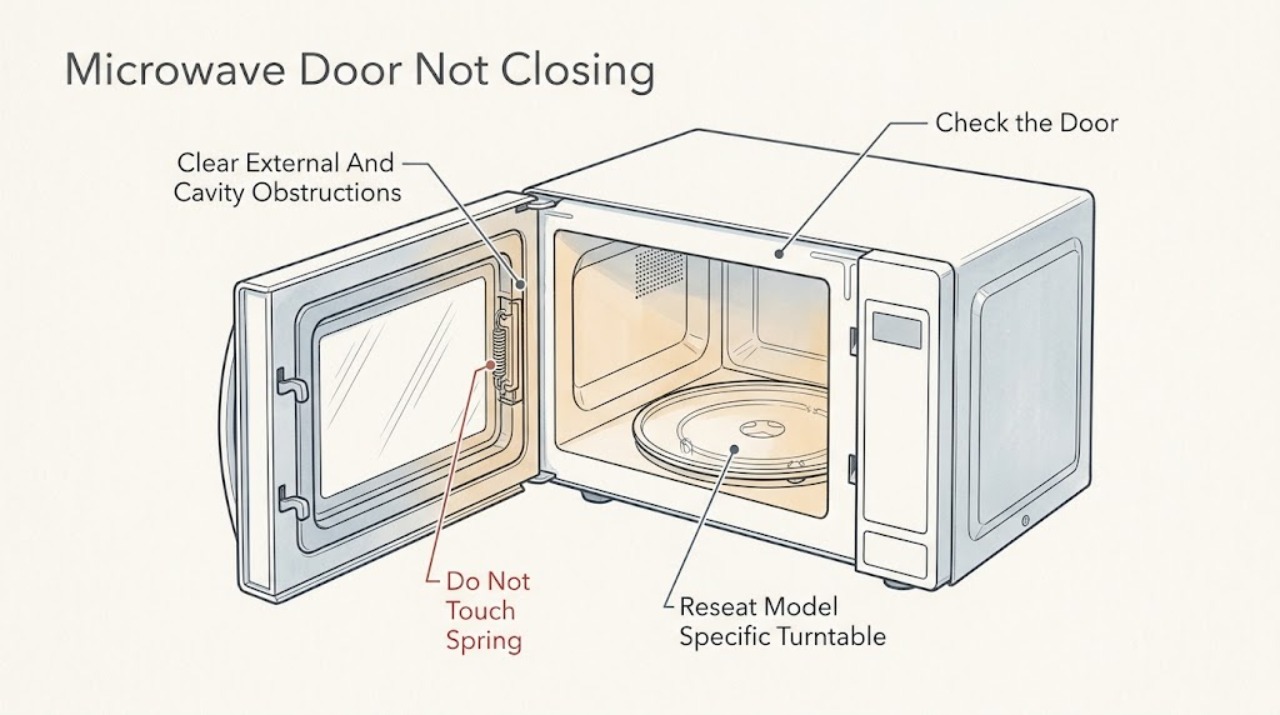
If a Breville microwave door will not close, first identify the exact model and whether the door is physically stopped before it reaches the frame or reaches the frame but will not stay shut. With the oven cool and unplugged when safe, remove the dish, food, rack, Combi Crisp pan, trivet, or any other loose accessory that could be in the closing path. On models with a glass turntable, check that the roller and glass are seated exactly as the manual shows; do not force the door against an oversized load or a displaced accessory. Wipe only accessible spills from the door edge and sealing surfaces with a soft cloth and mild, non-abrasive cleaner, never placing material in the door gap. If the door is bent or misaligned, a hinge or latch is loose or broken, the seal or sealing surface is damaged, the door closes only when pressed hard, or the controls treat a fully closed door as open, stop using the microwave and contact Breville or qualified appliance service. Do not bend the door, adjust the latch, tape it shut, defeat the interlock, remove the cover, or test the microwave with the door open.
Before you begin
Safety first
- This article covers model identification, removal of external or removable-cavity obstructions, model-specific turntable/roller seating when applicable, and gentle cleaning of accessible surfaces. A qualified technician must handle door adjustment, hinges, latches, seals, interlocks, covers, electrical parts, high-voltage parts, and radiation-leakage or compliance testing.
Work through in order
Diagnostic checks
Use only checks that match the exact appliance or system and its official guide.
-
Check 1
Read the Breville model number and observe the door with the oven idle and cool. Classify the symptom as the door stopping before the frame, the door reaching the frame but not staying shut, or a fully closed door being treated by the controls as open.
Expected result: The door hits an item or accessory; it sits unevenly; it springs back or will not latch; or it closes flush but the microwave will not recognize it as closed.
Next step: Use only the exact model manual for the accessory arrangement and continue to the matching branch. If the symptom is a latch or false door-open condition, do not force or test the mechanism.
Stop if: Do not operate with the door open, remove the housing, or combine instructions from different Breville microwave models.
Why this matters
Why: A physical stop points first to an item, accessory, or seating issue. A door that cannot be held, or a false door-open state, makes latch, hinge, alignment, seal, or interlock trouble more likely and is not a generic control reset.
-
Check 2
After the cavity and accessories are cool, remove the food container and every loose removable item that could touch the door or front edge. Check for an oversized dish, rack, Combi Crisp pan, trivet, packaging, or foreign material in the closing path.
Expected result: The door closes normally when the load or accessory is removed; an accessory is displaced; nothing is touching the door; or the door still stops before the frame.
Next step: Reload only with the exact model's approved accessory arrangement. If the door still stops with the cavity clear, leave the unit unused and arrange service rather than applying force.
Stop if: Do not use the door to clamp a large container, place a shim or object in the gap, or bend the door to gain clearance.
Why this matters
Why: A changed result after clearing the load supports an obstruction or model-specific accessory-position problem. No change with an empty, clear cavity makes a door, hinge, latch, seal, or alignment issue more likely.
-
Check 3
Only on a model equipped with a glass turntable and roller, remove those cool removable parts for cleaning and place the roller in its intended cavity position, then seat the glass on the roller's center indents exactly as the manual shows. Do not add a turntable to a flatbed model.
Expected result: The glass and roller were displaced or dirty; the parts now sit level and clear the door; or the door remains obstructed or uneven with the correct setup.
Next step: Use the exact model manual to confirm the approved accessory layout. If the correct setup does not change the door symptom, stop and have the door assembly inspected.
Stop if: Do not force the glass, alter the roller, use unapproved racks or pans, or press the door against a displaced accessory.
Why this matters
Why: Correct seating can remove an accessory or cavity interference on the applicable model. It cannot repair a door that is bent, loose, damaged, or not held by its latch.
-
Check 4
With the microwave cool and power removed, inspect the accessible door edge, matching front face, and sealing surfaces. Wipe only loose food or cleaner residue with a soft damp cloth and the mild, non-abrasive cleaner permitted by the exact manual.
Expected result: Residue or a foreign object is removed and the door now closes firmly; the surface is clean but a gap or uneven fit remains; or the seal is torn, loose, displaced, or visibly damaged.
Next step: If cleaning restores firm, undamaged closure, keep the surfaces clean and follow the model manual. If the gap, seal damage, or uneven fit remains, stop using the microwave and contact Breville or qualified service.
Stop if: Do not use abrasive pads, corrosive chemicals, steam, blades, tape, shims, or any material between the door and jamb.
Why this matters
Why: A surface residue can prevent proper contact, while a persistent gap or damaged seal is a safety-related door condition rather than a cleaning problem.
-
Check 5
Without removing panels or manipulating the mechanism, look for a bent or misaligned door, dents at the cavity edge, loose or broken hinge/latch parts, damaged sealing surfaces, or a door that closes only when pressed. If the door closes physically but the controls act as though it is open, record that behavior and stop.
Expected result: No damage is visible and the empty, correctly assembled cavity closes firmly; or any door, hinge, latch, seal, alignment, gap, or door-recognition fault remains.
Next step: Use the microwave only when the door closes firmly and remains undamaged according to the exact manual. Otherwise unplug or isolate it by the normal safe means and arrange Breville or qualified appliance service.
Stop if: Do not adjust or bend the latch or hinges, bypass or tape the interlock, run a door-open test, remove the cover, or perform live electrical testing.
Why this matters
Why: A normal closure after safe obstruction and cleaning checks supports a user-level cause. Any damage, abnormal force requirement, or false door-open state leaves a latch, hinge, seal, alignment, or interlock fault that requires qualified diagnosis.
Use your observations
Decision map
Find the observation that best matches what you see, then follow the next safe action.
-
PATH 01Safety boundary
What you see
The door stops against a dish, food container, rack, Combi Crisp pan, trivet, packaging, or a displaced turntable/roller, and closes after the item is removed or correctly reseated.
Do this next
Use only the exact Breville manual's approved load and accessory arrangement; do not exceed the cavity or force closure.
Why this path and its safety boundary
Why it matters: The changed result makes an obstruction or model-specific accessory arrangement more likely than a failed latch.
Safety stop: If the empty, correctly assembled cavity still stops the door, stop and arrange service.
-
PATH 02Safety boundary
What you see
Food splatter, grease, cleaner residue, or a foreign object is visible on the accessible closing or sealing surface, and the door closes firmly after gentle cleaning.
Do this next
Keep the front edge and door surfaces clean with the exact manual's mild, non-abrasive method and monitor for a repeat.
Why this path and its safety boundary
Why it matters: A removable surface obstruction is more likely; cleaning does not prove that a hidden latch or seal is sound if closure remains uneven.
Safety stop: Do not put material in the gap or use abrasives, chemicals, steam, blades, or force.
-
PATH 03Safety boundary
What you see
The cavity and surfaces are clear, but the door springs back, will not stay shut, closes only when pressed hard, sits unevenly, or leaves a visible gap.
Do this next
Stop using the microwave and contact Breville or qualified service for inspection; provide the model and whether the condition followed impact, moving, or cleaning.
Why this path and its safety boundary
Why it matters: A broken or loose latch, hinge or alignment problem, damaged door, seal, or sealing surface is more likely than a turntable issue.
Safety stop: Do not bend the door, tighten or adjust concealed hardware, tape it shut, or continue operation.
-
PATH 04Safety boundary
What you see
The door appears flush and closed, but the microwave will not start or behaves as if the door is open.
Do this next
Check only the exact model manual for a documented control-lock state. If the door is mechanically abnormal or the condition persists, leave the unit off and arrange service.
Why this path and its safety boundary
Why it matters: A latch/interlock, alignment, or control-sensing fault is possible; a child-lock or control state may also vary by exact model, but it does not justify bypassing a safety system.
Safety stop: Do not hold or defeat the latch, insert objects into the interlock, run an open-door test, or remove the cover.
-
PATH 05Safety boundary
What you see
The door, viewing area, hinges, latches, seal, sealing surfaces, or cavity edge are bent, cracked, loose, torn, or otherwise damaged; smoke, arcing, burning odor, or operation with the door open is observed.
Do this next
Stop immediately, disconnect power by the normal safe means if there is no immediate hazard, keep the door closed if smoke is present, and contact Breville or qualified service. Use emergency help for fire or immediate electrical danger.
Why this path and its safety boundary
Why it matters: This is a safety-related microwave fault and cannot be cleared by a user adjustment or cleaning step.
Safety stop: Do not operate, repeatedly test, force, repair, or defeat any interlock or protective cover.
Helpful context
Understand the symptom
Separate a physical obstruction from a latching problem
Breville's microwave range includes different countertop designs and controls, including Quick Touch and Combi Wave products. Record the model from the rating label or manual before applying a procedure. Then observe the failure without pushing hard: does the door stop against a dish or accessory, remain visibly proud of the frame, or reach the frame but spring back or fail to stay closed? A door that cannot reach the frame is an obstruction or seating question; a door that reaches the frame but is not held, or a microwave that reports the door as open, is a latch, hinge, alignment, or interlock boundary.
Clear the closing path without forcing the door
After cooking, let hot contents and accessories cool. With the unit unplugged when it is safe and practical, remove the food container and any removable accessory from the cavity. Check for an oversized dish, a rack, Combi Crisp pan, trivet, packaging, or a loose item touching the door or front edge. Do not insert a hand or tool into a tight latch area and do not use the door as a clamp. If the door closes normally after the obstruction is removed, use only the accessory arrangement approved by the exact model manual.
Check the glass turntable and roller only when the model has them
A Combi Wave-style model uses a glass turntable and roller. Remove and wash those removable parts only after the oven is cool, then return the roller to its intended position and seat the glass on its center indents as the BMO870 manual shows. A displaced roller or glass can create an accessory or cavity obstruction, but it does not justify forcing the door or changing the door mechanism. If your Breville is a flatbed model, do not add a turntable or borrow a setup from another model; follow its own manual.
Clean visible sealing surfaces gently
Inspect the accessible door edge, the matching oven front, and the sealing surfaces for food splatter, grease, cleaner residue, or a foreign object. With power removed and the appliance cool, wipe loose residue using a soft damp cloth and only the mild, non-abrasive cleaner allowed by the manual. Do not use abrasive pads, corrosive chemicals, steam cleaners, blades, or shims, and do not place anything between the door and jamb. Cleaning can remove a surface obstruction; it cannot correct a loose seal, bent frame, damaged screen, or distorted door.
Treat damage or a false door-open state as a service decision
Look only for visible damage: a bent or misaligned door, a loosened or broken hinge or latch, a torn or displaced seal, dents on the door or cavity edge, or a gap that remains after the closing path is clear. If the door physically closes but the microwave will not start or behaves as if the door is open, do not press harder or try to defeat the safety interlock; the exact model may use a concealed latch and interlock system. Stop using the oven and arrange Breville or qualified service for any of these findings or for a door that will not close firmly.
Safety boundary
Stop conditions
- Do not operate the microwave if the door does not close firmly, is bent or warped, has a visible gap, or has damage to the door, viewing area, hinges, latches, seals, or sealing surfaces.
- Do not place objects, tape, shims, cleaner residue, or any foreign material between the door and the oven front or jamb.
- Do not force the door against a container or accessory, bend or adjust the door or latch, or use an unapproved turntable, rack, pan, or trivet.
- Do not bypass, hold closed, probe, or test the safety interlock; never operate the microwave with the door open.
- Do not remove the cover or attempt internal latch, hinge, seal, wiring, high-voltage, or radiation-leakage work; route those faults to Breville or qualified service.
- Stop immediately for smoke, arcing, burning odor, fire, or a microwave that appears to operate while open; isolate power only by the normal safe means if it can be done without contact with a hazard.
When checks do not resolve it
Need a professional?
Safety scope: This article covers model identification, removal of external or removable-cavity obstructions, model-specific turntable/roller seating when applicable, and gentle cleaning of accessible surfaces. A qualified technician must handle door adjustment, hinges, latches, seals, interlocks, covers, electrical parts, high-voltage parts, and radiation-leakage or compliance testing.
Common questions
FAQ
Why is my Breville microwave door physically hitting something?
Remove the food container and any loose removable accessory, then check the exact model's approved arrangement. On a Combi Wave with a glass turntable, reseat the roller and glass exactly as the manual shows. If the empty, correctly assembled cavity still blocks the door, stop using it and arrange service.
Can a Breville microwave turntable stop the door from closing?
A displaced glass turntable, roller, rack, pan, trivet, or oversized dish can create an interference in a model's cavity, but it is not a reason to force the door. Use the exact model manual; flatbed models should not be fitted with another model's turntable.
Can I clean the Breville microwave door seal?
After the oven is cool and power is removed, wipe accessible spills from the door edge and sealing surfaces using a soft cloth and the manual's mild, non-abrasive method. Do not use abrasives, corrosive cleaners, steam, blades, or any object in the door gap. A torn, loose, displaced, or damaged seal needs service.
Why does my Breville microwave close but not start?
A door that is flush but not recognized can indicate a latch, alignment, interlock, or model-specific control state. Check only the exact manual for a documented control-lock state; do not hold the latch, insert an object, run the oven open, or remove the cover. Persistent behavior needs service.
When should I stop using a Breville microwave with a door problem?
Stop immediately if the door is bent, warped, loose, damaged, does not close firmly, leaves a gap, has damaged hinges, latches, seals, or sealing surfaces, or if the oven appears to operate while open. Contact Breville or qualified service rather than attempting a latch or interlock repair.
Read the exact guide
Official sources
- Breville LMO525 Microwave Oven Instruction ManualBreville · Official Breville manual for the LMO525/BMO525 family; used for safety boundaries that should be applied only with the exact model manual controlling operation.
- Countertop Microwave Ovens - Air Fryer & Convection CombosBreville · Official Breville US microwave listing; used to establish that more than one microwave family exists and that model-specific features differ.
- Microwave OvensU.S. Food and Drug Administration · Official U.S. FDA consumer guidance; used for the general safety escalation and not for Breville model-specific controls or parts.
- Breville the Combi Wave 3-in-1 Microwave Oven Instruction Manual BMO870Breville · Official Breville manual for the BMO870 Combi Wave family; used for its glass turntable/roller and door-surface examples, not as a universal flatbed procedure.
- the Breville Quick TouchBreville · Official Breville product page for one discontinued Quick Touch microwave; used only as a model-family example and for its child-lock/support references.
Community feedback
Share a repair observation
Share a plain-text repair observation. Accepted observations are published automatically; this page may take a moment to update.