
On this page
Start here
Quick answer
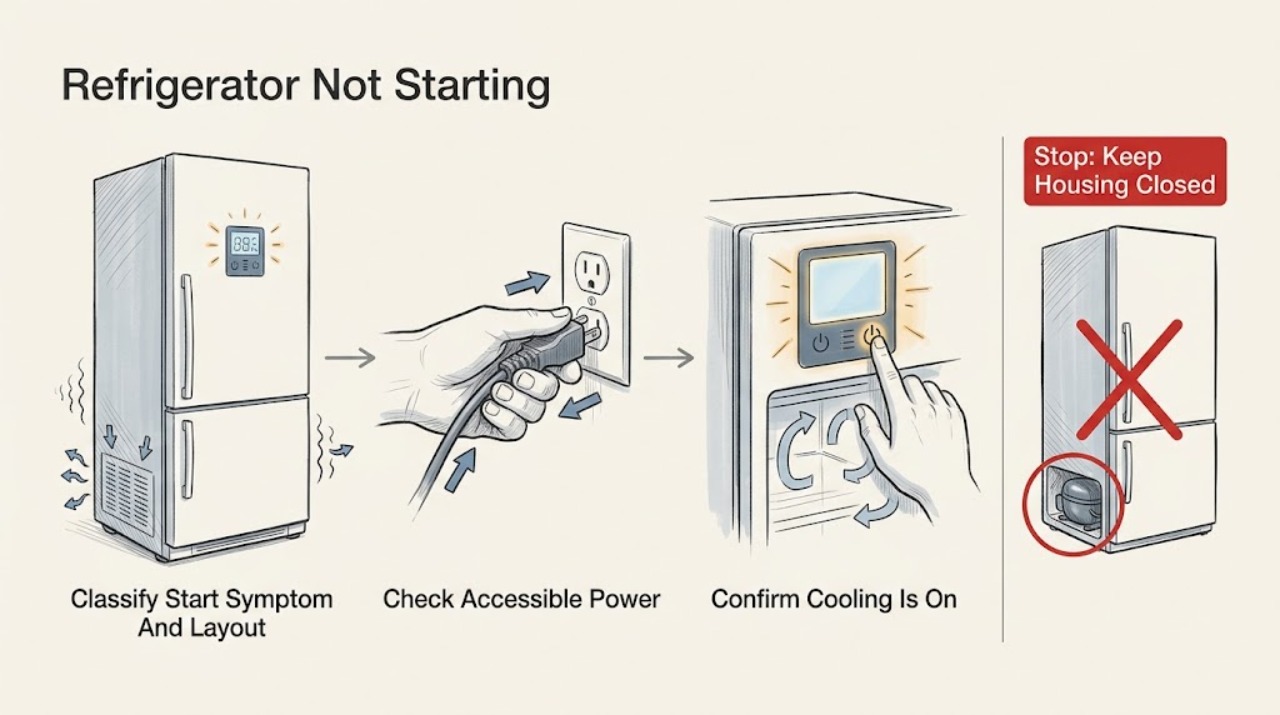
Treat “not starting” as a control or cooling-start symptom, not automatically as “no power” or “not cooling.” First record the model and whether the light, display, alarms, and controls work. JennAir's official no-operation guidance starts with the grounded supply, breaker/GFCI or fuse, and controls; its undercounter guidance also documents a model-specific Cooling On command. If the display and lights work but the compressor and fans remain off, check for a power-outage acknowledgement, showroom/demo mode, Sabbath mode, or a cooling-off setting using only the exact Owner's Manual. JennAir says demo mode can leave the display and lights operating while disabling cooling, and its exit sequence varies by model. A compressor can also have a normal restart delay after power interruption, but do not keep cycling power to force it. If the correct cooling state is selected and the compressor still will not start, or if there is a repeated trip, hot cord, burning odor, smoke, exposed wiring, water near electricity, clicking, or abnormal heat, stop and arrange qualified service. Do not open the control or compressor area, bypass a door/control switch, or perform live electrical tests.
Before you begin
Safety first
- This article covers model identification and ordinary-access control and power checks only. Do not open panels, access compressor or control terminals, bypass safety controls, run live tests, or work on refrigerant/sealed-system components.
Work through in order
Diagnostic checks
Use only checks that match the exact appliance or system and its official guide.
-
Check 1
Record the complete JennAir model number and layout, then observe the refrigerator without moving it: interior light, display, temperature controls, alarm or power-outage message, fan sound, compressor sound, and compartment temperature. Note whether the complaint began after an outage, cleaning, installation, or a control change.
Expected result: Everything is dark, the display/lights work but cooling is off, the compressor runs but temperatures rise, the panel ignores commands, or the model/layout is uncertain.
Next step: Use the matching branch and exact manual. Do not call a compressor failure from a dark display or a demo-mode state.
Stop if: Stop for smoke, burning odor, abnormal heat, a hot or damaged cord, exposed wiring, water near electricity, repeated trips, or a refrigerator that cannot be safely accessed.
Why this matters
Why: No light/display is a power or control path; a lit interface with no compressor is a start-state or cooling-off path; running but warm is not-cooling; and an unresponsive panel may be in a special mode. JennAir procedures depend on model and layout.
-
Check 2
If the floor, outlet, plug, and cord are dry and undamaged, confirm the plug is fully seated in the grounded outlet. Check only an accessible wall switch, breaker, GFCI, or fuse condition; do not remove an outlet cover or refrigerator panel. A separate safe appliance can indicate whether the outlet has power.
Expected result: The outlet or switch was off, the breaker/GFCI or fuse was tripped, power returns to the refrigerator, the outlet is normal but the refrigerator remains dark, or the cord/plug is hot, loose, scorched, or damaged.
Next step: Restore only an accessible switch or breaker once when there is no damage or hazard. If the unit remains dark, the breaker trips again, or the cord/plug is abnormal, leave it disconnected and arrange qualified appliance or electrical service.
Stop if: Do not repeatedly reset a breaker, use an extension cord or adapter, continue with a damaged connection, or perform a live measurement inside the refrigerator.
Why this matters
Why: JennAir's no-operation guidance treats supply, breaker/GFCI/fuse, and controls as separate checks. A normal outlet with a dark refrigerator points toward an appliance-side fault, while a damaged or hot connection is unsafe regardless of the display state.
-
Check 3
If the interface has power, compare the display and temperature controls with the exact Owner's Manual. Look for Cooling Off, OFF, a power-outage acknowledgement, or another model-specific cooling state. On an undercounter model only when the manual matches, JennAir documents holding Cooling On for three seconds; do not copy that command to another layout.
Expected result: Cooling is explicitly off, an outage message disables controls, the correct cooling state is confirmed, the panel does not respond, or the displayed control does not match the manual.
Next step: Use the exact manual's documented cooling-on or outage-confirmation step once. If cooling is on but the compressor does not start after any model-specific delay, continue to the demo and service branches.
Stop if: Do not guess hidden key combinations, enter service diagnostics, force a control, or reset power repeatedly.
Why this matters
Why: A refrigerator can look powered while cooling is intentionally disabled or awaiting acknowledgement. JennAir provides different control procedures by model, so a mismatched command can leave the user unable to tell whether the refrigerator has started.
-
Check 4
If lights or the display work but the compressor and fans remain off, check the exact model manual for Showroom/Demo mode, Sabbath mode, and a power-outage indicator. Record any text such as Demo, Showroom, Shwrm, or PO before changing anything; do not use another model's exit sequence.
Expected result: Demo/showroom is displayed or likely, Sabbath mode is active, a PO/power-outage state is waiting for confirmation, no special state is shown, or the mode cannot be identified.
Next step: If and only if the exact manual confirms the mode and exit method, follow that user control step once and observe cooling. If no mode is confirmed or the compressor remains off, leave further diagnosis to service.
Stop if: Do not repeatedly toggle modes, hold unknown buttons, bypass a door switch, remove panels, or continue using the refrigerator if food is warming and the state is unclear.
Why this matters
Why: JennAir says demo mode leaves display/lights active while disabling cooling, and its control-panel guidance says power-outage and Sabbath states can disable functions. A mode-specific symptom can therefore mimic a compressor that will not start.
-
Check 5
After the documented cooling state is on, listen from outside for a compressor or fan and monitor whether the refrigerator and freezer temperatures begin to change. Check only visible door closure, room conditions, and accessible airflow/vent clearance according to the exact model; do not touch the compressor or open a cover.
Expected result: No compressor or fan starts, the compressor starts but the refrigerator remains warm, the unit is newly installed or recently loaded, or external settings/airflow conditions are normal but temperature does not recover.
Next step: For a running-but-warm unit, follow the exact not-cooling guidance and protect food. For no start after the documented controls and delay, arrange qualified service rather than opening the cooling system.
Stop if: Do not force a fan, bypass a control, access the compressor, open refrigerant tubing, scrape hidden ice near wiring, or perform live tests.
Why this matters
Why: No operating sound after the cooling state is confirmed is a not-starting branch. A running compressor with persistent warmth is not-starting's neighboring not-cooling intent; door, room, load, and airflow conditions can affect temperature without proving a start fault.
-
Check 6
Document the model, layout, outlet result, light/display state, cooling-mode status, special-mode text, outage timing, compressor/fan sound, and temperature trend. If the refrigerator still will not start, disconnect power for an unsafe symptom and stop external troubleshooting.
Expected result: The supply is normal but the refrigerator is dark, the interface works but cooling never starts, a mode or reset does not resolve the condition, or the compressor clicks/trips and stops.
Next step: Arrange qualified JennAir appliance service and provide the recorded model and symptom history. If compartments are warming, keep doors closed as practical and protect perishable food under applicable food-safety guidance.
Stop if: Do not remove covers, access terminals, bypass controls, or restore power repeatedly to reproduce clicking, tripping, overheating, or no-start behavior.
Why this matters
Why: The remaining possibilities include an appliance-side control, start component, fan, compressor, wiring, or sealed-system fault. The official guidance does not make these safe homeowner tests, and model-specific service information is required.
Use your observations
Decision map
Find the observation that best matches what you see, then follow the next safe action.
-
PATH 01Next step
What you see
Are the interior light, display, and controls all dark or silent?
Do this next
Leave it disconnected for a persistent or unsafe condition and arrange qualified appliance or electrical service.
Why this path and its safety boundary
Why it matters: Use only the dry, accessible outlet, plug, switch, breaker/GFCI, or fuse checks. A normal household supply with a dark refrigerator is an appliance-side power/control fault.
-
PATH 02Next step
What you see
Do the display or lights work while Cooling Off, an outage message, Showroom/Demo, Sabbath, or another special state is shown?
Do this next
If the documented state is cleared and cooling still does not start, arrange service; do not guess another model's button sequence.
Why this path and its safety boundary
Why it matters: The refrigerator has partial power but may have cooling intentionally disabled or controls temporarily locked. Use only the exact model manual's confirmation or exit method.
-
PATH 03Next step
What you see
Are controls active and cooling confirmed on, but no compressor or fan starts after the model-specific delay?
Do this next
Do not open the compressor/control area or perform live tests. Disconnect power for abnormal clicking or trips and arrange qualified JennAir service.
Why this path and its safety boundary
Why it matters: This is the independent not-starting pattern: electrical interface power exists, but the cooling cycle does not begin. It is not the same as a completely dead refrigerator or a running compressor that cannot cool.
-
PATH 04Next step
What you see
Does the compressor or fan run while the compartments remain warm?
Do this next
Protect food and keep internal cooling-system diagnosis out of the user steps.
Why this path and its safety boundary
Why it matters: This is a neighboring not-cooling symptom, not proof that the refrigerator failed to start. Check only the model's settings, room conditions, door closure, and visible airflow, then use qualified cooling service if temperature does not recover.
-
PATH 05Next step
What you see
Is there a repeated trip, hot cord or plug, burning odor, smoke, water near electricity, exposed wiring, or abnormal heat?
Do this next
Disconnect power only from a dry, safe position if possible, do not reproduce the symptom, and arrange qualified appliance or electrical service.
Why this path and its safety boundary
Why it matters: This is a stop-use condition regardless of whether the control panel works.
Helpful context
Understand the symptom
A refrigerator can be powered without starting cooling
A dark interior light and display indicate a no-operation/power path. A lit display with no compressor or fan is a different branch: cooling may be off, a power-outage state may await acknowledgement, or demo/showroom mode may be active. A compressor that runs while the cabinet stays warm is a not-cooling symptom, not proof that the refrigerator never started. These branches must be kept separate before any reset or service decision.
Use the model number before trying a button sequence
JennAir's official pages show that Cooling On, showroom/demo, Sabbath, and power-outage responses vary by model. The undercounter page gives one example—holding Cooling On for three seconds—while the demo pages list different controls for different layouts. Record the model and use only the matching Owner's Manual; a sequence that works on one refrigerator can change the cooling state on another.
Starting the compressor is a professional boundary
Once power, controls, and documented operating modes are correct, a refrigerator that still does not start can involve a start device, control, fan, compressor, or sealed cooling system. Do not remove covers, probe terminals, bypass a control or door switch, or open refrigerant tubing. JennAir's no-operation guidance directs owners to service when the accessible checks do not resolve the condition.
Safety boundary
Stop conditions
- Stop for smoke, burning odor, abnormal heat, a hot/scorched/loose cord or plug, exposed wiring, water near electricity, repeated breaker/GFCI trips, or abnormal compressor clicking.
- Do not remove control, rear, compressor, or evaporator covers; access terminals; perform live electrical tests; or open refrigerant or sealed-system tubing.
- Do not bypass a door switch, thermostat, control lock, cooling interlock, or safety device, and do not use an undocumented diagnostic sequence.
- Do not repeatedly reset power or toggle Demo, Showroom, Sabbath, Cooling Off, or other model-specific states to force the refrigerator to start.
- Do not order a compressor, start device, control, fan, thermostat, or other part without the exact model and qualified diagnosis.
When checks do not resolve it
Need a professional?
Arrange qualified JennAir refrigerator service when the outlet is normal but the unit stays dark, when the interface works but cooling remains off after the exact model's documented control and mode checks, when no compressor or fan starts after a model-specific delay, or when any control, start component, compressor, fan, wiring, or sealed-system access is required. Stop immediately for smoke, burning odor, abnormal heat, damaged power connection, exposed wiring, water near electricity, abnormal clicking, or repeated trips.
Safety scope: This article covers model identification and ordinary-access control and power checks only. Do not open panels, access compressor or control terminals, bypass safety controls, run live tests, or work on refrigerant/sealed-system components.
Common questions
FAQ
What is the difference between a JennAir refrigerator not starting and not turning on?
Not turning on usually means no light, display, or control response. Not starting can mean the display and controls work but the cooling cycle or compressor never begins. Record the visible power and operating signs first, then use the matching JennAir model guidance.
Why does my JennAir refrigerator have lights but not start cooling?
JennAir says Showroom/Demo mode can power the display and lights while disabling cooling, and a power-outage or Sabbath state can also limit controls on applicable models. Check the exact model manual for these states before assuming a compressor fault.
Can I hold Cooling On to start my JennAir refrigerator?
Only if the exact manual matches an undercounter model that uses that control. JennAir documents a three-second Cooling On hold for one undercounter refrigerator procedure, while other layouts use different controls. Do not transfer the sequence across models.
Should I reset power if my JennAir refrigerator will not start?
Use a reset only when the exact JennAir guidance supports it, the area is dry, and there is no damage or hazard. JennAir documents a model-specific power reset for some unresponsive panels; repeated resets, tripping, clicking, heat, smoke, or a persistent no-start condition requires service.
Should I test the JennAir compressor or start relay myself?
No. A compressor, start device, control, fan, wiring, or sealed-system fault is inside the professional boundary. Do not remove covers or perform live tests; provide the technician with the model number, control state, sounds, temperatures, and power history.
Read the exact guide
Official sources
- Demo Mode - Side by Side RefrigeratorJennAir Product Help · Applies to JennAir side-by-side models and only supports a conditional special-mode branch for other layouts.
- Refrigerator Will Not Turn On - Undercounter RefrigeratorJennAir Product Help · Applies to JennAir undercounter refrigerators only; its Cooling On command is intentionally not generalized to full-size, built-in, or other models.
- Demo Mode - Top Freezer RefrigeratorJennAir Product Help · Applies to JennAir top-freezer models; it is used to distinguish top-freezer behavior from side-by-side or undercounter procedures.
- Control Panel Not Working - RefrigeratorJennAir Product Help · Applies directly to the French-door bottom-freezer control family described by the page; mode names and reset methods vary by model.
- No Operation - Will Not Turn On - RefrigeratorJennAir Product Help · Applies directly to the JennAir French-door bottom-freezer family described by the page; the model's Owner's Manual controls any other layout or control sequence.
Community feedback
Share a repair observation
Share a plain-text repair observation. Accepted observations are published automatically; this page may take a moment to update.