
On this page
Start here
Quick answer
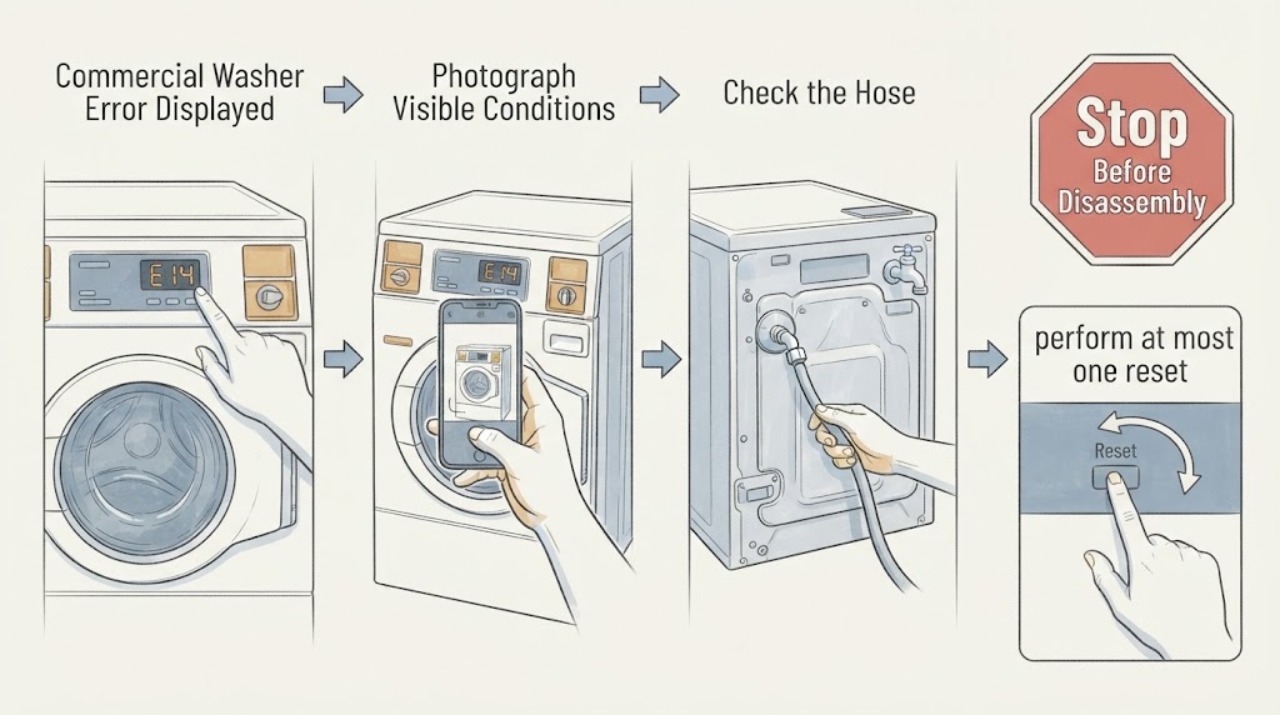
When a Speed Queen commercial washer displays an error, record the complete code, door state, water level, and cycle phase before attempting any reset. The opened Speed Queen guide documents distinct door, drain, fill, overflow, and water-level codes; a code that persists after the guide’s limited external checks needs service. Do not clear an unknown code repeatedly or bypass a door or water-level safety.
Work through in order
Diagnostic checks
Use only checks that match the exact appliance or system and its official guide.
-
Check 1
Photograph the complete display and note whether the door is locked, water remains, the machine is filling, draining, or stopped mid-cycle.
Expected result: The display matches a documented door, drain, fill, overflow, or water-level code, or it is unknown.
Next step: Use the exact model guide for a documented code. For an unknown or repeated code, keep the machine out of service and continue only with visible checks.
Why this matters
Why: Speed Queen maps different codes to different observations; the code text alone without the cycle state can mislead.
-
Check 2
Check only the visible door closure, power, faucets, drain hose, and drain receptacle named by the guide.
Expected result: A door is open, supply is off, the drain is kinked or blocked, or all visible conditions are normal.
Next step: Correct one obvious external condition if safe. Do not open the control panel or pump housing.
Why this matters
Why: The guide ties several codes to these external conditions; normal checks leave an internal sensing or control fault possible.
-
Check 3
If the guide documents a safe unplug interval for that code, perform at most one reset after the machine is stopped and safe.
Expected result: The code clears and the washer operates, or it returns immediately.
Next step: Stop after one reset and arrange service for recurrence, overflow, door failure, or abnormal water level.
Why this matters
Why: A cleared code can reflect a transient condition, while immediate recurrence requires diagnosis rather than repeated resets.
-
Check 4
Record the model, code, cycle, water level, recent power event, and results of the external checks for the service request.
Expected result: The code is intermittent, persistent, or accompanied by leak, odor, or electrical symptoms.
Next step: Keep the commercial washer out of use for persistent or hazardous symptoms and contact qualified service.
Why this matters
Why: The service technician needs the code history and physical symptoms to distinguish a control message from a safety fault.
Use your observations
Decision map
Find the observation that best matches what you see, then follow the next safe action.
-
PATH 01Next step
What you see
A documented code clears after its guide-approved external correction and does not return.
Do this next
Monitor one cycle and keep the model guide available.
Why this path and its safety boundary
Why it matters: The corresponding door, drain, fill, or overflow condition may have been transient.
-
PATH 02Next step
What you see
The code returns, is unknown, or is accompanied by standing water or a door that will not unlock.
Do this next
Stop operation and arrange qualified service; do not force the door or bypass the lock.
Why this path and its safety boundary
Why it matters: The fault needs model-specific service and may present a water or access hazard.
-
PATH 03Next step
What you see
Smoke, burning odor, damaged cord, or repeated breaker trips accompany the display.
Do this next
Disconnect power only if safe and obtain qualified service.
Why this path and its safety boundary
Why it matters: This is an electrical safety stop condition.
Helpful context
Understand the symptom
When a Speed Queen commercial washer displays an error, record the complete code, door state, water level, and cycle phase before attempting any reset. The opened Speed Queen guide documents distinct door, drain, fill, overflow, and water-level codes; a code that persists after the guide’s limited external checks needs service. Do not clear an unknown code repeatedly or bypass a door or water-level safety.
When checks do not resolve it
Need a professional?
Provide the exact model and the observed pattern to the manufacturer or a qualified technician.
Common questions
FAQ
What should I check first?
When a Speed Queen commercial washer displays an error, record the complete code, door state, water level, and cycle phase before attempting any reset. The opened Speed Queen guide documents distinct door, drain, fill, overflow, and water-level codes; a code that persists after the guide’s limited external checks needs service. Do not clear an unknown code repeatedly or bypass a door or water-level safety.
Read the exact guide
Official sources
- User's GuideSpeed Queen · Speed Queen commercial washer troubleshooting for not starting, not draining, cycle stopping, noise, and error displayed
Community feedback
Share a repair observation
Share a plain-text repair observation. Accepted observations are published automatically; this page may take a moment to update.