
On this page
Start here
Quick answer
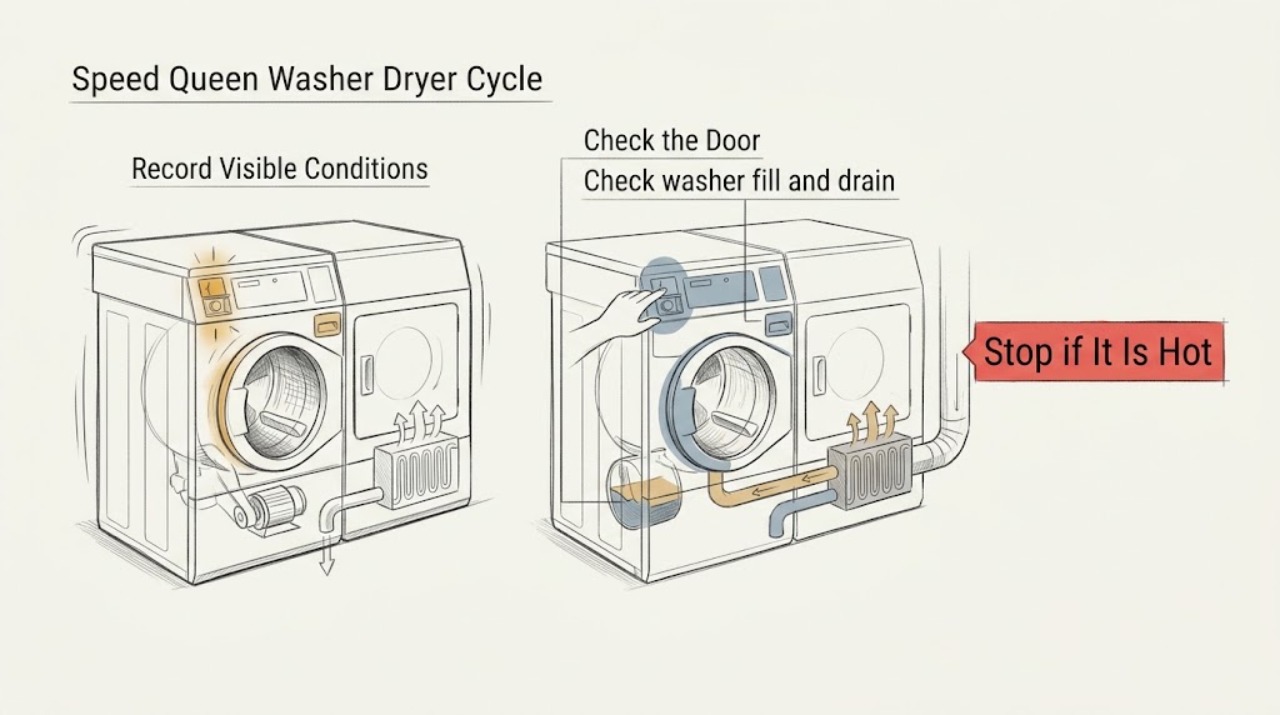
Identify which section stops and at which stage before resetting the Speed Queen washer dryer. A washer can pause during normal operation or temporarily slow for an unbalanced load, while a dryer’s Auto-Sensing cycle can take longer as load moisture, size, airflow, and room conditions change. Check the door, control settings, Start/Pause state, water and drain connections for the washer, and the dryer’s door, lint filter, visible exhaust, and overload indication. If water remains, a breaker opens, a fault returns, the motor repeatedly overloads, the unit stops with smoke, odor, heat, or noise, or the cycle never completes after safe user checks, leave it off and arrange qualified service. Do not open panels, bypass an interlock, or repeatedly restart a failing cycle.
Work through in order
Diagnostic checks
Use only checks that match the exact appliance or system and its official guide.
-
Record which section and stage stops
Observe one cycle without opening panels and note whether the washer or dryer stops during fill, wash or tumble, drain, spin, sensing, heating, cooling, or final completion. Record the display, status light, remaining-time behavior, water level, and whether clothing is wet. Do not restart a cycle when there is smoke, a burning smell, unusual heat, sparking, or water near electrical parts.
Expected result: The washer pauses briefly and resumes, stops with water inside, stops during spin, or the dryer remains in sensing, stops before cooling, loses power, or shows a code.
Next step: Use the matching washer or dryer branch below and record the exact symptom for service. Keep the unit off if a safety symptom or recurring fault is present.
Stop if: Stop for smoke, burning odor, sparks, abnormal heat, flooding, a hot cord, or water contacting electrical equipment.
Why this matters
Why: The stage changes the likely path: washer fill, drain, door, or balance checks differ from dryer airflow, motor, heat, or control checks. A persistent stop or code is different from a normal pause or variable sensing time.
-
Check a washer pause, balance, and door state
For a washer stop, confirm that the loading door is fully closed and the cycle has not been paused. Look for a severely uneven load, especially when the stop occurs at spin; redistribute only after the drum has safely stopped and the door can be opened normally. Do not bypass the door lock or force the door.
Expected result: The washer resumes after a normal pause, the load is severely unbalanced, the door remains locked, or the same stage repeats with a balanced load and a closed door.
Next step: Allow a normal pause to continue. For an imbalance, redistribute the load and use the model-specific Start/Pause control once. If water or the lock state persists, stop the washer and arrange service.
Stop if: Do not force a locked door, reach into a moving drum, bypass the loading-door switch, or continue after a repeated stop with unusual noise or damage.
Why this matters
Why: Speed Queen describes pauses as part of normal washer operation and says a severe imbalance can stop and then restart spin automatically. A locked or repeating state may involve the door interlock, control, drain, or drive system.
-
Check washer fill and drain conditions
If the washer stops during fill or before final spin, inspect the visible hot and cold faucet positions, fill hoses, drain hose, and drain receptacle for an obvious closed valve, kink, separation, or blockage. Do not pull out the stacked unit or remove the pump panel. Keep the water supply closed if a hose or connection is leaking.
Expected result: A faucet is off, a hose is kinked or disconnected, the drain receptacle is blocked, water remains in the basket, or the visible connections are normal.
Next step: Correct only an obvious accessible faucet or hose-position issue using the exact installation guidance and monitor one cycle if no safety symptom exists. Arrange qualified service for leaks, standing water, a blocked internal path, or recurrence.
Stop if: Stop for a leaking hose, flooding, standing water near power, a damaged connection, or any need to open the pump or cabinet.
Why this matters
Why: The washer guide links incomplete operation to supply, hose, drain, and receptacle conditions. Water remaining after a cycle can indicate a drain-path or pump problem that a visual external check cannot resolve.
-
Check dryer load, door, airflow, and sensing behavior
For a dryer that does not reach completion, confirm the loading door is closed, the lint filter is in place and clean, and the visible exhaust path is not crushed or blocked. Note whether the load is very small, unusually wet, overloaded, or still in an Auto-Sensing stage. Do not remove panels or clean an internal duct with tools.
Expected result: The door is open, the filter or visible exhaust is restricted, the load is unusually wet or small, the dryer progresses slowly but continues, or the same stage never advances.
Next step: Close the door, clean the user-accessible lint filter, use a suitable load, and follow the model guide. Arrange qualified service for restricted or inaccessible exhaust, recurring incomplete cycles, or abnormal heat.
Stop if: Do not operate without the lint filter, with a blocked or disconnected exhaust, with smoke or scorching, or when internal disassembly is needed.
Why this matters
Why: The dryer guide says a closed door and Start/Pause are required, and that Auto-Sensing time varies with moisture, load size, airflow, and the room. A persistent stage or restricted exhaust needs service rather than repeated cycles.
-
Check the control state and start sequence
Look for Control Lock, Idle Mode, a paused status, or an unfamiliar diagnostic indication. Use only the exact Speed Queen model guide to wake the control, clear a user-level lock, select a cycle, and press Start/Pause once. Do not enter an undocumented diagnostic mode or press controls repeatedly.
Expected result: The display wakes from Idle Mode, Control Lock is active, the cycle is paused, a code is shown, or the controls respond but the cycle still does not advance.
Next step: Follow the exact manual's user-level sequence once. If the same code or incomplete cycle returns, leave the appliance off and provide the code and stage to qualified service.
Stop if: Stop for an unfamiliar code with heat, odor, noise, or water, an erratic display, or any instruction that would require opening the machine.
Why this matters
Why: A control state can look like a stalled cycle, while a recurring code or an unresponsive panel indicates a control, door, motor, or power fault that user settings cannot identify.
-
Check for power interruption and repeated overload
Note whether the cycle stopped after a breaker event, outage, heavy washer load, dryer overload, or unusual sound. From a safe position, check that the power cord is firmly connected and the laundry-room breaker or fuse has not opened. For a dryer overload indication, follow only the model guide's documented cool-down and single recovery instruction; do not repeatedly restart it.
Expected result: The breaker or fuse is open, the cord or outlet is hot or damaged, the dryer shows the documented overload indication, or there is no supply warning but the cycle repeatedly stops.
Next step: Leave the unit off for a hot, wet, damaged, or repeatedly interrupted supply. Arrange qualified electrical or appliance service for a recurring breaker, overload, or incomplete cycle.
Stop if: Do not use an extension cord, touch wet electrical parts, open the outlet, repeatedly reset a breaker, or continue after an overload indication returns.
Why this matters
Why: A supply interruption can stop both sections, while a repeated overload indication can indicate a motor or drive problem. A normal-looking supply does not rule out an internal control, pump, motor, heater, or sensor fault.
-
Prepare a precise service handoff
Record the full model and serial information, washer or dryer section, cycle name, stage where it stops, display or code, water remaining or load condition, door and lock behavior, visible hose, drain, lint, and exhaust observations, power events, unusual sounds, and any odor or heat. Keep the appliance off if the symptom is persistent or unsafe.
Expected result: The cycle completes after one safe correction, pauses and resumes normally, or stops again at the same stage or with the same code.
Next step: Give the record to qualified Speed Queen appliance service and use qualified electrical service for household supply symptoms. Resume normal cycles only after the fault or safety condition is cleared.
Stop if: Stop all user troubleshooting for smoke, fire, burning smell, unusual heat or noise, flooding, a hot or damaged cord, repeated breaker trips, or any need to remove panels.
Why this matters
Why: A single balance, door, control-state, load, or accessible supply issue has a narrower explanation. A repeat at the same stage requires internal diagnosis rather than more resets.
Use your observations
Decision map
Find the observation that best matches what you see, then follow the next safe action.
-
PATH 01Next step
What you see
The washer pauses briefly, then resumes, or pauses during spin with a severely uneven load.
Do this next
Allow it to continue; if the load is severely unbalanced, redistribute it only after the drum stops and follow the model-specific Start/Pause guidance.
Why this path and its safety boundary
Why it matters: The pause or balance correction may be normal washer behavior.
-
PATH 02Next step
What you see
The washer remains full of water or stops before draining or final spin.
Do this next
Check only visible hose and receptacle conditions; keep the washer off for standing water, leaks, or any internal access and arrange service.
Why this path and its safety boundary
Why it matters: A drain hose, receptacle, pump trap, or internal drain problem is possible.
-
PATH 03Next step
What you see
The dryer Auto-Sensing cycle takes longer but the drum and status continue normally.
Do this next
Check the suitable load, clean accessible lint filter, and visible exhaust; arrange service if it never completes or becomes unusually hot.
Why this path and its safety boundary
Why it matters: Load moisture, size, airflow, or room conditions may be extending the estimated time.
-
PATH 04Next step
What you see
The dryer stops with a documented motor-overload indication or the indication returns after recovery.
Do this next
Follow the model guide's user-level recovery once; remove the dryer from use and call a service person if it cycles again.
Why this path and its safety boundary
Why it matters: The motor overload protector may have interrupted operation, but recurrence requires service.
-
PATH 05Next step
What you see
The door is not closed or latched, Control Lock or Idle Mode is active, or the cycle is paused.
Do this next
Use the exact manual to close the door, clear the user-level control state, and press Start/Pause once; arrange service for a faulty latch or recurring stop.
Why this path and its safety boundary
Why it matters: The control may be waiting for a normal user-state correction.
-
PATH 06Next step
What you see
The breaker opens, power cord or outlet is hot or damaged, or both sections stop after a power event.
Do this next
Leave the appliance off and obtain qualified electrical or appliance service; do not repeatedly reset the breaker or use an extension cord.
Why this path and its safety boundary
Why it matters: Treat it as an electrical or supply safety boundary.
-
PATH 07Next step
What you see
The same stage, code, noise, odor, or heat symptom returns after the safe external checks.
Do this next
Keep the unit off and arrange qualified Speed Queen appliance service with the recorded stage and symptom; do not open the stack.
Why this path and its safety boundary
Why it matters: An internal pump, motor, drive, heater, sensor, control, or interlock fault is possible.
Helpful context
Understand the symptom
“Not complete” can mean different things
A washer that pauses while balancing or a dryer that spends longer sensing moisture is not necessarily failed. The useful distinction is whether the machine eventually advances, holds water, stops with a code, loses power, or repeats the same stage. Note the upper or lower section, the stage shown by the status lights, and whether the drum contains water or damp clothing before changing settings.
Keep the stacked appliance intact
The washer and dryer are separate operating systems in a shared appliance arrangement. User checks should remain at the controls, doors, visible filter or hose areas, and household supply. Do not separate the units, remove panels, bypass a door lock, or use repeated restarts to force a cycle past a fault.
Safety boundary
Stop conditions
- Stop immediately for smoke, fire, burning odor, abnormal heat or noise, sparks, flooding, water near electrical equipment, or a hot or damaged cord.
- Do not use an extension cord, repeatedly reset a breaker, or continue after a recurring overload or diagnostic indication.
- Do not force or bypass a door lock, reach into a moving drum, open panels, or separate the washer and dryer from the stack.
- Do not operate a dryer with a missing lint filter or blocked, disconnected, or unsafe exhaust path.
- Keep the appliance off until qualified service clears a persistent incomplete cycle, standing water, repeated code, internal fault, or supply hazard.
Only after diagnosis
Potential parts
- washer drain pump or foreign-object trap component
Consider this category only when standing water or a repeated drain-stage stop has been confirmed and a qualified diagnosis identifies a failed internal drain component.
Confirm the full model and technician diagnosis before ordering; do not open the stacked appliance or access a pump with water and power connected. - washer or dryer door-lock assembly
Consider this category only when a qualified inspection confirms that the corresponding door cannot satisfy its interlock and the cycle stops at the door stage.
Confirm the exact model and section; never bypass or substitute an unverified interlock. - dryer motor, overload, or control component
Consider this category only when the documented overload indication or a recurring dryer-stage stop is confirmed and a qualified technician identifies the failed component.
Confirm the full model and technician diagnosis before ordering; do not open the cabinet or repeatedly restart an overload condition.
When checks do not resolve it
Need a professional?
Arrange qualified Speed Queen appliance service when the washer or dryer repeatedly stops at the same stage, retains water, shows a recurring code or overload indication, has a door or control-lock problem, or does not complete after the model-specific external checks. Use qualified electrical service for a hot, damaged, wet, or loose cord or outlet, repeated breaker trips, or another household power symptom.
Common questions
FAQ
Why does my Speed Queen washer pause and not finish?
Some pauses are normal, and a severely unbalanced load can interrupt spin while the washer redistributes it. If the washer remains paused, retains water, repeats the same stage, or shows a code, check the door, visible drain path, and controls once, then arrange service for recurrence.
Why does my Speed Queen dryer take so long to complete?
Auto-Sensing time changes with load moisture, size, airflow, and the laundry-room environment. Check the closed door, clean lint filter, suitable load, and visible exhaust. A cycle that never advances or becomes unusually hot needs qualified service.
What does an overload indication mean on a Speed Queen dryer?
The motor overload protector may have interrupted the dryer. Follow only the model guide's user-level recovery once; if the indication returns, remove the dryer from use and call a service person rather than repeatedly restarting it.
What should I check if the washer stops with water inside?
Check only visible faucet, fill-hose, drain-hose, and drain-receptacle conditions. Standing water, a leak, a blocked internal path, or a recurring drain-stage stop requires qualified service; do not open a stacked washer cabinet.
Should I keep restarting a Speed Queen washer dryer that stops?
No. One model-specific user-level correction for a normal pause, door state, balance, control state, or documented overload may be reasonable when no hazard is present. Repeated stops, codes, water, odor, heat, noise, or electrical symptoms are a stop condition and need service.
Read the exact guide
Official sources
- Speed Queen | Manuals & DownloadsSpeed Queen by Alliance Laundry Systems · Any Speed Queen washer, dryer, or washer-dryer when the exact model instructions are needed
- Appliance and Electrical Fire SafetyU.S. Fire Administration · Household washer-dryer electrical connections and supply symptoms
- User's Guide for Frontload DryersAlliance Laundry Systems / Speed Queen · Speed Queen dryer sections in washer-dryer and stacked washer-dryer products when the exact model guide is not yet identified
- User's Guide for Frontload WashersAlliance Laundry Systems / Speed Queen · Speed Queen washer sections in washer-dryer and stacked washer-dryer products when the exact model guide is not yet identified
- Speed Queen | SF7008BESpeed Queen by Alliance Laundry Systems · Speed Queen stacked washer-dryers with a shared stacked assembly and central controls
Community feedback
Share a repair observation
Share a plain-text repair observation. Accepted observations are published automatically; this page may take a moment to update.