
On this page
Start here
Quick answer
After changing the water filter on a Thermador T36IT71FN/01, first confirm that the filter is the correct type, fully inserted and rotated into its locked position, then purge air from the water system. The model's sixth character is 7, so Thermador's 700-series filter-alert guidance is the relevant general reset path: hold SETUP and ICE together for 3 seconds if those controls are present. Confirm ice production is on, the bin is seated and unobstructed, the water shut-off valve is open, and the freezer has had time to cool. Thermador says ice production may take about 24 hours to start and up to 72 hours to reach full production. If water supply and controls are correct but no ice returns after that period, arrange qualified service rather than opening the ice-maker assembly.
Work through in order
Diagnostic checks
Use only checks that match the exact appliance or system and its official guide.
-
Check 1
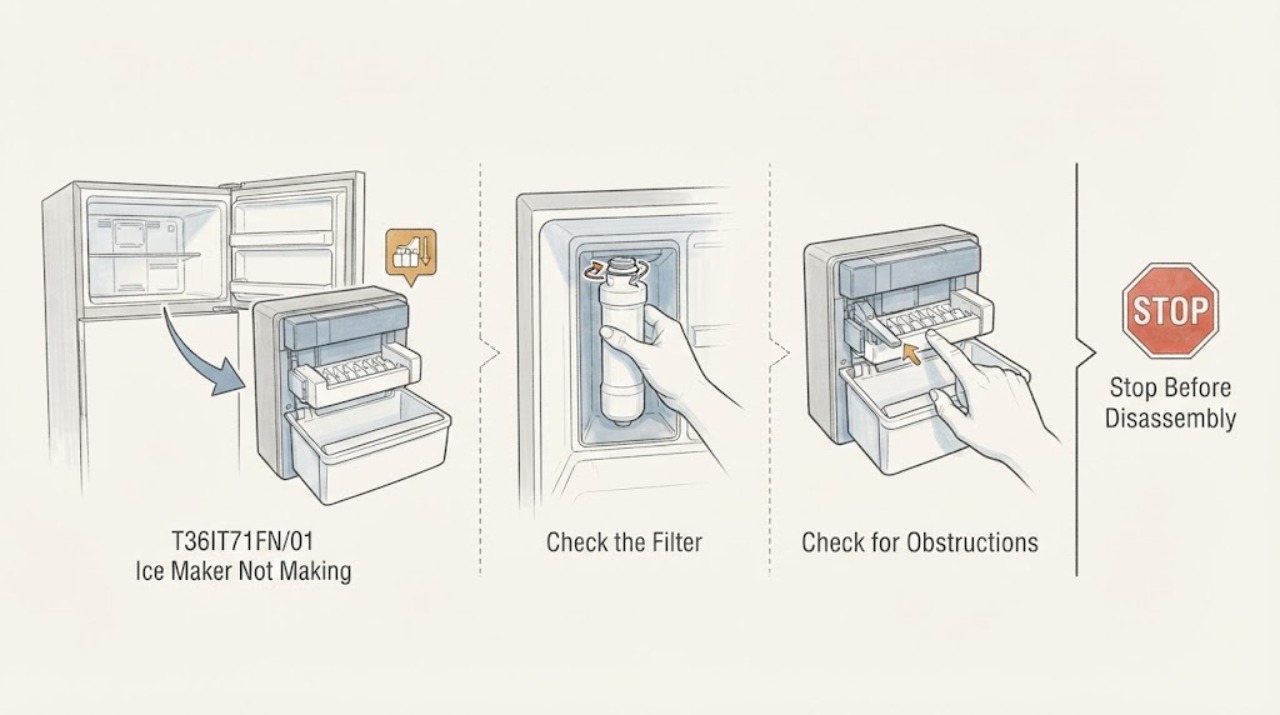
Remove and reinstall the replacement filter according to Thermador's built-in-refrigerator procedure: remove packaging, transfer the old cap when the filter design requires it, slide the filter fully into the opening, rotate it clockwise to lock, and align the cap with the raised refrigerator marks.
Expected result: The filter sits flush, the cap aligns with the marks, and the water dispenser can run without a persistent weak or sputtering flow; or the filter remains proud, will not lock, or water flow is still absent or reduced.
Next step: If it seats and water flow is normal, continue to the filter-alert and ice-production checks. If it does not, stop forcing it, confirm the filter part against the model documentation, and arrange qualified help for a damaged head, valve or supply path.
Why this matters
Why: Thermador identifies incorrect seating and a blocked or old filter as water/ice-production causes. A cartridge that will not seat or a continuing poor water path means the filter installation or water supply has not been resolved; it does not prove that the ice-maker module has failed.
-
Check 2
Clear the filter alert using the model-series path only if the control panel shows the matching controls. T36IT71FN has 7 as its sixth model character, placing it in Thermador's 700-series example; hold SETUP and ICE together for 3 seconds after the filter is installed.
Expected result: The filter alert clears and the panel accepts the command, or the panel has different controls, the alert remains, or there is no water/ice response.
Next step: If the alert clears, continue with ice-production and water-supply checks. If controls differ or the alert persists, use the exact owner's manual/service path instead of trying unrelated button combinations.
Why this matters
Why: Thermador publishes the SETUP-plus-ICE sequence for 700/800-series refrigerators, while warning that reset instructions vary by series and should be taken from the owner's manual when the general path does not apply. Clearing an alert is a tracker operation and does not by itself prove that water reaches the ice maker.
-
Check 3
Check the accessible ice-maker controls and storage bin: confirm ice production is switched on, insert the bin fully, and remove only loose ice or objects that visibly block the fill-level area. Use a blunt plastic tool for a reachable jam; do not use a sharp object or reach into moving parts.
Expected result: Ice production was off, the bin was not seated, or loose ice/objects blocked the fill-level sensing area; or the setting is on and the bin is seated and clear.
Next step: Correct the external condition and allow the freezer to operate through the recovery period. If the setting is on and the bin area is clear, continue to water and temperature checks rather than disassembling the ice maker.
Why this matters
Why: Thermador lists an off ice maker, a bin that does not activate the detection switch, and a blocked fill-level sensor as reasons production can stop. These observations point to a control or obstruction condition and do not identify an internal component failure when they are absent.
-
Check 4
Verify the external water path and freezer conditions without opening the cabinet: confirm the cold-water shut-off valve is open, look for a kinked or damaged visible hose, and check that the freezer is cold enough according to the appliance controls. Do not take apart the water connection or perform live electrical tests.
Expected result: The valve is closed, the hose is kinked/damaged, water pressure is suspected to be low, or the freezer is too warm; or the accessible supply and temperature appear normal.
Next step: Open the valve or correct a safe visible hose routing issue only when there is no leak, then allow the unit to stabilize. If pressure, the water valve, wiring or internal tubing needs diagnosis, stop and arrange qualified service.
Why this matters
Why: Thermador's troubleshooting links low water pressure, a blocked filter, a warm freezer and water-supply problems to low or absent ice production. The exact T36IT71FN installation instructions require a cold-water connection and specify 25–120 psi, so a suspected pressure problem needs a qualified person rather than an improvised measurement or bypass.
-
Check 5
After the filter, control, bin, water and temperature checks are complete, leave the appliance operating long enough to evaluate production rather than judging it immediately after the filter change.
Expected result: Ice begins within about 24 hours and production improves over the next 72 hours, or no ice is produced after that period despite normal water supply and enabled controls.
Next step: Discard ice made during the first 24 hours after the filter change as directed. If the recovery window passes with no ice, arrange model-specific qualified service and report the filter change, water-flow result, control state, bin position and elapsed time.
Why this matters
Why: Thermador states that a newly started ice maker may need about 24 hours before it begins producing and up to 72 hours for full production. No production after that recovery window with the external conditions satisfied is outside the documented user checks.
Use your observations
Decision map
Find the observation that best matches what you see, then follow the next safe action.
-
PATH 01Next step
What you see
The filter is flush and locked, water flow is normal, ice production is on, the bin is seated and clear, and the freezer has recently been restarted or the filter was just changed.
Do this next
Leave the unit operating and reassess after the recovery period; discard the first 24 hours of ice after the filter change.
Why this path and its safety boundary
Why it matters: The documented startup and filter-change recovery period may not have elapsed yet; Thermador gives approximately 24 hours to begin production and up to 72 hours for full production.
-
PATH 02Next step
What you see
The new filter will not lock flush, the water dispenser remains weak or empty, or the filter alert remains after the correct series reset.
Do this next
Stop forcing the filter, verify the exact filter and visible valve/hose, and use the model manual or qualified service for pressure, valve or filter-head diagnosis.
Why this path and its safety boundary
Why it matters: The water path or filter installation is still unresolved; Thermador's guidance points to seating, a blocked filter, water supply, or series-specific reset instructions.
-
PATH 03Next step
What you see
Ice production is off, the bin is not fully inserted, or loose ice/objects block the fill-level sensing area.
Do this next
Enable production, reseat the bin, and remove only reachable loose obstructions with a blunt plastic tool; do not reach into the ice-maker mechanism.
Why this path and its safety boundary
Why it matters: Thermador lists each of these external conditions as able to stop or reduce ice production.
-
PATH 04Next step
What you see
The filter is seated, water supply and freezer conditions are normal, ice production is enabled, the bin is clear, and no ice appears after the 24-to-72-hour recovery window.
Do this next
Stop troubleshooting at the cabinet boundary and arrange qualified Thermador service; provide the full model and revision, filter details, water-flow result, control state and elapsed time.
Why this path and its safety boundary
Why it matters: The documented external causes have been ruled out, so the remaining fault cannot be identified safely from the public user checks.
Helpful context
Understand the symptom
Start with the filter and water path
A filter change can leave the filter cap or cartridge short of its locked position, and Thermador lists a blocked filter as one possible reason for reduced ice production. Use the exact filter identified for the appliance and follow the cartridge seating instructions before treating the symptom as an ice-maker failure. Do not force the cartridge or open the cabinet to inspect internal valves.
Allow the ice maker to recover
Once water can reach the refrigerator and ice production is enabled, allow the freezer to return to its set temperature. Thermador's refrigeration troubleshooting says production may take about 24 hours to begin after power is switched on and up to 72 hours for full production. Discard the first 24 hours of ice after a filter change as directed by Thermador's filter instructions.
Keep service checks outside the cabinet
The exact T36IT71FN installation instructions identify a cold-water connection for the automatic ice maker and specify a 25–120 psi supply range. A user can verify the accessible shut-off valve and visible hose condition; pressure diagnosis, water-valve work, wiring, refrigerant work and internal ice-maker repair belong with a qualified technician.
When checks do not resolve it
Need a professional?
Arrange qualified service when the filter cannot be seated, water pressure or the water valve needs diagnosis, the unit leaks, the ice maker remains inactive after the documented checks and recovery window, or inspection would require opening the cabinet. Do not bypass the water system, perform live electrical tests, open the sealed refrigeration system, or replace an internal ice-maker part based only on the no-ice symptom.
Common questions
FAQ
Can a filter change itself stop the ice maker?
It can leave a blocked or incorrectly seated filter, air in the water path, or an uncleared filter alert. Thermador recommends fully seating the filter, following the series-specific alert reset, and discarding the first 24 hours of ice after replacement. That does not establish an internal ice-maker failure.
What reset applies to the T36IT71FN/01 filter alert?
Thermador says the sixth character of the model number identifies the refrigerator series; the 7 in T36IT71FN places it in the 700-series path. If the panel has these controls, hold SETUP and ICE together for 3 seconds. If the panel differs or the alert remains, use the exact owner's manual rather than a different series sequence.
How long should I wait after the filter change?
Thermador's refrigeration troubleshooting says an ice maker may take about 24 hours to begin producing after startup and up to 72 hours for full production. Discard ice made during the first 24 hours after a filter change as directed by Thermador's filter instructions.
What water supply condition does the exact T36IT71FN installation document specify?
The opened Thermador installation instructions for the T36IT71FN family require a cold-water connection for the automatic ice maker and specify 25–120 psi. Check the accessible valve and hose visually; have a qualified person handle pressure or valve diagnosis.
Read the exact guide
Official sources
- How to Replace Your Water FilterThermador · Opened official Thermador filter procedure; used for seating/rotation, cap alignment, water purging and first-24-hour ice disposal.
- Refrigerator Troubleshooting | Problems & SolutionsThermador · Opened official Thermador refrigeration troubleshooting page; used for the listed external checks and recovery timing, without asserting an internal component diagnosis for this model.
- How to Reset the Filter Alert After Replacing My Water FilterThermador · Opened official series-specific reset page. The task model T36IT71FN/01 has 7 as its sixth character, so the page's 700-series path is the relevant general guidance when the panel has the named controls.
- Installation Instructions: T36IT71FN / T36IT71FNS2Thermador / BSH Home Appliances · Opened official PDF. The cover identifies T36IT71FN and T36IT71FNS2; the water-connection section is used for the assigned T36IT71FN/01 family, while installation-only content is not presented as a user repair procedure.
Community feedback
Share a repair observation
Share a plain-text repair observation. Accepted observations are published automatically; this page may take a moment to update.