
On this page
Start here
Quick answer
If an Amana dryer will not turn on, first check whether the drum light or control panel is completely dark. From a dry, safe position, confirm the plug and socket are usable and look for a tripped household breaker or fuse; electric dryers can use more than one circuit. If the panel lights but the dryer will not start, check that Control Lock is not active, dry the controls and your hands, press Start or Hold to Start as the model requires, close the door fully, and select a valid drying cycle. Do not open the cabinet, inspect live terminals, bypass the door switch, replace a fuse with a different rating, or keep resetting a trip. If the socket or cord is damaged, the breaker trips again, the display stays dead, the door will not latch, or the controls remain unresponsive, leave the dryer unused and arrange qualified appliance or electrical service.
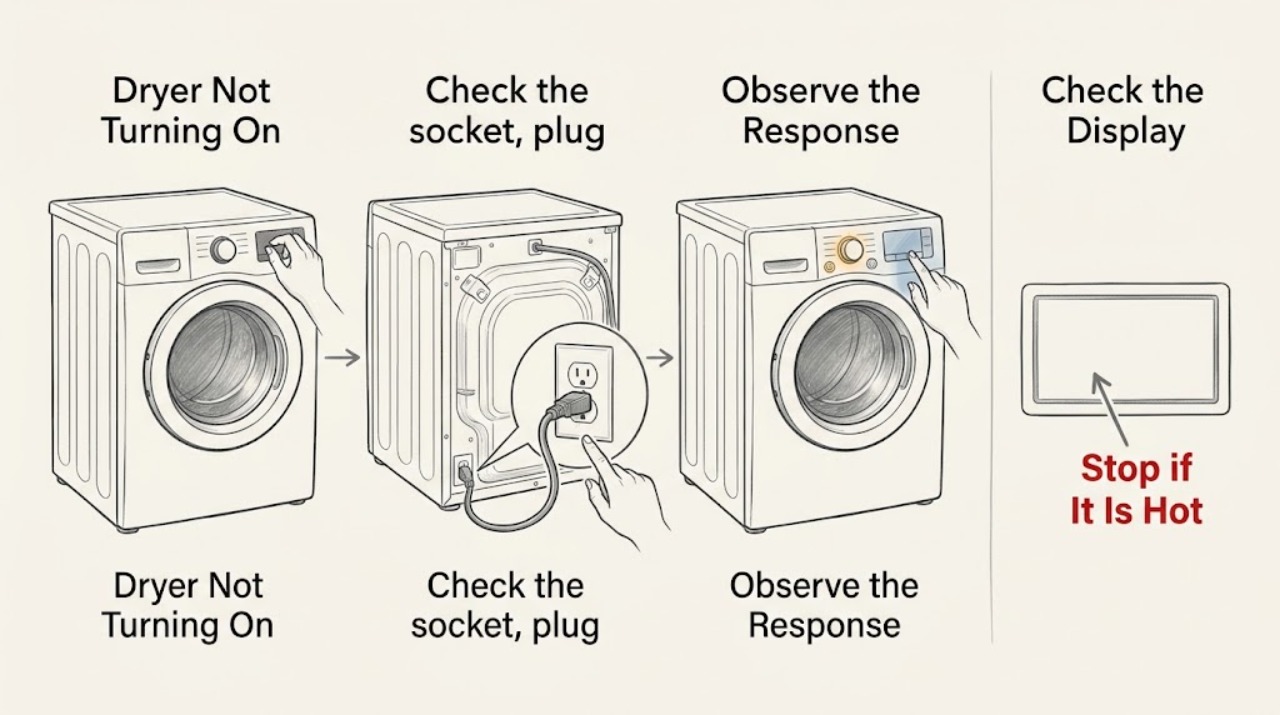
Work through in order
Diagnostic checks
Use only checks that match the exact appliance or system and its official guide.
-
Check whether any control or drum light is on
Press the normal Power control once and observe the control panel and drum light from a safe standing position. Do not move the dryer or repeatedly press the control.
Expected result: The panel and drum light are dark, the panel lights but ignores input, the Control Lock indicator is on, or the panel responds normally but the cycle does not start.
Next step: Follow the matching branch and record any indicator, symbol, or sound before making another change.
Stop if: Stop immediately for smoke, burning odor, sparking, a hot cord or plug, water at the appliance, or visible damage; leave the dryer unused and obtain qualified help.
Why this matters
Why: No illumination points toward a power or appliance supply path. A lit but unresponsive panel points toward Control Lock, moisture, or control failure; a responsive panel shifts the check to Start, door, and cycle conditions.
-
Check the socket, plug, and household supply safely
If the floor, plug, cord, and socket are dry and undamaged, verify that the plug is fully seated and look at the household breaker or fuse status without opening electrical hardware. Do not touch terminals or replace a fuse with a different rating.
Expected result: The socket appears dead, the breaker or fuse is tripped or blown, the dryer is connected normally, or the plug, cord, or socket is damaged or hot.
Next step: If the supply control is safely accessible and there is no warning sign, use only the normal reset procedure once. If the supply remains abnormal or trips again, leave it alone and arrange qualified electrical service.
Stop if: Stop for heat, scorch marks, moisture, exposed conductors, a loose socket, shock, or any need to open a panel or fuse box.
Why this matters
Why: A dead socket or tripped supply can leave the dryer dark. A damaged or hot connection is an electrical hazard, and repeated trips may indicate a fault rather than a reset opportunity. Electric dryers can use two supply circuits, so one partial supply can produce an unusual symptom.
-
Clear Control Lock and moisture conditions
If the panel is lit, read the Control Lock indicator and inspect the touch surface for moisture or residue. Dry your hands and wipe the panel with a clean, dry cloth as the model guidance directs; use the exact manual to unlock the controls, and do not hold random buttons.
Expected result: Control Lock is active, the panel or hands were damp, the panel is dry and unlocked, or the controls still ignore normal input.
Next step: Clear only a confirmed lock using the exact model procedure, then try Power and Start once. If input remains unavailable, stop and arrange service.
Stop if: Do not pry the panel, spray cleaner into gaps, remove a cover, or continue if liquid entered the control area.
Why this matters
Why: Amana states that Control Lock prevents touch commands and that moisture can reduce touch-panel response. A dry, unlocked panel that remains unresponsive points toward a control or appliance fault.
-
Use the correct Start control
Select the intended cycle and press or hold Start, Push to Start, or Hold to Start exactly as the Amana model manual describes. Use a fingertip on a touch panel rather than a fingernail; do not repeatedly start and cancel.
Expected result: The drum starts, the display counts down or changes state, Start has no effect, or the panel beeps or flashes without starting.
Next step: If the cycle starts, let the normal startup proceed. If Start remains ineffective after one correct attempt, continue to the door and cycle checks without bypassing controls.
Stop if: Stop if the appliance starts unexpectedly, runs with the door open, sparks, smells hot, or requires panel removal to investigate.
Why this matters
Why: Some Amana controls require a firm or held input, while a beep or flash can indicate a lock, invalid setting, moisture, or door condition. No response from a dry, unlocked panel suggests a control or power fault.
-
Check the door latch area
With the dryer off, look at the door edge and latch for clothing, packing material, or an obvious obstruction. Close the door normally until it latches; do not force it, bypass the switch, or reach into a moving drum.
Expected result: The door latches securely, clothing or packing material blocks the latch, the door is misaligned or damaged, or it appears shut but the dryer still reports an open door.
Next step: Remove only a loose visible obstruction, close the door once, and try the selected cycle. If it will not latch or the machine still will not start, stop and arrange service.
Stop if: Stop for broken glass, a torn seal, a door that springs open, a damaged latch, or any need to dismantle the door switch.
Why this matters
Why: Amana notes that a door can look closed without being latched and that clothing or packing material can block the latch. A damaged or misaligned door or a latch that never registers needs appliance service.
-
Confirm the cycle is valid for the model
Read the cycle selector or display and confirm that a drying cycle, rather than a non-start or option-only setting, is selected. Use the model manual for cycle names and options; do not switch repeatedly to force operation.
Expected result: An Automatic Dry, Accudry, or Timed Dry cycle is selected, a Wrinkle Shield or other option-only setting is selected, or the selector is between settings or unresponsive.
Next step: Select one valid cycle and use the normal Start input once. If the valid cycle still does not start, record the display and request service.
Stop if: Do not force a knob, remove the console, or continue if the dryer starts and stops abnormally or displays a fault.
Why this matters
Why: Amana says some models will not start when an option-only setting is selected. A selector between settings or a panel that cannot register the cycle is a control issue, not a reason to open the machine.
-
Record the model and installation history
Read the model label only from a normal, safe position and record whether the dryer is electric or gas, whether it was recently installed or moved, the exact panel state, breaker result, control-lock result, door behavior, selected cycle, and Start response.
Expected result: The issue began after installation or moving, occurs on every cycle, affects only the controls, follows a power event, or includes a code, odor, heat, or unusual sound.
Next step: Provide the complete record to qualified appliance service or an electrician for a house-supply concern. Leave the dryer disconnected or unused when the fault repeats.
Stop if: Stop all DIY work if diagnosis would require moving the dryer, opening panels, checking terminals, bypassing the door switch, or adjusting gas or electrical components.
Why this matters
Why: Installation or power history can point the professional toward supply and connection checks, while a repeatable no-start on every cycle suggests appliance-side diagnosis. The symptom alone cannot identify a failed component.
Use your observations
Decision map
Find the observation that best matches what you see, then follow the next safe action.
-
PATH 01Safety boundary
What you see
The panel and drum light are dark, and the socket or household supply is also abnormal.
Do this next
Leave the dryer and supply unused and arrange qualified electrical service for the household circuit or socket.
Why this path and its safety boundary
Safety stop: Do not open the fuse box, replace a fuse with a different rating, or keep resetting the breaker.
-
PATH 02Safety boundary
What you see
The socket appears normal, but the Amana dryer remains completely dark.
Do this next
Leave the dryer disconnected or unused and arrange qualified appliance service for its power path and controls.
Why this path and its safety boundary
Safety stop: Do not remove the cabinet, test terminals, or substitute internal parts.
-
PATH 03Safety boundary
What you see
The panel is lit but Control Lock is active or the touch surface is damp.
Do this next
Dry the panel and use the exact model manual to clear Control Lock once, then try the normal Start input.
Why this path and its safety boundary
Safety stop: Do not pry the panel, spray into controls, or hold random buttons.
-
PATH 04Safety boundary
What you see
The dryer beeps or flashes but Start does not begin a cycle.
Do this next
Confirm the correct cycle, press or hold Start as the model requires, and check that the door latch engages. Request service if the response remains unchanged.
Why this path and its safety boundary
Safety stop: Do not bypass the door switch or repeatedly start and cancel.
-
PATH 05Safety boundary
What you see
The door looks closed but does not latch, clothing blocks the latch, or the door or seal is damaged.
Do this next
Remove only a loose visible obstruction; arrange appliance service for misalignment, damage, or a latch that does not register.
Why this path and its safety boundary
Safety stop: Do not force, dismantle, or bypass the door switch.
-
PATH 06Safety boundary
What you see
A valid drying cycle is selected and the door and controls appear normal, but the dryer still does not start.
Do this next
Stop repeated user checks and arrange qualified appliance service for control, motor, supply, or related internal diagnosis.
Why this path and its safety boundary
Safety stop: Do not open panels, perform live tests, or replace an unconfirmed component.
-
PATH 07Safety boundary
What you see
There is smoke, burning odor, sparking, a hot or damaged cord, gas odor, water at the appliance, or a repeated circuit trip.
Do this next
Stop using the dryer, keep people away, isolate power or gas only through a safe accessible control when appropriate, and seek urgent qualified or local emergency help.
Why this path and its safety boundary
Safety stop: Do not touch damaged components, open panels, adjust gas, or continue the cycle.
Helpful context
Understand the symptom
Start by separating power from operation
A dark control panel and drum light suggest that power is not reaching the dryer or that an appliance power fault is present. A lit panel means the appliance has at least some power, so the no-start path moves to Control Lock, Start input, door latch, cycle selection, or a displayed fault. Electric and gas models have different supply arrangements; the exact model manual controls the details.
Keep electrical work out of the homeowner check
User-level checks can cover the plug, a safe socket observation, visible breaker status, dry controls, ordinary cycle settings, and the door latch area. Do not remove the rear panel, tighten terminal screws, bypass the door switch, open the fuse box, or test the supply with exposed conductors. Amana directs owners to a qualified electrician when power problems continue.
Recent installation changes the path
If the dryer was recently installed or moved, the cord or supply arrangement, door closure, shipping material, and selected cycle deserve special attention. Do not infer a wiring fault from a symptom alone; record the model and installation history for the technician.
When checks do not resolve it
Need a professional?
Arrange qualified Amana appliance service when the dryer remains dark after a safe socket and supply check, when Power or Start is ignored, the door will not latch, a valid cycle will not begin, or the same no-start fault returns. Use an electrician for a faulty socket, damaged supply connection, or repeated circuit trip. Seek urgent help for smoke, fire, gas odor, sparking, water near the appliance, or a hot cord.
Have this ready
- Provide the Amana model number if safely visible, electric or gas type, display and drum-light state, socket and breaker observation, Control Lock state, moisture observation, Start response, door-latch behavior, selected cycle, recent move or installation, and any code, odor, heat, or sound.
Common questions
FAQ
Why is my Amana dryer completely dark?
A dead socket, tripped household supply, damaged cord, or appliance power fault can leave the controls and drum light dark. Check the supply only from a safe position; if the socket works but the dryer remains dark, arrange qualified appliance service.
Why does my Amana dryer have power but not start?
Check Control Lock, a damp panel, the required Start or Hold to Start input, door latching, and valid cycle selection. If those user-level checks do not change the result, stop and arrange service.
Can I bypass the Amana dryer door switch?
No. Do not bypass or dismantle the door switch. Check only for loose clothing or packing material at the latch; a door that will not register as closed needs qualified appliance service.
Should I keep resetting the dryer breaker?
No. A single normal reset may be appropriate when there is no warning sign, but a breaker that trips again points to a supply or appliance fault. Leave it off and use qualified electrical or appliance service.
What should I tell the technician when my Amana dryer will not turn on?
Provide the model, electric or gas type, whether the controls and drum light are dark, socket and breaker observations, Control Lock state, door behavior, selected cycle, Start response, recent installation or moving, and any odor, heat, sound, or code.
Read the exact guide
Official sources
- Controls are Not Working - DryerAmana Product Help · Official Amana support page used for Control Lock and moisture-related control behavior. It does not establish an internal control failure for a particular model.
- Not Starting or Not Operating - DryerAmana Product Help · Official Amana support page used for the exact dryer no-start problem and its user-level power, control, door, and cycle branches. Model features vary, so the exact owner manual remains controlling.
- Use and Care GuideAmana · Official Amana use-and-care guide used for the safety boundary against reaching into a moving appliance, tampering with controls, or performing unapproved service; the guide is model-specific.
- No Power - Electric DryerAmana Product Help · Official Amana support page used for safe household-supply observations and the professional boundary for persistent power or cord problems. It applies to electric dryers; gas dryers have different supply details.
Community feedback
Share a repair observation
Share a plain-text repair observation. Accepted observations are published automatically; this page may take a moment to update.