
On this page
Start here
Quick answer
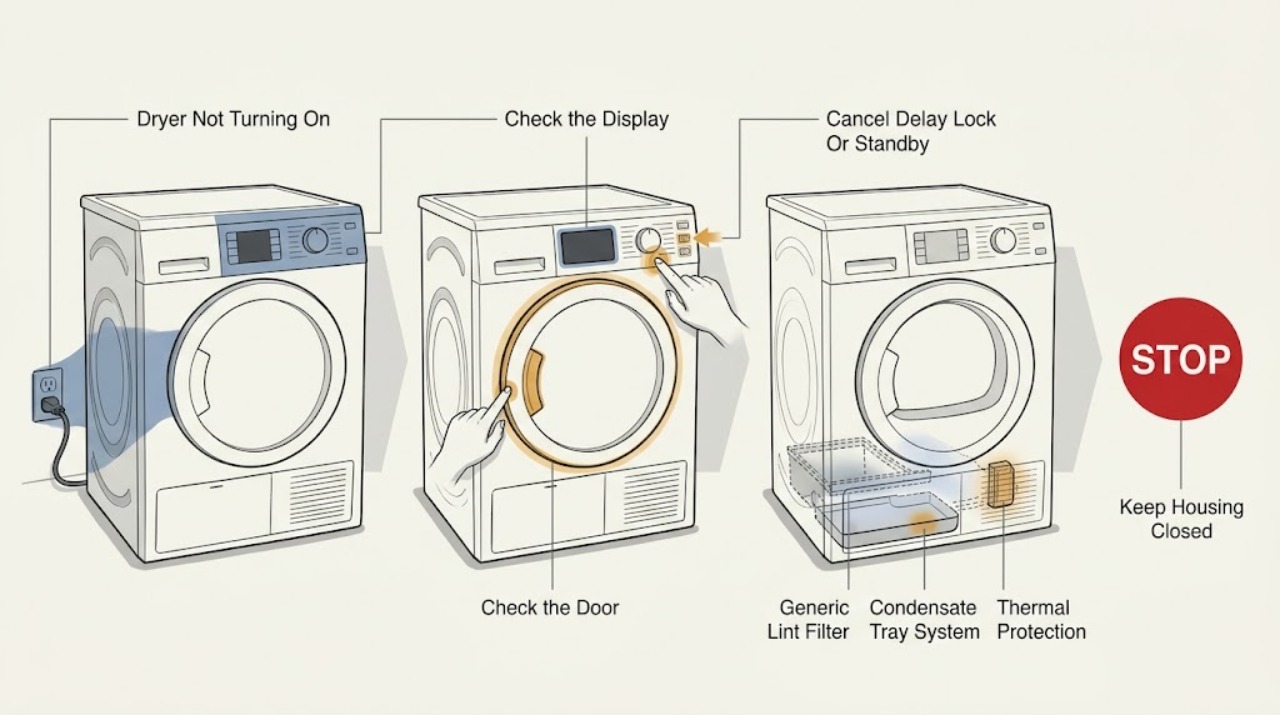
If an ASKO dryer will not turn on, first check the external switch or plug, close the door fully, select a program and press the documented Start/Pause control, then cancel any delayed start or lock mode shown on the display. For condenser or heat-pump models, check the user-accessible lint filter and condensate tank; if the dryer still stays dead, trips power, overheats, or shows a persistent fault, stop and arrange qualified service rather than opening the cabinet.
Work through in order
Diagnostic checks
Use only checks that match the exact appliance or system and its official guide.
-
Check 1
Look at the display and drum light, then check from outside that the main switch is on and the power cord is seated in the outlet. If a breaker or fuse has opened, inspect for an obvious hazard and reset it only once.
Expected result: The display is blank, returns after the external correction, or the breaker/fuse opens again.
Next step: If the panel returns, continue with door and program checks. If it stays blank or the supply trips again, leave the dryer off and arrange qualified appliance/electrical service.
Stop if: Do not remove the outlet, switch, plug, terminal, or dryer covers and do not replace a fuse with a different rating.
Why this matters
Why: A blank panel can indicate loss of supply or an internal power fault. A repeated trip is not a normal start condition and should not be chased with repeated resets.
-
Check 2
Open and close the dryer door firmly, check that no fabric is caught in the gasket, select a normal drying program, and press the model's documented Start/Pause control.
Expected result: The dryer starts after the door is closed and the start command is entered, or the display remains idle with the door apparently closed.
Next step: If it starts, monitor the cycle. If it remains idle, continue with delay/lock, tank, filter, and error-display checks; arrange service if the door does not latch or the latch is damaged.
Stop if: Do not force the door, defeat the door switch, or reach through the door opening toward moving or heated parts.
Why this matters
Why: ASKO's manual states that a program cannot start while the door is open; an unlatched door or an omitted start command can therefore look like a dead dryer.
-
Check 3
Read the display for a delayed-start countdown, lock symbol, shop/demo indication, or standby state. Follow the exact ASKO manual to cancel the delay or unlock controls, then reselect the program and press Start/Pause.
Expected result: The countdown/lock clears and the program starts, or the display remains locked/idle despite the documented procedure.
Next step: If the cycle starts, no repair is needed for this symptom. If the mode cannot be cleared, record its symbol and model number and arrange service rather than trying undocumented combinations.
Stop if: Do not enter a service menu, apply a factory reset without understanding its effect, or bypass a control lock.
Why this matters
Why: A delayed start intentionally waits before running, while a lock or shop mode can prevent normal user operation. A persistent mode or unresponsive control may indicate a control fault.
-
Check 4
For a condenser or heat-pump model, inspect the display and remove/empty the condensate tank only as the manual shows; clean and correctly reinstall the door and lower lint filters if they are user-accessible. Do not touch heat-exchanger fins or internal parts with bare hands.
Expected result: The tank-full or clean-filter indication clears after the permitted maintenance, or the dryer has no applicable tank/filter warning and still will not start.
Next step: Close the tank/filter access, select the program again, and retry once after the dryer is cool. If the warning returns or the dryer remains idle, arrange service.
Stop if: Do not operate without the required filter, press hard on heat-exchanger fins, spray water into the cabinet, or remove a fixed filter housing.
Why this matters
Why: A full tank can pause a program on applicable models, and restricted filters can cause overheating protection to stop the dryer. Absence of these warnings shifts attention to power, door, controls, or an internal fault.
-
Check 5
If the dryer stopped during a cycle or feels unusually hot, leave the controls alone until it cools, then check the user-accessible lint filters and the room/cabinet airflow described by the manual. Do not cover external openings or run the dryer in a restricted enclosure.
Expected result: The dryer restarts after cooling and filter/airflow correction, or it loses power again, remains hot, or will not restart.
Next step: If it restarts, monitor the next cycle and clean filters at the manual's interval. If it stops again or remains dead, keep it off and arrange qualified service.
Stop if: Stop immediately for smoke, burning odor, melted material, scorching, or heat that remains abnormal after the dryer is switched off.
Why this matters
Why: ASKO's manual links clogged filters and insufficient fresh air with overheating protection and a stopped compressor/cycle. A repeat failure after cooling suggests a thermal, airflow, sensor, or control problem.
-
Check 6
Record the complete ASKO model/product code, display state, program selected, door result, delay/lock symbol, tank/filter warning, breaker behavior, recent cleaning or installation work, and whether the dryer stopped during a previous cycle.
Expected result: The dryer still will not start after the external checks, an error returns, the supply trips, or the cabinet/cord shows damage.
Next step: Use the ASKO manual index to confirm the model documentation and arrange qualified ASKO/appliance service with the recorded details.
Stop if: Stop using the dryer and isolate power only if safe for a damaged cord, exposed wiring, smoke, burning odor, arcing, water near electrical parts, or repeated power trips.
Why this matters
Why: The unresolved causes may include a door interlock, power board, motor, thermal device, sensor, pump, or other internal fault that cannot be confirmed safely by the user checks.
Use your observations
Decision map
Find the observation that best matches what you see, then follow the next safe action.
-
PATH 01Next step
What you see
The display and indicators are blank.
Do this next
Check only the external switch, plug, and breaker/fuse once. If supply is present but the panel stays blank, arrange qualified service.
Why this path and its safety boundary
Why it matters: The dryer may have no external supply or an internal electrical fault.
-
PATH 02Next step
What you see
The display is on, but the program does not run after selecting it.
Do this next
Close the door fully, select the program, and press the documented Start/Pause control. Arrange service for a damaged latch or persistent no-start condition.
Why this path and its safety boundary
Why it matters: The door may not be latched or the start command may not have been entered according to the model instructions.
-
PATH 03Next step
What you see
A delay countdown, lock, shop/demo, or standby indicator is visible.
Do this next
Use the exact model manual to cancel the state, wake the panel, or unlock controls. If it will not clear, record the indicator and arrange service.
Why this path and its safety boundary
Why it matters: The dryer is waiting, restricting input, simulating operation, or conserving display power rather than necessarily being failed.
-
PATH 04Next step
What you see
A condenser/heat-pump model shows a full tank or filter warning, or stopped after becoming hot.
Do this next
Empty/clean only the user-accessible items specified by the manual, let the dryer cool, and retry once. If the warning or shutdown returns, arrange service.
Why this path and its safety boundary
Why it matters: A full tank, restricted lint path, or inadequate airflow may have paused the program or activated thermal protection.
-
PATH 05Next step
What you see
An error remains or returns after the documented user step, or the dryer will not restart after cooling.
Do this next
Stop repeating resets and arrange qualified ASKO/appliance service with the exact display message and model number.
Why this path and its safety boundary
Why it matters: A persistent fault may involve the control, sensor, motor, pump, thermal device, or another internal circuit.
-
PATH 06Next step
What you see
The breaker trips again, the cord/wiring is damaged, smoke or burning odor is present, or water reaches electrical parts.
Do this next
Stop using the dryer and arrange qualified service. Isolate power only when it can be done without touching damaged wiring or water.
Why this path and its safety boundary
Why it matters: This is a safety hazard, not a normal start-setting issue.
Helpful context
Understand the symptom
Start by separating a no-power symptom from a program that has not been allowed to start. A blank display suggests the external supply or an internal power problem. A lit display with no drum movement can instead mean that the door is not latched, no program was started, delayed start is active, the dryer is in standby, a condensate tank is full on applicable models, or a protection condition has stopped the cycle.
ASKO manuals are model-specific, so use the model number to retrieve the correct instructions before trying a reset or changing a system setting. Keep checks external and user-accessible: switch/plug, display, door, program/start command, delay indicator, lint filters, and condensate container where fitted. Do not remove covers, reach into the motor or heater area, or test wiring.
A dryer that stopped during a cycle may be protecting itself from overheating caused by restricted filters or airflow. Clean the user-accessible filter as directed, empty the tank if the model uses one, let the appliance cool, and retry only once. If the fault returns, the dryer remains dead, or there is a burning odor, smoke, damaged cord, or repeated power trip, leave it off and arrange qualified service.
Safety boundary
Stop conditions
- Do not remove covers, defeat the door switch, bridge a thermal device, or take electrical readings while the dryer is connected to power.
- Do not repeatedly reset a breaker or fuse that opens again; leave the dryer off and arrange qualified service.
- Do not operate without required lint filters, press on heat-exchanger fins, or spray water into the cabinet.
- Stop immediately for smoke, burning odor, scorching, arcing, a damaged cord or wiring, water near electrical parts, or abnormal heat.
- Use the exact model manual for delay, lock, shop mode, reset, tank, and filter instructions; do not generalize a sequence from another ASKO dryer.
When checks do not resolve it
Need a professional?
Arrange qualified ASKO or appliance service when the display stays blank with external power available, the door will not latch, delay/lock/shop mode will not clear, a filter/tank shutdown returns, an error persists, the dryer trips power, or any electrical, water, or heat hazard is present.
Have this ready
- Complete ASKO model/product code, display and indicator behavior, program and start sequence used, door result, delay/lock/shop state, tank/filter observations, breaker behavior, recent installation or cleaning, and whether the dryer stopped during a cycle.
Common questions
FAQ
What should I check first if my ASKO dryer will not turn on?
Check the external switch or plug, display, door closure, selected program, Start/Pause command, delayed-start state, and any filter or condensate warning applicable to the model. Use the matching ASKO manual for control details.
Can an open door stop an ASKO dryer from starting?
Yes. ASKO's manual states that a drying program cannot start while the door is open. Close it fully and retry the documented start sequence; arrange service if the latch does not hold.
Can delayed start make an ASKO dryer seem not to work?
Yes. A delayed-start countdown intentionally waits before the program runs. Cancel it using the model manual, then select the program and press Start/Pause again.
Why did my ASKO dryer stop and now not restart?
A clogged user-accessible filter, full condensate tank on applicable models, restricted airflow, or overheating protection can stop a cycle. Clean or empty only what the manual identifies, let the dryer cool, and arrange service if it stops again.
When should I call for ASKO dryer service?
Call when the display remains blank with supply available, the door will not latch, an error or thermal shutdown returns, the dryer trips power, or there is smoke, burning odor, damaged wiring, water near electrical parts, or abnormal heat.
Read the exact guide
Official sources
- User Manual — ASKO Tumble Dryer TD76 / T309HCW.UKASKO · This official manual is a model-specific example, not a universal ASKO procedure. Its troubleshooting covers no-start power, door, delayed start, condensate tank, filters, overheating protection, error history, and service escalation.
- Search for ManualsASKO · ASKO's official manual index asks for a product code or model name and directs users to the relevant market site, supporting model-specific troubleshooting rather than a universal button sequence.
- Maintenance of work equipmentHealth and Safety Executive · HSE states that equipment must be made safe before maintenance, electrical supplies isolated, manufacturer instructions followed, and maintenance performed by competent persons.
Community feedback
Share a repair observation
Share a plain-text repair observation. Accepted observations are published automatically; this page may take a moment to update.