
On this page
Start here
Quick answer
Start with the low-risk external checks: make sure the plug is fully seated, the door closes tightly, a valid cycle is selected, and the Start control is pressed completely. Check the dryer’s dedicated breaker or fuses and reset a partially tripped breaker once. If the display shows 1 or 2 on a supported newer model, the dryer may need its electric or gas personality setting selected. Stop if the cord, plug, terminal area, or door switch is scorched, loose, frayed, or damaged; do not bypass a safety switch or open the cabinet while connected. If these checks do not restore operation, arrange qualified service.
Before you begin
Safety first
- Keep the dryer disconnected for electrical damage or smoke. Never bypass a door switch or thermal safety device, and never manually light a gas dryer.
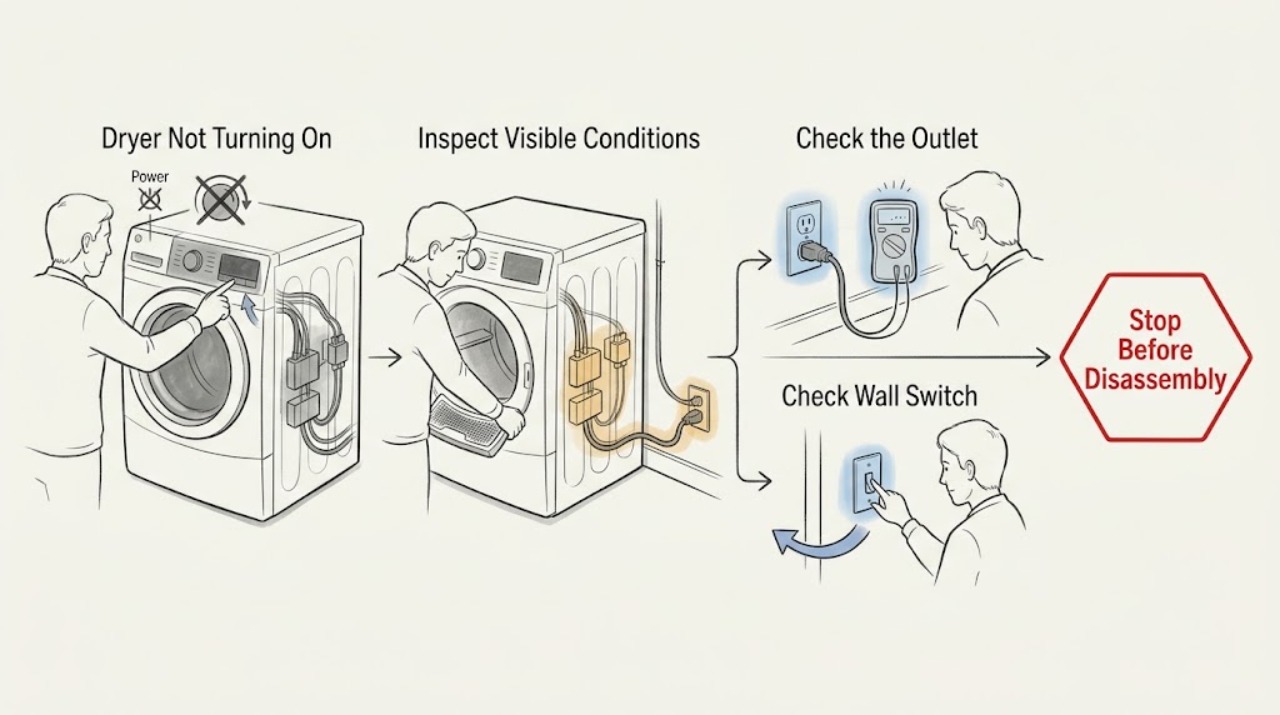
Work through in order
Diagnostic checks
Use only checks that match the exact appliance or system and its official guide.
-
Check 1
Look at the control panel before changing anything. Press the power or cycle control once and note whether the display or indicator lights respond; check a nearby light or known appliance if the entire laundry area appears dead.
Expected result: The panel is completely dark, or the panel lights up but the dryer will not begin a cycle.
Next step: For a dark panel, continue to the dedicated breaker and plug check. For a lit panel, do not repeatedly press Start; continue to the door and cycle checks.
Why this matters
Why: A dark panel points first to the outlet, breaker, fuse, supply cord, or an internal power path. A lit panel means the controls have some power, so continue with the door, cycle, and Start checks.
-
Check 2
Inspect only the accessible plug and wall connection without removing the dryer’s rear cover. Push the plug fully into the outlet and check for looseness, heat damage, a broken cord, or a scorched smell. Do not use an extension cord or a shared outlet for the dryer.
Expected result: The plug was loose but looks undamaged, or the cord, plug, or outlet shows scorching, fraying, melting, or looseness.
Next step: If the connection is intact, continue to the breaker check. If any cord, plug, or outlet damage is present, stop using the dryer, leave the circuit off if safe to do so, and arrange qualified electrical or appliance service.
Why this matters
Why: A loose but intact connection can interrupt the controls. Visible heat or physical damage is an electrical hazard and is not a reset or user-reconnection problem.
-
Check 3
At the household panel, identify the dryer’s dedicated breaker or fuses. If it is a breaker that appears on but may be partially tripped, switch it fully off and then back on once. Do not remove fuse covers or perform electrical measurements.
Expected result: The dryer powers up after one reset, the breaker will not stay on, or the dryer remains dead with the breaker apparently normal.
Next step: If the dryer powers up, run a short supervised test. If the breaker trips again or will not reset, leave it off and call a qualified professional. If it stays on but the dryer remains dead, continue with the control and door checks before service.
Why this matters
Why: A partial trip can remove dryer power even when the handle does not look fully off. A breaker that trips again indicates an unresolved electrical condition; a normal breaker with a dead dryer moves the problem toward the outlet, cord, or appliance.
-
Check 4
Remove any item caught at the door opening, close the door firmly, select a cycle with a valid temperature or drying time, and press the Start control completely. Keep hands out of the drum while testing.
Expected result: The dryer starts after the door closes or the cycle and Start control are set correctly, or the panel still responds but the motor does not start.
Next step: If it starts, monitor the first cycle and stop if it makes an abnormal sound or smells hot. If the door will not close, the Start control does not register, or the dryer remains silent, continue to inspect the accessible door switch condition without disassembling the cabinet.
Why this matters
Why: GE’s start procedure requires a securely closed door, a selected cycle, and a fully depressed Start control. A door that does not latch or a Start control that does not register can prevent operation even when the display is lit.
-
Check 5
With the dryer unplugged or its circuit safely off, look only at the visible door-switch area and control display. Do not press or bypass a switch. If a supported newer model displays 1 or 2 and will not tumble, check the owner documentation for its model-specific electric or gas personality selection.
Expected result: The door switch is visibly scorched, pushed in, loose, or damaged; the display shows 1 or 2; or neither condition is present.
Next step: Do not bypass or replace a damaged switch as an improvised fix. Use the exact model manual for a displayed 1 or 2; if the switch is damaged or setup does not restore operation, arrange qualified service.
Why this matters
Why: A damaged door switch can keep the dryer from operating. On some GE models from 2019 onward, a 1 or 2 display can indicate that the model’s electric or gas personality setting has not been selected; this is not a universal code for every GE dryer.
-
Check 6
For an electric model only, do not open the rear terminal area as an ordinary-user check. If you already observe a burned, loose, or frayed cord or terminal connection from a safe external view, record the location and leave the dryer disconnected. For a gas model, do not attempt to light anything manually.
Expected result: There is electrical heat damage, exposed wiring, a gas odor, smoke, or the dryer still does not run after the safe checks.
Next step: Stop using the dryer. Leave the circuit off for electrical damage or smoke, avoid flames and switches if gas is suspected, and contact the appropriate qualified appliance or gas professional. Provide the model, symptom, display behavior, and checks already completed.
Why this matters
Why: Cord and terminal damage requires repair of the affected electrical connection, and an unresolved no-start condition can involve a safety component or internal control. These conditions cannot be safely confirmed by bypassing parts or probing the cabinet.
Use your observations
Decision map
Find the observation that best matches what you see, then follow the next safe action.
-
PATH 01Next step
What you see
The control panel is dark and the breaker is tripped
Do this next
Reset the breaker once. If it trips again, leave it off and arrange qualified service.
-
PATH 02Next step
What you see
The display works but the drum does not start
Do this next
Close the door firmly, select a valid cycle, and press Start completely. Escalate if the door switch or Start control is damaged or unresponsive.
-
PATH 03Next step
What you see
A supported newer model shows 1 or 2 and will not start
Do this next
Use the exact model documentation to select the correct electric or gas personality setting; do not assume the display means a failed part.
-
PATH 04Next step
What you see
The cord, plug, outlet, or terminal area is burned, loose, or frayed
Do this next
Stop using the dryer and arrange qualified electrical or appliance service. Do not reconnect damaged wiring or operate the dryer to retest it.
-
PATH 05Next step
What you see
All low-risk checks pass but the dryer still will not turn on
Do this next
Request service for a diagnosis of the internal start and safety circuit; do not bypass a door switch, thermal device, or control.
Helpful context
Understand the symptom
What a GE dryer that will not turn on is telling you
A dryer that is completely dark has a different first path from one whose display works but whose drum never starts. A working display can still be blocked by the door, cycle settings, Start control, or a safety switch. Separate the symptoms before considering parts, and do not use a jumper or bypass to make the dryer run.
Electric and gas models do not share every power check
Both types need the correct controls, a closed door, and a reliable electrical supply for the motor and controls. Electric dryers commonly use a dedicated high-current circuit, while gas dryers still need electrical power for controls and the motor. The exact cord, breaker, terminal, and control arrangement is model-specific, so use the model manual for any service work.
Safety boundary
Stop conditions
- Stop for a breaker that trips again, a damaged cord or plug, scorching, exposed wiring, smoke, or a burning odor.
- Do not bypass the door switch or another safety device, and do not open the cabinet or terminal block while the dryer is connected to power.
- For a gas odor, avoid flames and electrical switches, leave the area, and contact the appropriate gas emergency service from a safe location.
- If the dryer remains inoperative after the documented external checks, arrange qualified service instead of repeatedly cycling the breaker.
Only after diagnosis
Potential parts
- door switch
Only consider this part class if a technician confirms that the door does not register closed or the switch is visibly damaged after power and latch checks.
Confirm the exact GE model and switch design with the manufacturer documentation before ordering. - thermal safety device
Only consider this class after a qualified diagnosis identifies an open safety device and also checks the underlying airflow or overheating cause.
Do not bypass a safety device; confirm the exact model and approved replacement with a qualified technician. - start control
Only consider this class if the correct cycle and door state are present but the Start control does not register and the control circuit is diagnosed as the cause.
Confirm the exact GE model and control style before ordering.
When checks do not resolve it
Need a professional?
Call a qualified appliance technician or electrician when the breaker trips again, the dryer remains dead with a confirmed supply, the door switch or Start control is damaged, the cord or terminal area is burned or loose, a gas odor is present, or the safe checks do not restore operation.
Safety scope: Keep the dryer disconnected for electrical damage or smoke. Never bypass a door switch or thermal safety device, and never manually light a gas dryer.
Have this ready
- GE model number
- whether the display is dark or lit
- whether the breaker tripped and whether it stayed reset
- whether the door latches and the Start control registers
- any 1 or 2 display or other code
- whether the model is electric or gas
- any cord, plug, switch, smoke, odor, or heat damage observed
Common questions
FAQ
Why is my GE dryer completely dark?
Check the accessible plug, the dedicated dryer breaker or fuses, and whether the breaker is partially tripped. Reset a breaker once; if it trips again or the dryer remains dark with confirmed supply, stop and arrange qualified service.
Why does my GE dryer have power but not start?
Close the door firmly, select a valid cycle, and press Start completely. A damaged door switch, an unregistered Start control, or an internal safety fault can prevent the motor from starting even when the display is lit.
What does 1 or 2 mean on a GE dryer that will not turn on?
On some GE models from 2019 onward, a 1 or 2 display can mean that the dryer’s electric or gas personality setting needs to be selected. Check the exact model documentation rather than treating that display as a universal fault code.
Can I bypass the GE dryer door switch to test it?
No. The door switch is a safety component. If it is scorched, pushed in, loose, or not registering a closed door, leave the dryer disconnected and have a qualified technician diagnose it.
Read the exact guide
Official sources
- Dryer - Will Not Run or StartGE Appliances · General GE dryer guidance; model controls and installation details vary.
- GE Dryer Owner's Manual 49-9742GE Appliances · Older GE dryer manual used only for general safety boundaries and no-start decision points; model-specific instructions take precedence.
- Electric Dryer - Has No PowerGE Appliances · Electric GE dryer guidance; gas dryers have different supply requirements.
Community feedback
Share a repair observation
Share a plain-text repair observation. Accepted observations are published automatically; this page may take a moment to update.