
On this page
Start here
Quick answer
If a Blomberg dryer will not turn on, first distinguish a blank display from a dryer that powers up but will not start. From a dry, safe position, check the accessible plug and household protection, close the loading door, select a programme, press Start/Pause, and check the child lock plus any model-specific condenser-cover or water-tank indication. Blomberg manuals list these conditions as common reasons a dryer may appear inactive. Make one model-directed reset only if the manual permits it and the area is safe; if the dryer remains dead, a breaker trips again, or there is smoke, a burning smell, or a damaged cord, stop using it and arrange authorized service. Do not open the cabinet or perform live electrical work.
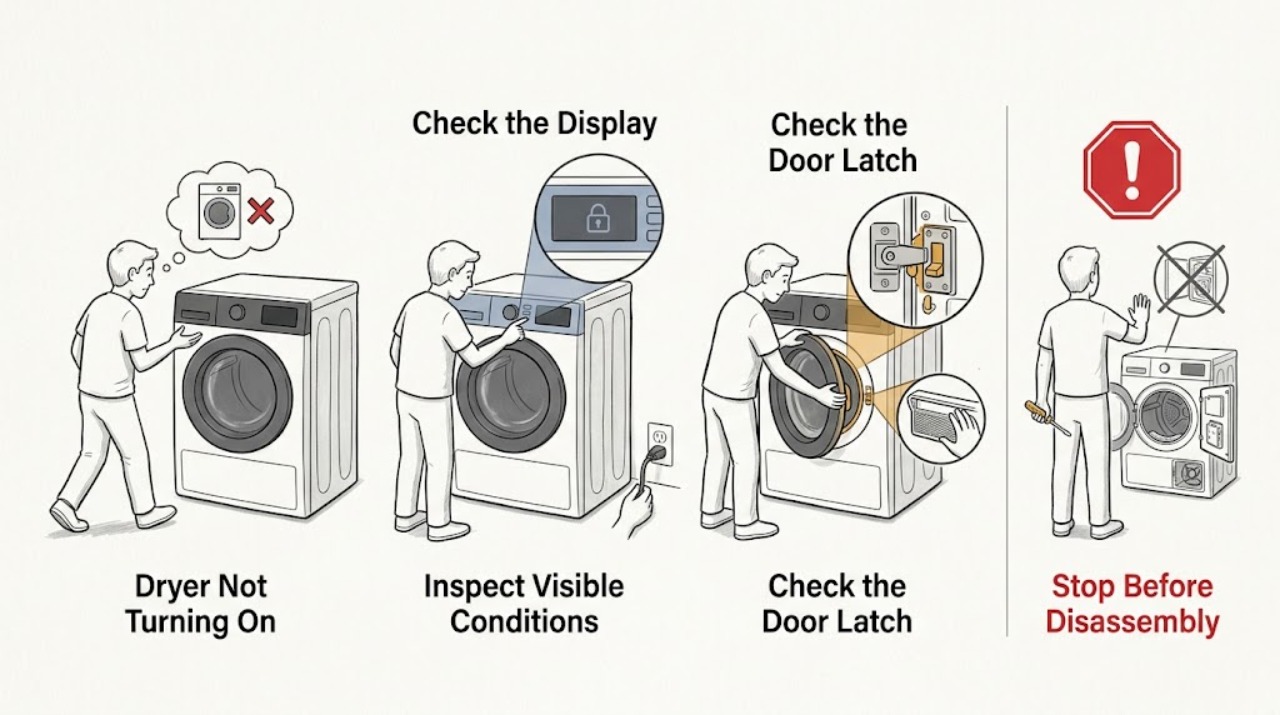
Work through in order
Diagnostic checks
Use only checks that match the exact appliance or system and its official guide.
-
Check 1
From a dry position, press the normal On/Off control once and note whether the display is completely blank, briefly lights and goes out, or shows a programme or warning. Also note any smoke, burning smell, unusual heat, or visible cord damage without moving the dryer.
Expected result: The entire control panel is dead, the panel responds but the programme does not begin, or a safety symptom appears.
Next step: If a safety symptom is present, stop using the dryer and follow the safety-service branch. Otherwise continue with the external power check for a blank display or the control and door checks for a responsive display.
Why this matters
Why: A blank panel points first to the accessible supply or an internal power-control fault. A responsive panel moves the check toward the door, programme, lock, tank, or start command. Smoke, burning smell, overheating, or cord damage is not a routine no-start symptom.
-
Check 2
Without moving the appliance or opening a cover, look at the accessible plug and cord for a loose connection, scorching, cuts, or crushed insulation. From a dry position, check the household fuse or circuit-breaker status that supplies the dryer.
Expected result: The plug and cord look intact and household protection is available, or protection is off / trips again when the dryer is selected.
Next step: If the cord, plug, or outlet is damaged, wet, hot, or loose, leave it alone and arrange qualified electrical or appliance service. If household protection can be restored safely and stays on, make only one start attempt; do not repeatedly reset it.
Why this matters
Why: Blomberg lists an unplugged dryer among no-start causes and requires an appropriate grounded supply. A protection device that trips again can indicate an electrical fault rather than a simple reset condition.
-
Check 3
With the dryer stopped, check that the loading door is fully closed and that no visible garment edge, lint, or object is caught at the door seal. Close it normally until the latch engages; do not force, adjust, or bypass the latch.
Expected result: The door closes and latches normally, or it stays ajar, will not latch, or the dryer changes its indication when the door is moved.
Next step: Remove only an obvious loose obstruction after the dryer is safe and cool, then try the selected programme once. If the door will not latch or the symptom returns, stop and request service.
Why this matters
Why: The Blomberg troubleshooting tables identify an ajar loading door as a reason the dryer programme will not start. A door that cannot latch can indicate an obstruction, latch, or door-sensing issue that is not safely isolated by defeating the safety device.
-
Check 4
On the control panel, select a drying programme shown in the exact manual, then press Start/Pause/Cancel once. Check whether a pause, delay, end or anti-wrinkle state, or childproof-lock symbol is displayed and use only the model's documented control sequence for a visible correction.
Expected result: A programme begins after the selection and Start/Pause command, or the controls remain paused, locked, delayed, or unresponsive.
Next step: Correct the visible control state once and observe the start response. If the panel remains locked or unresponsive, do not open it or repeat key combinations indefinitely; record the symbol and move to the service branch.
Why this matters
Why: Pressing On/Off alone does not necessarily start a Blomberg drying programme. A missing programme, an unpressed Start/Pause command, or an active child lock can make a powered dryer appear not to work; an accepted command with no start points beyond a simple setting error.
-
Check 5
If the model has a condenser and the panel shows a water-tank, condenser-cover, or red-lock indication, inspect only the user-accessible indicator and cover area described by that model's manual. Empty or reseat a water tank or cover only as the manual directs, with the dryer stopped and the area dry.
Expected result: The water-tank warning is on, the condenser cover or red lock is visibly not secured, or no such warning is shown and the accessible area is correctly closed.
Next step: Make one manual-directed correction if applicable and try the programme once. If the warning returns, the cover cannot secure, or access differs from the manual, stop and arrange service rather than opening deeper panels.
Why this matters
Why: Blomberg guidance says a full tank can interrupt a programme, and its FAQ calls out a securely closed condenser cover and red lock on applicable models. These checks do not apply identically to every dryer and do not establish an internal pump, sensor, or control fault.
-
Check 6
After the safe external checks, make one model-directed power reset only if the exact manual permits it and the plug, cord, outlet, and surrounding floor are dry and undamaged. Observe the first start attempt from outside the appliance and record the model, warning symbol, and result.
Expected result: The dryer starts and completes its initial movement, remains blank or inactive, returns the same warning, or causes a breaker to operate again.
Next step: Turn the dryer off after this one attempt. If it does not start normally, the warning recurs, or household protection operates again, stop using the dryer and provide the recorded details to authorized service.
Why this matters
Why: A single recovery after a documented reset supports a temporary control or supply interruption but does not prove the underlying cause is gone. A persistent blank panel, repeated warning, or renewed breaker operation indicates an internal power, control, door, sensor, or other fault that external checks cannot distinguish.
Use your observations
Decision map
Find the observation that best matches what you see, then follow the next safe action.
-
PATH 01Next step
What you see
There is smoke, a burning smell, abnormal heat, a damaged or hot cord, water near electrical equipment, or a household breaker that trips again.
Do this next
Stop using the dryer. If power can be isolated from a safely reachable dry control without touching a hazard, do so; otherwise leave the appliance alone and contact a qualified appliance or electrical professional. Do not open the cabinet.
Why this path and its safety boundary
Why it matters: This is a safety event, not a normal settings or start check.
-
PATH 02Next step
What you see
The display is blank, the plug or household protection is not available, or the supply remains unreliable after one safe external check.
Do this next
Use a qualified electrical professional for the household supply or authorized appliance service for the dryer. Do not repeatedly reset a tripping breaker or access appliance terminals.
Why this path and its safety boundary
Why it matters: The dryer may have an external supply issue or an internal electrical fault; the owner checks cannot separate those causes safely.
-
PATH 03Next step
What you see
The panel responds, but the door is not latched, no programme is selected, Start/Pause has not been accepted, or a child lock, delay, or tank/cover indication remains.
Do this next
Correct only the visible condition according to the exact manual and try one start. If it remains locked, will not latch, or returns the indication, use authorized service.
Why this path and its safety boundary
Why it matters: A control state or safety condition can prevent the programme from starting without justifying a part replacement.
-
PATH 04Next step
What you see
The supply, door, programme, Start/Pause control, lock, and applicable tank or cover checks are normal, but the dryer stays dead or will not start, or diagnosis would require a panel or internal electrical access.
Do this next
Stop using the dryer and arrange authorized appliance service. Provide the exact model, serial information, warning symbol, and results of the safe checks; do not remove panels or perform live electrical work.
Why this path and its safety boundary
Why it matters: An internal power, control, latch, sensor, or safety fault remains possible and cannot be safely isolated from outside.
Helpful context
Understand the symptom
What a no-start symptom tells you
A Blomberg dryer with a completely blank display has a different first path from one whose display responds but whose drum does not begin. A blank display keeps the accessible power path and household protection in focus. A live display with no programme start makes door closure, programme selection, Start/Pause, child lock, a condenser warning, or an internal control fault more likely. The control layout and lock combination vary by model, so use the manual identified by the rating label for any model-specific key sequence.
Keep electrical and fire hazards outside owner checks
Stay at the controls and other dry, accessible areas. Do not remove covers, expose terminals, defeat a door safety device, or perform live electrical work. Stop immediately for smoke, a burning smell, a hot or damaged cord, water near electrical equipment, or a breaker that trips again. Blomberg manuals say installation and repair should be carried out by authorized service and that a faulty dryer should not be operated until repaired.
Only after diagnosis
Potential parts
- door latch or door safety switch
Consider this component category only if the door cannot latch or a qualified technician confirms that the door-sensing circuit is not recognizing a correctly closed door.
Confirm the exact model and approved fitment with authorized service before ordering; no universal compatibility is assumed. - control board or power protection component
Consider this category only after a qualified technician confirms an internal power or control fault following the safe supply and start checks.
Use the full model and product identification information to verify the correct component and installation requirements.
When checks do not resolve it
Need a professional?
Use authorized appliance service when the dryer remains inactive after the visible plug, household protection, door, programme, Start/Pause, lock, and applicable tank or cover checks; when a warning returns; when a door will not latch; or when diagnosis would require opening the cabinet or accessing wiring. Stop immediately for smoke, burning smell, abnormal heat, a damaged cord, water near electricity, or repeated breaker operation.
Common questions
FAQ
Why is my Blomberg dryer completely blank?
Check the accessible plug, visible cord condition, and household fuse or breaker from a dry, safe position. If the supply is available but the panel stays blank, or the breaker operates again, stop using the dryer and arrange qualified service rather than opening the cabinet.
Why does my Blomberg dryer have power but not start?
Confirm that the loading door is latched, a programme is selected, Start/Pause has been pressed, and the childproof lock or a model-specific delay is not active. For condenser models, check the visible water-tank or condenser-cover indication. If the dryer still will not start, use authorized service.
Can a full water tank stop a Blomberg dryer?
Yes, on applicable condenser models Blomberg manuals identify a full water tank as a reason a programme may be interrupted, and the FAQ calls out the condenser cover and red lock. Follow the exact model manual for the accessible tank or cover; do not open deeper panels.
When should a Blomberg dryer that will not turn on be serviced?
Arrange authorized service when one safe external check and one model-directed start attempt do not restore operation, when the door will not latch, a warning returns, or the dryer needs cabinet or wiring access. Stop immediately for smoke, burning smell, abnormal heat, cord damage, water near electricity, or a repeated breaker operation.
Read the exact guide
Official sources
- FAQBlomberg Appliances · Blomberg appliance FAQ covering dryer no-start and interrupted-program symptoms
- Dryer / User ManualBlomberg · Blomberg TKF7431 dryer user manual
- Dryer / User ManualBlomberg · Blomberg LTS2832W dryer user manual
Community feedback
Share a repair observation
Share a plain-text repair observation. Accepted observations are published automatically; this page may take a moment to update.