
On this page
Start here
Quick answer
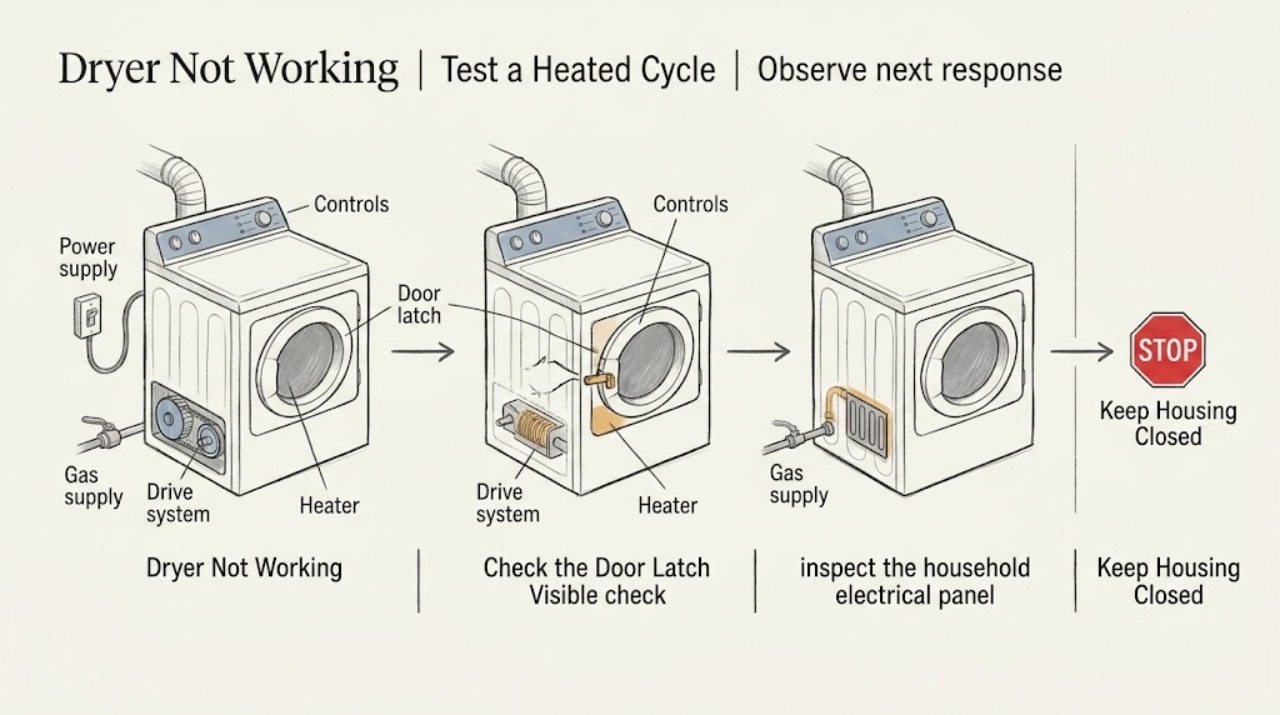
First identify what “not working” means: a completely dark display, a lit display that will not start, a drum that turns without heat, or a cycle that runs but leaves clothes wet. For an Amana dryer that will not start, confirm the door is latched, select a supported Timed Dry or Automatic Dry cycle, and hold Start or Push to Start for the model's required time; check Controls Locked if fitted. Electric dryers use two household breakers or fuses, while gas dryers use one, so check the visible panel only if it is dry and safe. If the drum runs but there is no heat, do not use Air Only; electric models need both supply legs, and gas models need an open gas shutoff. Clean the lint screen and inspect the visible vent path if drying is poor. Stop and arrange qualified service or electrical/gas help for repeated breaker trips, a burning smell, smoke, sparking, a damaged cord, gas odour, a failed door safety, or an internal fault. Do not open the cabinet, bypass a door switch, test live terminals, or repeatedly reset protection.
Before you begin
Safety first
- Do not open the dryer cabinet, remove the terminal cover, probe live wiring, bypass the door switch or Control Lock, access heating or ignition parts, alter gas fittings, repeatedly reset breakers, or run the dryer against a blocked vent. Stop immediately for smoke, burning smell, sparking, gas odour, overheating, water near electrical parts, a damaged cord, or repeated protection trips.
Work through in order
Diagnostic checks
Use only checks that match the exact appliance or system and its official guide.
-
Check 1
Before testing, note the exact state of the Amana dryer: completely dark display, display on but no start, drum turning with no heat, or a heated cycle that finishes damp. Check whether an error or indicator such as AF, Check Vent, L2, PF, or a model-specific code is visible.
Expected result: The display is dark; the controls light but the motor never starts; the drum runs but does not heat; or the cycle runs with poor drying.
Next step: Follow the matching power, start-controls, heating, or airflow branch and record the result for service if the first safe checks do not resolve it.
Stop if: Stop immediately for smoke, burning smell, sparking, gas odour, a hot or damaged cord, water near electrical parts, or repeated protection trips.
Why this matters
Why: Each symptom selects a different path. A dark display starts with supply. A no-start symptom starts with Start, door, cycle, and Control Lock. A no-heat symptom starts with cycle selection and electric/gas supply. Damp results with heat point toward airflow or load conditions.
-
Check 2
If the controls are lit but the dryer will not start, close the door firmly, confirm clothing is not caught in the latch, select Automatic Dry or Timed Dry as supported by the model, and press or hold Start, Push to Start, or Hold to Start as the manual specifies. Look for a Controls Locked or child-lock indicator.
Expected result: The door was not latched, the selected option was not a running cycle, Start was only tapped, or Controls Locked was active; alternatively, the controls and door appear normal but the motor remains silent.
Next step: Correct only the visible setting using the exact model manual and make one normal start attempt. If the dryer still does not start, leave it off and arrange appliance service rather than bypassing the latch or opening the cabinet.
Stop if: Do not force the door, bypass a door switch or lock, remove the control panel, or keep cycling Start when the dryer smells hot or electrical.
Why this matters
Why: Amana says the door must be latched, some models require Start to be held for two to five seconds, some cycle options do not run the dryer, and Controls Locked can prevent starting. If those conditions are normal and the dryer remains silent, the symptom is no longer a simple setting correction.
-
Check 3
If the display is dark or the dryer suddenly stopped, inspect the household electrical panel from a dry, safe position. For an electric model, identify whether both dryer breakers or fuses are intact; for a gas model, check the single dryer breaker or fuse. Reset a clearly tripped breaker only once if the panel and appliance are dry and there is no hazard.
Expected result: A breaker or fuse is visibly tripped or blown, all visible protection appears normal, or the breaker trips again as the dryer is used.
Next step: If protection resets and the dryer operates normally, monitor it without opening anything. If it trips again, a fuse is blown, the supply is uncertain, or the display stays dark, leave the dryer off and call a qualified electrician or appliance technician.
Stop if: Do not replace a fuse with an unknown rating, remove an outlet or terminal cover, touch wiring, use an extension cord, or reset a breaker repeatedly.
Why this matters
Why: Amana identifies household protection as a common cause of an unexpected stop and says electric dryers have two circuits. A repeated trip is evidence of an electrical or appliance fault, not a reason to keep resetting the panel. Normal protection with a dark display leaves the supply, cord, outlet, or internal power path unresolved.
-
Check 4
If the drum turns but there is no heat, confirm the cycle is a heated Timed Dry or other model-approved heated setting rather than Air Only or Air/Fluff. For an electric model, check the two visible dryer breakers again; for a gas model, observe from a safe position whether the supply shutoff is open, without loosening a gas connection.
Expected result: Air Only was selected; one electric supply leg is off; the gas shutoff is closed; or the selected heated cycle still produces no heat.
Next step: Correct the cycle or have the supply checked by the appropriate qualified professional. If the model-approved setting and supply are normal, stop using the dryer and arrange appliance service; do not test live components.
Stop if: Do not open the cabinet, access heating or ignition parts, test terminals, relight or alter gas fittings, or continue running a dryer with a burning smell, smoke, overheating, or a repeated trip.
Why this matters
Why: Amana says Air Only never adds heat, electric dryers need both supply sides, and a gas dryer will not heat with its shutoff closed. If the correct cycle and visible supply are normal but there is still no heat, a heater, thermal, ignition, or control diagnosis is required rather than a guessed part replacement.
-
Check 5
If the dryer heats but clothes remain damp or a Check Vent/AF indicator appears, clean the lint screen and inspect the accessible vent hose, wall connection, and outside hood for lint, debris, crushing, kinks, or a blocked flap. If the dryer must be moved, switch it off and unplug it first and keep the vent connection intact until it is safe to inspect.
Expected result: The lint screen or vent is restricted, the outside exhaust is weak, the vent indicator clears after the accessible obstruction is removed, or airflow remains poor.
Next step: Run only a supervised model-approved test after the accessible lint is cleared. If airflow remains weak, the vent is inaccessible, or the indicator returns, stop hot-cycle testing and arrange vent service or appliance service.
Stop if: Do not reach into moving parts, run the dryer against a visibly blocked vent, use an improvised vent, open the cabinet, or continue if the laundry area becomes unusually hot or smoky.
Why this matters
Why: Amana says restricted airflow can extend drying time and identifies the screen, hose, wall connection, outside hood, vent length, and elbows as checks. Improvement after clearing an accessible restriction supports an airflow cause. Persistent weak airflow or a recurring indicator means the full vent run needs professional cleaning or assessment.
Use your observations
Decision map
Find the observation that best matches what you see, then follow the next safe action.
-
PATH 01Next step
What you see
The Amana dryer has no display, suddenly stopped, or a breaker/fuse trips again.
Do this next
Check the visible household protection once when dry and safe; electric models have two circuits. If the display remains dark or protection trips again, leave the dryer off and use qualified electrical or appliance service.
-
PATH 02Next step
What you see
The display works but the motor does not start.
Do this next
Confirm the door latch, a supported running cycle, the required Start press/hold, and Controls Locked status. If one model-directed correction does not restore operation, service is the next step; do not bypass the door safety.
-
PATH 03Next step
What you see
The drum turns but clothes or the empty drum do not warm on a model-approved heated cycle.
Do this next
Rule out Air Only and check the visible supply branch: both electric breakers or the gas shutoff as applicable. If supply and settings are normal, stop and arrange appliance service for heating or control diagnosis.
-
PATH 04Next step
What you see
The dryer heats but clothes remain damp, or Check Vent/AF appears.
Do this next
Clean the lint screen and inspect the accessible hose, wall connection, and outside hood. Persistent weak airflow or a recurring indicator requires the full vent run to be professionally cleaned or assessed.
-
PATH 05Next step
What you see
There is smoke, burning smell, sparking, gas odour, overheating, water near electrical parts, a damaged cord, repeated breaker trips, or a failure after the safe checks.
Do this next
Stop using the dryer, disconnect power only if it can be done safely, keep the cabinet closed, and arrange qualified appliance, electrical, gas, or vent service as appropriate.
Helpful context
Understand the symptom
“Not working” describes several different symptoms
A dark display is a power or supply branch. A lit display that refuses to start is more often a door-latch, cycle, Start-button, touch-control, or Control Lock branch. A running drum with no heat is a separate heating branch, and a heated cycle that finishes with damp clothing points toward airflow, load, or heating performance. Record the exact symptom before changing settings so a working motor is not mistaken for a completely dead dryer.
Electric and gas models need different supply checks
Amana says an electric dryer has two household breakers or fuses and that one lost supply leg can prevent correct operation or heating. A gas dryer uses one breaker or fuse but also needs its gas supply connected and shutoff open to heat. These are external observations only. Do not remove the terminal cover, probe voltage, alter wiring, or work on a gas connection; a repeated trip or uncertain supply belongs with a qualified professional.
Airflow can make a working dryer appear broken
If the drum turns and clothes are warm but remain damp, Amana's Check Vent guidance directs attention to the lint screen, crushed or kinked hose, wall connection, outside hood, and the length and bends of the vent run. Clear only accessible lint and debris after switching the dryer off and unplugging it when the inspection requires moving it. A persistent airflow indicator or weak exhaust should be professionally cleaned or assessed rather than repeatedly running hot loads against a restricted vent.
Only after diagnosis
Potential parts
- dryer door latch or switch assembly
Consider this category only when the door cannot latch or a qualified diagnosis confirms a failed latch or door-sensing component after the visible door and clothing checks.
Confirm the exact Amana model and manufacturer fit information; never bypass the door safety to test or operate the dryer. - dryer heating or thermal safety component
Consider this category only when the correct heated cycle and visible power or gas supply are confirmed and a qualified technician identifies a heater or thermal fault.
Do not select an internal electrical or gas component from the no-heat symptom alone; confirm model fit, ratings, and safe installation through qualified service. - dryer exhaust vent component
Consider this category only when inspection confirms a damaged, crushed, or unsuitable accessible vent component rather than a blocked full-length vent run.
Match the installation instructions, vent material, routing, and exterior termination; do not use a substitute that restricts airflow or vents indoors.
When checks do not resolve it
Need a professional?
Call qualified appliance service when an Amana dryer still will not start after the door, cycle, Start, Control Lock, and safe supply checks, or when it runs without heat on a correct heated cycle. Call an electrician for uncertain supply or repeated breaker trips, qualified gas help for gas-supply concerns, and vent service for persistent Check Vent/AF or weak exhaust. Stop immediately for smoke, burning odour, sparking, gas odour, overheating, a damaged cord, water near electrical parts, or any need to bypass a safety device.
Safety scope: Do not open the dryer cabinet, remove the terminal cover, probe live wiring, bypass the door switch or Control Lock, access heating or ignition parts, alter gas fittings, repeatedly reset breakers, or run the dryer against a blocked vent. Stop immediately for smoke, burning smell, sparking, gas odour, overheating, water near electrical parts, a damaged cord, or repeated protection trips.
Common questions
FAQ
Why is my Amana dryer not starting even though the display is on?
Confirm the door is fully latched, clothing is not caught in the latch, a supported Automatic Dry or Timed Dry cycle is selected, and Start is pressed or held as required by the model. Check whether Controls Locked is active. If the dryer still does not start, arrange service rather than bypassing the door safety.
Why does my Amana dryer run but not heat?
Make sure Air Only or Air/Fluff is not selected. An electric dryer needs both supply breakers or fuses available; a gas dryer also needs its gas shutoff open. If the cycle and visible supply are correct but there is no heat, stop using the dryer and arrange qualified appliance service.
Does an Amana electric dryer use more than one breaker?
Yes. Amana says electric dryers use two household fuses or circuit breakers. Check only the visible panel when dry and safe, and do not repeatedly reset protection. If a breaker trips again or the dryer remains dead, call a qualified electrician or appliance technician.
What does Check Vent or AF mean on an Amana dryer?
Amana uses these indicators for restricted airflow. Clean the lint screen and inspect the accessible hose, wall connection, and outside hood for lint, debris, crushing, or kinks. If airflow remains weak or the indicator returns, arrange cleaning or professional assessment of the entire vent run.
Should I keep resetting the breaker if my Amana dryer stops?
No. A single visible reset may be appropriate only when the panel and appliance are dry and there is no hazard, but a repeated trip indicates an electrical or appliance fault. Leave the dryer off and arrange qualified electrical or appliance service; do not open the cabinet or terminal cover.
Read the exact guide
Official sources
- Dryer is Not HeatingAmana Product Help · Official Amana guidance for selecting a heated cycle, checking electric supply, confirming gas supply and shutoff, and escalating persistent no-heat faults.
- Checking if a Household Fuse or Circuit Breaker has TrippedAmana Product Help · Official Amana guidance for an appliance that unexpectedly stops, including the two-circuit requirement for electric dryers and escalation when the issue continues.
- Dryer Not Starting or No OperationAmana Product Help · Official Amana guidance for a dryer that will not start or operate, including Start technique, touch controls, door latch, cycle selection, and Controls Locked.
- AF or "Check Vent" - DryerAmana Product Help · Official Amana guidance for AF or Check Vent indications and weak airflow affecting drying performance.
Community feedback
Share a repair observation
Share a plain-text repair observation. Accepted observations are published automatically; this page may take a moment to update.