
On this page
Start here
Quick answer
When a GE dryer is not working, first separate a blank or unresponsive control from a dryer that starts but will not tumble or heat. Confirm the plug, dedicated circuit, door closure, cycle settings, and Start command; then note whether the door switch, drum, and display behave normally. Do not operate a gas dryer without its exhaust, and stop for a burning smell, smoke, a hot or damaged cord, exposed wiring, repeated breaker trips, or a blocked vent that makes the dryer hot. If the external checks do not restore operation, arrange qualified dryer service.
Work through in order
Diagnostic checks
Use only checks that match the exact appliance or system and its official guide.
-
Identify whether the dryer has any control power
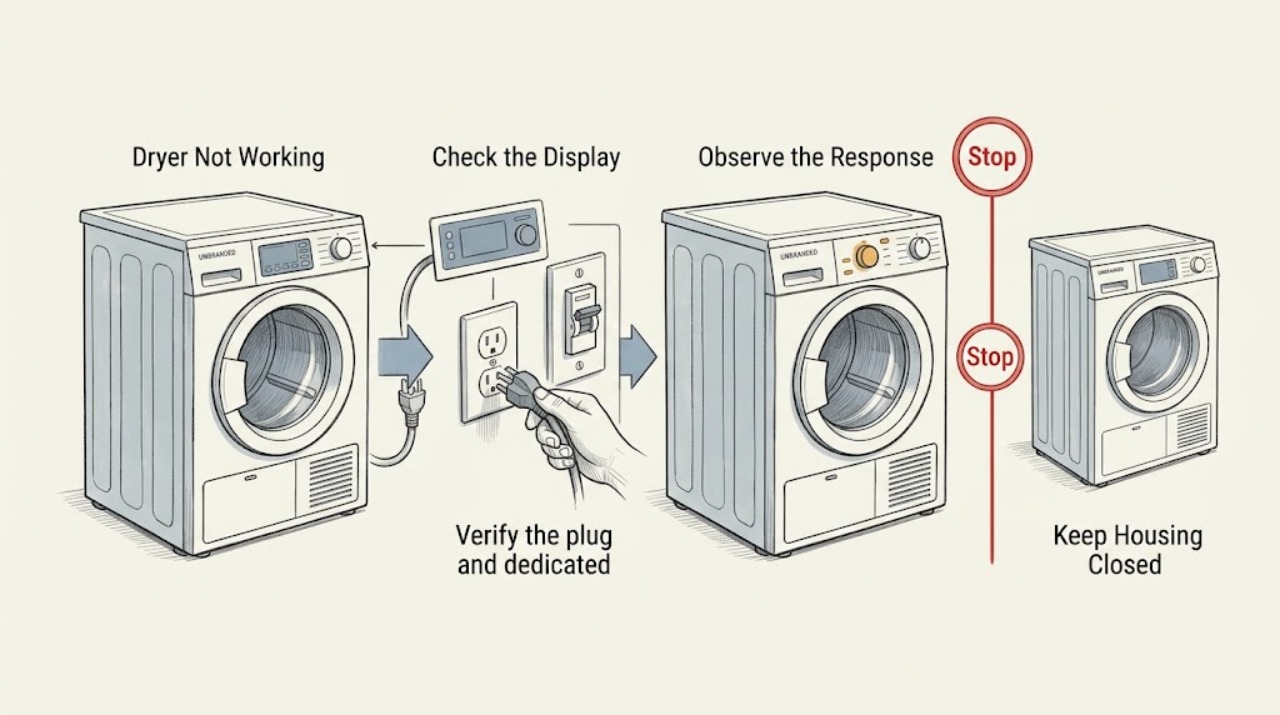
Press the normal Power or Start control once and record whether the display is blank, lights up, shows a number or alert, or responds but leaves the drum still. Check the dryer type and preserve any unusual display indication before changing settings.
Expected result: A blank display points first to the plug, circuit, or internal power path. A lit display with no motor response points toward door detection, cycle settings, Start input, or a drive fault; a running drum with no heat is a different branch.
Next step: For a blank panel, check the connection and circuit. For a lit panel, continue with door, cycle, and Start checks; do not open the cabinet to identify a component.
Why this matters
Why: GE's no-start guidance treats power, closure, controls, Start input, door switch, and circuit protection as separate checks rather than one generic failure.
-
Verify the plug and dedicated circuit
With the dryer off and safe to reach, confirm the plug is fully seated in its wall outlet and check the home's dryer breaker or fuses according to normal user procedures. Do not keep resetting a breaker that trips, and do not inspect rear wiring unless the model instructions and a qualified person make that safe.
Expected result: If restoring a stable supply brings the panel back, the dryer had a connection or circuit interruption. If the panel stays blank, or a breaker trips again, the supply or dryer has an unresolved fault.
Next step: Arrange electrical service for a dead outlet or repeat trip. If the outlet and circuit are stable but the dryer remains blank, stop external testing and request appliance service.
Why this matters
Why: GE says the dryer should use a separate circuit and that an unplugged unit or inoperative house circuit can prevent starting. Electric dryers may have more than one protective device, depending on the model.
-
Check door closure and the door switch
Open and close the dryer door firmly, checking that no garment or lint is caught at the opening. With power disconnected, visually inspect the accessible door-switch area for scorching, damage, or a switch that appears pushed in; do not bypass or electrically test it.
Expected result: If the dryer starts only after the door is firmly closed, closure or switch detection was blocking operation. A scorched, damaged, or persistently unresponsive switch can prevent the motor from starting even when the display works.
Next step: Keep the switch intact and arrange service for damage or a persistent no-start. Never tape, hold, or bypass the switch to make the dryer run.
Why this matters
Why: GE specifically identifies a tightly closed door and a door switch that is scorched or pushed in as no-start clues; the switch is a safety interlock.
-
Confirm cycle, Start input, and model settings
Select a normal dry cycle with a valid fabric, temperature, and time setting, then press or turn Start fully as the model requires. If the display shows a model setting number or personality prompt, use the owner's manual to select the setting matching whether the dryer is gas or electric; do not guess at hidden service settings.
Expected result: If the motor starts after a valid cycle and complete Start input, the earlier issue was a control selection or incomplete command. On certain newer GE models, an invalid personality setting can leave the dryer from turning on or tumbling and may show a number in the display.
Next step: If the setting is unclear, stop and use the exact model manual. If a valid selection and full Start command still produce no action, continue to the drum and service checks.
Why this matters
Why: Cycle and Start controls are part of the run command, and GE notes that some models require a gas or electric personality selection.
-
Separate a drum or drive fault
If the dryer hums but the drum does not turn, stop the cycle and remove some clothing if the load is heavy or wet. With the dryer unplugged, do only the model-approved external check of whether the drum turns normally by hand; do not remove panels or reach for the belt.
Expected result: If a smaller load allows the drum to turn, the load may have overloaded the drive. If the drum turns unusually freely with power disconnected or the motor runs without tumbling, GE identifies a possible loose or broken belt that requires service.
Next step: Stop using the dryer and arrange service for a free-spinning drum, persistent hum, scraping, or no-tumble condition. Do not run the dryer with a suspected belt or motor fault.
Why this matters
Why: A no-tumble symptom is mechanical and is not fixed by a breaker reset or a new cycle setting.
-
Check airflow and heat-related symptoms
If the dryer runs but is hot, stops early, dries slowly, or shows Check Vent, inspect the lint filter and the accessible exhaust path only when the appliance is off. Check the outside hood for a free-moving damper and look for a kinked or collapsed duct; do not disconnect a gas dryer's exhaust to run a test.
Expected result: A Check Vent alert, weak exhaust, a hot cabinet, or lint accumulation indicates restricted airflow that can make the dryer overheat and can become a safety issue. If airflow is normal but the dryer still stops or will not heat, the appliance needs diagnosis.
Next step: Clean the permitted lint and vent areas, then follow the model manual. If the dryer remains hot, stops, or fails to heat, stop operation and request service rather than bypassing a thermal or gas safety device.
Why this matters
Why: GE says the vent removes hot, moist air and lint; blocked airflow can retain heat and increase risk. Gas dryers must retain their required exhaust because exhaust gases can enter the room.
Use your observations
Decision map
Find the observation that best matches what you see, then follow the next safe action.
-
PATH 01Next step
What you see
The display is blank and the plug or circuit has no stable power.
Do this next
Treat this as an electrical-supply issue. Arrange qualified electrical service for a dead outlet or repeated breaker trip; do not open the dryer.
-
PATH 02Next step
What you see
The display works but the motor will not start.
Do this next
Check firm door closure, the accessible door-switch condition, a valid cycle, and a complete Start command. Persistent failure needs appliance service.
-
PATH 03Next step
What you see
The motor runs but the drum does not turn.
Do this next
Stop the dryer and reduce a heavy load only once. A free-spinning drum, hum, or persistent no-tumble condition requires drive-system service.
-
PATH 04Next step
What you see
The dryer runs but overheats, stops, dries slowly, or shows Check Vent.
Do this next
Turn it off, clean the permitted lint and exhaust path, and request service if airflow or operation remains abnormal. Never operate a gas dryer without its required vent.
-
PATH 05Next step
What you see
There is smoke, burning odor, sparking, a hot or damaged cord, gas odor, or a repeated electrical trip.
Do this next
Stop immediately, disconnect power only if safe, avoid further tests, and contact qualified electrical, gas, or appliance emergency support from a safe location.
Helpful context
Understand the symptom
Classify the failure before resetting anything
A completely blank panel, a panel that lights but does not respond, a motor that hums without turning the drum, and a cycle that tumbles without heat are different faults. Record the model, display message, cycle selected, whether the drum turns, whether the front feels unusually hot, and whether the dryer is gas or electric.
Dryer safety boundary
Unplug the dryer before cleaning or maintenance that the owner's instructions permit. Never bypass the door switch, remove a terminal-block cover while energized, or operate a gas dryer without the required exhaust. Stop for smoke, a burning smell, sparking, a hot or frayed cord, repeated breaker trips, or a lint blockage that makes the appliance hot.
Only after diagnosis
Potential parts
- door switch
Only consider this when the door closes correctly but a qualified diagnosis confirms the switch is scorched, physically damaged, or not detecting closure.
Switch shape and wiring vary by exact model; verify the model documentation before ordering. - drive belt
Only consider this when the drum turns freely or a technician confirms a loose or broken belt after separating overload and motor causes.
Belt length, routing, and fit are model-specific; confirm the exact model and diagnosis. - thermal protection or heating component
Only consider this after a qualified diagnosis identifies a failed thermal or heating component and the vent path has been checked.
Electrical and gas-heating parts require exact model documentation and qualified installation; do not infer compatibility from appearance.
When checks do not resolve it
Need a professional?
Arrange qualified dryer service when stable power, door closure, cycle settings, and Start input do not restore operation; when the door switch is damaged; when the drum will not turn or turns freely; or when the dryer repeatedly stops or fails to heat. Have the exhaust professionally checked for persistent Check Vent or overheating symptoms. Stop immediately for smoke, burning odor, sparks, a hot or damaged cord, gas odor, or repeated breaker trips. Do not operate a gas dryer without its required exhaust.
Common questions
FAQ
Why is my GE dryer not working at all?
Check whether the display is blank or lit. Confirm the plug and circuit, then check door closure, cycle settings, and the Start command. If those are correct and it remains dead, arrange service.
Why does my GE dryer turn on but not start?
A door that is not detected, an incomplete Start command, an invalid cycle or model setting, or a drive fault can prevent running. Do not bypass the door switch; request service for a persistent failure.
What does Check Vent mean on a GE dryer?
It indicates low exhaust airflow. Turn the dryer off, clean the permitted lint and exhaust path, and have persistent restriction or overheating investigated.
Can I run my GE gas dryer without the vent connected?
No. GE warns that a gas dryer must retain its required exhaust because combustion fumes can enter the room.
Read the exact guide
Official sources
- Dryer - Things To Check For A Venting IssueGE Appliances Support · Kinked ducts, airflow, heat retention, outside hood, and gas-dryer exhaust safety
- Dryer - Check Vent Sensor AlertGE Appliances Support · Low airflow, heat retention, lint risk, and accessible vent cleaning
- Dryer - Drum Does Not TurnGE Appliances Support · Overload, free-spinning drum, belt-related no-tumble symptom, and service boundary
- Dryer - Will Not Run or StartGE Appliances Support · No-start checks for plug, door, cycle, Start control, door switch, circuit, and model settings
- Gas Dryer - Runs But Does Not HeatGE Appliances Support · Cycle selection, airflow, electrical outlet, gas line, and service boundary
- Use This Problem SolverGE Appliances · Dryer won't start, door closure, controls, Start command, circuit, and lint guidance
Community feedback
Share a repair observation
Share a plain-text repair observation. Accepted observations are published automatically; this page may take a moment to update.