
On this page
Start here
Quick answer
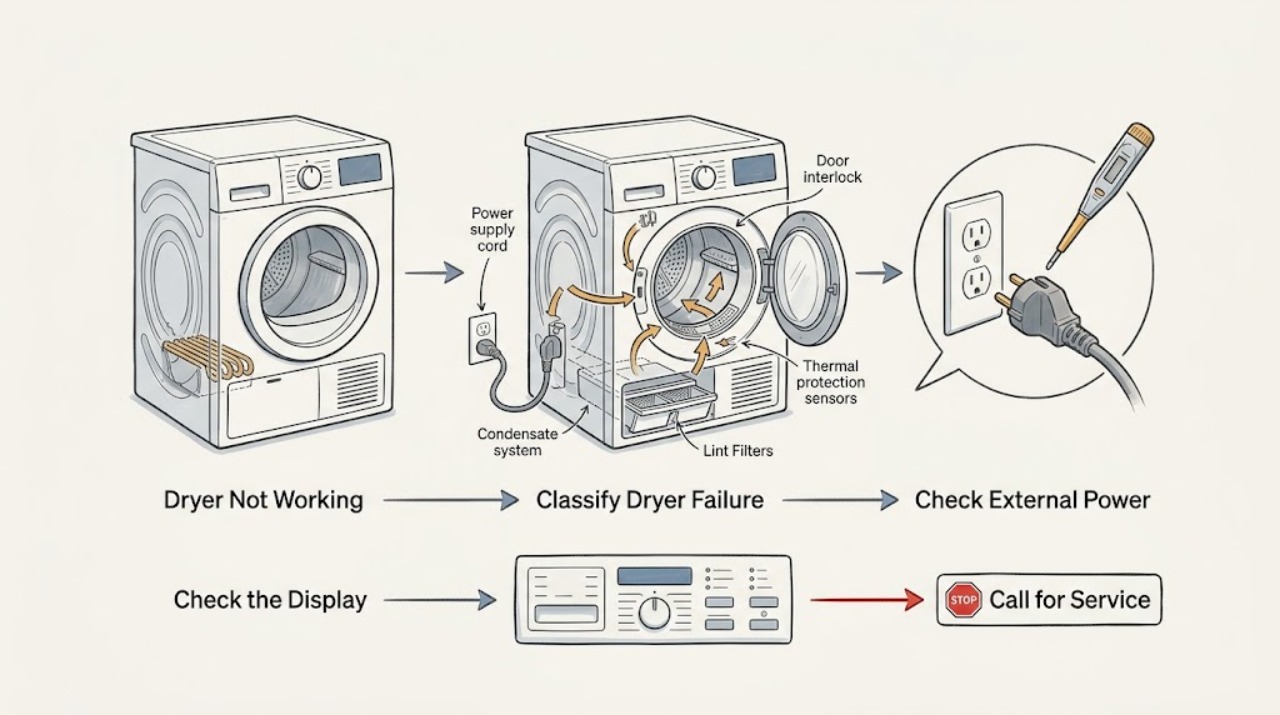
An Asko dryer that is not working may be losing power, waiting for a valid start, blocked by an open door or active delay/lock state, stopped by a full condensate tank on applicable models, or protecting itself from heat caused by dirty filters or restricted airflow. First identify whether the display is blank, the programme is idle, the drum stops during a cycle, or the dryer runs but does not dry. Check only the normal external power point, close the door, use the exact model's start sequence, empty the tank and clean user-accessible filters where fitted, and allow a hot dryer to cool. If the same fault returns, an error remains, power trips, or there is smoke, burning odor, abnormal heat, water near electrics, or a damaged cord, stop using the dryer and arrange qualified service rather than opening the cabinet.
Work through in order
Diagnostic checks
Use only checks that match the exact appliance or system and its official guide.
-
Check 1
From outside the dryer, note whether the display and indicators are completely dark, whether the display is lit but idle, whether the drum starts and then stops, or whether the drum runs while the load stays wet. Record any message, symbol, unusual heat, odor, or sound before trying another cycle.
Expected result: The panel is blank; the panel is active but no programme begins; the dryer stops during operation; or it completes a cycle without drying adequately.
Next step: Follow the matching power, programme, condensate/filter, airflow, or service branch below. Keep the dryer off if any electrical, burning, water, or abnormal-heat warning is present.
Stop if: Stop immediately for smoke, burning odor, visible sparking, water near electrical parts, an abnormally hot cabinet, or a damaged cord or plug.
Why this matters
Why: A blank panel directs the first check to external supply. A lit but idle panel points to door, start, delay, lock, tank, or programme state. A mid-cycle stop raises filter, airflow, condensate, or thermal-protection questions. A running but wet load follows the drying-performance branch rather than a no-power diagnosis.
-
Check 2
Check the normal main switch and confirm the power cord plug is correctly seated in the intended outlet. If an accessible fuse or breaker has opened, look for an obvious hazard and reset it no more than once; do not use an extension cord or open the outlet, plug, terminal area, or dryer cabinet.
Expected result: The display returns after the external correction; the outlet or fuse still has no supply; the breaker opens again; or the dryer remains blank despite apparent supply.
Next step: If the panel returns without a recurrence, continue with the door and start sequence. If the supply trips again or the panel stays blank with supply available, leave the dryer off and arrange qualified appliance or electrical service.
Stop if: Do not repeatedly reset a breaker or fuse, replace it with a different rating, use a damaged cord, or test live wiring.
Why this matters
Why: ASKO lists a switched-off main switch, no outlet voltage, and an incorrectly inserted plug as causes of a dryer that will not start. A repeated trip or persistent blank panel is not a normal programme setting and may indicate an electrical or appliance fault.
-
Check 3
Close the door fully without force, check from outside that fabric is not caught in the seal, select a simple drying programme, and press Start/Pause exactly as the model manual describes. Check the display for a delayed-start countdown, Lock, or standby state; use only the model manual to cancel or wake that state.
Expected result: The programme starts; the door is not recognised as closed; a delay or lock indicator clears; the display is only in standby; or the controls accept the selection but the dryer stays idle.
Next step: If the dryer starts, monitor one supervised cycle. If the door will not latch, the lock or delay will not clear, or the controls remain unresponsive after the documented procedure, stop repeated button combinations and arrange service.
Stop if: Do not force the door, defeat the door interlock, enter an undocumented service menu, or bypass a control or safety device.
Why this matters
Why: The manual says no programme can start with the door open, delayed start intentionally waits, standby turns the display off after inactivity, and a locked control prevents other functions. If the start sequence is accepted but the dryer remains idle, a user setting alone no longer explains the symptom.
-
Check 4
If the dryer is a condenser or heat-pump model, inspect the display for a condensate warning and empty the user-accessible tank only as the exact manual directs. With the dryer switched off and cool, clean and correctly refit the door or lower lint filters that the manual identifies as user-accessible.
Expected result: The tank is full; a filter warning is present; a filter is visibly clogged; the model drains directly and has no applicable tank; or the tank and filters are clear but the dryer still will not run.
Next step: Refit the tank and filters, then retry one simple programme after the dryer is cool. If a warning returns, the dryer stops again, or the model's filter or tank is not safely accessible, leave it off and arrange service.
Stop if: Do not operate without required filters, press on heat-exchanger fins, spray liquid into the cabinet, access a pump, or remove a fixed filter housing.
Why this matters
Why: ASKO identifies a full condensate tank as a no-work condition on applicable models. It also explains that a clogged door filter can raise temperature, trigger overheating protection, and switch the dryer off. A clear tank and filters remove those user-level possibilities but do not diagnose a pump, control, motor, or thermal fault.
-
Check 5
If the drum runs but drying is slow or incomplete, keep the visible air openings clear, check that the dryer is not enclosed in a way that blocks fresh air, and compare the load size and programme with the model manual. Note whether the laundry was sufficiently spun before drying; do not dismantle the dryer to inspect the heater or compressor.
Expected result: Filters are clean but the room or cabinet is poorly ventilated; the room is unusually cold or hot; the load is too large, too small, or tangled; the laundry was not spun sufficiently; or the same poor result occurs under suitable conditions.
Next step: Improve only the clearly visible airflow, load, programme, or laundry-preparation condition described by the manual and run one supervised cycle. If drying remains poor with clean filters and suitable conditions, arrange qualified appliance service.
Stop if: Stop for persistent abnormal heat, smoke, burning odor, a blocked fixed vent, or any need to move a stacked or built-in dryer to investigate.
Why this matters
Why: The ASKO manual links long drying times to dirty filters, restricted fresh air, unsuitable room conditions, insufficient spinning, unsuitable load size, and tangled laundry. These observations can explain poor drying without proving an internal component has failed.
-
Check 6
If an error or information message appears, copy it exactly, use the model or product code to retrieve the matching ASKO manual, and perform only its documented user step. After all safe external checks, the manual permits one controlled switch-off, one-minute wait, and restart for an error; record the result rather than repeating resets.
Expected result: The message clears and one cycle runs normally; the same message returns; the dryer still will not start; the drum stops again; or the display identifies a door, pump, sensor, control, relay, or motor communication fault.
Next step: Leave the dryer off when the error or symptom returns and arrange qualified service with the model, type, serial number, exact message, selected programme, and checks already completed.
Stop if: Do not keep clearing an error, bypass a safety device, remove panels, test internal components, or continue using the dryer after smoke, burning odor, water near electrics, or repeated power trips.
Why this matters
Why: ASKO's error table routes persistent or component-related failures to service. A one-time restart can address a temporary disturbance, but recurrence is evidence of an unresolved fault and not a reason to open the cabinet or replace a part by guesswork.
Use your observations
Decision map
Find the observation that best matches what you see, then follow the next safe action.
-
PATH 01Next step
What you see
The display and indicators are completely dark.
Do this next
Check only the normal external switch, plug, and accessible fuse or breaker once. If supply is available but the panel stays blank, arrange qualified service.
Why this path and its safety boundary
Why it matters: The main switch, outlet, plug, household protection, or an internal power circuit may be involved.
-
PATH 02Next step
What you see
The display is lit, but the programme does not begin.
Do this next
Wake the display if needed, close the door, cancel delay or lock only as the model manual describes, and start one simple programme. Arrange service for a failed latch or persistent idle state.
Why this path and its safety boundary
Why it matters: The dryer may be in standby, waiting for the documented Start/Pause command, blocked by an open door, or held by delay or lock state.
-
PATH 03Next step
What you see
A condenser or heat-pump dryer shows a full condensate tank or related warning.
Do this next
Empty and refit the tank only as the exact manual directs, then retry once. If the warning returns or the tank path is not safely accessible, arrange service.
Why this path and its safety boundary
Why it matters: The full tank can interrupt operation on applicable dryer types.
-
PATH 04Next step
What you see
The dryer stopped during a programme, was unusually hot, or shows a filter warning.
Do this next
Let the dryer cool, clean and refit only the user-accessible filters, keep visible air openings clear, and try one supervised cycle. Arrange service if it stops again.
Why this path and its safety boundary
Why it matters: A clogged lint path can raise temperature and activate protective shutdown; restricted fresh air can also impair drying.
-
PATH 05Next step
What you see
The drum runs, but laundry remains wet or the programme takes much longer than expected.
Do this next
Correct a clearly visible user-level condition according to the model manual and run one supervised cycle. If the result repeats with clean filters and suitable conditions, arrange appliance service.
Why this path and its safety boundary
Why it matters: Filters, room airflow or temperature, load size, tangled laundry, or insufficient pre-spin may be contributing; an internal heating fault cannot be identified from this symptom alone.
-
PATH 06Next step
What you see
An error returns, the dryer remains idle after the documented start sequence, or it will not restart after cooling and one controlled restart.
Do this next
Stop repeated resets and arrange qualified service with the exact error or symptom record and the model, type, and serial number.
Why this path and its safety boundary
Why it matters: The remaining possibilities include an internal control, sensor, pump, motor, thermal, door, or power fault that requires model-specific diagnosis.
-
PATH 07Next step
What you see
There is smoke, burning odor, visible sparking, water near electrical parts, abnormal heat, a damaged cord, or a breaker that opens again.
Do this next
Stop using the dryer and arrange qualified appliance or electrical service. Isolate power only if it can be done without touching water or damaged equipment.
Why this path and its safety boundary
Why it matters: This is a safety condition, not a programme-setting problem.
Helpful context
Understand the symptom
First separate no power from no programme
A completely dark display and a lit display with no movement are different starting points. The ASKO manual says the display can enter standby after inactivity, while an appliance that will not start can also have a switched-off main supply, no outlet voltage, an incorrectly inserted plug, an unaccepted programme start, an open door, a full condensate tank on applicable models, or delayed start. Record the display state and the exact point where the dryer stops before changing settings.
Use model-specific controls and maintenance
ASKO manuals cover several dryer types and explicitly note that some settings or equipment may not be present on every model. Use the model or product code to retrieve the matching manual, and treat the tank, lower filter, lock, delay, and reset instructions as model-specific. Keep the inspection external and user-accessible; cabinet, motor, heater, pump, control, sensor, refrigerant, and wiring work belongs to trained service personnel.
A dryer that runs but does not dry is still a useful branch
If the drum turns but clothes remain wet or the cycle takes much longer, the problem may be filters, insufficient fresh air, unsuitable room conditions, a load that is too large or too small, or laundry that was not sufficiently spun. These findings do not prove a failed heater or compressor. Correct only the documented user-level condition, then escalate if the result repeats.
Safety boundary
Stop conditions
- Stop using the dryer for smoke, burning odor, visible sparking, a damaged or hot cord or plug, water near electrical parts, abnormal heat, or a repeated electrical trip.
- Do not remove cabinet panels, probe wiring, access the motor, heater, pump, compressor, refrigerant circuit, or control board, or bypass the door or thermal protection.
- Do not repeatedly reset a fuse, breaker, error, or control state when the same symptom returns.
- Do not operate without required lint filters, block air openings, press on heat-exchanger fins, or spray liquid into the cabinet.
- Stop if diagnosis would require moving a stacked or built-in dryer, opening a fixed filter housing, or working on a damaged door lock or cord.
Only after diagnosis
Potential parts
- door interlock or latch assembly
Consider this only if qualified diagnosis confirms that the door is correctly aligned but the dryer does not recognise a closed door.
Confirm the exact Asko model and manufacturer fit information before ordering; do not bypass the interlock or infer fit from the symptom. - lint filter
Consider this only if the model manual identifies a damaged or missing user-replaceable filter after cleaning does not restore the required filter condition.
Confirm the exact model, filter position, and manufacturer fit information; do not run the dryer without its required filter. - condensate pump
Consider this only after qualified diagnosis confirms a condensate-pump fault on a model that uses a pump; a full-tank warning alone does not identify the pump.
Confirm the exact model and manufacturer fit information with a qualified technician before ordering or replacing this internal component.
When checks do not resolve it
Need a professional?
Arrange qualified Asko or appliance service when the display stays blank with external supply available, the door will not latch, a delay or lock state will not clear, a condensate or filter shutdown returns, the dryer remains idle after the documented start sequence, drying remains poor after clean filters and suitable airflow, an error persists, or any electrical, water, smoke, odor, or abnormal-heat warning occurs.
Common questions
FAQ
Why is my Asko dryer not working even though the display is on?
A lit display does not prove that a programme has started. Check standby, the exact Start/Pause sequence, door closure, delayed start, lock state, and a full condensate tank on applicable models. If the controls accept a programme but the dryer remains idle, arrange qualified service after the safe external checks.
Can a full tank stop an Asko dryer?
Yes, on condenser and heat-pump models the ASKO troubleshooting table lists a full condensate tank as a reason the dryer may not work. Empty and refit the tank only as the exact model manual directs, then retry once; a returning warning needs service.
Can a dirty filter make an Asko dryer stop?
Yes. ASKO explains that a clogged door filter can raise the temperature, activate overheating protection, and switch the dryer off. Let it cool, clean and refit only the user-accessible filters, and arrange service if the dryer stops again.
Why does my Asko dryer run but leave clothes wet?
The manual lists dirty filters, insufficient fresh air, unsuitable room conditions, insufficient pre-spinning, an unsuitable load size, and tangled laundry as possible contributors to long or incomplete drying. Correct a clearly visible user-level condition once; persistent poor drying with clean filters needs service rather than an assumed heater replacement.
Should I keep resetting an Asko dryer that stops?
No. ASKO's manual describes switching the appliance off, waiting one minute, and restarting once for an error disturbance, then calling an authorised service centre if the error persists. Do not repeat resets for a returning fault, power trip, burning odor, smoke, water near electrics, or abnormal heat.
What information should I give Asko service?
Provide the model, type, and serial number from the rating plate inside the door, plus the exact display message, programme, door and start result, tank and filter condition, whether the drum moved, and what happened after the one documented restart. That record is more useful than guessing at a replacement part.
Read the exact guide
Official sources
- Search for ManualsASKO · Use to locate the exact manual before applying a control, lock, delay, condensate, filter, or reset procedure; it does not establish a universal sequence for every model.
- User ManualASKO · This is an official model-family manual and its settings or equipment are not universal to every Asko dryer; use the exact model manual for the reader's controls and maintenance steps.
Community feedback
Share a repair observation
Share a plain-text repair observation. Accepted observations are published automatically; this page may take a moment to update.