
On this page
Start here
Quick answer
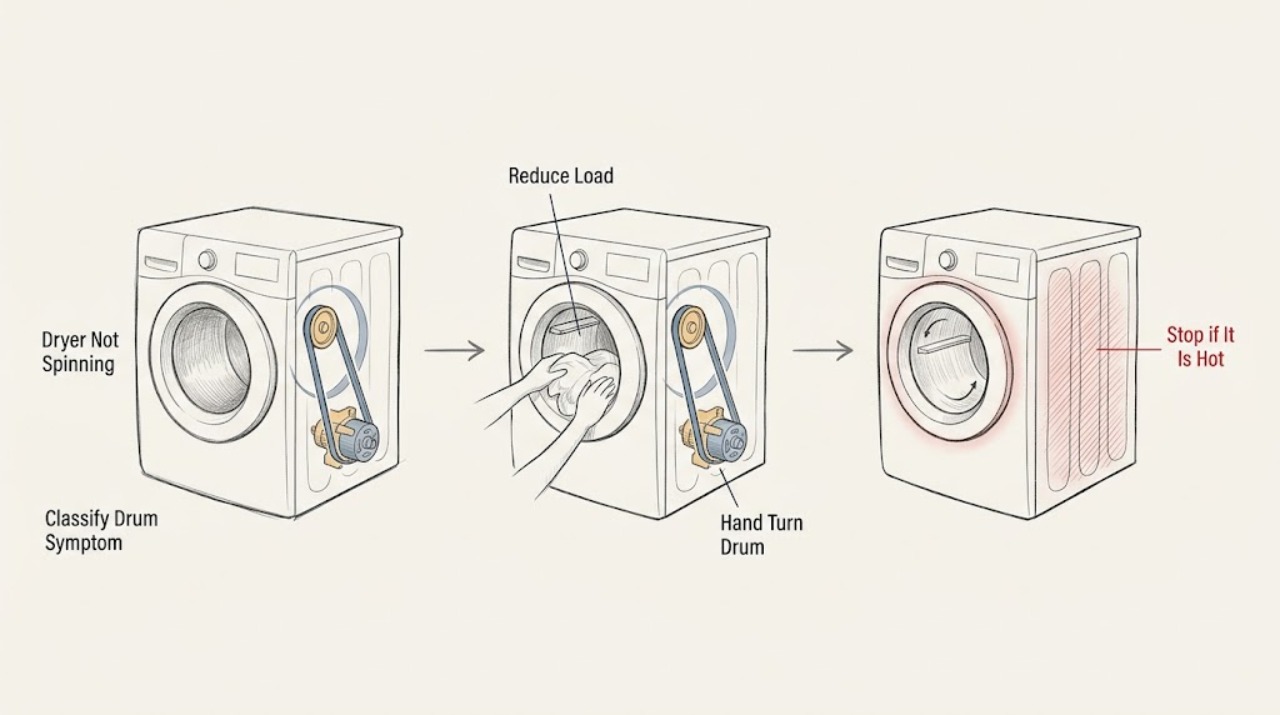
If a Blomberg dryer runs but the drum does not spin, stop the cycle, disconnect power, and remove some laundry if the drum is overloaded. With power disconnected, turn the drum by hand: unusually easy movement can point to a drive-belt problem, while scraping, binding, or a drum that will not move is a stop-and-service result. Also check that the door closes securely, a programme is selected, Start/Pause is pressed, Child Lock is not blocking the controls, and any water-tank or filter warning is handled according to the model manual. If the dryer has no power, the breaker trips, the motor only hums, there is a burning smell, or the drum still will not turn after these external checks, unplug it and arrange authorised service rather than opening the cabinet or replacing drive parts yourself.
Work through in order
Diagnostic checks
Use only checks that match the exact appliance or system and its official guide.
-
Check 1
Stop the dryer and identify whether the display and cycle are active while the drum is still, or whether the dryer never starts at all.
Expected result: The drum is still after a programme begins, the controls are active but no cycle begins, or the panel is completely blank.
Next step: Use the matching load-and-drum, start-controls, or power branch instead of repeating the same Start command.
Stop if: Stop immediately for smoke, a burning smell, sparks, visible heat damage, or a damaged power cord.
Why this matters
Why: A running cycle with no drum movement points toward load or drive mechanics; a powered but idle panel points toward door/start settings; a blank panel points toward the supply or an internal electrical fault.
-
Check 2
Turn the dryer off, open the door, and remove part of the load if the drum is tightly packed or heavy; keep the load within the capacity stated for the exact model.
Expected result: The drum becomes able to move and spins on a supervised short cycle, or it remains still with a normal-sized load.
Next step: If it spins with less laundry, use smaller loads. If it remains still, disconnect power and perform the hand-turn check.
Stop if: Do not force the drum or continue operating if the load is accompanied by scraping, burning odor, or unusual heat.
Why this matters
Why: An overloaded drum can prevent proper rotation and can strain the drive system. If reducing the load changes nothing, the fault is not explained by load size alone.
-
Check 3
With the dryer switched off and unplugged, gently turn the empty drum by hand from the door opening; do not remove panels or reach into the drive area.
Expected result: The drum turns unusually easily, feels roughly normal, or scrapes, binds, or will not turn.
Next step: If movement is unusually easy, abnormal, or noisy, leave the dryer unplugged and request service for the belt/drive system. Do not treat this check as permission to replace the belt yourself.
Stop if: Stop at once for binding, scraping, a loose drum, exposed material, or any need to open the cabinet.
Why this matters
Why: Blomberg identifies a drum that turns too easily as a clue for a worn or broken drive belt. Binding or scraping is an abnormal mechanical result, while a normal-feeling drum with no powered rotation leaves the motor, idler, controls, or another drive fault unresolved.
-
Check 4
If the display is lit, close the loading door firmly, select a valid drying programme, make sure the dryer is not paused, and press Start/Pause once.
Expected result: The dryer starts and the drum begins moving, or the door is closed but the programme remains idle.
Next step: If it starts, supervise the first cycle. If it stays idle, check Child Lock and any displayed warning using the exact model manual, then stop if the door switch does not engage normally.
Stop if: Do not slam or bypass the door switch, and stop if the latch, hinge, seal, or switch is damaged or requires force.
Why this matters
Why: A dryer will not operate when the loading door is open, when a programme is not selected, or when the control remains in Pause. A successful start makes a drive fault less likely for that test; a persistent idle state keeps the door switch or controls in the diagnostic path.
-
Check 5
Read the display for Child Lock, Pause, water-tank, filter, or end-of-programme indications and follow the exact model manual for clearing that state; do not guess a button combination.
Expected result: The lock or warning clears and the drum starts, or the indication returns and the dryer still will not spin.
Next step: Handle only an accessible tank or filter task described for the model, then retry once. Record a recurring indication and arrange service if the programme still will not run.
Stop if: Stop if water is leaking toward electrical parts, a filter or cover will not close securely, or a warning returns immediately.
Why this matters
Why: A control lock, full water tank, or interrupted programme can prevent normal operation without proving that the belt or motor has failed. A recurring indication requires model-specific diagnosis.
-
Check 6
If the panel is blank or the dryer stopped after a power event, inspect the plug and cord externally and check the household breaker or fuse without opening the dryer.
Expected result: The outlet and breaker are normal, or the outlet is dead, the cord is damaged, or the breaker trips again when the dryer is used.
Next step: If the household supply is at fault, have it checked. If supply is present but the dryer remains dead or trips again, unplug it and arrange authorised service.
Stop if: Stop for a damaged cord, hot/discolored outlet, sparks, moisture at the connection, or any repeated trip.
Why this matters
Why: A supply problem can prevent the motor from running, but a good supply with a non-spinning dryer shifts the fault into the appliance. A repeated trip is evidence of a fault, not a cue to keep resetting the breaker.
-
Check 7
Before requesting repair, record the model number, whether the display was blank or active, the load size, hand-turn result with power disconnected, door/start result, warnings, and any unusual sound or smell.
Expected result: The drum remains still after a normal load and valid start, the hand-turn result is abnormal, the motor hums without rotation, or the dryer has a recurring control or power fault.
Next step: Keep the dryer unplugged when the result is abnormal or hazardous and arrange authorised Blomberg service with the recorded model and symptom history.
Stop if: Do not open the cabinet, bypass the door switch, test live wiring, or continue running the dryer to reproduce a mechanical or electrical hazard.
Why this matters
Why: The remaining possibilities include the drive belt, idler pulley, motor, timer/control board, door switch, wiring, or another internal component. Blomberg identifies these as professional repair territory rather than a safe cabinet-level user fix.
Use your observations
Decision map
Find the observation that best matches what you see, then follow the next safe action.
-
PATH 01Safety boundary
What you see
The controls are active but the drum does not move after the programme starts.
Do this next
Check load size, then perform the unplugged hand-turn check; an unusually easy, binding, or scraping drum is a service result.
Why this path and its safety boundary
Safety stop: If the programme never starts, check door, programme, Start/Pause, Child Lock, warnings, and power.
-
PATH 02Safety boundary
What you see
The drum is overloaded or the load is tightly packed.
Do this next
Remove some items and try a supervised short cycle within the model's stated capacity.
Why this path and its safety boundary
Safety stop: Continue to the unplugged hand-turn and drive-path check.
-
PATH 03Safety boundary
What you see
The empty drum turns much more easily than expected, binds, scrapes, or will not turn by hand with power disconnected.
Do this next
Leave the dryer unplugged and arrange service for the belt or mechanical drive; do not remove panels or attempt a belt repair as an ordinary-user step.
Why this path and its safety boundary
Safety stop: Check the door/start controls and any displayed lock or warning.
-
PATH 04Safety boundary
What you see
The door is fully closed, a programme is selected, and Start/Pause is pressed, but no cycle begins.
Do this next
Check Child Lock and model-specific warnings; if the door switch does not engage or the controls remain idle, request service.
Why this path and its safety boundary
Safety stop: Supervise the cycle and stop if the drum stops, slips, or makes an abnormal sound.
-
PATH 05Safety boundary
What you see
The panel is blank, the breaker trips, or the dryer has smoke, burning odor, heat damage, or a damaged cord.
Do this next
Unplug if safe, keep the dryer out of use, and arrange qualified appliance or electrical service; do not repeatedly reset or live-test it.
Why this path and its safety boundary
Safety stop: Continue only with the external checks and stop if the drum remains still.
Helpful context
Understand the symptom
First separate a no-spin fault from a no-start fault
If the programme starts and the drum stays still, the drive path is the main decision point. If the dryer never begins, the door, selected programme, Start/Pause state, Child Lock, water tank, or power supply may be preventing the motor from being commanded at all. A single observation—whether the drum moves—keeps those paths separate.
What the hand-turn check can and cannot prove
A hand-turn check is only an external clue and must be done with the dryer disconnected from power. Blomberg says a drum that turns too easily can indicate a belt problem, while the belt, motor, idler pulley, timer, and control board are repair components. The check cannot identify which internal part failed, so it should not become a cabinet-disassembly project.
Do not keep running a mechanically or electrically abnormal dryer
Stop using the dryer for a burning odor, smoke, sparks, a hot or damaged cord, repeated breaker trips, grinding or scraping, or a motor that hums without turning the drum. Do not bypass the door switch, remove panels, reach around the belt, or test live wiring.
Safety boundary
Stop conditions
- Unplug and stop for smoke, a burning smell, sparks, heat damage, or a damaged cord or outlet.
- Stop after a breaker or fuse trips again; do not keep resetting it.
- Stop for a drum that binds, scrapes, will not turn, or turns unusually easily.
- Do not bypass the door switch or remove panels to inspect the belt, motor, idler, or control board.
- Stop if water leaks toward electrical connections or a tank/filter cover will not close securely.
Only after diagnosis
Potential parts
- drive belt
Only consider this component if the unplugged drum turns unusually easily and a qualified diagnosis confirms a belt fault.
Confirm the exact dryer model and manufacturer fit information before ordering; no generic belt is assumed to fit. - idler pulley
Only consider this component if service inspection finds worn or damaged belt tension hardware; a hand-turn result alone does not identify the pulley.
Confirm the exact dryer model and manufacturer fit information before ordering.
When checks do not resolve it
Need a professional?
Arrange authorised appliance service when the drum still will not spin after the load, door, programme, control-lock, warning, and unplugged hand-turn checks; when the drum turns unusually easily, binds, scrapes, or the motor hums without rotation; or when the dryer has a recurring fault, a damaged door switch, a repeated breaker trip, smoke, burning odor, heat damage, or a damaged cord. Do not open the cabinet, bypass the door switch, or test live wiring.
Common questions
FAQ
Why is my Blomberg dryer running but the drum is not spinning?
Stop and disconnect it, reduce an overloaded load, then turn the empty drum gently by hand. If it turns unusually easily, binds, or scrapes, leave the dryer unplugged and arrange service for the drive system rather than opening the cabinet.
Can an overloaded Blomberg dryer stop the drum from turning?
Yes. Blomberg lists an overloaded drum as a possible reason for poor or absent rotation. Remove some laundry and use a load within the exact model's stated capacity; if the drum still will not spin, continue to the unplugged mechanical check.
What should I check if my Blomberg dryer will not start spinning?
Check that the power supply is present, the door is securely closed, a programme is selected, Start/Pause is pressed, and Child Lock or a warning is not blocking operation. Use the exact model manual for any lock or warning procedure.
Is a loose drum proof that the dryer belt is broken?
No. Blomberg says a drum that turns too easily can indicate a belt problem, but the same symptom does not identify the exact failed part. Treat it as a service clue, not a reason to disassemble the dryer or order an unverified belt.
When should I stop troubleshooting a Blomberg dryer that is not spinning?
Stop for an abnormal hand-turn result, scraping, humming without rotation, smoke, burning odor, heat damage, a damaged cord, or a repeated breaker trip. Keep the dryer unplugged and arrange authorised service; do not bypass the door switch or test live wiring.
Read the exact guide
Official sources
- 8 TroubleshootingBlomberg · Blomberg LTK2803B dryer user manual and troubleshooting
- Why is my tumble dryer not heating?Blomberg · Blomberg tumble-dryer troubleshooting
- FAQBlomberg Appliances · Blomberg appliance FAQ and washer/dryer operating guidance
- Why is my tumbler dryer not spinning?Blomberg · Blomberg tumble-dryer troubleshooting
- Dryer User Manual LTS2832WBlomberg · Blomberg LTS2832W dryer user manual and troubleshooting
Community feedback
Share a repair observation
Share a plain-text repair observation. Accepted observations are published automatically; this page may take a moment to update.