
On this page
Start here
Quick answer
A Blomberg washing-machine door normally stays locked while a programme is running, while the drum contains water, or briefly after the cycle finishes. Wait for the programme to stop and the lock to release, then check the display and whether water remains in the drum. If the machine has lost power, a single model-appropriate reset may help; if water remains, follow the exact manual for a safe drain or pump-filter check. Never force the door, remove the filter with water inside, or bypass the interlock. A door that stays locked after the drum is empty and the normal wait, reset, and drain checks needs authorised service.
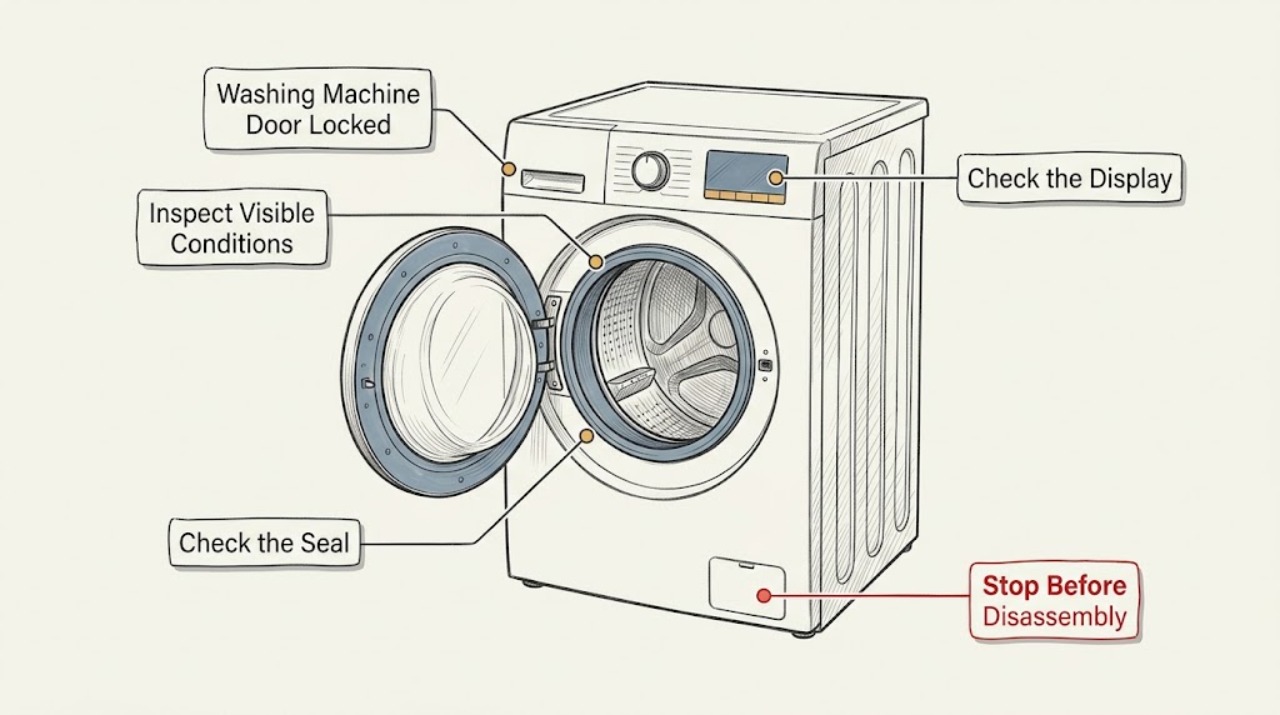
Work through in order
Diagnostic checks
Use only checks that match the exact appliance or system and its official guide.
-
Check 1
Stop pressing the handle and observe the machine from outside. Confirm whether a programme is still running, the drum is still moving, the machine is heating or spinning, or the cycle has just ended. Wait until the programme has fully stopped and give the lock time to release as described by the exact manual.
Expected result: The lock releases after the cycle and brief wait, the programme is still active, the display shows a lock indicator or fault, or the door remains locked after the machine is fully stopped.
Next step: If the door releases, no further unlocking work is needed. If it remains locked, read the display and check for water in the drum without opening the door or filter by force.
Why this matters
Why: Blomberg says the door lock prevents opening during operation and may take a few minutes after completion to disengage. A locked door during a live cycle is expected; a persistent lock after the normal release period points to remaining water, power interruption, an interlock fault, or another condition requiring the next check.
-
Check 2
Look through the door glass for visible standing water and observe whether the machine completed a drain stage. If the drum is empty, continue to the power and reset check. If water is visible, use only the exact manual's Pump or Spin or drain procedure; do not open the door or filter while water may be inside.
Expected result: The drum is empty, water remains at a visible level, the machine did not complete draining, or a drain or pump warning is displayed.
Next step: If the drum is empty, continue with a single reset and door inspection. If water remains, follow the model-specific drain instructions only when the manual confirms the user-accessible method; stop and arrange service for hot water, an inaccessible filter, a leak, or a drain that will not clear.
Why this matters
Why: Blomberg documentation links a locked door to the water level and says water should be drained before the door can open. A drain hose restriction or pump-filter blockage can leave water in the drum, but the amount and temperature cannot be safely judged from the outside alone.
-
Check 3
If the machine lost power or stopped unexpectedly, check the display and the accessible plug or supply from outside. Turn the machine off and unplug it only if the plug and area are dry and safe, wait for the model-recommended reset interval, then restore power once; do not pull the door during the reset.
Expected result: The panel returns and the door releases, the panel remains dark, the lock remains engaged, or the same fault returns after power is restored.
Next step: If power returns and the lock releases, retrieve laundry only when the drum is empty and stationary. If the panel stays dark, the door remains locked, or the fault repeats, stop repeated resets and arrange authorised service.
Why this matters
Why: Blomberg says a power issue can leave the door locked and that turning the machine off, unplugging it, waiting, and restoring power can sometimes reset the lock. A reset that does not release a door with no visible water does not establish that the lock itself is the only failed part.
-
Check 4
With the programme stopped and the door still closed, inspect the visible door edge and rubber seal for a garment caught between the door and gasket, and look for visible damage to the latch area. Do not insert tools, remove the lock, pull the handle harder, or defeat the interlock.
Expected result: A visible garment edge or obstruction is present, the seal and latch look normal, the door is misaligned or damaged, or the lock indicator remains on with an empty drum.
Next step: Remove only a loose, visible item without stressing the seal, then allow one normal lock attempt. If the latch is damaged, misaligned, or still locked, keep the washer out of use and request service.
Why this matters
Why: A trapped item can keep a door from seating correctly, while a normal-looking seal cannot prove that the electronic or mechanical lock is healthy. Blomberg says a visible obstruction or damaged lock mechanism should be addressed through the manual or support rather than force.
-
Check 5
If the exact manual identifies a user-accessible drain hose or pump filter and the machine is unplugged, cool, and prepared for water, place a suitable container and towels before opening that access slowly. Inspect only for a visible blockage or kink and refit the filter securely; skip this step if water level, temperature, access, or manual instructions are uncertain.
Expected result: Water drains and the door later releases, the filter or hose has visible debris or a kink, water does not drain, a leak appears, or the door remains locked after drainage.
Next step: Refit the filter and hose exactly as the manual directs and try one Pump or Spin or equivalent drain programme if safe. If drainage fails, a leak appears, or the door remains locked after the drum is empty, stop and arrange authorised service.
Why this matters
Why: Blomberg's drain guidance warns that water may flow when the filter housing is opened and identifies blocked filters or hoses as drainage causes. Clearing an accessible obstruction can restore the safe water level, but a pump, pressure-sensing, or lock fault cannot be diagnosed by repeatedly opening the filter.
-
Check 6
After the safe checks, record the model, programme, lock indicator, visible water level, power state, drain result, and any error. Do not force the door, remove the filter while water may remain, reach into a moving drum, or remove covers to reach an emergency lock mechanism.
Expected result: The door releases normally, or it remains locked with an empty drum, repeated error, damaged latch, unusual sound, leak, hot water, or other unsafe symptom.
Next step: Stop using the washer and contact an authorised Blomberg service agent for any persistent lock or unsafe symptom. Provide the recorded model, programme stage, display message, water level, and checks completed.
Why this matters
Why: A normal release after the cycle or safe drainage is consistent with the door-protection function. Persistent locking after the water and power conditions are resolved may involve the lock, control, or sensing system and requires professional diagnosis.
Use your observations
Decision map
Find the observation that best matches what you see, then follow the next safe action.
-
PATH 01Safety boundary
What you see
Is the programme still running, heating, spinning, or only just finished?
Do this next
Wait until the programme fully stops and the normal lock-release period passes. Never force the door during a cycle.
Why this path and its safety boundary
Safety stop: Continue to the visible-water and power branches because a stopped machine with a locked door needs another explanation.
-
PATH 02Safety boundary
What you see
Is water visible in the drum or did the machine fail to complete draining?
Do this next
Use the exact manual's safe Pump or Spin or drain procedure. Do not open the door or filter while water may remain; arrange service if water is hot, inaccessible, leaking, or will not drain.
Why this path and its safety boundary
Safety stop: Continue with one model-appropriate power reset and the external latch inspection.
-
PATH 03Safety boundary
What you see
Did the washer lose power or stop unexpectedly?
Do this next
Restore power once through a dry, safe plug or supply, following the model manual's reset process. If the door remains locked, stop repeated resets and request service.
Why this path and its safety boundary
Safety stop: Do not assume the lock is a power problem; continue with the water, latch, and persistent-fault boundary.
-
PATH 04Safety boundary
What you see
Is there a visible garment obstruction or damage at the seal or latch?
Do this next
Remove only a loose visible item without force. Do not pull the handle, use tools, or bypass the lock; request service if the door still does not release.
Why this path and its safety boundary
Safety stop: A normal-looking latch does not rule out an internal lock or control fault; continue to service if the drum is empty and the lock remains on.
-
PATH 05Safety boundary
What you see
Does the door remain locked after the cycle, normal wait, safe reset, and confirmed empty drum, or is there a leak, hot water, damage, or a recurring fault?
Do this next
Stop using the washer and arrange authorised service. Do not force the door, remove covers, or perform an emergency release unless the exact manual explicitly identifies a safe procedure and the drum is confirmed empty.
Why this path and its safety boundary
Safety stop: If the door releases normally after the safe condition is corrected, monitor the next cycle and keep the exact model manual available.
Helpful context
Understand the symptom
A locked door is often a safety state
The lock is expected during an active wash, heating, or spin stage and may take a short time to release after the programme ends. Water remaining in the drum is another important clue: the machine may keep the door locked until it can confirm a safe level. The lock should be treated as a safety feature, not a handle problem to overcome by force.
Match every action to the exact model
Blomberg models differ in their controls, filter access, and emergency-release arrangement. Use the model and serial details to open the correct manual. The checks below keep the reader outside the cabinet and stop before any task that could release hot water, cause a flood, or defeat the door interlock.
Safety boundary
Stop conditions
- Stop immediately for a leak, hot water, smoke, burning smell, damaged cord or plug, unusual mechanical noise, a damaged latch, or a door that remains locked with an unsafe condition.
- Do not force a locked door, remove a filter while water may remain, reach into a moving drum, remove covers, bypass the interlock, or use tools to defeat the lock.
When checks do not resolve it
Need a professional?
Call an authorised Blomberg service agent when the door remains locked after the programme and normal wait, the drum is empty but the lock stays on, a safe drain or reset does not help, the latch is damaged, a recurring error appears, or any leak, hot-water, electrical, or mechanical safety symptom occurs.
Common questions
FAQ
Why is my Blomberg washing-machine door still locked after the cycle?
Wait for the programme to stop and the lock to release, then check whether water remains in the drum. A power interruption, incomplete drain, child lock, or door-lock fault can keep it engaged. Never force the door; follow the exact manual or arrange authorised service.
Can water in the drum keep a Blomberg door locked?
Yes. Blomberg documentation links the lock to the water level and says the machine should drain before the door opens. Use only the exact manual's safe Pump or Spin or drain procedure, and never remove the filter while water may remain.
Will unplugging a Blomberg washer release the locked door?
A safe, model-appropriate power reset can sometimes restore the machine after a power interruption, but it is not a guarantee. Turn the machine off and unplug only when the plug and area are dry and safe, follow the exact manual, and do not force the door if it remains locked.
When should I call service for a locked Blomberg washing-machine door?
Arrange authorised service when the drum is empty but the lock remains engaged after the normal wait and one safe reset, the latch is damaged, drainage will not clear, a recurring fault appears, or there is a leak, hot water, electrical symptom, or unusual noise. Do not bypass the interlock or force the door.
Read the exact guide
Official sources
- My Blomberg washing machine has stopped working, what should I do?Blomberg · Blomberg washing machine power, door lock, control, reset, water, drain, and fault-display checks
- Washing Machine / User’s ManualBlomberg · Blomberg washing machine door-lock, water-level, programme-completion, and troubleshooting guidance
- Washing MachineBlomberg · Blomberg washing machine locked-door, water, filter, electrical, and authorised-service safety boundaries
- Why is my washing machine not draining properly?Blomberg · Blomberg washing machine drain hose, pump filter, water-release precautions, and service guidance
- My washing machine door will not release, what can I do?Blomberg · Blomberg washing machine door lock timing, water level, power issues, reset, drain, and service guidance
Community feedback
Share a repair observation
Share a plain-text repair observation. Accepted observations are published automatically; this page may take a moment to update.