
On this page
Start here
Quick answer
When a Bosch cooktop will not turn on, first separate a blank display from a lit display that will not accept touch commands and from a gas burner that has no ignition. Check the appliance supply and breaker without opening the cabinet, dry the control panel and remove objects, release the panel lock using the exact model instructions, and note any code. For an induction or electric model, cookware compatibility matters only after the controls light and a cooking zone is selected; for a gas model, check the gas supply and ignition sound, but stop immediately for a gas smell. Bosch documents power, child-lock, wet-panel, overheating, demo-mode, and error-code checks, while persistent faults or a repeat breaker trip need qualified service.
Before you begin
Safety first
- Keep the cooktop off for repeated trips, gas odor, cracked glass, scorching, exposed wiring, or persistent no-start. Do not bypass locks or open the built-in appliance.
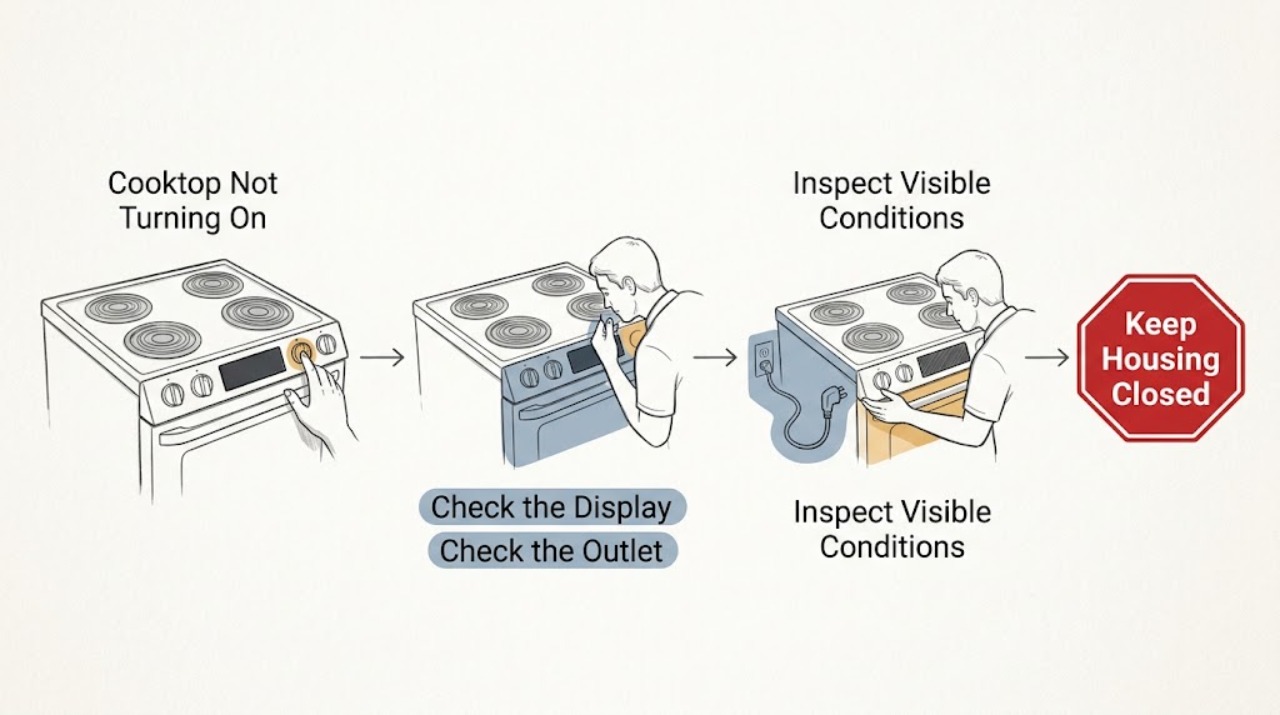
Work through in order
Diagnostic checks
Use only checks that match the exact appliance or system and its official guide.
-
Check 1
Identify the cooktop type and make the area safe before testing: electric radiant, induction, or gas. Turn all controls off. If there is a cracked glass surface, smoke, scorching, exposed wiring, liquid in the control area, or a gas odor, stop and isolate the hazard rather than trying to start the appliance.
Expected result: Note whether the display is completely blank, whether any indicator lights, beeps, or error symbols appear, and whether the cooktop uses gas burners or a smooth electric/induction surface.
Next step: Continue only with the branch that matches the observed type and symptom. Keep the appliance off for any hazard condition.
Stop if: Do not use a cracked cooktop, bypass an interlock, or touch live wiring; do not attempt an ignition test when gas odor is present.
Why this matters
Why: A blank display is a power-path symptom; a lit but unresponsive display is a control/interlock symptom; a gas unit with clicking but no flame is an ignition or gas-flow symptom. A damaged or odorous appliance is a safety case, not a routine reset.
-
Check 2
Check the external power path without removing the cooktop. If the model has a plug, confirm it is seated and test the same outlet with a known-working appliance. For a built-in connection, inspect the household breaker or fuse panel only from the normal user side; reset a tripped breaker once if there is no visible hazard.
Expected result: The test outlet either works or does not, and the breaker either holds or trips again. After a safe reset, the cooktop display may remain dark, return, or show a code.
Next step: If the external supply is sound, continue to the panel and lock check. If the circuit will not hold, leave the cooktop disconnected and arrange electrical or appliance service.
Stop if: Do not remove a junction-box cover or probe terminals; do not keep cycling a breaker to force the cooktop on.
Why this matters
Why: A failed outlet or tripped circuit can make the cooktop appear dead. A breaker that trips again suggests an electrical fault or overload and should not be repeatedly reset. A persistent blank display after confirmed supply shifts the problem toward the appliance power or electronics.
-
Check 3
Inspect the touch panel with the cooktop off and cool. Remove cookware or other objects from the controls and dry the panel completely. Look for a key or padlock symbol; if the model has the documented child-lock key, touch and hold it for the model's specified interval, then select a zone or burner normally.
Expected result: The panel may begin responding after drying or removing an object, the lock indicator may clear, or the controls may remain dark/unresponsive. Record any flashing indicators rather than guessing at another key combination.
Next step: Use the exact owner manual for the lock symbol and button sequence. If the panel remains unresponsive after one documented attempt, move to the code/type-specific check and prepare for service.
Stop if: Do not pour cleaner onto the controls, hold random keys indefinitely, or bypass the panel lock.
Why this matters
Why: Bosch states that a wet or covered panel can cause flashing indicators and that a panel lock prevents operation. If neither condition changes the response, the control electronics or supply path remains unresolved.
-
Check 4
Follow the cooktop-type branch. On induction, use a suitable magnetic pan only after the display and zone controls respond; on electric radiant, select a zone and a power level. On gas, confirm the supply valve is open only if there is no gas odor, turn a knob briefly to observe whether ignition clicks, and turn it off promptly if there is no safe ignition.
Expected result: For electric or induction, note whether the selected zone indicator and heat response appear. For gas, note clicking with no flame, no clicking, or a flame that lights and then goes out; also record whether all burners or only one are affected.
Next step: Use the appropriate manual for cookware, burner-cap, and ignition procedures. If controls respond but the zone or burner still does not operate, stop the test and move to code/service handling.
Stop if: For gas, turn the control off immediately for failed ignition or any odor; never use an external flame to test it.
Why this matters
Why: Cookware detection can explain an induction zone that does not heat after the controls turn on, but it cannot explain a blank control panel. On gas, no clicking can indicate an ignition/control issue while clicking without flame keeps gas supply and burner condition in the branch; neither is a reason to continue if gas is smelled.
-
Check 5
Read and record any exact code or indicator before attempting only the model-documented recovery. Remove hot cookware from the control area and allow an overheating condition to cool. If the code identifies demo mode, panel lock, incorrect supply, or overheating, follow Bosch's listed user step once; do not disconnect a built-in cooktop unless the manual and a qualified person make that safe.
Expected result: The code may clear after the documented condition is removed, return immediately, or change to a blank/unresponsive display. Note whether all indicators flash, a lock symbol remains, or a supply-voltage code appears.
Next step: If the code or no-start symptom returns, turn the cooktop off, leave it in a safe state, and provide the exact model and code to an authorised technician or qualified electrician as appropriate.
Stop if: Do not bypass voltage protection, open electronics, or repeatedly power-cycle a fault code.
Why this matters
Why: Bosch maps different indicators to different branches: wet/covered panel, lock, overheating, demo mode, supply voltage, or electronics fault. A returning code is evidence that the underlying condition remains, not permission to replace a guessed part.
Use your observations
Decision map
Find the observation that best matches what you see, then follow the next safe action.
-
PATH 01Next step
What you see
The display is blank, the outlet is dead, or the breaker trips again.
Do this next
Leave the cooktop off and have the household circuit or appliance assessed by a qualified professional; do not open the connection.
Why this path and its safety boundary
Why it matters: The problem is in the supply or appliance power path until proven otherwise.
-
PATH 02Next step
What you see
The display is lit but the panel is locked, wet, covered, or flashing.
Do this next
Dry the panel, remove objects, and clear the lock using the exact Bosch model instructions; arrange service if it remains unresponsive.
Why this path and its safety boundary
Why it matters: A control-panel condition may be preventing operation.
-
PATH 03Next step
What you see
An induction or electric display responds but a selected zone does not heat.
Do this next
For induction, verify compatible cookware and placement; for electric, record the affected zone and any code, then stop if it still does not heat.
Why this path and its safety boundary
Why it matters: This is a zone/cookware/heat-output branch rather than a total power failure.
-
PATH 04Next step
What you see
A gas cooktop has no clicking, clicks without flame, or only one burner fails.
Do this next
Turn the knob off, use Bosch's safe model-specific guidance, and arrange qualified service if ignition does not return promptly.
Why this path and its safety boundary
Why it matters: The gas supply, ignition, knob, burner-cap, or burner-port branch is involved; the exact cause cannot be selected from the symptom alone.
-
PATH 05Next step
What you see
A code indicates overheating, demo mode, incorrect supply, or an electronics fault.
Do this next
Remove the stated cause or allow cooling only as Bosch directs; if the code returns, leave the appliance off and provide the exact code for service.
Why this path and its safety boundary
Why it matters: The cooktop has identified a condition that requires its documented recovery or professional diagnosis.
-
PATH 06Next step
What you see
Power and controls are present but no zone or burner turns on after one safe type-specific test.
Do this next
Stop use and request qualified appliance service with the model, cooktop type, affected zones, and observed indicators.
Why this path and its safety boundary
Why it matters: An internal control, power, heating, or ignition fault is possible, but the part cannot be identified remotely.
Helpful context
Understand the symptom
Read the symptom before choosing a repair path
A completely dark display points toward the supply or appliance power path. A lit display with no response points toward a lock, wet or covered touch panel, or control fault. A gas cooktop that responds but produces no flame follows a gas-supply and ignition path. Do not treat these as the same failure, and do not infer a failed board or element from the word “on” alone.
Model instructions take precedence
Bosch cooktops differ by electric, induction, and gas design, and their symbols and reset procedures vary. Record the model from the rating information and use its owner manual for the exact lock key, connection arrangement, and code interpretation. A general check can identify the branch, but it cannot establish part compatibility or authorize cabinet-level work.
Safety boundary
Stop conditions
- Stop immediately for gas odor, smoke, scorching, a cracked glass surface, exposed wiring, liquid in the control area, or a repeat breaker/RCD trip.
- Do not bypass the child lock, doorless safety design, voltage protection, or any other interlock.
- Do not open a built-in cooktop or probe live terminals; cabinet-level wiring, boards, elements, and ignition work require qualified service.
- Stop after one model-documented recovery attempt if a code or no-start symptom returns.
Only after diagnosis
Potential parts
- touch-control or panel assembly
A lit but persistently unresponsive panel may lead a technician to inspect the touch-control assembly, but a lock, wet surface, supply fault, or control board can present similarly.
Confirm the complete model and product identification; Bosch cooktop appearance alone does not establish fit. - power or control electronics assembly
A blank display with confirmed external supply or a returning electronics code may justify professional inspection of the internal power/control path.
Do not treat an error code as proof that a particular board has failed or is compatible. - heating zone or induction power assembly
A single inactive zone after the controls operate can prompt a technician to inspect the zone and its wiring, but cookware detection and settings must be excluded first.
Select only after model-specific diagnosis; do not substitute a zone assembly by size or appearance. - gas ignition component
No clicking or clicking without flame can justify inspection of ignition and gas-flow components, subject to the gas-safety boundary.
Gas work and part selection require the exact model and a qualified technician; never test with an external flame.
When checks do not resolve it
Need a professional?
The outlet or circuit is dead, a breaker trips again, or the cooktop display stays blank after confirmed external supply., The panel remains locked or unresponsive after it is dry and the exact model procedure has been followed., A gas burner will not ignite safely, a cooking zone remains inactive, or any error code returns after the documented recovery., The cooktop is cracked, scorched, wet internally, or has damaged wiring.
Safety scope: Keep the cooktop off for repeated trips, gas odor, cracked glass, scorching, exposed wiring, or persistent no-start. Do not bypass locks or open the built-in appliance.
Common questions
FAQ
Why is my Bosch cooktop completely blank?
Start with the outlet or household circuit if the model uses an accessible plug, or the breaker for a built-in connection. If supply is confirmed but the display stays blank, Bosch's error guidance treats missing power or an electronics fault as possibilities; leave the cooktop off and arrange qualified diagnosis rather than opening it.
How do I know whether the Bosch cooktop is locked?
Look for a key or padlock symbol or a panel that lights but ignores normal touches. Bosch documents a panel-lock condition and a four-second clean-lock/child-lock touch on applicable models, but the exact key varies, so use the owner manual for your model.
Could a wet control panel stop a Bosch cooktop from turning on?
Yes. Bosch says a wet panel or an object covering it can make all indicators flash. Turn the cooktop off, remove the object, dry the panel completely, and test once; persistent flashing or no response needs service.
My Bosch gas cooktop clicks but does not light. What should I do?
Turn the knob off promptly and do not keep releasing gas. If there is any gas odor, avoid sparks and electrical switching and follow local gas-safety instructions. Without an odor, Bosch's guidance points to checking the gas supply and ignition system, with qualified service if the burner still will not light.
Read the exact guide
Official sources
- Bosch Cooktop & Rangetop Error Codes | Bosch - Troubleshooting Instructions for Error Codes, Child Locks & Other IssuesBosch Home Appliances · Bosch electric, induction, and gas cooktops showing blank displays, panel-lock, wet-panel, overheating, demo, supply, or electronics indicators
- Bosch Gas Cooktop Troubleshooting & Repair | Bosch – Fix Burners Not Lighting, Low or Uneven Flames & Other ProblemsBosch Home Appliances · Bosch gas cooktops that do not turn on or whose burners do not ignite
- Bosch Electric Cooktop Troubleshooting & Repair | Bosch – Fix Cooktop Not Heating, Not Turning on & Other ProblemsBosch Home Appliances · Bosch electric cooktops that do not turn on, overheat, or show control-panel errors
- Bosch Gas Cooktop Troubleshooting & Repair | Bosch – Fix Cooktops Not Heating, Overheating, Uneven Heating & MoreBosch Home Appliances · Bosch induction cooktop no-power and no-heat symptoms, as covered in the induction troubleshooting section of the opened Bosch page
Community feedback
Share a repair observation
Share a plain-text repair observation. Accepted observations are published automatically; this page may take a moment to update.