
On this page
Start here
Quick answer
First identify whether the cooktop is completely dark, powered but locked or delayed, induction and not detecting the pan, or gas and not igniting. For a dark cooktop, check the wall outlet and accessible circuit breaker without opening the appliance. For a powered cooktop, confirm the cycle or heat setting and START control, clear and dry the touch panel, and turn off Child Lock or Lockout through the exact model instructions. Induction zones need suitable magnetic cookware of the right size and position; gas burners need a correctly seated, dry cap and an available gas supply. Stop for gas odor, smoke, sparking, a hot connection, cracked glass, repeated breaker trips, or an abnormal flame, and arrange qualified LG service. [Source: lg-power-settings; lg-display-power; lg-gas-burner; lg-induction-pan]
Work through in order
Diagnostic checks
Use only checks that match the exact appliance or system and its official guide.
-
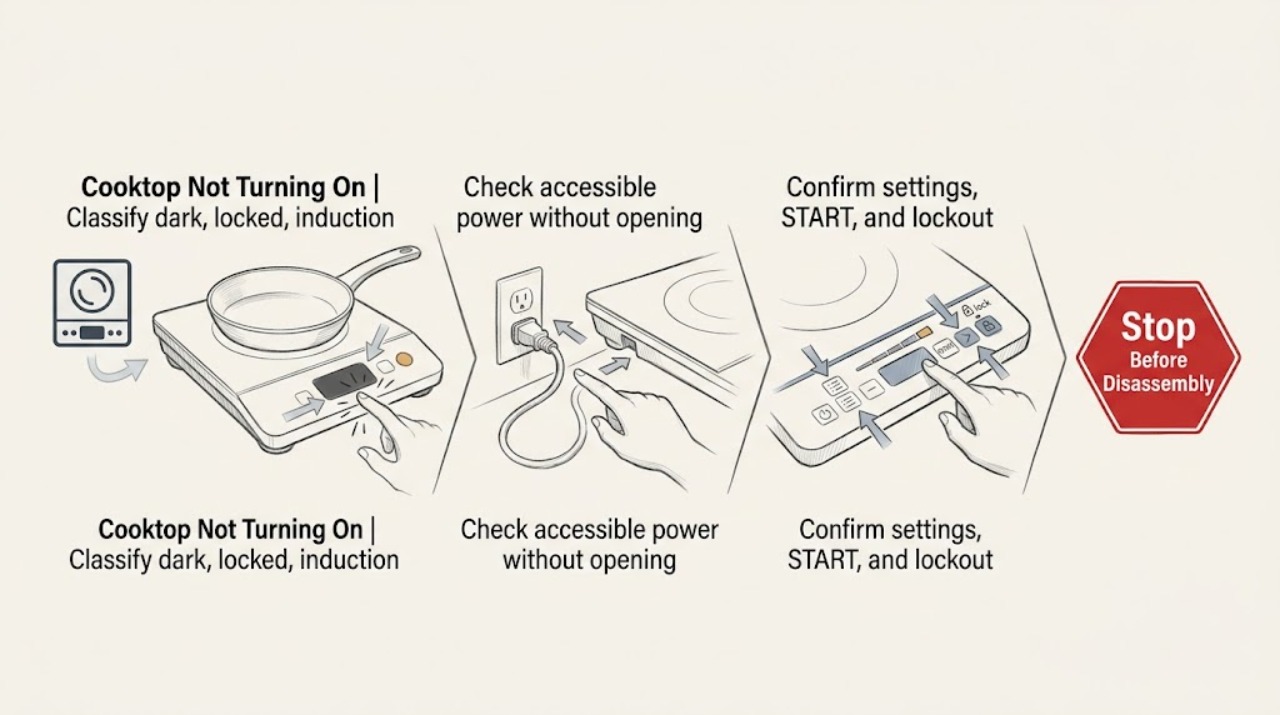
Classify dark, locked, induction, or gas behavior
With the cooktop clear and safe to touch, observe whether the display or indicators illuminate, whether all zones or only one are affected, whether a lock or delay message is shown, and whether the unit is gas, electric, or induction. Do not touch hot cookware or a hot burner to perform the classification.
Expected result: Nothing operates, the panel is lit but no zone starts, an induction pan symbol flashes, a gas igniter clicks without flame, or the display is blank while another burner works.
Next step: Follow the matching power, control, induction, gas, or service branch without repeatedly cycling the cooktop.
Why this matters
Why: A dark panel points toward power; a lit but inactive panel points toward settings or lockout; induction flashing points toward cookware or surface conditions; gas clicking without ignition points toward supply or burner condition; a blank display with partial operation needs service.
-
Check accessible power without opening the appliance
If the cooktop is dark or none of its controls respond, check the wall outlet or accessible connection and observe the household circuit breaker. Use only a safe external check; do not remove a cover, touch conductors, change the breaker rating, or keep resetting a breaker that trips again.
Expected result: The outlet or circuit has no power, the breaker is tripped, the breaker trips again, the cooktop is the only affected appliance, or power appears normal but the display remains dark.
Next step: If power is absent more broadly, use the appropriate electrical or utility channel. If the breaker trips again or the cooktop stays dark with power available, leave it off and request qualified electrician or LG service.
Why this matters
Why: LG identifies the wall outlet and circuit breaker as the first power path for a non-operating range or cooktop. A repeat trip or persistent appliance-only failure can indicate wiring or an internal fault.
-
Confirm settings, START, and lockout state
On a powered cooktop or range, select the intended cooking zone or burner, set the desired heat or cycle, and confirm it with the model's START control if required. Check the display for OVEN LOCKOUT, CHILD LOCK, Control Lock, or DELAY START and use only the exact LG guide's normal unlock or cancel action.
Expected result: The zone starts after the setting is confirmed, the lock or delay indicator clears, the display still shows a lock or delay, or the controls remain unresponsive.
Next step: Perform one normal start after the manual-approved correction. If no zone responds or the lock cannot be cleared, stop and arrange service.
Why this matters
Why: LG states that unconfirmed settings, Lockout or Child Lock, and Delay Start can make a powered unit appear not to run. A control that remains locked or unresponsive after the documented action points to service.
-
Check induction pan detection when applicable
For an induction LG cooktop, place one clean, dry pan that the exact model manual identifies as induction-compatible on the selected zone. Center it and confirm that its base is magnetic and large enough for that zone; do not heat an empty pan or continue if the glass is damaged.
Expected result: The pan is detected and heats, a no-cookware symbol flashes, the pan is too small or off-center, or a suitable centered pan is still not detected.
Next step: Try one correct pan and one normal heat selection only. If detection fails again, stop changing cookware and request service for the affected zone.
Why this matters
Why: LG explains that induction operation depends on cookware material, size, and position. An unsuitable or small pan may leave the zone inactive; a suitable centered pan that is not detected shifts the problem toward the zone or control system.
-
Check a gas burner without creating an unlit-gas condition
For a gas LG cooktop, confirm from a safe external observation that the household gas supply is available. With the burner and grate cool and all controls OFF, check that the visible burner cap and head are seated level and free of moisture or debris; do not keep a knob open while waiting for ignition or work on a gas valve.
Expected result: All burners fail, one burner fails, the igniter clicks but no flame appears, gas odor is present, or the cap is wet, dirty, tilted, or misassembled.
Next step: Turn the control OFF immediately if ignition is not reliable. For gas odor, leave the area and use the appropriate gas or emergency channel; otherwise clean or reseat only accessible cool parts as the model guide permits, then arrange service if the burner still fails.
Why this matters
Why: LG links all-burner failure to gas supply or power and single-burner failure to cap, head, igniter, moisture, or debris. Gas odor without reliable ignition is a stop condition, not a cue to repeat the attempt.
-
Stop for damage or persistent non-operation
Record the exact model, affected zone or burner, display message, power state, setting, pan or gas symptom, and whether the issue followed cleaning or a spill. Keep the cooktop out of service for cracked glass, smoke, sparking, a hot connection, abnormal flame, repeated breaker trip, or a failure that remains after one safe check; do not remove panels or replace a module from symptoms alone.
Expected result: The cooktop recovers after a safe correction, one zone or burner remains dead, all zones remain dead with stable power, or a safety symptom appears.
Next step: Arrange qualified LG service or an electrician as appropriate. For gas odor, smoke, sparking, or fire risk, leave the area and use the appropriate emergency channel.
Why this matters
Why: A corrected setting, pan, cap, or power issue can be monitored. Persistent zone-specific or whole-cooktop failure needs diagnosis of controls, wiring, ignition, gas supply, or power electronics; safety symptoms require immediate stop.
Use your observations
Decision map
Find the observation that best matches what you see, then follow the next safe action.
-
PATH 01Safety boundary
What you see
The cooktop display is dark and no burner or zone operates.
Do this next
Check the wall outlet or accessible circuit breaker once. If power is available but the cooktop remains dark, leave it off and request qualified service.
Why this path and its safety boundary
Safety stop: Continue with lockout, induction, gas, or setting checks.
-
PATH 02Safety boundary
What you see
The display is lit but a lock, delay, or unconfirmed setting prevents operation.
Do this next
Use the exact LG manual's normal unlock, cancel, and START sequence once. Persistent unresponsiveness needs service.
Why this path and its safety boundary
Safety stop: Continue with pan detection or gas-burner checks.
-
PATH 03Safety boundary
What you see
An induction zone shows no cookware or flashes with a pan.
Do this next
Use one compatible magnetic pan of the correct size, centered on the zone. If it is still not detected, request service.
Why this path and its safety boundary
Safety stop: Continue with power and control diagnosis.
-
PATH 04Safety boundary
What you see
A gas burner clicks without lighting, or all gas burners fail.
Do this next
Turn the control OFF, check only the safe external gas-supply state and cool visible cap condition, and stop immediately for gas odor or unlit gas.
Why this path and its safety boundary
Safety stop: Continue with electrical or induction branch as applicable.
-
PATH 05Safety boundary
What you see
Smoke, sparking, hot wiring, cracked glass, repeated breaker trips, gas odor, or an abnormal flame is present.
Do this next
Stop immediately, isolate the area from a safe location, and use the appropriate emergency, gas, electrical, or qualified LG service channel.
Why this path and its safety boundary
Safety stop: Perform only one supervised normal operation check after the applicable safe correction, then escalate if the fault returns.
Helpful context
Understand the symptom
Not turning on can mean no display at all, a display that does not accept input, or a zone that is active but refuses to heat. Separate the appliance type first: an induction zone needs compatible cookware, a gas burner needs ignition and gas, and an electric control needs stable power and a confirmed setting.
The safe checks below stay at the wall outlet or breaker indication, cool glass, control panel, cookware, and visible gas-burner parts. Do not remove panels, test live voltage, change a breaker rating, open a gas connection, bypass a lock or flame safety, or work on internal wiring.
A blank display with an otherwise operating gas burner is a service symptom. A brief delay before a zone starts, a residual-heat indicator, or a pan-not-detected symbol can be normal model behavior; use the exact LG manual for the symbol rather than treating it as a dead cooktop.
Safety boundary
Stop conditions
- Stop immediately for gas odor, smoke, sparking, a hot or scorched connection, damaged wiring, cracked glass, an abnormal flame, or a breaker that trips again.
- Do not keep a gas control open while waiting for ignition, relight repeatedly, open gas fittings, adjust a burner or valve, or bypass ignition, lock, or heat safety.
- Do not remove panels, test live voltage, change a breaker rating, operate a wet control panel, heat an empty induction pan, or touch hot glass or grates.
- Do not keep repeating reset, pan, or burner tests. Arrange qualified LG service when a valid setting, compatible pan, safe cap check, and accessible power check do not restore operation.
When checks do not resolve it
Need a professional?
Request qualified LG service or an electrician when the cooktop remains dark with normal household power, controls stay locked or unresponsive, a suitable induction pan is not detected, a gas burner will not ignite reliably, an error returns, or a zone remains inactive after safe checks. Use the appropriate emergency gas or electrical channel for gas odor, smoke, sparking, hot wiring, cracked glass, or abnormal flame.
Have this ready
- Exact LG model and serial details
- Whether the cooktop is gas, electric, induction, or part of a range
- Whether the display is blank, partially lit, locked, delayed, or showing an error
- Affected zones or burners and the setting, pan, or ignition behavior
- Accessible outlet or breaker state and any repeat trip
- Any gas odor, smoke, sparking, abnormal flame, cracked glass, spill, cleaning, or wiring damage
Common questions
FAQ
Why is my LG cooktop completely dark?
Check the accessible wall outlet or circuit breaker and whether other household power is affected. If power is available but the cooktop remains dark, leave it off and request qualified LG or electrical service.
Why does my LG induction cooktop not turn on with a pan?
Use one compatible magnetic pan of the correct size, centered on the selected zone, and confirm the zone and heat setting. If a suitable pan is still not detected, arrange service for the zone or controls.
What should I do if an LG gas cooktop burner will not ignite?
Turn the control OFF, check only the safe external gas-supply state, and inspect the cool visible cap and head for moisture, debris, or misalignment as the model guide permits. Stop immediately for gas odor or unlit gas and use qualified service.
Read the exact guide
Official sources
- LG Range, Oven, Electric Cooktop: Powers On, Won't RunLG · LG electric and gas cooking appliances, ranges, and cooktops; manufacturer guidance for settings, START, circuit breaker, lockout, Delay Start, and service
- LG Gas Range/Cooktop: The Display Does Not Light Up or the Text Appears DistortedLG · LG gas ranges and cooktops; manufacturer guidance for blank display, wall outlet, circuit breaker, and service
- LG Range - Troubleshooting Induction Cookware Not HeatingLG · LG induction ranges and cooktops; manufacturer guidance for compatible cookware, pan material, size, position, and no-cookware indication
- LG Range - Why Won't My Burner LightLG · LG gas ranges and cooktops; manufacturer guidance for all-burner and single-burner ignition, gas supply, cap, head, igniter, moisture, and debris
Community feedback
Share a repair observation
Share a plain-text repair observation. Accepted observations are published automatically; this page may take a moment to update.