
On this page
Start here
Quick answer
A GE cooktop that will not turn on may have no household power, a recent outage, a control or lock state, a wet or misaligned gas burner, a failed igniter, a radiant coil or receptacle issue, or an internal control fault. First identify whether the cooktop is gas, electric, radiant, or induction and whether every zone is affected. Check only the accessible power indication and normal controls; on gas models inspect cool, removable burner caps and heads only after the appliance is safe and dry. Do not open the cooktop, test live wiring, bypass controls, or manually light a gas burner as a diagnostic. Stop for gas odor, smoke, sparks, burning odor, a cracked glass surface, repeated electrical trips, or uncontrolled heating and arrange qualified GE service.
Before you begin
Safety first
- This article covers identifying the cooktop type, visible power and control observations, cool removable gas-cap inspection, and cool surface or coil inspection only. A qualified technician must handle gas components, ignition systems, electrical measurement, receptacles, switches, touch controls, induction power electronics, wiring, and glass removal.
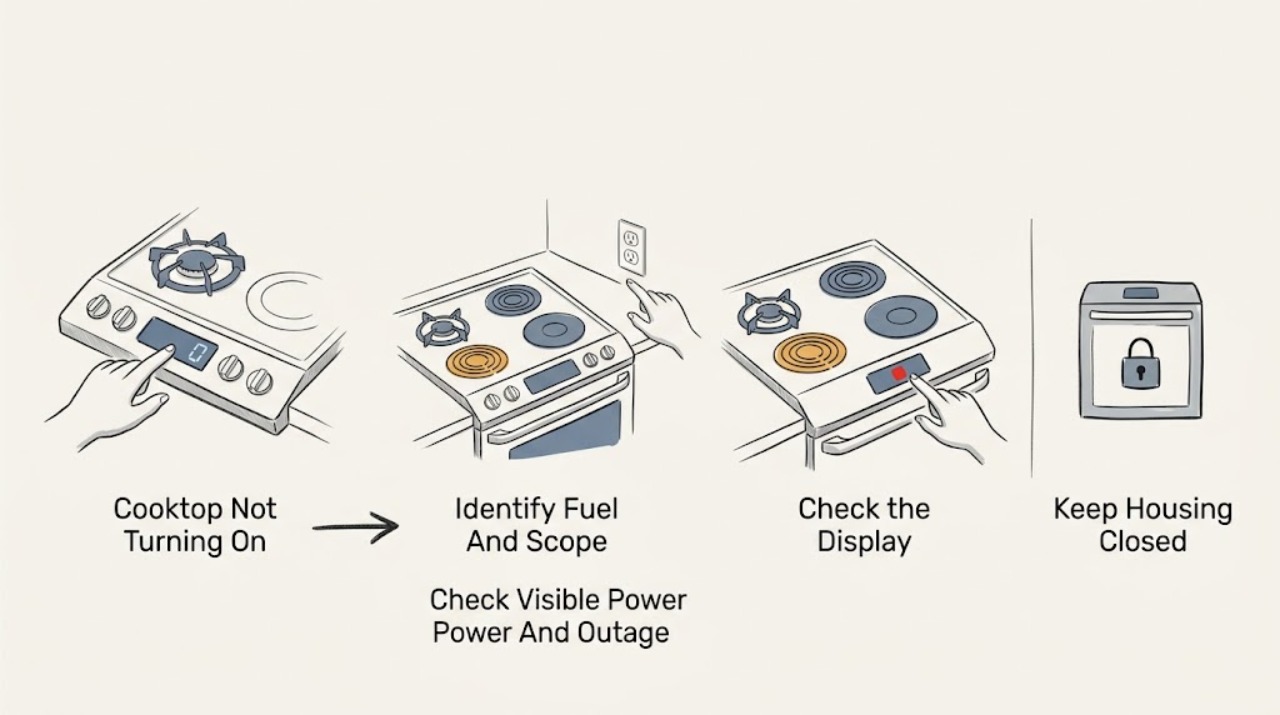
Work through in order
Diagnostic checks
Use only checks that match the exact appliance or system and its official guide.
-
Check 1
Identify whether the GE cooktop is gas, electric coil, radiant glass, or induction, and note whether every burner or zone is inactive or only one is affected; use the model manual if the type is unclear.
Expected result: Record all controls dark, all burners or zones inactive with indicators on, one gas burner not clicking, one electric zone not heating, or one induction zone not responding.
Next step: Continue with the visible power check for all-zone symptoms. For one gas burner, continue only with the cool cap and ignition checks; for electric or induction, continue with the model-appropriate control branch.
Stop if: Do not remove the cooktop, lift the glass, or operate a gas control if there is any gas odor or visible damage.
Why this matters
Why: A whole-cooktop symptom keeps power, control, and outage conditions in scope, while a one-zone symptom points toward that burner, receptacle, igniter, sensor, or zone control. The safe procedure depends on the fuel and design.
-
Check 2
Check ordinary indicators such as a control display, indicator light, or normal response from another appliance on the same household supply, without opening the cooktop or touching wet electrical areas.
Expected result: Record a recent outage, a dark display, a tripped household protection device, normal control power, or power present while the burners remain inactive.
Next step: If household power is absent, wait until it is restored and leave gas controls in their normal off state. If power is present but the cooktop does not respond, use the exact manual's control guidance and arrange service for a persistent fault.
Stop if: Do not probe the outlet, remove a fuse or cover, bypass household protection, or repeatedly reset a device that trips.
Why this matters
Why: GE states that electric, radiant, and induction burners do not operate during a power outage and that a gas cooktop's igniters also need appliance power. A powered display with no burner response keeps the cooktop controls or burner system in scope.
-
Check 3
For a gas cooktop with no gas odor, make sure the selected knob corresponds to the intended burner and use the normal ignition position only once; keep the control off if no flame appears promptly.
Expected result: Record a click and flame, no click, click without flame, a burner that responds only to the wrong control, or gas odor or an unexpected flow sound.
Next step: If there is no click, stop and arrange service after the visible power check. If there is a click without flame, turn the control off and continue only with the cool, dry burner-cap check; if gas odor is present, leave and use the gas-emergency boundary.
Stop if: Do not manually light the burner, hold the knob open, repeat ignition, or investigate a gas smell or unexpected gas flow.
Why this matters
Why: GE says the correct burner must match its switch and that a gas burner with no igniter click needs service if power is otherwise available. A click without normal ignition can involve a wet, dirty, or misassembled burner, but it is not a reason to keep allowing gas to flow.
-
Check 4
With all gas controls off and the cooktop fully cool, inspect the visible burner cap, head, and ignition area for moisture, soil, a cap on the wrong burner, or a cap that does not sit flat; do not poke the ports or press an electrode.
Expected result: Record dry clean parts correctly seated, moisture after cleaning or a spill, a mismatched or tilted cap, a visibly blocked port, or an electrode that appears damaged or out of position.
Next step: Allow removable parts to dry and return only each cap and head to its matching position as the manual shows. If the parts are damaged, the burner still will not ignite, or any gas smell occurs, stop and request service.
Stop if: Do not use needles, clips, metal tools, flame, compressed air, or a live control to clear ports, and do not operate with a damaged burner component.
Why this matters
Why: GE says wet or dirty burner ports and an incorrectly seated electrode or cap can prevent ignition. A damaged electrode or a persistent no-ignition condition needs service rather than a tool or wire adjustment.
-
Check 5
For an electric coil, radiant, or induction cooktop, check that the control is in the normal operating state and, only when cool, inspect the visible surface or removable coil for soil, moisture, cracks, or a cookware condition described by the exact manual.
Expected result: Record all zones inactive, one coil or zone inactive, a clean dry intact surface, a cracked glass surface, a wet or dirty coil, or an induction indication that changes with approved cookware.
Next step: Clean only a cool, accessible surface with the manual-approved method and use approved cookware for an induction comparison if the manual permits. Arrange service for a dead zone, damaged receptacle, cracked glass, or persistent no-response condition.
Stop if: Do not test live wiring, swap coils between receptacles, lift the glass, use a cracked surface, or operate a zone without the manual-required cookware.
Why this matters
Why: GE states that these burner types need appliance power and identifies clean, dry coil surfaces and correct cookware contact as relevant on Sensi-Temp coil models. A one-zone failure or cracked surface is not safely diagnosed by swapping live components.
-
Check 6
Use the exact GE owner's manual to check whether the cooktop has a control lock, timer, touch-control activation step, or model-specific reset, then perform only the normal user sequence once.
Expected result: Record controls responding normally, a lock or timer state, no response from one control, a reset that clears the display, or the same no-start symptom returning.
Next step: If the manual state clears and operation is normal, monitor without repeated resets. If no response or the fault returns, stop user troubleshooting and arrange qualified GE service.
Stop if: Do not enter undocumented service modes, remove the control panel, bypass a lock, or repeatedly reset the cooktop.
Why this matters
Why: A user setting can prevent a burner from starting without proving a hardware failure, but a control that remains unresponsive after the documented sequence keeps the switch, touch panel, or control electronics in scope.
-
Check 7
Only when the cooktop is intact, cool where required, free of gas odor and other hazards, and the applicable manual-approved correction is complete, make one brief supervised normal-control attempt from a safe position.
Expected result: Record normal operation, a repeat no-click or no-heat result, a warning, a gas odor, smoke, sparks, burning odor, a protection trip, or uncontrolled heating.
Next step: Stop at the first abnormal sign and give the technician the fuel type, affected zone, controls, power history, cap or coil condition, and exact manual steps used.
Stop if: Do not repeat a failed ignition or electrical test, continue after smoke or odor, or open the cooktop to identify a part.
Why this matters
Why: A single normal operation after a dry cap, power restoration, or user-setting correction supports a transient condition. A repeated failure remains a service diagnosis rather than a reason for more invasive testing.
Use your observations
Decision map
Find the observation that best matches what you see, then follow the next safe action.
-
PATH 01Safety boundary
What you see
The household has lost power or the cooktop display and indicators are dark.
Do this next
Leave all cooktop controls off, restore household power through normal safe means, and use the manual to resume operation. Request service if the cooktop remains unresponsive after power returns.
Why this path and its safety boundary
Why it matters: GE says electric, radiant, and induction burners do not operate during a power outage, and gas ignition also depends on appliance power.
Safety stop: Do not probe the supply, open the cooktop, bypass protection, or manually light gas as a diagnostic.
-
PATH 02Safety boundary
What you see
A gas burner has appliance power but produces no igniter click when its normal control is used.
Do this next
Keep the gas control off and arrange qualified GE service; provide the affected burner and whether other burners click.
Why this path and its safety boundary
Why it matters: GE treats no clicking as an ignition or power-to-igniter service condition after the basic power check.
Safety stop: Do not keep allowing gas to flow, manually light the burner, or open the cooktop.
-
PATH 03Safety boundary
What you see
The gas igniter clicks but a normal flame does not appear, or ignition changed after cleaning or a spill.
Do this next
Turn the control off, allow cool removable parts to dry, and reseat only the matching cap and head as the manual shows. Request service if ignition remains abnormal.
Why this path and its safety boundary
Why it matters: GE identifies wet or dirty ports, an electrode that is not seated, or a mismatched burner cap as possible causes; continued gas release is unsafe.
Safety stop: Do not manually light, poke ports, use tools, or continue when gas odor is present.
-
PATH 04Safety boundary
What you see
An electric, radiant, or induction cooktop has power indicators but no burner or zone responds.
Do this next
Use the exact manual's normal control or lock guidance once. If no zone responds, stop and arrange qualified GE service.
Why this path and its safety boundary
Why it matters: A control state, power module, touch panel, or model-specific fault remains possible; the outage branch is less likely when indicators are normal.
Safety stop: Do not lift the glass, test live circuits, swap internal components, or use a cracked surface.
-
PATH 05Safety boundary
What you see
Only one electric or radiant zone fails while other zones and controls work normally.
Do this next
Inspect only a cool, visible coil or surface for damage and request service for a persistent dead zone or receptacle concern.
Why this path and its safety boundary
Why it matters: The affected coil, receptacle, sensor, switch, or zone control may be involved; GE's coil guidance does not make a live user test necessary.
Safety stop: Do not swap coils, remove receptacles, lift the cooktop, or probe wiring.
-
PATH 06Safety boundary
What you see
The cooktop has power but touch controls or knobs do not respond, or a lock or timer state is shown.
Do this next
Use the exact owner's manual to clear the state once. If the controls remain inactive, arrange qualified diagnosis.
Why this path and its safety boundary
Why it matters: The appliance may be in a model-specific user state, but a control that remains unresponsive after the manual sequence needs service.
Safety stop: Do not enter service mode, bypass a lock, or remove the control panel.
-
PATH 07Safety boundary
What you see
Gas odor, unexpected gas flow, smoke, sparks, burning odor, cracked glass, damaged cord, repeated electrical trips, or uncontrolled heating is present.
Do this next
Stop using the cooktop, keep people away, avoid switches or flames if gas may be present, and contact the appropriate emergency or qualified service provider. Leave and contact local emergency services if there is immediate danger.
Why this path and its safety boundary
Why it matters: This is a potential gas, electrical, fire, or burn hazard outside ordinary cooktop troubleshooting.
Safety stop: Do not relight, restart, touch damaged wiring or glass, pour liquid on the appliance, or investigate under the surface.
Helpful context
Understand the symptom
First separate a power problem from a burner problem
A completely dark cooktop, one burner that does not operate, a gas burner that does not click, and an induction zone that shows no response are different paths. GE notes that electric, radiant, and induction burners will not operate during a power outage, while gas surface ignition still uses electrical spark components on many models. Record whether every zone is affected and whether the controls or indicators respond before selecting a repair branch.
Use only cool, ordinary-access checks
For a gas cooktop, GE identifies burner selection, cap placement, and dry or clean ports as possible user-checkable conditions. For electric coil models, GE describes clean, dry coils and proper cookware contact as relevant to normal operation. These checks are limited to cool, removable, visible parts; the wiring, controls, ignition module, receptacles, glass, and induction electronics remain service work.
Do not convert a no-start symptom into a live test
A cooktop that has power but no igniter click, no heat, or no response from one control may have a switch, receptacle, igniter, sensor, control, or wiring fault. GE directs service when ignition does not return after the applicable checks. Do not remove the glass, swap internal wiring, probe a receptacle, or continue turning a gas control when a flame does not appear normally.
Safety boundary
Stop conditions
- Stop immediately for gas odor or unexpected gas flow, smoke, sparks, burning odor, a cracked glass surface, damaged cord or wiring, repeated electrical trips, or uncontrolled heating.
- Do not open the cooktop, lift the glass, test live wiring, remove an ignition module, swap coils or receptacles, or bypass a lock or safety control.
- Do not manually light a gas burner as a diagnostic, hold a gas knob open, poke burner ports with tools, or keep repeating ignition attempts.
- Do not use a cracked surface, operate a damaged burner, reach into a hot or powered mechanism, or clean a component that is not cool and isolated according to the manual.
- Do not choose a replacement igniter, switch, coil, receptacle, sensor, or control from a no-start symptom alone; use exact model diagnosis.
Only after diagnosis
Potential parts
- gas igniter or electrode assembly
Consider this category only when qualified testing confirms a no-click or no-ignition fault in the applicable gas ignition system after power and cool burner-cap conditions are checked.
Confirm the exact GE model and technician diagnosis; do not test or replace an igniter while connected or near released gas. - gas burner cap or burner head
Consider this category only when the exact model's cool removable component is cracked, damaged, or confirmed by service to be the cause of persistent ignition trouble.
Confirm the exact model and matching burner position; do not substitute a cap by appearance or use a damaged burner. - electric coil or receptacle assembly
Consider this category only when qualified diagnosis confirms that one dead electric zone is caused by the coil or receptacle after power and visible surface conditions are ruled out.
Confirm exact model fit and professional diagnosis; do not swap coils or access the receptacle as a live test. - cooktop switch, touch control, or induction power module
Consider this category only after service diagnosis links an unresponsive control or inactive induction zone to the specific switch, touch assembly, or power module.
Confirm the exact GE model and technician diagnosis; internal electrical access is not user troubleshooting.
When checks do not resolve it
Need a professional?
Arrange qualified GE cooktop service when power and normal controls are present but a burner or zone remains inactive, a gas burner does not click or ignite, a control stays unresponsive, an electric coil or receptacle is damaged, an induction zone remains inactive, or any gas, electrical, fire, glass, or burn hazard appears.
Safety scope: This article covers identifying the cooktop type, visible power and control observations, cool removable gas-cap inspection, and cool surface or coil inspection only. A qualified technician must handle gas components, ignition systems, electrical measurement, receptacles, switches, touch controls, induction power electronics, wiring, and glass removal.
Common questions
FAQ
Why is my GE cooktop completely dark and not turning on?
Check for a recent power outage and ordinary control or indicator response. GE says electric, radiant, and induction burners do not operate without power, while gas ignition also needs appliance power. If the panel remains dark after normal power is restored, arrange qualified service.
Why does my GE gas cooktop not click or ignite?
Confirm the correct burner control and inspect only cool, visible burner caps and heads for moisture or mismatched placement. GE directs no-click faults to service after the basic power check; do not manually light the burner or keep allowing gas to flow.
Can a wet or incorrectly placed burner cap stop a GE cooktop from lighting?
Yes. GE identifies wet or dirty ports and a burner head or cap that is not matched or seated correctly as possible ignition causes. Work only with cool removable parts and stop for damage or gas odor.
Why is one GE electric cooktop burner not working?
A single-zone fault can involve the cool visible coil, sensor, receptacle, switch, or control. GE recommends clean and dry coil conditions for applicable Sensi-Temp models, but a persistent dead zone needs service; do not swap coils or test live wiring.
What if my GE induction or radiant cooktop has power but no zone responds?
Use the exact manual for touch-control or lock states and confirm that no outage condition remains. If all zones stay inactive, arrange qualified service rather than lifting the glass or opening the power electronics.
When should I stop using a GE cooktop that will not turn on?
Stop for gas odor, unexpected gas flow, smoke, sparks, burning odor, a cracked glass surface, damaged wiring, repeated electrical trips, uncontrolled heating, or any need to open the cooktop. Keep clear and arrange appropriate qualified service.
Read the exact guide
Official sources
- Gas Range & Cooktop - Surface Burners Not Clicking, Not Trying to IgniteGE Appliances · GE Appliances support guidance for gas ranges and cooktops; the exact model manual controls burner layout and service procedure.
- Gas Range & Cooktop - Common Causes for Slow Ignition, No Ignition or Clicking on Surface BurnersGE Appliances · GE Appliances support guidance for gas range and cooktop surface burners; cleaning and component access remain model-specific.
- Electric Range & Cooktop - Sensi-Temp Coil Burners Not WorkingGE Appliances · GE Appliances support guidance for Sensi-Temp plug-in coil ranges and cooktops; it does not transfer coil procedures to radiant or induction models.
- Range, Cooktop & Wall Oven - Power Outage Tips and OperationGE Appliances · GE Appliances support guidance for ranges, cooktops, and wall ovens; exact model controls and installation instructions remain authoritative.
Community feedback
Share a repair observation
Share a plain-text repair observation. Accepted observations are published automatically; this page may take a moment to update.