
On this page
Start here
Quick answer
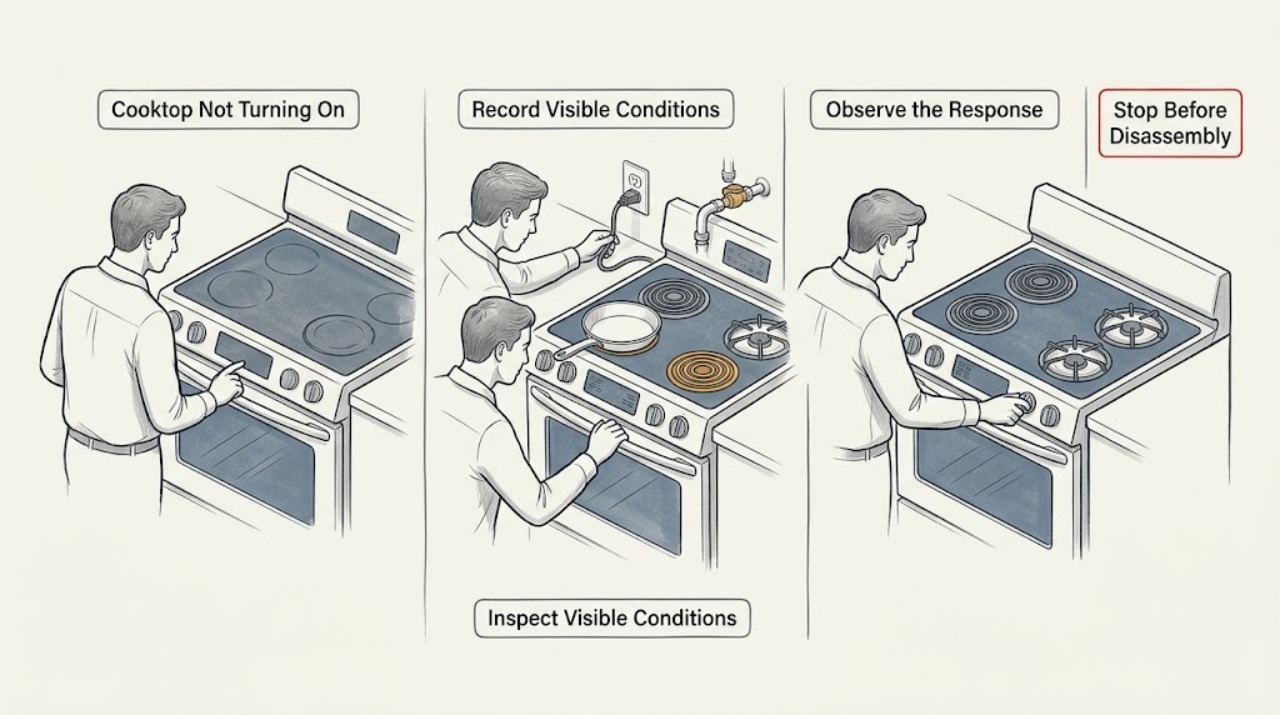
First identify whether the appliance is gas, radiant electric, or induction; do not assume that a blank display, a locked touch panel, a burner that will not ignite, and an induction pan warning have the same cause. For an electric or induction cooktop, check the model instructions for the On/Off control, then inspect the dry, accessible control panel for a lock icon, spill, object, or error display. Check the dedicated supply and breaker only from a safe, dry position and reset power once according to the manual; do not open a junction box or take live measurements. For a gas cooktop, confirm the external gas supply is available only when there is no gas odor, and note whether the igniter clicks; never keep trying to light a burner with an odor, delayed ignition, abnormal flame, or suspected leak. If an induction zone powers up but will not heat, center a dry, correctly sized magnetic pan and use the manual's cookware guidance. Demo or Showroom mode is a possibility only when the display or manual identifies it for that model. Stop immediately for gas odor, smoke, flame outside the burner, sparks or arcing, a cracked glass surface, damaged cord, water near electrics, repeated breaker trips, uncontrolled heating, or a control that will not turn off; leave gas emergencies and live electrical or gas repairs to qualified or emergency professionals.
Work through in order
Diagnostic checks
Use only checks that match the exact appliance or system and its official guide.
-
Check 1
Identify the cooktop type from its rating label, controls, or owner manual: gas burners with knobs, radiant electric elements, or induction zones. Record whether all zones are dead, one zone is affected, the display is blank, the display is lit but unresponsive, or the appliance powers up without heating. Record the exact code or symbol rather than guessing what it means.
Expected result: A blank display or no ignition on every burner points first to supply or a main control issue. A lit panel with no response points toward a lock, wet or covered touch surface, or control fault. A single induction zone that displays a pan warning may be operating normally but not detecting suitable cookware.
Next step: Follow only the branch matching the identified type and symptom; if the type or code is unclear, stop at observation and obtain the manual or qualified help.
Why this matters
Why: The appliance type changes the safe first check: gas needs gas and ignition, electric needs supply and controls, and induction additionally needs compatible pan detection. Exact codes and symbols are model-specific.
-
Check 2
With all zones off and the surface cool, inspect the accessible control panel. Wipe away moisture with a clean, dry cloth and remove any utensil or spill covering a touch key. Look for a key, padlock, clean-lock, or control-lock indicator and use the model manual's unlock gesture; do not repeatedly press a wet panel.
Expected result: A lock indicator or a panel that responds after drying and clearing can explain why the cooktop seemed not to turn on. A panel that remains blank or unresponsive after it is dry and unlocked indicates a supply, control, or fault-code branch rather than a cookware problem.
Next step: If the lock clears and controls respond, select one zone using the manual. If the panel remains unresponsive, continue to the safe supply check; do not bypass the lock or remove the control panel.
Why this matters
Why: Official electric and induction guidance identifies a control lock and a wet or obstructed panel as causes of apparent non-operation; lock gestures and labels vary by model.
-
Check 3
From a dry, stable position, check the external supply: look for a tripped dedicated breaker or fuse and, only when the appliance is designed for an accessible plug, confirm the plug is fully seated. Do not remove covers, access a junction box, change a fuse unless qualified, or touch a cord or outlet that is hot, damaged, wet, or arcing. If the manual allows it, switch the cooktop's breaker off for the specified reset interval and restore it once.
Expected result: A dead outlet, tripped breaker, or display that returns after a single safe reset points to supply interruption or a resettable control state. A breaker that trips again, a damaged connection, or no display with a confirmed safe supply points to an electrical fault requiring service.
Next step: If power does not return, or the breaker trips again, leave the cooktop off and arrange an electrician or qualified appliance technician. If power returns, follow the control and type-specific checks rather than repeatedly cycling the breaker.
Why this matters
Why: Official electric-cooktop troubleshooting lists the power connection, household breaker or fuse, and a one-time power reset before service, but does not make live internal electrical work a user check.
-
Check 4
For a gas cooktop only when there is no gas odor or hissing, confirm the external gas shutoff is visibly in its normal open position and check that knobs are aligned, fully off when not testing, and not cracked or slipping. Turn a control toward ignition only as the owner manual describes and observe briefly whether the igniter clicks; do not keep gas flowing while investigating.
Expected result: No clicking with a safe gas supply suggests an ignition-power or igniter branch. Clicking without a flame can indicate supply, burner-cap or burner-port, or ignition trouble. A damaged knob, uncertain valve, delayed ignition, or abnormal flame is not a reason for another test.
Next step: Turn the knob fully off. If the supply is unavailable, ignition is absent, or the burner does not light promptly, stop and arrange qualified gas-appliance service; never diagnose a suspected leak yourself.
Why this matters
Why: Official gas-cooktop guidance distinguishes the gas valve, electrical power, control lock, knob alignment, and igniter as separate causes. Gas-line disassembly and ignition repair require qualified service.
-
Check 5
For an induction cooktop that powers on but does not activate a zone, remove anything covering the controls, place a dry pan in the center of the selected zone, and use only cookware the manual approves. If the manufacturer permits a magnet check, hold a magnet to the pan base; do not heat an empty pan or use a pan that is cracked, unstable, or too small for the zone.
Expected result: A pan symbol, flashing level, or no heat that clears with a centered magnetic pan indicates pan detection or size/placement rather than a dead cooktop. If a suitable pan is detected but the zone stays off, or every zone fails, the remaining possibilities are settings, supply, error state, or an internal fault.
Next step: Try one known-compatible, correctly sized pan once. If detection still fails, record the indicator or code and arrange model-specific service; do not use adapter plates or open the glass or electronics.
Why this matters
Why: Induction heating depends on magnetic cookware and correct placement; official guidance uses a magnet as a compatibility check and explains that unsuitable cookware will not be detected.
-
Check 6
If the display shows Demo, Showroom, a lock, a wet-panel warning, an overheat indication, or another code, copy it exactly and consult the model manual. Only when the manual explicitly identifies a demo/showroom mode should you follow its exit procedure. For an overheat indication, remove cookware from controls, reduce use, and let the appliance cool fully; do not restart while it is unusually hot.
Expected result: A demo indication can allow displays or controls without normal heating, while a wet-panel or overheat warning can intentionally inhibit operation. A recurring or unlisted code after the model-approved reset is evidence of a fault, not permission to keep testing.
Next step: Follow the manual once for the displayed state. If the code returns, the cooktop will not restart after cooling, or controls cannot turn it off, leave it out of use and arrange qualified service.
Why this matters
Why: Official error guidance documents model-specific demo modes, wet or covered controls, overheated zones/electronics, incorrect supply voltage, and automatic protection states; exact codes differ by appliance.
Use your observations
Decision map
Find the observation that best matches what you see, then follow the next safe action.
-
PATH 01Next step
What you see
The cooktop has no display or no response on any zone, and the external supply is dead or the breaker is tripped.
Do this next
Restore only an obvious, safe external supply condition or perform one manual-approved reset. If the breaker trips again or power does not return, stop and arrange electrical or appliance service.
-
PATH 02Next step
What you see
The display is present but a lock indicator, wet panel, object, or spill prevents touch controls from responding.
Do this next
With the surface cool, clear and dry the panel and use the model manual's lock control. Do not bypass the lock; arrange service if the panel remains unresponsive when dry.
-
PATH 03Next step
What you see
An induction zone powers on but does not heat, and a pan symbol or flashing setting appears.
Do this next
Center a dry, correctly sized magnetic pan and select the zone and power level. If a known-compatible pan is not detected, stop and arrange model-specific service.
-
PATH 04Next step
What you see
A gas burner has no ignition, clicks without lighting, or the external gas supply is unavailable, but there is no gas odor.
Do this next
Turn the knob fully off and check only the safely visible supply and model instructions. Do not open gas connections or repeat ignition attempts; arrange qualified gas-appliance service for persistent failure.
-
PATH 05Next step
What you see
The display identifies Demo or Showroom mode, or an overheat/temporary protection state, and the model manual confirms that interpretation.
Do this next
Use only the model-approved exit or cool-down procedure once. If the state returns, the unit stays off, or the control cannot turn the appliance off, arrange qualified service.
-
PATH 06Next step
What you see
There is gas odor or hissing, an abnormal or delayed flame, smoke, fire, sparks/arcing, a cracked glass surface, water near electrics, damaged wiring, uncontrolled heat, or a repeated breaker trip.
Do this next
Stop immediately and do not operate appliance controls, switches, phones, or flames in a gas-odor area. Leave and contact emergency or gas assistance from a safe location. For electrical, fire, glass, or water hazards, isolate power only if safely reachable without touching the hazard and obtain qualified or emergency help. Do not re-test.
Helpful context
Understand the symptom
Start by identifying the cooktop type and the exact symptom
A gas cooktop needs gas and usually electrical power for ignition; a radiant electric cooktop needs electrical supply and responsive controls; an induction cooktop may show power while refusing to heat an unsuitable or misplaced pan. Record whether the display is blank, whether touch keys or knobs respond, whether only one zone is affected, and any code, lock symbol, clicking, or indicator. The model manual controls the exact button sequence.
Treat gas, glass, and electrical symptoms as stop conditions
Do not keep testing for a gas smell, hissing, delayed ignition, abnormal flame, smoke, fire, sparks, arcing, a cracked glass surface, water on the controls, damaged wiring, uncontrolled heat, or a breaker that trips again. If gas is suspected, avoid flames, phones, and electrical switches in the area, leave, and contact emergency or gas assistance from a safe location. Never remove a cover, bypass a lock, adjust gas pressure, or test live wiring.
When checks do not resolve it
Need a professional?
Arrange qualified appliance service when a dry, unlocked control panel has a confirmed external supply but the cooktop remains dead, when a gas burner will not ignite promptly, or when a known-compatible induction pan is not detected., Stop immediately for gas odor or hissing, delayed ignition, abnormal flame, smoke, fire, sparks or arcing, a cracked glass surface, damaged cord or wiring, water near electrical parts, uncontrolled heating, or a breaker that trips again., Do not open a junction box or cooktop cover, measure live voltage, adjust gas pressure, bypass a control lock or pan sensor, force knobs, or replace internal ignition, heating, or control parts without qualified model-specific service., Keep the cooktop out of use after an unlisted or recurring code, a failed cool-down, a control that will not turn off, or any unexplained repeat shutdown.
Common questions
FAQ
Why is my cooktop completely blank?
Check the external supply and breaker only from a dry, safe position, then perform one manual-approved reset. A recurring trip, damaged connection, or blank display with confirmed supply needs qualified service; do not open the electrical connection.
Why will my touch cooktop not turn on?
A control lock, wet panel, or object covering a key can inhibit operation. Let the surface cool, dry and clear the panel, and use the model manual's unlock control. If it stays unresponsive, arrange service rather than bypassing the lock.
Can Demo or Showroom mode make a cooktop seem not to work?
On some models, yes. Treat it as a possibility only when the display or manual identifies that mode, and follow the model-specific exit procedure once. Do not guess a button sequence or repeatedly cycle power.
Why does my induction cooktop turn on but not heat?
The zone may not detect the pan. Use a dry, centered pan of suitable size and magnetic material; a magnet should attach to its base when the manufacturer permits that check. If a known-compatible pan is not detected, service is needed.
What should I check when a gas cooktop will not start?
Only when there is no gas odor or hissing, check the safely visible external gas supply, knob alignment, and whether the igniter clicks briefly under the model instructions. Turn the knob off promptly and arrange qualified service for persistent failure.
What should I do if I smell gas near the cooktop?
Do not operate switches, appliance controls, phones, flames, or engines in the area. Leave, keep others away, and contact emergency or gas assistance from a safe location. Do not return or test the cooktop until professionals say it is safe.
Read the exact guide
Official sources
- Not Powering On - Electric CooktopWhirlpool Product Help · Electric cooktop control, control-lock, power, breaker, fuse, and one-time reset guidance
- Nothing Will Work - Gas CooktopWhirlpool Product Help · Gas cooktop power, gas supply, main shutoff, control lock, and ignition-related no-operation guidance
- Recognizing and Responding to Pipeline EmergenciesU.S. Department of Transportation, Pipeline and Hazardous Materials Safety Administration · Natural-gas odor emergency precautions, ignition-source avoidance, evacuation, and safe-location reporting
- Bosch Cooktop & Rangetop Error CodesBosch Home Appliances · Electric and induction cooktop demo mode, wet controls, overheating, supply-voltage, display, and protection-state guidance
- What is induction cookware?Bosch Home Appliances · Induction cookware material, magnetic compatibility, and pan-detection fundamentals
- Bosch Induction Cooktop TroubleshootingBosch Home Appliances · Induction cooktop power, child lock, cookware size and placement, overheating, and no-heat troubleshooting
- Bosch Gas Cooktop & Rangetop TroubleshootingBosch Home Appliances · Gas cooktop supply, ignition clicking, controls, burner ports, and qualified service guidance
- Bosch Electric Cooktop TroubleshootingBosch Home Appliances · Electric cooktop power, child lock, error display, overheating, ventilation, and cracked-surface service guidance
Community feedback
Share a repair observation
Share a plain-text repair observation. Accepted observations are published automatically; this page may take a moment to update.