
On this page
Start here
Quick answer
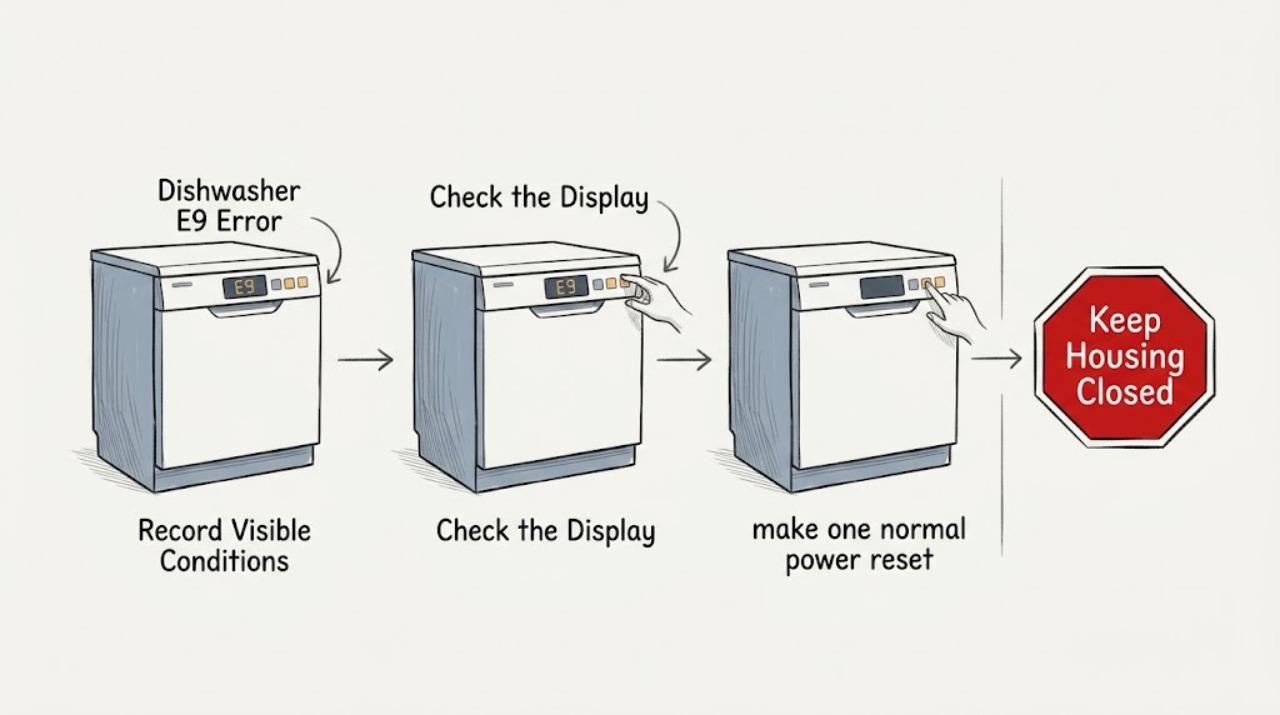
Do not apply E9 to every Crosley dishwasher without checking the complete model. In the opened official Crosley ZDM6502AS manual, E9 means a control button has been continuously contacted for more than 30 seconds, with water or another object on the buttons listed as a possible cause. Turn the dishwasher off, keep the control area dry, and inspect only the visible panel after it is safe. If E9 clears after a single model-permitted reset and there is no leak, standing water, hot or damaged wiring, or wet electrical area, monitor it. If E9 returns, a button remains stuck, water has reached the base, an overflow occurred, or any electrical warning is present, keep the dishwasher out of service and arrange qualified Crosley or appliance service.
Before you begin
Safety first
- Owner checks are limited to reading the model label, observing the visible control surface and leak signs, and drying or cleaning only the accessible panel after safe power isolation and cooling. Do not remove the console or enclosure, reach into the base, touch the heater, bypass controls or leak sensors, disconnect hoses, probe live wiring, or repeatedly reset protection.
Work through in order
Diagnostic checks
Use only checks that match the exact appliance or system and its official guide.
-
Check 1
Read the complete model and serial label on the dishwasher tub wall or door area and compare it with the exact Crosley Use and Care manual. Record whether it is the ZDM6502AS platform covered by the opened manual, another Crosley model, or an unreadable identity.
Expected result: The full identity matches ZDM6502AS; the dishwasher is another Crosley model; or only a partial brand/model name is available.
Next step: Use the matching manual for the exact model. If the identity is unknown or the display behavior does not match that manual, stop model-specific troubleshooting and obtain the correct guide or qualified service identification before ordering a control part.
Stop if: Do not move the built-in dishwasher, remove trim, or open panels to find the label while power or water is connected.
Why this matters
Why: The opened manual defines E9 only for its documented platform. Other Crosley dishwasher controls and codes may differ, so the code cannot be safely generalized from the brand name alone.
-
Check 2
With the cycle stopped and the dishwasher cool, inspect the control surface from outside for a wet spot, detergent film, food residue, tape, or an object resting on a key. From a safe dry position, wipe only the visible panel with the method allowed by the exact manual; do not spray cleaner into seams or hold a button down to test it.
Expected result: The panel is visibly wet or contaminated; an object or a button appears to remain pressed; or the panel is clean and dry but E9 remains.
Next step: Remove only the visible, loose contamination after power is safely off and allow the panel to dry. If a key remains depressed, the surface is cracked, or E9 persists with a dry panel, leave the dishwasher out of service and arrange qualified diagnosis.
Stop if: Do not use a sharp tool, flood the panel with cleaner, remove the console, or touch wet controls while the appliance is energized.
Why this matters
Why: On the opened ZDM6502AS platform, water or another substance/object on the control buttons can create the prolonged-contact condition behind E9. A clean dry panel with a persistent code makes a stuck key, touch-control fault, wiring, or another model-specific issue more likely.
-
Check 3
After the visible control area is dry and only if the exact manual permits a restart, make one normal power reset or clear operation without starting a heated wash. Watch whether E9 disappears when no key is being touched, and do not repeatedly press the same button or cycle the breaker.
Expected result: E9 clears and the controls respond normally; E9 returns immediately; or the dishwasher will not clear the display without a key being held or repeated resets.
Next step: If it clears, monitor one unloaded or model-permitted short check only when there is no water or electrical hazard. If it returns or needs repeated resets, stop using the dishwasher and provide the exact model, code timing, panel condition, and reset result to service.
Stop if: Do not keep resetting, bypass the control, run a heated cycle to test it, or make live electrical measurements.
Why this matters
Why: A code that clears after the panel is dry and no key is contacted is consistent with a transient control-surface condition on the documented platform. A returning or non-clearable E9 points toward a stuck key, touch-control, control-board, or wiring diagnosis that cannot be selected safely from the display alone.
-
Check 4
Check for a water-safety condition without dismantling the dishwasher: look for an overflow, standing water that did not drain, wet flooring or cabinetry, water near the toe-kick or base, or a visible hose/connection leak. Do not reach into a wet base or remove a panel.
Expected result: There is no visible leak or retained water; an overflow occurred; water is in or suspected in the base pan; or water is near an outlet, cord, control, or other electrical area.
Next step: For overflow, turn off the main water supply before calling service if this can be done from a safe dry position. Keep the dishwasher out of service until base-pan water, leaks, and the cause are assessed; use qualified appliance or plumbing help when a connection, pump, hose, sensor, or concealed leak is involved.
Stop if: Do not restart with water in the base, touch wet electrical parts, pull the dishwasher out, disconnect hoses, or use a wet vacuum near energized equipment.
Why this matters
Why: The official manual treats overflow and water in the base pan from an overfill or small leak as a separate stop condition. E9 may be a control symptom, but the water source and electrical risk take priority over clearing the code.
-
Check 5
Look and listen for electrical or heat warnings from outside: a hot or damaged power cord or outlet, burning odor, smoke, sparks, melted plastic, repeated breaker trips, or a control that becomes hot. Do not reproduce the symptom by starting another cycle.
Expected result: No electrical warning is present and E9 is gone; or any smoke, burning smell, spark, damaged power line, hot connection, repeated trip, or water near electrics is present.
Next step: For any electrical or fire warning, keep clear, isolate power only from a safe dry position if accessible, and arrange qualified appliance/electrical service; use emergency procedures for active smoke or fire. Provide the E9 history but do not ask service to replace a control based on the code alone.
Stop if: Do not reset a tripped breaker repeatedly, open the control console, touch the heater, bypass a leak sensor, or repair wiring yourself.
Why this matters
Why: A clean panel cannot make an electrically suspect or wet dishwasher safe. The official Crosley manual warns against use with a damaged power line or plug and limits servicing to safe, qualified handling.
Use your observations
Decision map
Find the observation that best matches what you see, then follow the next safe action.
-
PATH 01Next step
What you see
The full identity matches the ZDM6502AS manual, E9 appears after water or an object contacts the control buttons, and the code clears after the panel is safely dry without a leak or electrical warning.
Do this next
Keep the control area dry, avoid resting objects on the keys, and monitor a single normal use only if the appliance remains dry and controllable. Escalate if E9 returns.
Why this path and its safety boundary
Why it matters: This pattern fits the documented prolonged-button-contact explanation better than a confirmed internal component failure.
-
PATH 02Next step
What you see
The panel is clean and dry but E9 returns immediately, a button remains depressed, the console is cracked, or the code requires repeated resets to clear.
Do this next
Keep the dishwasher out of service and arrange qualified Crosley or appliance service with the complete model, serial, E9 timing, panel observations, and reset result.
Why this path and its safety boundary
Why it matters: A stuck key, touch-control assembly, wiring, or controller issue is more likely than temporary moisture, but the code alone does not identify the failed part.
-
PATH 03Next step
What you see
E9 occurs with an overflow, standing water, water in the base pan, a visible leak, or water near the outlet, cord, control, or other electrical area.
Do this next
Turn off the main water supply if safe, isolate electrical power from a dry safe position if accessible, do not restart, and obtain qualified appliance or plumbing service to locate and clear the water safely.
Why this path and its safety boundary
Why it matters: The water and electrical safety boundary takes priority. The manual specifically warns that overflow or base-pan water must be addressed before restarting.
-
PATH 04Next step
What you see
The model cannot be confirmed, the display is not actually E9, or the appliance shows smoke, burning odor, sparks, a hot/damaged power connection, or repeated breaker trips.
Do this next
Stop using the dishwasher and obtain the exact manual or qualified service diagnosis. Treat smoke or active fire as an emergency and do not return the appliance to use until cleared.
Why this path and its safety boundary
Why it matters: The exact code interpretation is unverified, or the appliance has crossed into an immediate safety path. Brand-level assumptions and ordinary button cleaning are not enough.
Helpful context
Understand the symptom
E9 is a model-specific display message, not a universal Crosley dishwasher diagnosis. The official ZDM6502AS manual ties it to a control button being contacted for more than 30 seconds and points to water or an object on the buttons. That gives you a safe first branch—identity, dry visible controls, and one controlled observation—but it does not authorize opening the door panel or assuming that a recurring E9 is only a dirty touch surface.
A leak or electrical symptom changes the priority. An overflow, water in the base pan, a wet outlet, a hot or damaged cord, smoke, sparks, or repeated breaker operation is a stop-and-service condition. Do not keep running cycles to see whether the code disappears.
Only after diagnosis
Potential parts
- control panel or touch-key assembly
Consider only after a qualified technician confirms that the correct model has a stuck or failed control interface after the panel is dry and no water or wiring fault remains.
E9 is model-specific; match the complete Crosley model and revision and do not order a control from the code alone. - door seal, leak sensor, pump, or internal hose
Consider only if service confirms that overflow, base-pan water, or a visible leak is the cause of the safety condition associated with E9.
Do not select a leak-related part until the source and exact model are confirmed; keep the appliance out of service while water is near electrical components.
When checks do not resolve it
Need a professional?
Contact Crosley support through the dealer or exact Use and Care guide, or use qualified appliance service, for a recurring E9, stuck button, damaged console, overflow, standing water, base-pan water, leak, or uncertain model identity. Use electrical service for circuit or cord hazards.
Safety scope: Owner checks are limited to reading the model label, observing the visible control surface and leak signs, and drying or cleaning only the accessible panel after safe power isolation and cooling. Do not remove the console or enclosure, reach into the base, touch the heater, bypass controls or leak sensors, disconnect hoses, probe live wiring, or repeatedly reset protection.
Have this ready
- Provide the complete model and serial, the exact E9 display, when it appears, whether the button area was wet or obstructed, whether the code cleared after drying, any overflow or standing-water result, leak photographs after the appliance is safe, and any electrical symptoms.
Common questions
FAQ
What does E9 mean on a Crosley dishwasher?
On the opened official Crosley ZDM6502AS manual, E9 means contact with a control button for more than 30 seconds. Water or another substance/object on the control buttons is listed as a possible cause. Because Crosley uses more than one dishwasher platform, verify the complete model before applying that definition.
Can I wipe the buttons and keep using the dishwasher?
Only if the exact model manual permits the visible cleaning, the panel is dry, E9 clears, and there is no leak, base-pan water, damaged cord, hot connection, smoke, or electrical warning. If E9 returns or a button sticks, leave the dishwasher out of service and arrange service.
Does E9 mean the dishwasher is leaking?
Not by itself. The ZDM6502AS manual describes E9 as prolonged button contact, but it separately warns that overflow or water in the base pan from an overfill or small leak must be addressed before restarting. If E9 appears with water, treat the water and electrical safety issue as the priority.
Should I reset the breaker to clear Crosley E9?
Do not repeatedly reset a breaker. If the model-specific manual allows one safe reset after the visible control panel is dry and there is no water or electrical warning, observe whether E9 clears. A returning code, hot or damaged connection, smoke, sparks, or a wet base requires qualified service instead.
Read the exact guide
Official sources
- Dishwasher Use & Care Manual ZDM6502ASCrosley Home Products · Opened the official Crosley PDF for the ZDM6502AS dishwasher. It identifies E9 as contact with a control button for more than 30 seconds and lists water or another substance/object on the control buttons as a possible cause; it also gives overflow, base-pan water, power, and service precautions.
- Customer Service - Crosley Home ProductsCrosley Home Products · Opened the official Crosley customer-service page. It states that appliance service should be routed through the Crosley dealer or the Use and Care guide because contact information varies by product.
Community feedback
Share a repair observation
Share a plain-text repair observation. Accepted observations are published automatically; this page may take a moment to update.