
On this page
Start here
Quick answer
Start by separating a completely dead refrigerator from one that has lights or a display but is not cooling. From a dry, safe position, check the plug, outlet, and household breaker, then identify whether the exact Crosley model has mechanical controls, electronic controls, a POWER button, Demo/Cooling Off mode, Holiday mode, or a delay/defrost state. A control set to OFF or a documented defrost/protection interval can make cooling stop without proving a failed compressor. If the display or light works but both compartments stay warm, or the compressor clicks, remains silent, or repeatedly trips protection, the start, control, fan, or sealed refrigeration system needs professional diagnosis. Do not open the rear cover, test live wiring, bypass a door or temperature sensor, handle refrigerant, or keep resetting a breaker. Protect perishable food and arrange Crosley or qualified appliance service for persistent no-start, no-cooling, or electrical symptoms.
Before you begin
Safety first
- The user may check the accessible outlet/plug, display/light, documented controls and modes, normal door closure, visible loading/airflow, and the exact manual's stabilization interval. Qualified service personnel must handle internal electrical, compressor-start, fan, control, defrost, refrigerant, and sealed-system work.
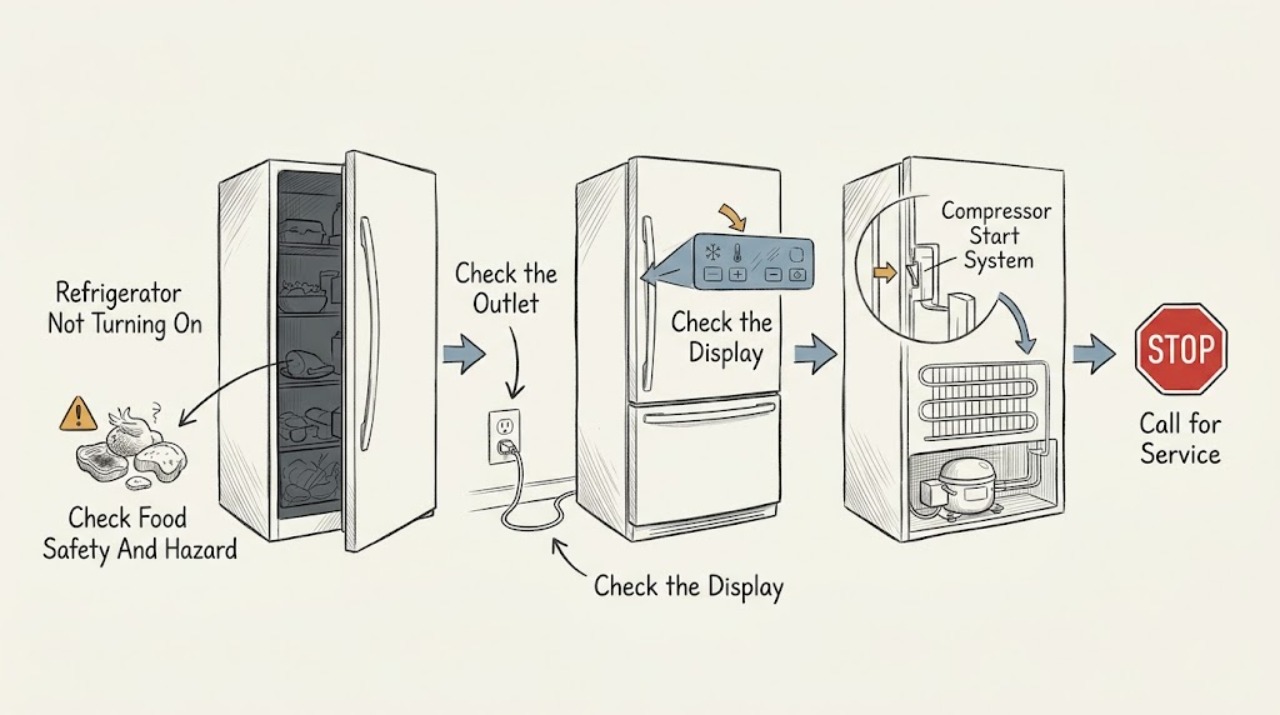
Work through in order
Diagnostic checks
Use only checks that match the exact appliance or system and its official guide.
-
Check 1
Protect perishable food and inspect the refrigerator from a dry, safe position for smoke, burning odor, a hot or damaged cord/plug, liquid near electrical parts, a damaged casing, or a breaker that opens again. Do not touch the appliance if a fire or exposed conductor is present; isolate power only from a safe location and keep the unit out of service.
Expected result: There is an immediate electrical/fire hazard, the refrigerator is warm but otherwise safe, or no hazard is visible.
Next step: For smoke, odor, heat, damage, liquid, or repeated trips, leave the refrigerator disconnected and contact qualified service. If safe, continue by recording the light/display state and checking the accessible supply.
Stop if: Do not touch exposed wiring, repeatedly reset a breaker, use a damaged cord, or continue operating when food safety or electrical safety is compromised.
Why this matters
Why: A hazard takes priority over any mode or reset check. A safe but warm refrigerator can proceed to external power and control observations, but those checks cannot authorize internal electrical work.
-
Check 2
Check whether the interior light, control display, or indicator is completely dark. If the plug and outlet are safely accessible, confirm the plug is fully inserted and check the outlet with a small known-good appliance; inspect the household breaker or fuse once. Do not open the outlet, power cord, or refrigerator cabinet.
Expected result: The outlet is dead, the breaker/fuse opens again, the refrigerator remains dark while the outlet works, or the light/display works.
Next step: Use a qualified electrician for a failed outlet and leave the refrigerator disconnected if protection opens again. If the outlet is normal, record the exact display/light pattern and continue with the model-specific control check.
Stop if: Do not keep resetting protection, use an extension as a workaround, test internal voltage, or remove panels.
Why this matters
Why: A dead outlet or recurring protection event points to household electrical service or an appliance fault. A dark refrigerator with a working outlet needs appliance service; a working display/light moves the diagnosis toward controls, mode, defrost, or cooling components rather than total loss of supply.
-
Check 3
Identify the exact model and inspect only its user controls. For a mechanical model, check that the refrigerator control is not at OFF or 0. For an electronic model, check the displayed refrigerator/freezer settings and whether POWER, Demo/Cooling Off, Eco, Holiday, or another documented mode is active; use only the exact manual's mode exit or setting adjustment.
Expected result: The control is OFF, a cooling-off/Demo/POWER mode is active, the setting is warmer than intended, a special mode cannot be exited, or controls appear normal.
Next step: Make one model-documented correction and record the prior state. Keep doors closed and allow the appliance to resume normally; if it will not exit the mode or cooling does not return, arrange service rather than repeatedly pressing controls.
Stop if: Do not use undocumented button combinations, enter service mode, bypass a sensor, or infer that a generic reset applies to every Crosley model.
Why this matters
Why: A user control or documented special mode can stop cooling while lights or the display remain active. A mode that cannot be exited or normal settings with warm compartments point toward a control, defrost, fan, compressor-start, or sealed-system fault.
-
Check 4
Note whether the refrigerator was just plugged in, recently moved, switched off for a long time, or may be in a documented defrost/protection interval. Check that each door closes fully, no package holds it open, and visible air outlets are not blocked. Look for heavy frost only from outside accessible areas; do not remove covers or use heat or sharp tools.
Expected result: The unit has just started or is in a defrost/protection interval, a door is held open, the room/environment is unsuitable, heavy frost blocks an accessible circulation path, or conditions appear normal.
Next step: Allow only the exact manual's stated stabilization/defrost interval, close doors, and clear only visible loading obstructions. If frost is behind a cover, returns, or the refrigerator remains warm after the documented interval, call service.
Stop if: Do not chip ice, use a heat source, remove evaporator/fan covers, bypass a door switch, or repeatedly power-cycle the compressor.
Why this matters
Why: Crosley manuals describe temporary non-operation during defrost or after startup to protect the compressor, and link warmth to door openings, room conditions, and blocked airflow. A normal door and environment with both compartments warm makes an internal fault more likely.
-
Check 5
With the doors closed, record whether one compartment or both are warm, whether the compressor or fan is silent, clicking, or running continuously, and whether the display responds normally. If the light/display works but cooling does not return after the model-specific control, defrost, and door checks, stop testing and record the exact model, mode, temperature settings, timing, sounds, and any error for Crosley support.
Expected result: Cooling returns after a documented correction, only the refrigerator or freezer compartment is warm, both compartments are warm, the compressor clicks or stays silent, or an error/protection symptom occurs.
Next step: Keep the refrigerator out of service as appropriate and contact Crosley or a qualified appliance technician for persistent no-cooling, abnormal sounds, or codes. Provide the observation record instead of ordering a generic relay, compressor, control, or fan.
Stop if: Do not open the rear cover, test live wiring, bypass a temperature or door sensor, handle refrigerant, or repeat a hazardous start attempt.
Why this matters
Why: A corrected mode, door, startup, or defrost condition can explain a temporary no-cooling symptom. A working light/display with persistent warmth, especially in both compartments or with clicking/silence, makes a compressor-start, control, fan, or sealed-system issue more likely; the safe checks cannot identify the part.
Use your observations
Decision map
Find the observation that best matches what you see, then follow the next safe action.
-
PATH 01Safety boundary
What you see
The light and display are dark, the outlet is dead, or the breaker/fuse opens again.
Do this next
Have a qualified electrician check a failed outlet and leave the refrigerator disconnected for recurring protection trips. If the outlet is normal but the refrigerator remains dark, arrange Crosley appliance service.
Why this path and its safety boundary
Why it matters: A household supply issue or appliance electrical fault is more likely than a cooling-mode issue.
Safety stop: Do not keep resetting protection, open the outlet or appliance, or use a damaged cord.
-
PATH 02Safety boundary
What you see
The display or interior light works, but the exact model shows POWER/Cooling Off, Demo, Holiday, OFF, or another documented non-cooling state.
Do this next
Exit the documented mode or set the mechanical control to its normal operating position once, then allow the refrigerator to resume. If the mode cannot be exited or cooling remains absent, call service.
Why this path and its safety boundary
Why it matters: A user-selectable control state is more likely than a proven compressor failure.
Safety stop: Do not enter hidden service settings, bypass sensors, or repeatedly toggle modes.
-
PATH 03Safety boundary
What you see
The refrigerator was just plugged in, recently switched off/moved, or is within the exact manual's defrost or compressor-protection interval, with no hazard present.
Do this next
Keep the doors closed and allow only the exact manual's documented interval, then reassess once. If the unit does not resume or temperatures remain unsafe, arrange service.
Why this path and its safety boundary
Why it matters: A temporary normal pause or stabilization period is possible and does not identify a failed start component.
Safety stop: Do not repeatedly unplug/replug, force the compressor to start, or remove covers to check it.
-
PATH 04Safety boundary
What you see
A package holds a door open, the gasket/door does not close normally, air outlets are blocked, or the room/environment is outside the model's operating guidance.
Do this next
Remove only a loose obstruction, close the doors, and clear visible loading obstructions. If the seal is damaged, frost is inaccessible/recurring, or warmth persists, call service.
Why this path and its safety boundary
Why it matters: Heat gain or restricted circulation can explain poor cooling without proving a compressor or sealed-system fault.
Safety stop: Do not bend hinges, puncture the gasket, remove air ducts, chip frost, or alter the installation.
-
PATH 05Safety boundary
What you see
Power is available, controls and modes are normal, the door/environment checks pass, but one or both compartments remain warm, the compressor clicks/stays silent, or an error/protection symptom recurs.
Do this next
Protect food, stop repeated start attempts, and contact Crosley or qualified appliance service with the exact model and symptom record.
Why this path and its safety boundary
Why it matters: An internal start, control, fan, compressor, defrost, or sealed-system fault is more likely and is outside user diagnosis.
Safety stop: Do not test or replace a relay, compressor, control board, sensor, fan, thermostat, wiring, or refrigerant circuit yourself.
Helpful context
Understand the symptom
“Not turning on” describes two different symptoms
If the interior light and display are both dark, start with the outlet, plug, breaker, and fuse path. If the light or display works but the refrigerator is warm, the appliance has some power and the cooling system may be disabled by a user mode, a defrost/protection interval, or an internal fault. Do not treat a working light as proof that the compressor or control system is healthy.
Modes and delays are model-specific
Crosley manuals show more than one control design. A mechanical model can be turned off at its control, while an electronic model may have POWER, Demo/Cooling Off, Eco, Holiday, or other documented modes. A refrigerator can therefore look active while cooling is disabled, or remain temporarily stopped during defrost or compressor protection. Use the exact model and do not apply a button combination from another Crosley family.
Food safety and the service boundary come first
Move vulnerable food to a known-safe cold appliance or insulated container and keep the refrigerator doors closed. A qualified technician must handle the compressor start circuit, relays, control board, fan wiring, refrigerant, sealed system, and live electrical testing. A no-start symptom alone is not enough to select a replacement part.
Safety boundary
Stop conditions
- Stop using the refrigerator for smoke, burning odor, a hot or damaged cord/plug, exposed wiring, liquid near electrical parts, repeated breaker trips, or unsafe food temperatures.
- Do not repeatedly reset a breaker, unplug/replug to force a start, enter undocumented modes, or bypass a door or temperature sensor.
- Do not remove rear, control, fan, evaporator, or compressor covers; perform live electrical tests; handle refrigerant; or access sealed-system components.
- Do not chip frost with sharp tools, use a heat source, bend the door/gasket, or remove ducts to investigate a no-start or no-cooling symptom.
- If a documented power, control/mode, door, environment, or stabilization correction does not restore operation, stop testing and arrange professional service.
When checks do not resolve it
Need a professional?
Safety scope: The user may check the accessible outlet/plug, display/light, documented controls and modes, normal door closure, visible loading/airflow, and the exact manual's stabilization interval. Qualified service personnel must handle internal electrical, compressor-start, fan, control, defrost, refrigerant, and sealed-system work.
Common questions
FAQ
Why is my Crosley refrigerator completely dead?
Check the accessible plug, outlet, and breaker/fuse once from a safe dry position. If the outlet works but the refrigerator light and display stay dark, leave it disconnected and arrange service. Do not open the power cord, outlet, or rear panel.
Why are the lights on in my Crosley refrigerator but it is not cooling?
A working light/display does not prove that the cooling circuit is running. Check the exact model's control position and documented POWER, Demo/Cooling Off, Eco, or Holiday state, then allow its documented startup/defrost interval. If one or both compartments remain warm, call service rather than testing the compressor or control.
Can Demo mode stop a Crosley refrigerator from cooling?
On the CFDN2216AS manual consulted, Demo mode prevents the refrigerator from generating cool air while it may appear to be working. That button sequence is model-specific. Identify your model and use its documented mode-exit procedure; do not apply it to another Crosley refrigerator without confirmation.
Is it normal for a Crosley refrigerator to stop briefly?
Some Crosley manuals describe a temporary pause during defrost or shortly after startup to protect the compressor, and a new or recently moved refrigerator may need a stabilization period. Allow only the exact manual's interval. A refrigerator that does not resume, stays warm, clicks repeatedly, or trips protection needs service.
When should I call a professional for a Crosley refrigerator that will not turn on?
Call when the outlet is normal but the refrigerator remains dark, a mode cannot be exited, one or both compartments remain warm after the external checks, the compressor clicks or stays silent, or an error/protection symptom recurs. Treat smoke, burning odor, damaged wiring, liquid near electrical parts, and repeated trips as urgent. Internal electrical, compressor, fan, and refrigerant work is not a user check.
Read the exact guide
Official sources
- Crosley Home Products SupportCrosley Home Products · General Crosley support destination; the correct manual and service path depend on the exact model and market.
- CFDNH2218AS User Operation ManualCrosley Home Products · Official CFDNH2218AS-family manual; use its procedure only after matching the exact model.
- Conservator Refrigerator User and Care GuideCrosley Home Products · Crosley-hosted model-family guide; use only as general control/defrost context and verify the exact product manual.
- CFDN2216AS Use and Care GuideCrosley Home Products · Official CFDN2216AS-family manual; POWER/Demo behavior must not be assumed for another Crosley model.
- CRHS12RW/S Top Mount Refrigerator Product PageCrosley Home Products · Specific Crosley product page used to distinguish a top-mount electronic-control architecture; not a universal control procedure.
- XTS21 Refrigerator Troubleshooting TipsCrosley Home Products · Official Crosley-hosted manual; its control and defrost details are model-family specific.
Community feedback
Share a repair observation
Share a plain-text repair observation. Accepted observations are published automatically; this page may take a moment to update.