
On this page
Start here
Quick answer
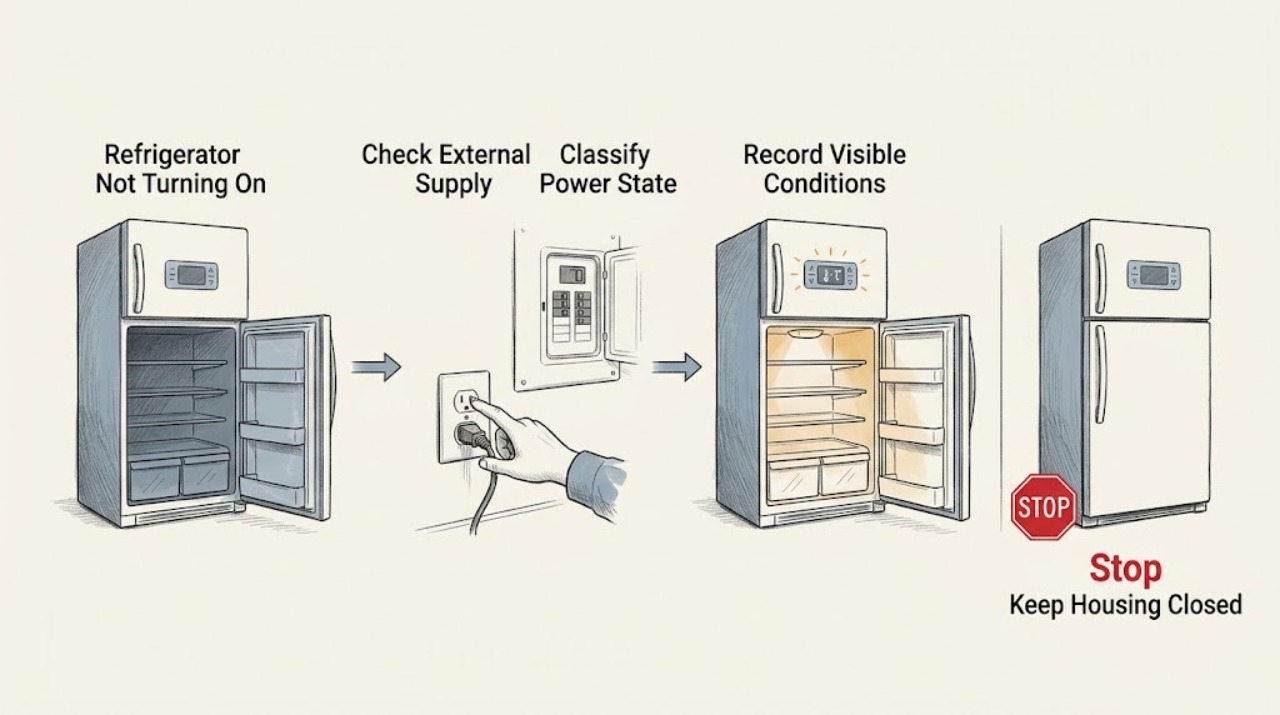
First separate a totally unpowered refrigerator from one that has lights or a display but is not cooling. If the display and interior light are both dead, make only safe external checks: confirm the plug is seated, check whether the refrigerator breaker or GFI has tripped, and—only if the outlet and appliance are dry and undamaged—confirm the outlet with a normal appliance. Frigidaire specifies a dedicated, properly grounded 115/120-volt outlet and says to contact service when the no-power checks do not resolve the issue. If the display or interior light works but the refrigerator is warm, do not call that a power failure: check the selected mode, temperature setting, door closure, visible gasket contact, blocked vents, recent outage, and whether the compressor or fans are simply in a normal delay or cycle. Frigidaire gives 37°F for the refrigerator and 0°F for the freezer as suggested settings, but a newly powered unit may need up to 24 hours to stabilize. A 77 77 display can be model-specific Demo Mode and SB/Sb can be Sabbath Mode; use only the exact model manual for exit steps. PF indicates a documented power outage or surge and may accompany a high-temperature alarm. Do not open panels, probe live wiring, repeatedly reset a breaker, or diagnose the compressor, inverter, fan, sensor, control, or sealed refrigeration system yourself. Leave the refrigerator off and arrange qualified service for a hot or damaged cord/outlet, smoke, arcing, water near electrical parts, repeated trips, a dead display after safe external checks, or persistent no-cooling symptoms.
Before you begin
Safety first
- The user may check accessible lights, display, plug seating, breaker/GFI status, a dry intact outlet using a normal appliance, model-specific settings, door/gasket, vents, and visible temperature context. Qualified personnel must handle panels, wiring, live tests, controls, sensors, fans, compressors, inverters, refrigerant, and any water- or electrically-damaged appliance.
Work through in order
Diagnostic checks
Use only checks that match the exact appliance or system and its official guide.
-
Check 1
With the refrigerator standing safely and dry, check whether any control-panel display, alarm, dispenser light, or interior light responds. Do not remove a cover or reach behind the appliance to perform this check.
Expected result: The display and interior light are both dead; one or both lights/display are on; the display is blinking or showing PF/another code; or there is smoke, odor, heat, arcing, or water near electrics.
Next step: For a dark but hazard-free unit, continue with safe external supply checks. For a lit or coded unit, record the display and continue with model and cooling checks. For a hazard, stop and arrange qualified service.
Stop if: Do not restore power or touch the appliance if the cord, plug, outlet, cabinet, or surrounding floor is hot, wet, scorched, smoking, or arcing.
Why this matters
Why: A completely dark unit follows the no-power path. A lit display or interior light means the unit has at least some power and should follow the no-cooling, setting, mode, or control path instead. A hazard takes priority over both paths.
-
Check 2
For a dead display and light, confirm from a safe position that the power cord is firmly seated and that the refrigerator's breaker or GFI has not tripped. If the outlet and plug are cool, dry, intact, and accessible, verify the outlet with a normal appliance as Frigidaire describes; do not probe voltage.
Expected result: The plug is loose; the breaker or GFI is tripped; the outlet does not operate another appliance; the outlet works but the refrigerator remains dark; or the power path is hot/damaged.
Next step: Reseat a loose plug only if dry and undamaged. A single safe reset of the correct GFI/breaker may be appropriate when there is no hazard, but if it trips again or the refrigerator stays dark, leave it off and call appliance/electrical service.
Stop if: Do not repeatedly cycle the breaker, use an extension cord, open an outlet or plug, or perform live tests.
Why this matters
Why: A loose plug or household protection event can explain a dark refrigerator. A working outlet with a dark refrigerator shifts concern to the appliance power input or controls, which is not a user-level internal repair. Heat or damage makes repeated restoration unsafe.
-
Check 3
If any display or light works, photograph and transcribe the exact model number, platform, display characters, blinking state, and alarm pattern before acknowledging or resetting. Record whether the refrigerator is French door, side-by-side, top freezer, or another documented configuration.
Expected result: There is no code; PF appears; 77 77 appears; SB/Sb appears; the display is locked or in a menu; or the code is partial/unknown.
Next step: Use the exact Owner's Manual for any mode, lock, or alarm action. If the model or code cannot be confirmed, preserve the photo and request service rather than guessing a reset sequence.
Stop if: Do not combine a display sequence from one Frigidaire platform with a reset sequence from another.
Why this matters
Why: Frigidaire's published codes and display functions vary by model. PF can follow an outage or surge, while 77 77 and SB/Sb can be mode indications, but similar-looking characters cannot be mapped safely without the exact manual.
-
Check 4
For a powered but apparently idle refrigerator, inspect the selected temperature, any visible OFF or Demo/Sabbath indication, control lock state, and the exact model manual's operating-mode screen. Do not press random keys or hold combinations copied from another appliance.
Expected result: A control is set to OFF or a model-specific mode is shown; the display is locked; normal temperature settings are selected; or the control does not respond.
Next step: Change only an identified setting using the exact manual. If the setting is normal, the display will not respond, or the refrigerator remains warm, continue external cooling checks and arrange service if unresolved.
Stop if: Do not bypass a control lock, disconnect a sensor, remove the display, or open a control panel.
Why this matters
Why: A setting or mode can make a refrigerator appear not to run while the display remains active. A nonresponsive control or persistent no-cooling condition after a documented mode correction raises concern for controls or cooling components.
-
Check 5
For a powered but warm unit, check only accessible conditions: actual temperature display, door closure, visible gasket contact, blocked interior vents, recent extended door opening, ambient location, and whether a recent outage or installation occurred. Listen from outside for normal cycling without moving panels or placing hands near moving parts.
Expected result: The unit was recently installed or powered after an outage; a door or gasket is not sealing; vents are blocked; temperatures are out of range; or all accessible conditions look normal but cooling is absent.
Next step: Correct only an accessible obstruction or door-closure issue and allow the model's documented stabilization period where applicable. If the refrigerator remains warm, move food to safe storage and arrange qualified service.
Stop if: Do not remove evaporator covers, fan guards, compressor covers, or refrigerant lines to identify the cooling fault.
Why this matters
Why: Frigidaire says a newly powered refrigerator may need up to 24 hours to stabilize and identifies airflow, door sealing, settings, and outage recovery as accessible cooling factors. Normal exterior conditions with persistent warmth shift concern to fans, compressor, controls, or the sealed system.
-
Check 6
If doors or airflow are implicated, close each door without forcing it, remove only items visibly blocking the door or vents, and inspect the gasket for dirt or an obvious gap. Frigidaire's dollar-bill check may be used only on a clean, dry, undamaged seal; do not pull hard or dismantle the gasket.
Expected result: The door closes and the seal has some resistance; the bill slides out with no resistance; an item blocks a vent or door; or the door/gasket is damaged or misaligned.
Next step: Remove the accessible obstruction and clean the gasket with warm soapy water if the manual allows. If the gasket, hinge, cabinet, or alignment is damaged or cooling remains abnormal, call service.
Stop if: Do not heat, stretch, glue, replace, or pry the gasket, and do not access the hinge or wiring behind a panel.
Why this matters
Why: A non-sealing door or blocked vent can destabilize temperature, but a good visible seal does not rule out a fan, control, compressor, or sealed-system fault. Physical damage is a service issue.
-
Check 7
Prepare a service handoff with the model and serial, power-state result, display or light behavior, outage/breaker history, settings or mode, temperatures, door/vent observations, sounds, and time since installation or restart. Do not run a new test cycle solely to make a compressor or fan sound.
Expected result: Power is absent after safe external checks; the display is on but cooling does not return; the control is unresponsive; the breaker trips; or the unit has smoke, odor, heat, water, or visible damage.
Next step: Leave the refrigerator in the safest available state and arrange qualified appliance service; involve an electrician for a household outlet or circuit issue. Protect food if temperatures are not controlled.
Stop if: Do not open panels, test energized circuits, bypass controls, or purchase a compressor, inverter, board, sensor, fan, or sealed-system part based only on this symptom.
Why this matters
Why: These patterns distinguish a supply problem from an appliance power-input, control, fan, compressor, or sealed-cooling diagnosis, but they do not identify a safe user-replaceable part. Repeated trips and physical hazards require immediate isolation.
Use your observations
Decision map
Find the observation that best matches what you see, then follow the next safe action.
-
PATH 01Safety boundary
What you see
The control display and interior light are both dead, with no smoke, heat, water, or visible damage.
Do this next
Make the safe external supply checks once. If a known-good outlet is available but the refrigerator remains dark, arrange service rather than opening the appliance.
Why this path and its safety boundary
Why it matters: The problem follows Frigidaire's no-power path: plug, dedicated outlet, breaker/GFI, fuse, installation, or appliance power input.
Safety stop: Stop for a hot/damaged cord or outlet, repeated trip, smoke, arcing, or wet electrical area.
-
PATH 02Safety boundary
What you see
The display or interior light works, but the refrigerator or freezer is warm or neither compartment cools.
Do this next
Check only settings, mode, doors, gasket, vents, installation/outage timing, and actual temperatures. If cooling does not return, call qualified service.
Why this path and its safety boundary
Why it matters: The unit has at least some power; a household no-power fix is unlikely. Settings, outage recovery, airflow, door sealing, fans, compressor, controls, or the sealed system remain possible.
Safety stop: Do not remove panels or test compressor, inverter, fans, sensors, or refrigerant circuits.
-
PATH 03Safety boundary
What you see
A recent outage, surge, breaker event, or exact PF indication is present and the refrigerator is now lit or recovering.
Do this next
Record PF and the event, confirm safe power externally, and follow only the exact model manual's acknowledgement. If PF returns, cooling remains poor, or power is unstable, arrange service.
Why this path and its safety boundary
Why it matters: Frigidaire identifies PF as a power outage or surge indication and notes that it may be followed by a high-temperature alarm. A warm cabinet after a power event does not by itself prove a failed compressor.
Safety stop: Do not repeatedly reset the circuit or use a power cycle as a diagnostic test.
-
PATH 04Safety boundary
What you see
The display shows 77 77, SB/Sb, or another mode indication while the unit appears powered but functional cooling is absent.
Do this next
Use the model-specific Owner's Manual to exit the mode. If the display remains in that mode, the unit remains warm, or the code is not confirmed for the model, call service.
Why this path and its safety boundary
Why it matters: Frigidaire documents 77 77 as Demo Mode and SB/Sb as Sabbath Mode examples, but feature availability and exit sequences vary by model. The display is not evidence of an internal electrical failure until the exact mode is ruled out.
Safety stop: Do not hold keys from another model or open the control housing.
-
PATH 05Safety boundary
What you see
The refrigerator has power and no service code, but a control is OFF, a vent is blocked, the door is not sealing, or the unit was recently installed or left open.
Do this next
Correct the visible setting or obstruction, close the door, clean the gasket if appropriate, and allow the documented stabilization period. Call service if temperatures remain abnormal.
Why this path and its safety boundary
Why it matters: Frigidaire identifies settings, installation/stabilization, airflow, door closure, and gasket contact as accessible causes of a warm refrigerator.
Safety stop: Do not force the door, modify the gasket, or access internal fans and controls.
-
PATH 06Safety boundary
What you see
The outlet and display are normal, settings and visible airflow/doors are normal, but cooling is absent or the control does not respond; or the display is dead despite a confirmed working outlet.
Do this next
Keep the refrigerator in a safe state, protect food, and arrange qualified service with the recorded model and observations.
Why this path and its safety boundary
Why it matters: An appliance power-input, control, fan, compressor, inverter, sensor, or sealed-system issue becomes more likely, but the symptom cannot identify a part safely.
Safety stop: Do not open panels, probe live wiring, bypass a controller, or order an unverified part.
-
PATH 07Safety boundary
What you see
The cord, plug, outlet, cabinet, or floor is hot, wet, scorched, smoking, arcing, damaged, or the breaker trips again.
Do this next
Keep people away, disconnect only from a safe dry location if accessible, and arrange qualified appliance or electrical service. Do not restore power to see whether the display returns.
Why this path and its safety boundary
Why it matters: This is an electrical or water-safety condition, not a normal “not turning on” branch. Restoring power can increase fire, shock, or equipment risk.
Safety stop: Do not touch wet electrical parts, repeatedly reset the breaker, move a damaged appliance, or perform live testing.
Helpful context
Understand the symptom
“Not turning on” has two different diagnostic paths
A dead display and dead interior light point first toward the household supply, plug, breaker/GFI, or appliance power input. A lit display or interior light proves that at least part of the refrigerator has power; it does not prove that the compressor, fans, or cooling system are operating. Keep those paths separate so that a warm refrigerator is not “fixed” by repeatedly resetting an outlet or a control.
A mode or outage can look like a failure
Frigidaire's error guide lists PF after a power event, 77 77 for Demo Mode, and SB/Sb for Sabbath Mode. Those indicators and their exit procedures are model-dependent. A recent outage can also leave the cabinet warm while the refrigerator recovers. Preserve any display or alarm before clearing it, then follow the exact Owner's Manual rather than copying a button sequence from another platform.
User checks stop before internal electrical or refrigeration work
It is reasonable to inspect an accessible plug, breaker/GFI status, display, light, door, gasket, settings, vents, and visible frost. It is not safe to remove a rear or control panel, test live voltage, bypass a control or door switch, handle a compressor or inverter, or open the sealed system. If power is abnormal or cooling does not return after the documented external checks, arrange qualified service.
Safety boundary
Stop conditions
- Stop and isolate the refrigerator for smoke, burning odor, arcing, a hot or damaged cord/outlet, water near electrical parts, cabinet damage, or a breaker that trips again; arrange qualified service or electrical inspection.
- Do not open rear, control, evaporator, compressor, or dispenser panels; probe energized wiring; bypass a controller or safety switch; or handle the sealed refrigeration system.
- Do not repeatedly reset a breaker, GFI, or refrigerator to see whether it starts, and do not use an extension cord or improvised power arrangement.
- Do not copy Demo Mode, Sabbath Mode, alarm, or temperature-control sequences from another Frigidaire model or platform.
- Do not diagnose or replace a compressor, inverter, fan, sensor, control board, heater, valve, or refrigerant component from the no-start symptom alone.
When checks do not resolve it
Need a professional?
Safety scope: The user may check accessible lights, display, plug seating, breaker/GFI status, a dry intact outlet using a normal appliance, model-specific settings, door/gasket, vents, and visible temperature context. Qualified personnel must handle panels, wiring, live tests, controls, sensors, fans, compressors, inverters, refrigerant, and any water- or electrically-damaged appliance.
Common questions
FAQ
How can I tell whether my Frigidaire refrigerator has no power or just is not cooling?
Check whether the control display and interior light work. If both are dead, follow the external outlet, plug, breaker/GFI, and fuse path. If either is active, the refrigerator has at least some power and you should check settings, modes, doors, airflow, temperatures, and outage recovery instead.
What should I check if the Frigidaire refrigerator display is completely blank?
From a safe, dry position, check secure plug seating, the refrigerator breaker or GFI, and—only if the outlet and plug are intact—whether the outlet operates another normal appliance. If the outlet works but the refrigerator remains blank, arrange service; do not open the appliance or test live wiring.
Why does my Frigidaire refrigerator have lights but not cool?
Lights indicate that at least part of the refrigerator has power, not that the cooling system is working. Check the selected mode and temperature, recent outage or installation, blocked vents, door closure, visible gasket contact, and actual compartment temperatures. Persistent warmth needs qualified service.
Can Demo Mode or Sabbath Mode make a Frigidaire refrigerator seem not to run?
Yes, Frigidaire documents 77 77 as Demo Mode and SB/Sb as Sabbath Mode examples. Because features and exit sequences vary by model, use the exact Owner's Manual and do not copy a button combination from another refrigerator.
When should I stop trying to turn on a Frigidaire refrigerator?
Stop for a hot or damaged cord/outlet, smoke, burning odor, arcing, water near electrical parts, cabinet damage, or a breaker that trips again. Also stop user diagnosis when safe external power checks fail, a powered refrigerator remains warm, a code returns, or the next step would require opening panels or testing live circuits.
Read the exact guide
Official sources
- Refrigerator Error Code PF or Power Failure LightFrigidaire · Applies to Frigidaire refrigerators displaying PF or a power-failure light; confirm reset behavior in the exact model manual.
- What should I do if my freezer isn’t running?Frigidaire · Applies to freezers and refrigerators and supports external checks for an OFF control knob, fuse/breaker, plug, extension-cord avoidance, and outage.
- Refrigerators - Not CoolingFrigidaire · Applies to all refrigerators and supports separating power presence from cooling, settings, outage recovery, airflow, doors, and gasket checks.
- Refrigerator Error Codes and Alarms GuideFrigidaire · Applies to Frigidaire refrigerators as a general orientation; exact display meanings and key sequences remain model-dependent.
- Refrigerators - How do I use the features and functions on my French-Door refrigerator display?Frigidaire · The page covers French-door, side-by-side, and top-freezer refrigerator display features, but explicitly says functions vary by model and the Owner's Manual should be checked.
- Refrigerator No PowerFrigidaire · Applies to all refrigerators and supports external installation, dedicated-outlet, breaker/fuse, plug, and outlet checks.
Community feedback
Share a repair observation
Share a plain-text repair observation. Accepted observations are published automatically; this page may take a moment to update.