
On this page
Start here
Quick answer
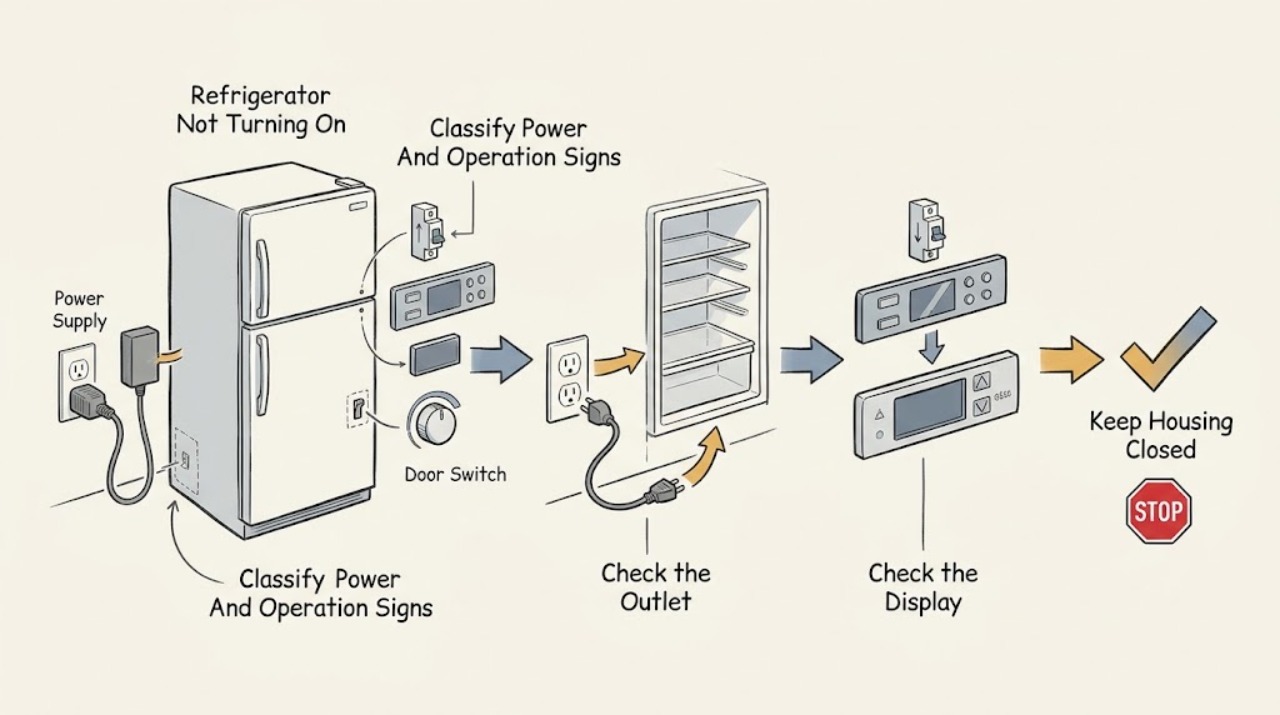
First separate a refrigerator with no signs of power from one whose display or interior light works but whose cooling does not start. For a completely dark appliance, check the plug, the dedicated outlet, and the refrigerator circuit breaker or fuse from a dry, safe position; Electrolux says to confirm an outlet with another appliance and not to use an extension cord. After a recent power cut, its display guidance allows a brief unplug-and-reconnect reset followed by pressing the temperature-display control. If the display or light works, check whether the exact model has been switched off at its control panel, is in a model-specific mode, or has a temperature control set to OFF; do not assume a universal control layout. Record any code or alarm before resetting. If power is present but the compressor and cooling do not start, the display stays dark after safe supply checks, a breaker trips again, or there is smoke, burning odor, abnormal heat, water near electrics, or cord damage, stop and arrange qualified service. Do not remove panels, probe live wiring, bypass a control or door switch, or replace an internal part from the symptom alone.
Before you begin
Safety first
- The user may inspect a secure plug and dry outlet from outside, check a household breaker once when safe, use a known-good appliance to check an outlet, follow the exact model's display or control instructions, record codes, and perform one documented reset. Outlet wiring, panels, internal power supply, compressor, fan, sensors, controls, live testing, and refrigerant work are for qualified personnel.
Work through in order
Diagnostic checks
Use only checks that match the exact appliance or system and its official guide.
-
Check 1
From a dry position, check whether the interior light, display, control buttons, fan or compressor sound, and cooling or freezing are present. Do not open panels or touch wiring. Record whether every sign is absent, only the display is dark, or the display and light work while cooling does not.
Expected result: There is no light, display, response, sound, or cooling; the display is dark after a power event but another sign works; or the display/light works while the appliance does not cool.
Next step: Use the no-power supply checks for a completely dark appliance, the display-reset check after a power cut, and the mode, code, and cooling checks when the display or light works.
Stop if: Stop immediately for smoke, sparks, burning odor, abnormal heat, liquid near electrical parts, a damaged cord or plug, or a repeated breaker trip.
Why this matters
Why: No signs point first to supply or circuit protection. A display-only symptom may be a display state or post-outage condition. Power with no cooling points toward an OFF or special mode, delayed operation, alarm or error, or an internal cooling or control fault.
-
Check 2
For a completely dark refrigerator, confirm that the plug is fully seated and the dedicated outlet is not switched off. From a dry, safe position, check whether the refrigerator's circuit breaker has tripped or a fuse has operated. If permitted by your local electrical setup, verify the outlet with a small known-good appliance; do not use an extension cord or open the outlet.
Expected result: The plug is loose, the outlet has no power, the refrigerator protection has tripped, the outlet works but the refrigerator remains dark, or the cord or plug is damaged or hot.
Next step: Restore only a loose plug or a clearly tripped household control once, if safe. If the breaker trips again, the outlet is faulty, or the appliance remains dark with a working outlet, leave it disconnected and arrange qualified service.
Stop if: Do not repeatedly reset protection, replace a fuse with an unapproved type, use an extension cord, handle exposed conductors, or test a wet or damaged outlet.
Why this matters
Why: A loose connection, failed outlet, power outage, or operated protection can explain complete loss of signs. An outlet that works but a refrigerator that remains dark makes the appliance's cord, input, power supply, or control more likely. Heat or damage is a stop-use condition.
-
Check 3
If a power outage or surge preceded a dark display, and the plug, outlet, and appliance area are dry and undamaged, follow the exact model's display-reset instruction. Electrolux's display guidance says to unplug for 10 seconds, reconnect, and press the temperature-display button. Do not use that timing as a universal reset for every model; use the manual if it differs.
Expected result: The display returns, the display remains dark but the interior light works, all signs return but an alarm or code appears, or nothing returns after the documented reset.
Next step: Record any code or symbol before clearing it, then follow the exact code guide. If the display or operation does not return, stop repeated resets and arrange service.
Stop if: Do not remove covers, touch the control board, bypass a display or door control, or keep cycling power after a fault or protection event.
Why this matters
Why: A temporary display state after a power cut is more likely when the display returns and cooling resumes. A returning code or continued loss of signs makes a supply, display, control, or electronic fault more plausible and needs model-specific diagnosis.
-
Check 4
When the display or interior light works, read the exact model's manual and control panel for an ON/OFF setting, a rotary control at OFF, Sabbath or demo mode, a child lock, holiday or other special mode, and any temperature or alarm indication. Make only the documented external control change that matches the model; record the original state first.
Expected result: The refrigerator or a compartment is switched OFF, a model-specific mode or lock is active, the controls are normal, or the panel is unresponsive despite being lit.
Next step: Return only an unintended setting to the documented ON or operating state, then allow the model's normal restart behavior. If the panel stays unresponsive or cooling does not begin, preserve the mode and display information for service.
Stop if: Do not guess at hidden key combinations, defeat a lock, enter service mode, or remove the control panel.
Why this matters
Why: A deliberate OFF state or special mode can make an appliance appear not to turn on even though electrical power is present. Normal settings with an unresponsive panel or no cooling make a control, sensor, power, or cooling fault more likely.
-
Check 5
Before resetting a lit display, photograph or write down every code, symbol, alarm, and temperature indication. Check whether the compressor or fan starts, whether either compartment cools, whether the door is closing, and whether the same code or alarm returns after one documented reset. Do not make an energized electrical test.
Expected result: A code disappears and operation returns, a code returns, an alarm repeats, several functions are unavailable, or the display is normal but there is no cooling or freezing.
Next step: Use the exact code guide or manual for a model-specific safe action. If the code returns or cooling remains absent, arrange qualified service and protect food rather than repeatedly resetting.
Stop if: Do not erase evidence before recording it, bypass an alarm or sensor, or continue operation when food is warming, the appliance leaks, or electrical danger appears.
Why this matters
Why: Electrolux says some codes can be temporary, but a returning code, unstable temperature, repeated alarm, or unavailable function may indicate a sensor, defrost, ventilation, cooling, freezing, or electronic-control fault. Display activity alone does not prove the compressor circuit is healthy.
-
Check 6
After the safe outlet, plug, protection, display, mode, code, and one documented reset checks, record the exact model, region, power-event history, signs that work, temperature or cooling behavior, and every alert. Keep doors closed and move vulnerable food to safe storage if the appliance cannot maintain safe conditions.
Expected result: The refrigerator starts normally after an external correction; the display or light works but cooling never starts; it remains completely dark with a working outlet; or a breaker, code, alarm, leak, odor, or abnormal heat recurs.
Next step: Leave the appliance off or disconnected when safe, protect food, and arrange qualified Electrolux or appliance service with the diagnostic record.
Stop if: Do not remove panels, access the compressor or control board, probe live wiring, bypass a switch, or replace an internal component from the symptom alone.
Why this matters
Why: An external supply or mode correction can resolve a simple no-start. Persistent failure with power can involve the input supply, display, controls, compressor, fan, sensor, wiring, or electronic board; the symptom cannot safely identify a part.
Use your observations
Decision map
Find the observation that best matches what you see, then follow the next safe action.
-
PATH 01Safety boundary
What you see
The interior light, display, control response, operating sound, and cooling are all absent.
Do this next
Check the outlet and refrigerator protection once from a dry, safe position. If the outlet works but the refrigerator remains dark, or protection operates again, disconnect it and arrange service.
Why this path and its safety boundary
Why it matters: Supply, plug, outlet, power outage, or circuit protection is more likely than a temperature-setting issue. Electrolux directs users to check the dedicated outlet, breaker or fuse, and secure plug.
Safety stop: Do not open the outlet, use an extension cord, repeatedly reset protection, or touch damaged wiring.
-
PATH 02Next step
What you see
The display is dark after a power cut, but the plug, outlet, interior light, or other sign indicates that some power remains.
Do this next
Use that step only when it matches the exact model, then check for cooling and record any code. If the display stays dark or the symptom returns, arrange service.
Why this path and its safety boundary
Why it matters: A temporary display state or display-control issue is more likely than complete loss of refrigerator power. Electrolux publishes a brief unplug/reconnect and temperature-display-button step for this symptom.
-
PATH 03Next step
What you see
The display or interior light works, but the refrigerator or a compartment is not cooling and the control panel shows OFF, a special mode, lock, or an out-of-range setting.
Do this next
Return only the unintended setting to ON or normal operation as the exact manual describes, then allow the documented restart behavior. If cooling does not begin, arrange service.
Why this path and its safety boundary
Why it matters: A model-specific control state can disable or alter operation while electrical power remains. Electrolux notes that different models have different settings and that some controls can turn a compartment off.
-
PATH 04Next step
What you see
The display is lit but a code, alarm, repeated beep, unstable temperature, or several unavailable functions accompany the no-start symptom.
Do this next
Record the exact code and follow the matching model or regional guide. Perform at most the documented reset; if the code returns or cooling remains absent, arrange qualified service.
Why this path and its safety boundary
Why it matters: The code or alarm may be temporary, but Electrolux associates repeated codes and unavailable functions with possible sensor, defrost, fan, cooling, freezing, or electronic-control faults. A generic code table is not safe across models.
-
PATH 05Safety boundary
What you see
The outlet, plug, display, and controls are normal, but the compressor or cooling does not start after one documented reset and the appliance remains warm or unstable.
Do this next
Keep doors closed, move vulnerable food to safe storage, and arrange qualified Electrolux or appliance service with the model, settings, codes, and observed sounds or temperatures.
Why this path and its safety boundary
Why it matters: An internal power supply, control, sensor, fan, compressor, or cooling-system fault is more plausible than a simple user setting. The visible signs cannot identify which component failed.
Safety stop: Do not remove panels, perform live tests, touch the compressor or wiring, bypass a control, or keep cycling power.
Helpful context
Understand the symptom
Define what not turning on means
Check three independent signs: interior light, display or control response, and cooling sounds or temperature. No light, no display, and no sound points first to supply or power protection. A lit display with no cooling points to an OFF or special mode, a delayed restart, an alarm or error, or an internal cooling or control fault. A dark display after a power interruption is a display-specific symptom, not proof that the whole appliance has no power.
Use the exact model's controls and modes
Electrolux states that different fridge and freezer models have different features and settings. Some have a separate ON/OFF control, a rotary setting that can switch a compartment off, or a special mode that changes display and cooling behavior. Read the product label and manual before changing a setting. Record codes and symbols before a reset, because a repeated code can point toward sensors, fans, defrost, cooling, freezing, or electronic controls.
Reset only from the safe external boundary
If a power cut preceded the symptom, use the exact Electrolux page or manual's brief unplug-and-reconnect instruction, then check the display, light, and operating sound. Reset a breaker only when the panel and surroundings are dry and safe, and do not keep resetting one that trips again. Do not use an extension cord, open the outlet, or remove a refrigerator panel to investigate power.
When the appliance has power but does not cool
A display, light, or alarm can remain active while the compressor, fan, or control system is not operating normally. After checking the mode, temperature control, door closure, code, and one documented reset, observe whether cooling begins and whether a code returns. Persistent no-cooling with power, unstable temperature, repeated alarms, or several unavailable functions needs service diagnosis rather than a guessed compressor or board replacement.
Safety boundary
Stop conditions
- Stop immediately for smoke, sparks, burning or electrical odor, abnormal heat, a hot or damaged cord or plug, liquid near electrical parts, or repeated breaker or fuse operation.
- Do not use an extension cord, open an outlet, handle exposed conductors, or repeatedly reset household protection.
- Do not remove panels, probe live wiring, touch the compressor, fan, control board, or internal power supply, or bypass a switch, lock, sensor, or alarm.
- Record a code or symbol before resetting; do not apply a code meaning from another Electrolux model or region.
- Protect food and arrange qualified service when the appliance remains dark with a working outlet, has power but no cooling after the documented checks, or a code, alarm, leak, odor, heat, or unstable temperature persists.
Only after diagnosis
Potential parts
- electronic control or display assembly
Consider this only after qualified diagnosis confirms an internal control or display fault when supply, settings, codes, and documented reset checks are normal.
Confirm the complete model, regional electronics, and manufacturer's fit information; a dark display or no-start symptom alone does not identify this part. - temperature sensor or thermostat
Consider this only when qualified diagnosis links persistent no-cooling or unstable temperature to the exact model's sensor or thermostat circuit.
Verify the exact model and control architecture before ordering; electronic and rotary-control systems are not interchangeable by symptom. - compressor or start device
Consider this only after qualified service confirms that the appliance has correct supply and controls but the compressor circuit fails to start.
Compressor and start components require model-specific technical matching and professional installation; do not infer failure from silence alone.
When checks do not resolve it
Need a professional?
Arrange qualified Electrolux or appliance service when the refrigerator remains completely dark after the safe plug, outlet, and circuit checks, or when its display or light works but cooling does not start after the exact model's OFF, mode, code, and one documented reset checks. Stop immediately for smoke, burning odor, abnormal heat, liquid near electrical parts, cord or plug damage, or repeated breaker operation. Internal power supply, compressor, fan, sensor, wiring, control, and live electrical work are professional tasks.
Safety scope: The user may inspect a secure plug and dry outlet from outside, check a household breaker once when safe, use a known-good appliance to check an outlet, follow the exact model's display or control instructions, record codes, and perform one documented reset. Outlet wiring, panels, internal power supply, compressor, fan, sensors, controls, live testing, and refrigerant work are for qualified personnel.
Common questions
FAQ
What should I check if my Electrolux refrigerator has no lights or display?
Check the plug, dedicated outlet, and refrigerator circuit breaker or fuse from a dry, safe position. Electrolux recommends verifying the outlet with another appliance and says not to use an extension cord. If the outlet works but the refrigerator remains completely dark, or the breaker trips again, disconnect it and arrange service.
Why is the display off after a power outage when the refrigerator has power?
Electrolux has a specific display-after-power-cut step: when the area is dry and undamaged, unplug for 10 seconds, reconnect, and press the temperature-display button. Use the exact model manual if it differs. If the display remains dark, cooling does not resume, or a code returns, arrange service.
Can an Electrolux refrigerator be switched off at the controls?
Yes, some models have an ON/OFF control or a temperature selector with an OFF state. Other models have special modes or locks that change operation. Read the exact manual, record the current display, and return only an unintended state to the documented ON or normal setting. Do not assume another model uses the same control sequence.
What does it mean if the Electrolux display is lit but the refrigerator is not cooling?
Power is reaching at least some controls, but cooling may be disabled by a model-specific OFF or special mode, delayed after a reset, or affected by a code, sensor, fan, control, compressor, or cooling fault. Record the display and codes, check the exact settings, perform only one documented reset, and arrange service if cooling does not start.
Should I keep resetting the breaker if my Electrolux refrigerator will not turn on?
No. Check the refrigerator circuit once from a dry, safe position, but a breaker that trips again is a stop-use condition. Do not open the electrical panel, use an extension cord, or investigate exposed wiring. Leave the appliance disconnected when safe and arrange qualified electrical or appliance service.
When should I call service for an Electrolux refrigerator that will not turn on?
Call when it remains dark with a working outlet, the display or light works but cooling never starts after the exact model's settings and documented reset check, or an error, alarm, unstable temperature, leak, odor, heat, or repeated protection event persists. Internal power, control, sensor, fan, compressor, wiring, and live electrical work require qualified service.
Read the exact guide
Official sources
- Electrolux fridge-freezer shows an error code – what does it mean?Electrolux · Applies to Electrolux fridge-freezers; code meanings and reset methods are model and region specific.
- What should I do if my freezer isn’t running?Electrolux · Applies to Electrolux freezers and refrigerators and distinguishes OFF control, circuit protection, plug, and outage causes; exact model controls take precedence.
- Where Can I Find Information About My Specific Fridge Freezer/ Fridge and Freezer Settings?Electrolux · Applies to Electrolux freestanding and integrated fridge and freezer families and emphasizes that different models have different features and settings.
- Display of my fridge / refrigerator/ freezer is not working after a power cutElectrolux · Applies to Electrolux fridges and freezers with a display symptom after a power cut; the exact model manual controls the display and reset behavior.
- Refrigerator No PowerElectrolux · Applies to Electrolux refrigerators and covers installation, dedicated outlet, circuit protection, plug, and outlet checks; exact model instructions control.
- Fridge Freezer Alarm, Red Light or Beeping | Causes & FixesElectrolux · Applies to Electrolux fridges and fridge-freezers; control direction, alarm timing, frost, and defrost behavior vary by model.
Community feedback
Share a repair observation
Share a plain-text repair observation. Accepted observations are published automatically; this page may take a moment to update.