
On this page
Start here
Quick answer
If an Electrolux dryer is not turning on, stop for a burning smell, smoke, a hot or damaged cord, water near electrical parts, or a breaker that trips again. Otherwise, check the plug, outlet, breaker, selected cycle, delay start, door closure, and child lock without opening the cabinet. Electrolux also identifies a full water tank, restricted drain, dirty lint filter or condenser, and a recent overheat shutdown as possible start or run barriers. You can perform only the reset and maintenance steps allowed for your model; if the display remains dead, the door switch is damaged, an error returns, or the dryer still will not start, unplug it when safe and arrange an Authorized Service Center visit.
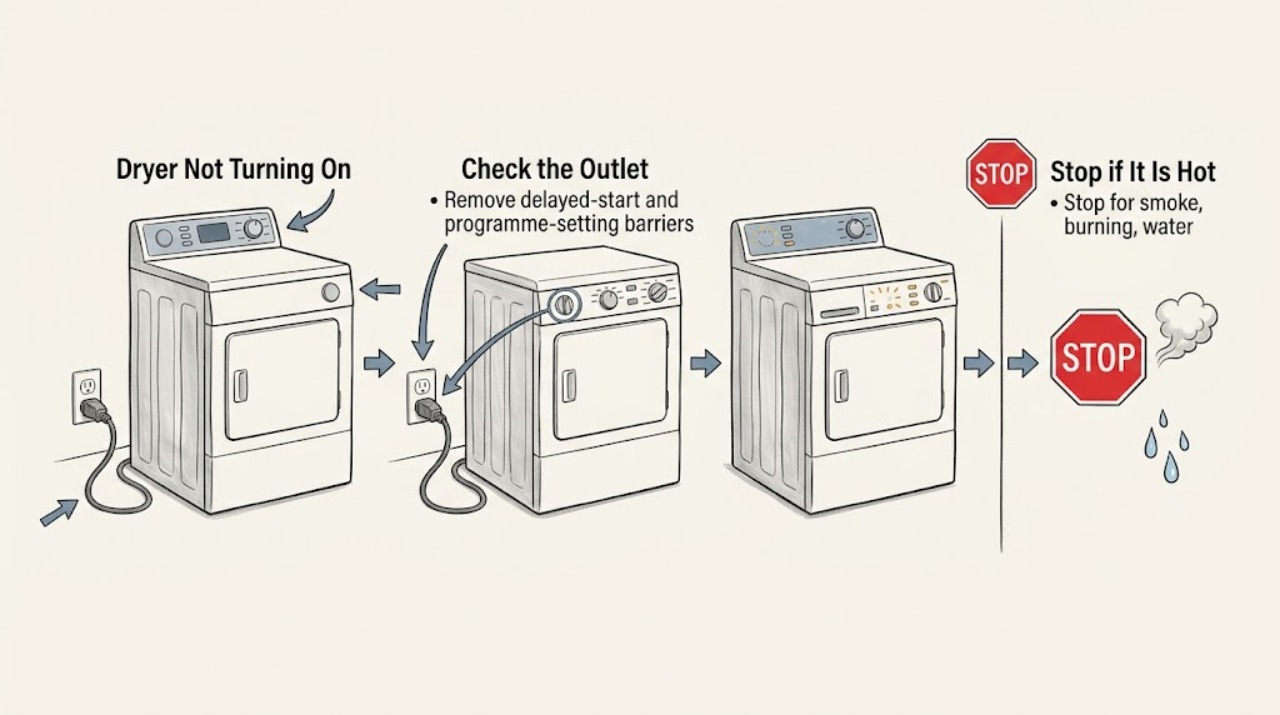
Work through in order
Diagnostic checks
Use only checks that match the exact appliance or system and its official guide.
-
Stop for smoke, burning, water, or repeated power trips
Look at the plug, cord, outlet, control area, and cabinet exterior without opening the dryer. Stop immediately for smoke, a burning smell, a hot or damaged cord, water near electrical parts, unusual arcing, or a breaker that trips again when the dryer is connected.
Expected result: An electrical or heat hazard is present, or the dryer is dry with an intact cord and no unusual smell.
Next step: For any hazard, isolate power only from a safe location, keep clear, and arrange qualified service. If there is no hazard, continue without removing panels or testing live conductors.
Why this matters
Why: The first result indicates a possible fire or shock hazard outside a user start check. A dry, intact appliance can proceed to non-invasive supply and setting checks.
-
Confirm the outlet and circuit have power
Make sure the dryer plug is fully seated. Test the outlet with a small lamp or another safe device, then check the accessible breaker or safety switch for a tripped position. Do not use an extension lead for the dryer and do not open the outlet or consumer-unit cover.
Expected result: The outlet is dead, the breaker will not stay on, or the outlet works but the dryer remains completely dark.
Next step: If the outlet is dead or the breaker trips again, call a qualified electrician. If the outlet works but the dryer remains dark, unplug it when safe and arrange an Authorized Service Center visit.
Why this matters
Why: A dead outlet points to the household circuit or supply. A working outlet with no dryer response points to the appliance power path, control, or internal fault.
-
Remove delayed-start and programme-setting barriers
If the display works, check for a countdown or delay-start indicator, select a normal drying cycle, and confirm the dryer is not paused or in an energy-saving state. Switch it off and on once to cancel a documented delay setting; use the exact model manual for controls rather than guessing at a hidden mode.
Expected result: A delay countdown, energy-saving indication, unselected cycle, or pause state is shown, or the display is ready but Start still produces no response.
Next step: Cancel the delay or select the cycle once and press Start/Pause. If the dryer still does not begin, continue to the door and lock check; do not repeatedly press the button.
Why this matters
Why: A delayed or inactive programme can make a powered dryer appear not to start. A ready display with no response after the documented setting check points to the door switch, control, or another fault.
-
Check the door, latch, and child lock
Open and close the dryer door firmly without slamming it. Remove any fabric caught in the seal or latch, and look for a broken pin, handle, hinge, or latch misalignment. If a padlock symbol is displayed, use the model's documented child-lock sequence; do not hold the door shut or bypass the door switch.
Expected result: The door closes squarely and the lock indication clears, or the latch is damaged, the hinge is broken, the door does not align, or the child lock remains active.
Next step: If the door is intact and the lock clears, press Start once. If the latch, hinge, or handle is damaged or the cycle still will not start, stop using the dryer and request service.
Why this matters
Why: Electrolux dryers will not start when the door switch is not enabled, and a child lock can block cycle changes. A damaged or misaligned door is a mechanical repair issue, not a setting to force.
-
Check tank, drain, filters, and recent overheating
Read the display for a full-water-tank or drain indication. If the dryer is a condenser or heat-pump model, empty the tank and check the external drain hose for a kink only as the manual allows. With power disconnected and the dryer cool, clean the lint filter and condenser or heat-exchanger area. If it recently overheated, let it cool for the model guidance period before one further start attempt.
Expected result: The tank is full, the drain hose is kinked, the filter or condenser is blocked, a thermal shutdown preceded the failure, or these checks are clear but the dryer still does not start.
Next step: Correct only the accessible tank, hose routing, and manual-approved cleaning task. If the dryer still will not start, an error returns, or overheating repeats, unplug it when safe and arrange an Authorized Service Center visit.
Why this matters
Why: A full tank, drain restriction, poor airflow, or a thermal safety shutdown can stop or prevent normal operation. Clear maintenance conditions can be user-correctable; a repeated shutdown or clear maintenance path with no start points to service.
Use your observations
Decision map
Find the observation that best matches what you see, then follow the next safe action.
-
PATH 01Safety boundary
What you see
The outlet is dead or the breaker or safety switch trips again.
Do this next
Leave the dryer disconnected and have the household circuit checked by a qualified electrician. Do not keep resetting the breaker or use an extension lead.
Why this path and its safety boundary
Safety stop: True
-
PATH 02Safety boundary
What you see
The display is dark while the outlet works and the plug and cord are intact.
Do this next
Do not open the dryer or test live wiring. Unplug it when safe and arrange an Authorized Service Center visit for the appliance power or control path.
Why this path and its safety boundary
Safety stop: True
-
PATH 03Next step
What you see
The display works, but delay start, energy saving, pause, or the child lock prevents the programme from starting.
Do this next
Cancel the setting using the model manual, select a drying cycle, close the intact door, and press Start/Pause once. If it still refuses to start, request service.
-
PATH 04Safety boundary
What you see
The door latch, hinge, handle, or door switch cannot align or is visibly damaged.
Do this next
Stop using the dryer and arrange a service-engineer visit. Do not tape the door shut, bypass the switch, or run the dryer with a damaged closure.
Why this path and its safety boundary
Safety stop: True
-
PATH 05Next step
What you see
A full tank, kinked drain, blocked filter, or recent overheat is found and the dryer starts after the manual-approved correction.
Do this next
Monitor the next cycle without leaving the dryer unattended. If the no-start, high-heat, or warning condition returns, stop use and arrange service.
-
PATH 06Safety boundary
What you see
There is smoke, a burning smell, unusual heat, water at electrical parts, or any error that returns after the documented check.
Do this next
Stop immediately, isolate power only if safe, do not restart or open the dryer, and arrange qualified service.
Why this path and its safety boundary
Safety stop: True
Helpful context
Understand the symptom
Make the no-start condition safe
Do not remove the rear cover, reach into the heater or motor area, bridge the door switch, or test live wiring. Stop if you smell burning, see smoke, find a frayed or hot cord, see water at electrical parts, or the breaker trips again. Disconnect power only from a dry, safe position; if that is not safe, keep clear and arrange professional help.
A dark display is not the same as a cycle that will not begin
If the display and indicators are completely dark, start with the plug, outlet, and breaker. If the display lights but Start does nothing, check the door, delay setting, child lock, selected programme, water tank or drain indication, and any error symbol. This distinction prevents a control setting from being mistaken for an electrical failure.
Protect the dryer and laundry during checks
Do not keep pressing Start or repeatedly reset a dryer that smells hot, trips power, or stopped after overheating. Let a recently overheated unit cool as the model guidance allows, keep airflow paths maintained, and arrange service if the symptom returns. Record the model, cycle, indicators, and what happened immediately before the failure.
Only after diagnosis
Potential parts
- tumble dryer door latch or door switch
Consider this only when the door is visibly misaligned or a technician confirms that the door switch is not being enabled after the closure checks.
Confirm the complete Electrolux model and manufacturer's fit information before ordering; latch and switch assemblies vary by model. - tumble dryer thermal cutout or temperature sensor
Consider this only after qualified diagnosis confirms a repeated thermal-protection or temperature-sensing fault and airflow is clear.
This is a safety-related internal component; a qualified technician must confirm the exact model and safe replacement procedure. - tumble dryer control module
Consider this only after the outlet, settings, door switch, and accessible maintenance checks are verified and a technician identifies a control fault.
Confirm the complete Electrolux model and board configuration through authorized service before replacement.
When checks do not resolve it
Need a professional?
A technician is required for a persistent no-power condition, failed door switch or control, repeated error, thermal shutdown, unusual heat or smell, or an internal electrical or motor fault.
Common questions
FAQ
Why is my Electrolux dryer completely dead?
Check the plug, outlet, and accessible breaker without opening the dryer. If the outlet works but the display remains dark, unplug the appliance when safe and arrange authorized service for the appliance power or control path.
Why does my Electrolux dryer have power but not start?
Check for delay start, energy-saving mode, pause, child lock, a selected cycle, and a fully closed door. Also check any water-tank, drain, or error indication. If the door is damaged or the cycle still will not start after the model checks, request service.
Can overheating stop an Electrolux dryer from starting?
Yes. Electrolux identifies overheating protection as a possible safety shutdown. Let the dryer cool according to the model guidance, clean the manual-approved filter and condenser areas, and make one supervised attempt. Repeated overheating or no-start requires service.
Should I keep using an Electrolux dryer that smells hot or trips the breaker?
No. Stop for a burning smell, unusual heat, smoke, water near electrical parts, or a repeated trip. Isolate power only if safe, do not open or restart the dryer, and arrange qualified service.
Read the exact guide
Official sources
- What to check before contacting Electrolux consumer serviceElectrolux · Electrolux dryer not turning on, power, restart, filters, maintenance, error codes, installation, ventilation, manual lookup, and service boundary
- Tumble dryer's door will not open or is defective / brokenElectrolux · Electrolux dryer not turning on, door latch, handle, hinge, closure, and service requirement
- Tumble dryer does not start / does not workElectrolux · Electrolux dryer not turning on or not starting, delayed start, reset, power, door, child lock, energy saving, water tank, drain, and service escalation
- Tumble dryer has no powerElectrolux · Electrolux dryer not turning on, outlet, breaker, door latch, child lock, reset, delay start, overheating, tank, filters, and service
Community feedback
Share a repair observation
Share a plain-text repair observation. Accepted observations are published automatically; this page may take a moment to update.