
On this page
Start here
Quick answer
First record the exact model, serial information, display state, and any alert or fault code. Do not operate the dryer for smoke, a burning smell, a hot or damaged cord, water near electricity, a damaged cabinet, or other fire or shock warning; isolate power only from a safe dry location and arrange service. If the dryer is cool and safe, check that the household power point is on, the cord is intact, and the model's POWER and START or PAUSE controls are being used as the guide shows. A locked control panel, open door, full water tank, blocked filter, overload, or active delay can prevent a cycle from starting on models that have those features. Fisher & Paykel guides allow only model-specific user actions and reset steps; if the dryer remains dead or the alert returns, stop resetting and contact Fisher & Paykel support or a trained service technician.
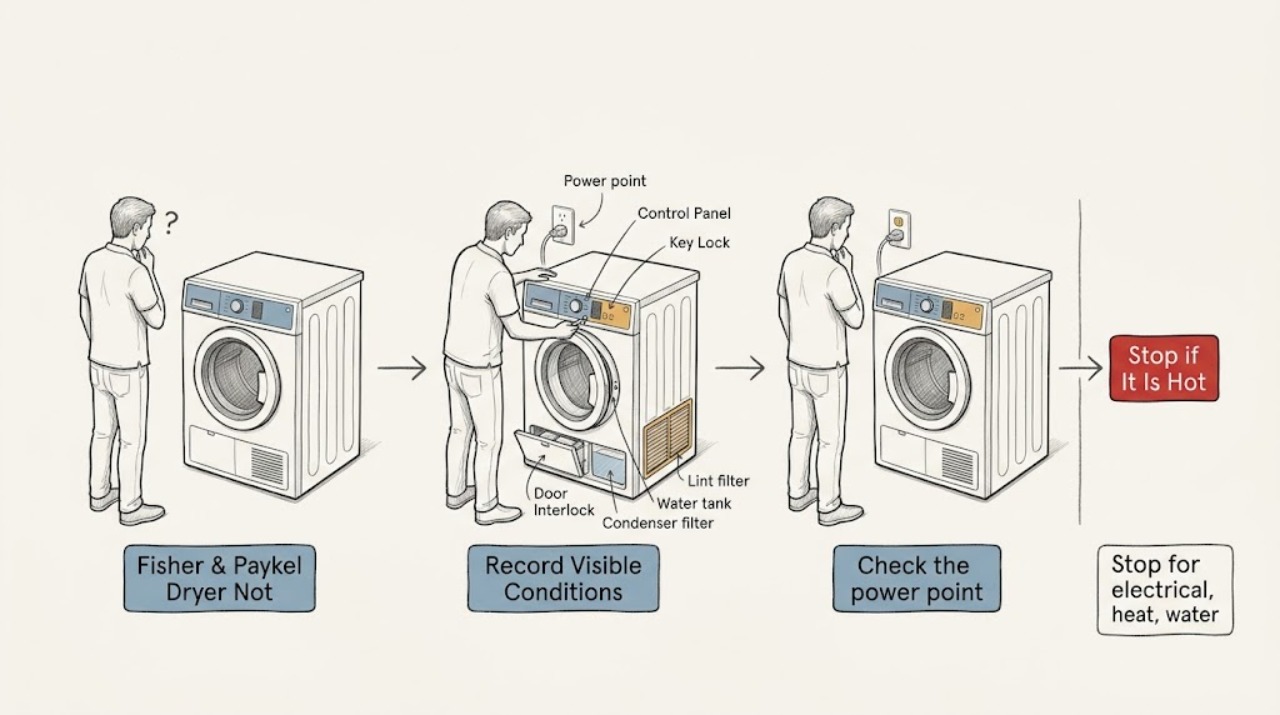
Work through in order
Diagnostic checks
Use only checks that match the exact appliance or system and its official guide.
-
Stop for electrical, heat, water, or fire warnings
Press POWER or turn the control to off and wait for the drum to stop. If there is smoke, a burning or electrical smell, a hot or damaged cord, visible scorching, water near an electrical connection, a damaged cabinet, or unsafe drum movement, keep clear and disconnect power only from a safe dry location. Do not reach into a moving drum or restart the dryer to clear the display.
Expected result: The dryer is cool and dry with no odor or damage, or one of the heat, smoke, water, electrical, or mechanical hazards is present.
Next step: For any hazard, keep the dryer off and arrange appropriate appliance, electrical, or emergency service. If the appliance is safe, continue by recording the model and display state.
Why this matters
Why: A safe no-start can be investigated through user-facing controls and supply checks. A hazard overrides the normal error or start procedure and requires qualified help.
-
Record the display and the exact failure state
Write down the model and serial information, whether the display or progress lights illuminate, what happens when POWER is pressed, whether buttons respond, and any alert, fault code, beep, or lock symbol. Note whether the problem began after a move, outage, cleaning, or a completed cycle. Do not substitute a code or control sequence from another model family.
Expected result: There is no display, a display appears but the cycle will not start, a user warning is shown, or a fault code returns after a prior reset.
Next step: Use the matching branch and exact user guide. If the code is unfamiliar or recurring, preserve it and arrange service rather than trying random button combinations.
Why this matters
Why: No display points first to power, cord, household supply, or the control system. A powered display with a warning points to a door, lock, tank, filter, load, delay, cooling, or model-specific condition. A recurring fault needs service evidence.
-
Check the power point and cord from a dry location
Make sure the power point is switched on and the dryer cord is seated and visibly undamaged. If the exact installation permits a simple household-supply check, confirm the power point operates normally without opening the dryer or removing a terminal cover. Do not use an extension cord or continue if the cord, plug, outlet, or surrounding floor is hot or wet.
Expected result: The power point is off or dead, the cord or plug is damaged or hot, a household protection device has tripped, or the supply appears normal but the dryer remains blank.
Next step: Restore a switched-off point only when safe and make one start attempt. If the outlet is dead, the cord is damaged, a protection device trips again, or the console stays blank, stop and contact an electrician or appliance technician.
Why this matters
Why: A household supply fault can make the dryer appear dead. Heat, water, damage, or a repeated trip indicates an electrical hazard; a normal supply with no display points to the appliance rather than a user setting.
-
Check POWER, key lock, cycle, and door conditions
With the dryer safe and stopped, follow the exact guide for pressing POWER and selecting a cycle. If a key-lock or control-lock indicator is shown, use only the documented unlock action. Close the door firmly and remove any visible clothing or lint preventing the latch from engaging; never defeat the door interlock or force the door.
Expected result: The key lock is active, the door does not close or latch, the controls respond but no cycle starts, or controls and latch appear normal.
Next step: Correct only the user-facing lock, cycle, or visible door obstruction and make one cautious start attempt. If the lock or latch remains abnormal, arrange service without bypassing it.
Why this matters
Why: A locked panel or door interlock condition can prevent a start without a failed motor or heater. A normal lock and door with no response makes supply, control, or internal safety faults more likely.
-
Check compatible tank, filters, load, and delay conditions
If the model has a water tank, check that it is empty and seated as the guide requires. Clean and refit only the user-accessible lint or condenser filters, remove an overload, and check that a delay-start setting is not active. Do not operate without required filters, open fixed covers, or handle a hot tank, pump, fan, or heater.
Expected result: The water tank is full or misplaced, a filter warning is present, the load is excessive, a delay is active, or all compatible user-facing conditions are normal.
Next step: Correct only the condition authorized by the exact guide, then clear the warning and try once. If the dryer remains off, the warning returns, or a leak or heat warning appears, stop and arrange service.
Why this matters
Why: Fisher & Paykel documents tank, filter, load, and delay conditions that can stop a cycle on compatible models. Normal conditions with a blank or unresponsive dryer point to power or control diagnosis rather than more cleaning.
-
Use a documented reset only once
If the exact model guide recommends a power reset, turn the dryer off at the power point and wait the guide's stated interval before restoring power. Remove the load only after the drum has stopped and it is safe. Do not repeatedly cycle power, enter an unapproved diagnostic mode, or assume a cleared message proves the fault is repaired.
Expected result: The display returns normally and the dryer starts, or the same code returns, the display remains blank, or a different fault appears.
Next step: If the fault returns or the dryer remains unresponsive, keep it off, record the exact code and serial number, and contact Fisher & Paykel support or a trained service technician.
Why this matters
Why: A reset may clear a transient control state on some models. A repeated or changed fault indicates an underlying power, sensor, door, tank, filter, control, or drive problem requiring model-specific diagnosis.
-
Escalate persistent no-start behavior
Prepare the model, serial number, exact display, cycle and load, door and lock status, filter and tank condition, power-point result, reset result, and any noise, heat, odor, water, or damage. Do not remove non-user parts, bypass a door switch, replace a fuse or control speculatively, or test energized wiring.
Expected result: The dryer is still blank, starts and immediately stops, has a recurring fault, remains unable to latch or unlock, or has a suspected internal power, control, sensor, motor, or heater issue.
Next step: Keep the dryer off and contact Fisher & Paykel support or a trained service technician with the recorded evidence. Follow only the technician's model-specific access instructions.
Why this matters
Why: The remaining causes require trained inspection and may involve electrical, thermal, control, drive, or interlock components. Guessing at a part or bypassing a safety device can create a shock, fire, or moving-machine hazard.
Use your observations
Decision map
Find the observation that best matches what you see, then follow the next safe action.
-
PATH 01Next step
What you see
The display stays blank after a safe power-point, cord, and control check, with no smoke, heat, water, or damage.
Do this next
Arrange qualified service and follow the exact model guidance.
Why this path and its safety boundary
Why it matters: The dryer remains out of service until the no-power cause is diagnosed without opening panels or bypassing protection.
-
PATH 02Next step
What you see
The display works but the cycle will not start and a lock, door, tank, filter, load, delay, or cooling warning is shown.
Do this next
Arrange qualified service and follow the exact model guidance.
Why this path and its safety boundary
Why it matters: If the warning clears and the dryer operates normally, monitor it; a returning warning or abnormal behavior needs service.
-
PATH 03Next step
What you see
The same fault code returns after the documented reset or the dryer remains unresponsive after an accessible condition is corrected.
Do this next
Arrange qualified service and follow the exact model guidance.
Why this path and its safety boundary
Why it matters: The dryer stays out of service until the recurring control, sensor, drive, power, or interlock fault is assessed.
-
PATH 04Next step
What you see
Smoke, burning smell, hot or damaged cord, visible scorching, water near electricity, damaged cabinet, or unsafe drum movement accompanies the no-start problem.
Do this next
Arrange qualified service and follow the exact model guidance.
Why this path and its safety boundary
Why it matters: The dryer remains out of service; do not restart it or remove fixed panels to identify the cause.
Helpful context
Understand the symptom
Separate a dead console from a cycle that will not start
A dryer with no lights or display has a different path from one that powers on but refuses to start. Record whether POWER changes the display, whether buttons respond, whether the door latches, and whether a warning is shown. Model families differ, so do not assume a code, key-lock gesture, water-tank location, or reset interval from another Fisher & Paykel dryer.
Keep internal electrical and moving-part work out of user checks
Fisher & Paykel guides limit user removal to specified filters, tanks, or racks on compatible models and reserve other parts for trained service. Do not remove panels, bypass the door interlock, bridge a fuse, probe energized wiring, or repeatedly power-cycle a dryer that shows heat, smoke, odor, water, or damage.
When checks do not resolve it
Need a professional?
Request service for persistent no-power or no-start behavior, recurring fault codes, an abnormal door or lock, internal power or control suspicion, or any heat, smoke, water, electrical, or mechanical hazard.
Common questions
FAQ
Why is my Fisher & Paykel dryer not turning on at all?
Check the power point and intact cord from a safe dry location, then record whether POWER produces any display or response. If the supply is normal and the console remains blank, stop troubleshooting and arrange service; do not open panels or bypass safety devices.
Why does my Fisher & Paykel dryer power on but not start?
A model-dependent key lock, door, water tank, filter, load, delay, cooling, or fault condition may block a cycle. Follow only the exact guide's user action; if the warning remains or returns, record it and contact a trained service technician.
Can I reset a Fisher & Paykel dryer that will not turn on?
Only if the exact model guide documents a power reset. Turn it off, wait as instructed, and retry once; a returning code or blank display means the reset did not resolve the cause and needs service.
When should I stop using the dryer instead of troubleshooting it?
Stop for smoke, burning smell, abnormal heat, a hot or damaged cord, visible scorching, water near electricity, a damaged cabinet, or unsafe drum movement. Isolate power only from a safe dry location and arrange qualified help; do not restart it to confirm the fault.
Read the exact guide
Official sources
- FAULT CODES — Condensing Dryer User GuideFisher & Paykel Appliances · Fisher & Paykel official condensing-dryer fault-code guide opened from the manufacturer's document host; its reset sequence is a model-family example and not a universal code interpretation.
- Installation Guide / User Guide — Condensing DryerFisher & Paykel Appliances · Fisher & Paykel official installation and user guide opened from the manufacturer's document host; apply its power, door, tank, filter, load, warning, and service steps only to matching model features.
- Contact UsFisher & Paykel Appliances · Fisher & Paykel's official US support page opened during research; it directs users to model-specific Product Help, manuals, and service booking.
Community feedback
Share a repair observation
Share a plain-text repair observation. Accepted observations are published automatically; this page may take a moment to update.