
On this page
Start here
Quick answer
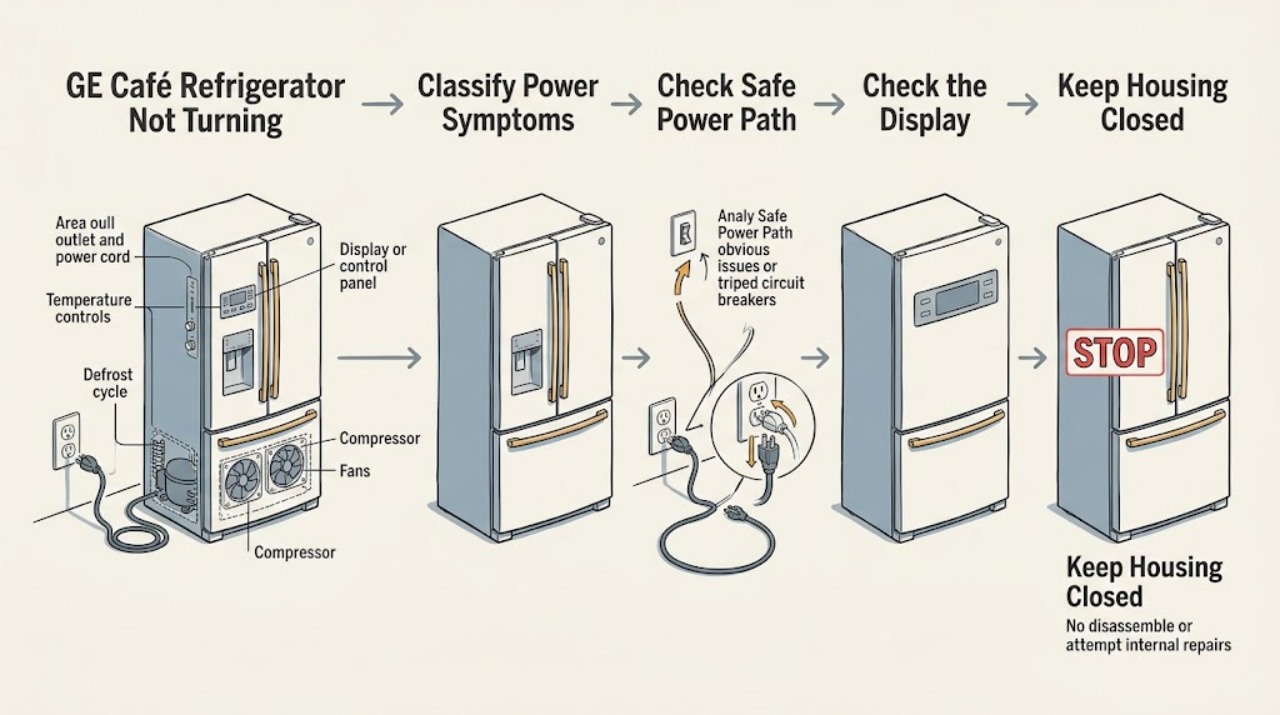
First separate a completely dead GE Café refrigerator from one that has lights or a display but is not cooling. If the interior light and display are both off, check from a dry, safe position that the plug is seated and that the outlet or breaker has not lost power; do not open the cabinet or test live wiring. If lights or a display work, check the exact model's temperature controls, lock or demo/showroom mode, and whether the refrigerator is in an automatic defrost cycle or recovering from a short power interruption. GE lists several model-dependent demo-mode button combinations and says controls must be checked in the Owner's Manual, so do not try a borrowed sequence. If power is present and the refrigerator still will not start, the breaker trips again, there is a burning smell, water near electricity, or internal access would be needed, stop and arrange qualified appliance service. One verified Café example is model CFE29TSDSS, a 28.6 cu. ft. French-door refrigerator; its architecture and controls must not be assumed for another Café model.
Before you begin
Safety first
- This article supports ordinary-access observation and a safe external power check only. Do not open panels, probe energized parts, bypass protection, disconnect door wiring, handle refrigerant, or move a loaded refrigerator.
Work through in order
Diagnostic checks
Use only checks that match the exact appliance or system and its official guide.
-
Check 1
Open the fresh-food door normally and, without touching wiring or moving the refrigerator, note whether the interior light, display, control response, door alarm, and any cooling sound are present.
Expected result: Record one of these patterns: no light and no display; light on but display dark; display or controls on but no compressor or fan sound; or cooling has started but the appliance is not yet cold.
Next step: Continue only with the branch that matches the observed pattern and write down the model number before using any model-specific control instruction.
Stop if: Stop if the door, light, plug, cord, outlet, or floor is wet, if there is smoke or burning odor, or if an electrical part is exposed.
Why this matters
Why: No light and no display make lost supply power or an internal power fault more likely. Light or display with no cooling shifts the check toward controls, demo mode, defrost, delayed restart, or cooling-system diagnosis. A sleeping display alone does not prove the refrigerator is off.
-
Check 2
From a dry, safe position, inspect that the refrigerator plug is fully seated, the outlet has not been switched off, and the appliance circuit breaker is not visibly tripped; use another known-working device at the outlet only if doing so is safe and practical.
Expected result: Record a loose plug, no power at the outlet, a tripped breaker, power restored after a safe breaker reset, or normal outlet power with the refrigerator still dead.
Next step: Reseat the plug only without touching wet parts or damaged insulation; if the breaker is safely accessible and has tripped once, follow the home's normal reset procedure once. Arrange service if power does not return or the breaker trips again.
Stop if: Do not probe the outlet, remove the plug by its cord, bypass a fuse or breaker, use an extension cord as a fix, or keep resetting a tripping circuit.
Why this matters
Why: A loose connection, switched outlet, or single tripped breaker can explain a completely dead appliance. Normal outlet power with no refrigerator response points beyond the external supply. A breaker that trips again indicates a fault or overload, not a successful repair.
-
Check 3
If the light or display works, look for an off indication, a locked control, or a demo/showroom indication such as 0F 0F or dE no, and compare the controls with the exact model's GE Owner's Manual.
Expected result: Record normal temperature settings, a clearly off cooling control, a control lock, a model-specific demo/showroom message, or no mode indication despite working controls.
Next step: Use only the matching manual's user-level procedure to restore cooling or unlock controls, then allow the model's stated stabilization period; if the control stays unresponsive or the mode returns, request service.
Stop if: Do not remove a control panel, disconnect a door harness, short contacts, or use a sequence copied from a different Café or GE model.
Why this matters
Why: GE documents controls-off and demo mode as causes of a refrigerator that appears not to run, but button combinations and display labels vary by model. A generic sequence can change settings or fail to exit the mode, so the absence of a code does not rule out an internal control fault.
-
Check 4
If power and controls are normal, note whether the refrigerator recently had a power interruption, was unplugged and immediately reconnected, or has simply stopped running for a short period while the compartments remain at their usual temperature.
Expected result: Record a recent outage or quick reconnect, an apparent pause without warming, a pause with warming, or no clear cycle or outage explanation.
Next step: Do not repeatedly cycle power; monitor temperatures and keep doors closed as practical. If cooling does not resume or food safety is at risk, arrange qualified service and protect perishable food.
Stop if: Do not open panels, adjust sealed-system parts, handle refrigerant, or force a compressor restart.
Why this matters
Why: GE says compressors and fans pause during automatic defrost and that overload protection can delay compressor restart after a short outage or immediate reconnect. A pause with rising temperatures, or no recovery after the model's normal cycle behavior, is not cleared by assuming defrost.
-
Check 5
After the external checks, document the model number, power symptoms, display message, breaker behavior, recent outage, temperature change, and any visible cord, plug, water, or odor issue for a qualified technician.
Expected result: Record normal external power with a dead appliance, an unresolved mode or control response, repeated breaker trips, smoke or burning odor, water near electricity, a hot or damaged cord, or warming compartments.
Next step: Arrange qualified appliance service; use qualified electrical service for an outlet, cord, or breaker concern. If the plug and outlet are dry and safely reachable without moving the refrigerator, switch off or unplug it for a hazard; otherwise keep clear and isolate the area.
Stop if: Do not open the cabinet, test live circuits, bypass protection, move a loaded refrigerator, or continue operating after smoke, arcing, burning odor, or water near electricity.
Why this matters
Why: Normal outlet power with no response or unresolved cooling failure can require internal power, control, compressor, fan, or wiring diagnosis. Repeated breaker trips and visible electrical or water hazards are safety conditions, not consumer troubleshooting steps.
Use your observations
Decision map
Find the observation that best matches what you see, then follow the next safe action.
-
PATH 01Safety boundary
What you see
The interior light and display are both off, the plug or outlet is loose or dead, and no hazard is visible.
Do this next
Restore only a clearly loose connection or a single safely reset breaker according to the home's procedure, then reassess. If power is absent or the breaker trips again, use qualified electrical or appliance service.
Why this path and its safety boundary
Why it matters: The external supply path is more likely than a temperature setting or defrost pause.
Safety stop: Do not probe the outlet, bypass the breaker, or keep resetting it.
-
PATH 02Safety boundary
What you see
The interior light or display works, but the refrigerator has an off indication, locked controls, or a cooling control set off.
Do this next
Use the exact model's Owner's Manual to restore the control or unlock it; do not use another model's button sequence.
Why this path and its safety boundary
Why it matters: A user setting or control lock can make the appliance appear not to turn on even though electrical power is present.
Safety stop: Request service if controls remain unresponsive or require panel access.
-
PATH 03Safety boundary
What you see
The display shows a demo or showroom indication such as 0F 0F or dE no, especially after installation or a display reset.
Do this next
Confirm the exact model and follow only its manual's demo-mode exit procedure; reset the desired temperatures afterward and allow the specified stabilization period.
Why this path and its safety boundary
Why it matters: GE identifies demo mode as a model-dependent state that can leave normal lights and controls available while cooling is disabled.
Safety stop: Do not guess a button combination or open the control assembly.
-
PATH 04Safety boundary
What you see
Power and controls are normal, the compressor and fans are temporarily quiet, and the appliance recently entered a defrost period or recovered from a short outage without immediate warming.
Do this next
Do not cycle power repeatedly; observe temperature and whether cooling resumes. Call service if the pause persists, the model's normal behavior is exceeded, or compartments warm.
Why this path and its safety boundary
Why it matters: GE says a defrost cycle stops the compressor and fans, and overload protection can delay restart after a power interruption or immediate reconnect.
Safety stop: Do not force a restart or access the compressor or control wiring.
-
PATH 05Safety boundary
What you see
The interior light works but the display or dispenser panel remains dark or unresponsive, and no clear off or demo indication is present.
Do this next
Wake or unlock the panel only as the exact manual allows and record whether interior cooling continues. If it remains unresponsive, request model-specific service.
Why this path and its safety boundary
Why it matters: The refrigerator may have a sleeping, locked, or failed control panel while the cabinet still has power; the panel symptom alone does not prove total appliance power loss.
Safety stop: Do not disconnect door wiring, remove the dispenser panel, or reset power repeatedly as a substitute for diagnosis.
-
PATH 06Safety boundary
What you see
The outlet has power and controls appear normal, but the refrigerator remains dead or does not cool; or the breaker trips again, the cord is hot or damaged, there is burning odor, smoke, arcing, or water near electricity.
Do this next
Keep clear and arrange qualified appliance or electrical service. Disconnect only from a dry, safely reachable point without moving the refrigerator, and protect perishable food if temperatures are rising.
Why this path and its safety boundary
Why it matters: An internal power, control, compressor, fan, wiring, or other fault may be present; the hazard symptoms require a safety stop rather than more resets.
Safety stop: Do not open the cabinet, perform live tests, bypass protection, or continue operating a damaged or wet appliance.
Helpful context
Understand the symptom
Define what “not turning on” means
A GE Café refrigerator can appear off for different reasons. No interior light, no display, and no response suggest a power path or internal power issue. Interior light or display with no cooling points instead to controls, demo/showroom mode, an automatic cycle, a delayed restart after an outage, or an internal cooling fault. A dark external display alone is not proof that the refrigerator has lost power: some control panels sleep or depend on the door or touch input, and exact behavior varies by model. Record what still works before changing settings.
Use a verified Café model only as a conditional reference
GE's Owner Center identifies CFE29TSDSS as a GE Café Series 28.6 cu. ft. French-door refrigerator and links its manual. That confirms the product-line identity and one real configuration, but the assigned problem has no model number. Do not apply CFE29TSDSS button sequences, wiring assumptions, door-harness locations, or accessory behavior to another Café refrigerator. Read the model label and use the matching GE manual whenever a control, mode, or installation-specific step is involved.
Check power without creating a second hazard
GE recommends checking that the plug is not loose and that the outlet has power. From a dry position, look for a partly pulled plug, a switched outlet, a tripped breaker, or a power interruption. A known-working low-power device can help confirm an outlet only when it can be used safely and is not a substitute for electrical diagnosis. Never remove appliance covers, probe the outlet, bypass a breaker, or keep resetting a circuit that trips again.
Lights on but no cooling can be a mode or cycle
GE says the temperature controls may have been turned off, the compressor and fans do not run during defrost, and a short outage can leave the compressor's overload protection cycling while the system equalizes. GE also documents demo mode, including displays such as 0F 0F or dE no on some models, but the buttons differ. Use only the exact model's instructions; do not repeatedly unplug and replug the refrigerator to force a restart.
Safety boundary
Stop conditions
- Do not open the cabinet, remove control or rear panels, or perform live electrical tests.
- Do not bypass a breaker, fuse, overload, control lock, or other safety feature, and do not keep resetting a circuit that trips again.
- Do not repeatedly unplug and immediately reconnect the refrigerator to force a compressor restart.
- Stop for smoke, arcing, burning odor, a hot or damaged cord or plug, water near electricity, or an exposed electrical part.
- Do not move or tip a loaded refrigerator, handle refrigerant, or access the compressor, fan, wiring, or sealed system.
When checks do not resolve it
Need a professional?
Arrange qualified appliance service when the outlet has power but the GE Café refrigerator remains dead, controls or demo mode cannot be restored using the exact model manual, cooling does not resume after a normal defrost or restart delay, the appliance is warming, or internal access would be required. Use qualified electrical service when an outlet, cord, plug, or breaker is damaged or repeatedly trips. Smoke, arcing, burning odor, water near electricity, or a hot cord requires an immediate safety stop.
Safety scope: This article supports ordinary-access observation and a safe external power check only. Do not open panels, probe energized parts, bypass protection, disconnect door wiring, handle refrigerant, or move a loaded refrigerator.
Common questions
FAQ
How do I tell whether my GE Café refrigerator has no power?
Open the fresh-food door normally and note the interior light, display, control response, and any alarm or cooling sound. No light and no display point toward the power path; a light or display with no cooling points toward controls, demo mode, defrost, restart protection, or an internal cooling fault.
Why is my GE Café refrigerator's display on but it is not cooling?
Check the exact model's cooling controls, lock, and demo or showroom indication. GE also says compressors and fans pause during defrost and may restart after an outage once overload protection clears. Do not use a button sequence from another model.
What does 0F 0F or dE no mean on a GE refrigerator?
GE documents these as demo or showroom indications on some models, but display labels and exit buttons vary. Confirm the complete model number and follow only its Owner's Manual; do not guess a sequence.
Should I keep resetting the breaker if the refrigerator will not turn on?
No. A single safe reset may restore a visibly tripped breaker, but GE recommends service if it trips again when the refrigerator is powered. Do not bypass the breaker or investigate live wiring.
Can a defrost cycle make a GE Café refrigerator seem turned off?
Yes. GE says the compressor and fans do not run during defrost, so a temporary quiet period can be normal. If the compartments warm, the pause persists, or cooling does not resume, arrange service rather than repeatedly cycling power.
When should I unplug a GE Café refrigerator that appears dead?
For an ordinary no-run symptom, first perform only safe external observations and preserve the symptom for diagnosis. If there is smoke, arcing, burning odor, a hot or damaged cord, or water near electricity, keep clear and disconnect only from a dry, safely reachable point without moving the appliance; otherwise contact qualified service.
Read the exact guide
Official sources
- Refrigerator - Not RunningGE Appliances · GE Appliances general refrigerator support guidance; demo-mode messages and button combinations vary by model and require the matching Owner's Manual.
- GE Appliance - Resetting Your Circuit BreakerGE Appliances · GE Appliances general breaker guidance; household electrical work and a repeatedly tripping circuit require qualified assessment.
- Refrigerator - Does Not Run or CoolGE Appliances · GE Appliances general refrigerator troubleshooting guidance; exact controls and cycle behavior remain model-dependent.
- Troubleshooting for CFE29TSDSS | GE AppliancesGE Appliances · Official GE Appliances Owner Center for CFE29TSDSS, identified as a GE Café Series 28.6 Cu. Ft. French-Door Refrigerator; it verifies one Café configuration and must not be generalized to an unidentified model.
- Refrigerator - Dispenser Control Panel Not WorkingGE Appliances · GE Appliances general guidance for refrigerators with a dispenser control panel; panel layout and user controls vary by model.
Community feedback
Share a repair observation
Share a plain-text repair observation. Accepted observations are published automatically; this page may take a moment to update.