
On this page
Start here
Quick answer
First separate a completely dead refrigerator from one that has lights or a display but is not cooling, and from a single compartment or control that is disabled. For a completely dead unit, Haier's official guidance is to verify that the refrigerator is plugged into a working outlet, check power at the wall outlet, and confirm that the unit is turned on with the thermostat set to a cold setting. If the display is blank, Haier also describes power-supply failure or a refrigerator fault and says to call service if the screen remains dark after the safe plug check. Do not cut the grounding pin, use an ungrounded connection, repeatedly reset a breaker, or open the control area. If lights or a display work, do not call that a no-power condition: check only the exact model's compartment, holiday, or control settings and visible airflow, then arrange service if the compressor, fan, sensor, or control still does not operate. Stop immediately for a hot or damaged cord, burning odor, smoke, arcing, water near electrical parts, or repeated protective-device operation.
Before you begin
Safety first
- The user may perform dry, accessible observations of the plug, outlet state, on or thermostat setting, door and compartment state, and visible airflow only. Qualified service must handle outlet wiring, cord or ground repairs, control panels, fans, compressor circuits, sensors, defrost, sealed-system work, internal wiring, and live tests.
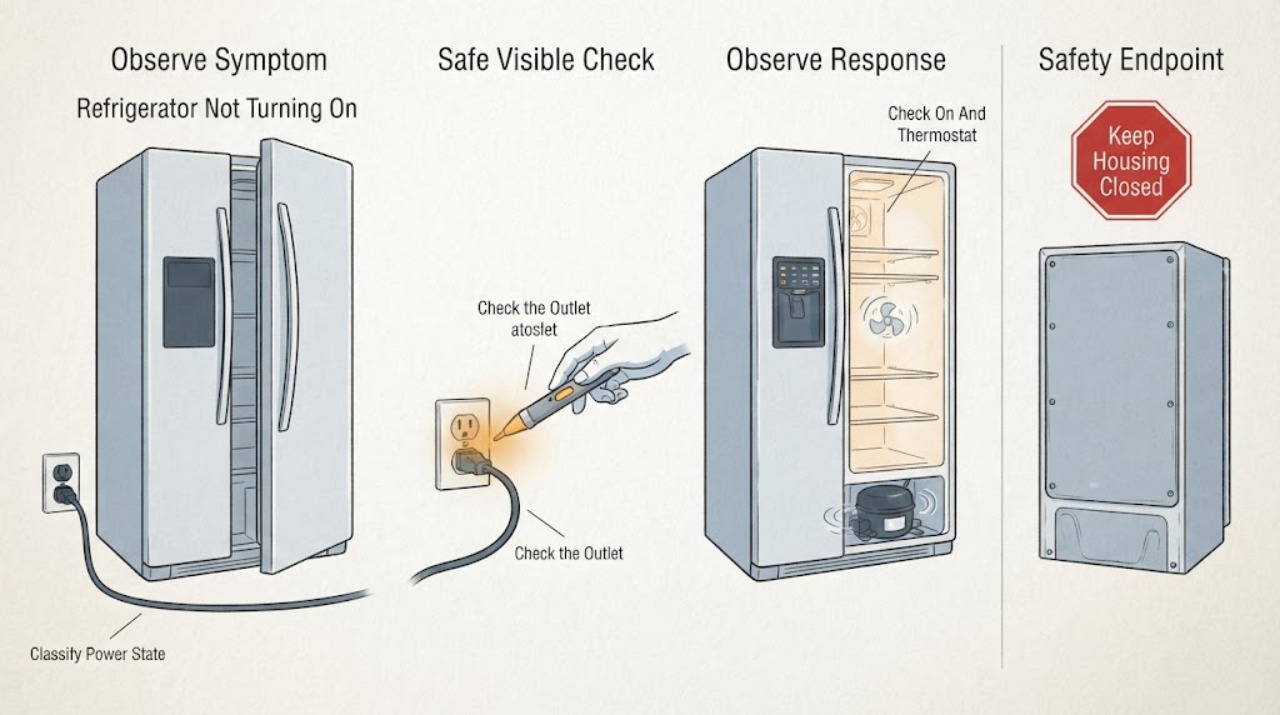
Work through in order
Diagnostic checks
Use only checks that match the exact appliance or system and its official guide.
-
Check 1
Without repeatedly pressing controls, note whether the interior light, display, temperature area, alarm, fan sound, or compressor vibration is present. Record whether both compartments are affected and whether the refrigerator was recently moved or had a power event.
Expected result: Everything is dark and silent, the display or light works, only one compartment is inactive, or the controls work but there is no cooling sound.
Next step: Follow only the matching branch below and preserve the model number and observations. Stop for smoke, burning odor, arcing, heat, water near electrical parts, or repeated breaker operation.
Stop if: Do not keep cycling power to make the appliance respond.
Why this matters
Why: A completely dead unit follows the power-path branch. A lit panel or one inactive compartment is a control, mode, airflow, or refrigeration branch rather than proof that the refrigerator has no power.
-
Check 2
If the refrigerator is completely dark, check from a dry, accessible position that the plug is seated in a working outlet and that the outlet's accessible switch or protective device is on. Check household power only in the normal user-accessible way; do not open the outlet or use the refrigerator as a test load.
Expected result: The plug is loose, the outlet is dead, an accessible breaker or GFCI is open, the outlet is powered but the refrigerator stays dark, or the cord or outlet is hot or damaged.
Next step: Restore only a normal accessible supply state once if safe. If the refrigerator remains dark, the protective device trips again, or the cord/outlet is hot or damaged, leave it isolated and arrange qualified electrical or appliance service.
Stop if: Do not repeatedly reset a breaker or GFCI, change its rating, use an extension cord, or open an outlet.
Why this matters
Why: Haier identifies the plug and wall-outlet supply as first checks for a refrigerator that does not work at all. A stable outlet with a dark refrigerator makes an internal power, control, or wiring fault more likely; heat or damage makes this an electrical stop condition.
-
Check 3
If the outlet is powered but the refrigerator has no normal operation, check only the accessible on or off control and thermostat or temperature setting described by the exact model manual. Do not assume a universal button sequence or turn a temperature control through force.
Expected result: The unit was off, the thermostat was not set to a cold position, the display is active but controls do not respond, or the settings are normal and the unit remains inactive.
Next step: Correct only a clearly documented setting and observe once. If the display remains unresponsive or the appliance still does not run, keep the controls unchanged and arrange model-specific service.
Stop if: Do not remove the thermostat, display, control board, or wiring.
Why this matters
Why: Haier's US support guidance includes the on state and a cold thermostat setting in the no-running check. A powered refrigerator with normal settings is not fixed by repeatedly changing the control and may need service.
-
Check 4
If the display or interior light works but one compartment seems inactive, check the exact model manual for a compartment-off, holiday, or similar mode. Inspect only the visible cold-air outlet for food blocking it; do not remove covers or reach toward a fan.
Expected result: One temperature area is blank, holiday or compartment-off mode is shown, a visible air outlet is blocked, both compartments are warm, or the display and airflow appear normal.
Next step: Clear only a visible food obstruction and exit a mode only through the exact manual. If both compartments are warm, a fan is silent, or the code or fault persists, arrange prompt service and protect perishable food.
Stop if: Do not chip ice, remove a fan cover, or test refrigeration components.
Why this matters
Why: Haier documents compartment-off and holiday settings and says model operations differ. A blocked visible outlet can affect airflow, but these checks do not establish a fan, sensor, defrost, compressor, or control failure.
-
Check 5
If the screen and interior light remain blank after the accessible outlet check, record whether the outlet is confirmed powered and whether the refrigerator had a recent outage. A single model-supported plug reconnection may be performed only from a dry, safe position and only when no hazard is present.
Expected result: The screen returns, remains dark with stable outlet power, returns briefly then goes dark, or the outlet or cord shows heat or damage.
Next step: Keep the refrigerator isolated if it remains dark, unstable, hot, or damaged and arrange service. Do not repeat power cycling to search for an intermittent fault.
Stop if: Do not open the control panel, bypass a fuse, or use a non-grounded connection.
Why this matters
Why: Haier describes a blank screen as possible supply failure or a refrigerator fault and directs service when the screen remains dark. A temporary return does not prove the internal fault is cleared.
-
Check 6
Inspect only the visible plug, cord, and surrounding floor for scorching, fraying, moisture, or heat. If the refrigerator was moved, do not reposition or power it until its installation and safe upright-rest requirements are confirmed in the exact manual.
Expected result: The cord or plug is damaged or hot, the outlet sparks, water is near the electrical supply, a ground pin is missing, or the accessible supply appears normal.
Next step: Leave the appliance disconnected when safe and obtain qualified electrical or appliance service. If there is no hazard, continue only with the model-specific external branch; do not move the refrigerator to reach hidden wiring.
Stop if: Do not repair the cord, remove the ground, open the outlet, or perform live tests.
Why this matters
Why: Haier warns not to cut or dismantle the grounding pin and identifies electric leakage as dangerous. Visible electrical damage or moisture overrides ordinary no-power troubleshooting.
-
Check 7
Arrange qualified service when stable accessible power and the exact model's on, thermostat, compartment, and mode settings are normal but the refrigerator remains dark, the controls do not operate, cooling never starts, or the same failure returns.
Expected result: A safe external correction restores normal operation, or the refrigerator remains inactive or fails again without an external explanation.
Next step: Give the technician the model, power-state observations, temperature or compartment impact, and any outage timeline. Arrange electrical service for a circuit or outlet fault rather than changing appliance parts.
Stop if: No cover removal, component substitution, live measurement, or deliberate fault reproduction.
Why this matters
Why: The remaining possibilities include internal power circuitry, display or control, door switch, fan, compressor, sensor, or sealed-system faults. These cannot be selected or safely repaired from the no-turn-on symptom alone.
Use your observations
Decision map
Find the observation that best matches what you see, then follow the next safe action.
-
PATH 01Safety boundary
What you see
The light, display, controls, and sounds are all absent.
Do this next
Perform one dry external supply check. If power is present but the unit remains dead, arrange qualified service.
Why this path and its safety boundary
Why it matters: An accessible outlet, plug, breaker, cord, or internal power fault is more likely than a cooling-only problem.
Safety stop: Stop for heat, damage, moisture, smoke, odor, arcing, or repeat protective-device operation.
-
PATH 02Safety boundary
What you see
The display or light works, but one compartment's temperature area is blank or the compartment is inactive.
Do this next
Use only the exact manual's setting procedure and call service if the state cannot be corrected or the code persists.
Why this path and its safety boundary
Why it matters: A model-dependent compartment-off or holiday setting is possible; this is not the same as no power.
Safety stop: Do not infer a control-board failure or open the panel.
-
PATH 03Safety boundary
What you see
Lights or display operate, but the compressor or fan does not appear to run or both compartments warm.
Do this next
Check only visible airflow and the exact model's mode settings, protect food, and arrange prompt appliance service if cooling does not resume.
Why this path and its safety boundary
Why it matters: This is a refrigeration or control branch. A visible airflow obstruction or setting can be checked, but a fan, sensor, compressor, defrost, or sealed-system diagnosis is not user-selectable.
Safety stop: Do not remove covers, chip ice, or test refrigerant or compressor circuits.
-
PATH 04Safety boundary
What you see
The wall outlet is confirmed powered, but the refrigerator display and light remain dark or return only briefly.
Do this next
Leave the appliance off or isolated when safe and arrange qualified service with the model and timeline.
Why this path and its safety boundary
Why it matters: Haier identifies a possible refrigerator fault after the supply check and directs service if the screen remains dark.
Safety stop: No repeated power cycling, fuse bypass, or non-grounded operation.
-
PATH 05Safety boundary
What you see
The cord, plug, or outlet is hot or damaged, the breaker trips again, water is near the supply, or smoke, arcing, or burning odor occurs.
Do this next
Disconnect only if it can be done without contacting water or damaged parts; otherwise leave the area and obtain qualified electrical help. Do not move or reopen the appliance.
Why this path and its safety boundary
Why it matters: This is an immediate electrical stop condition, regardless of whether the refrigerator has any display or cooling symptom.
Safety stop: Do not touch exposed conductors, alter protective devices, or restore power to a damaged unit.
Helpful context
Understand the symptom
What ‘not turning on’ means
Check whether the interior light, display, fan sound, compressor vibration, and temperature controls show any life. A dark panel and no light point first to the accessible power path. A lit panel with no cooling, a blank compartment temperature area, or a refrigerator that was deliberately placed in a mode is a different diagnosis. Do not treat not cooling, not starting a cycle, and not turning on as interchangeable symptoms.
Use one safe external power check
From a dry position, inspect the accessible plug and outlet without opening either one. Haier's guidance supports checking outlet power and the refrigerator's on or thermostat state. A breaker that trips again, a hot outlet, damaged cord, or missing ground requires electrical service; it is not a reason to fit a larger breaker or bypass the ground.
Do not mistake a partial control failure for no power
Haier explains that some models can turn the refrigerator compartment off, show a holiday mode, or have different touch-control operations. If the panel is active, use only the exact model manual to check those settings. If the whole appliance remains dead after the accessible power check, or the control responds but the refrigeration system does not run, stop owner diagnosis before opening panels or testing internal parts.
Safety boundary
Stop conditions
- Stop immediately for smoke, burning odor, visible arcing, a hot or damaged cord or outlet, water near electrical parts, a missing ground, or repeated breaker or GFCI operation.
- Do not cut or dismantle the grounding pin, use a non-grounded connection, change a protective-device rating, use an extension cord, or open an outlet.
- Do not remove refrigerator covers, bridge a door switch, bypass a fuse or control, enter an unverified test mode, or perform live tests.
- Separate complete loss of power from a lit display with no cooling or one disabled compartment. Use the exact Haier manual for settings and call qualified service for persistent internal faults.
Only after diagnosis
Potential parts
- power cord, plug, or outlet connection
Consider this category only when qualified electrical diagnosis identifies a supply or cord fault after the accessible checks.
Do not repair a cord, change grounding, or open an outlet from the no-power symptom; regional plug and installation requirements vary. - thermostat, user control, or display interface
Consider this category only when the exact model's controls are powered but a qualified diagnosis confirms a failed control or display path.
A compartment-off or holiday setting can mimic failure. Verify the complete model and do not infer fit from a blank display. - fan, compressor-start, sensor, or defrost component
Consider these categories only for a powered refrigerator that does not cool and after model-specific service diagnosis.
No-turn-on symptoms do not distinguish among internal refrigeration and control components; sealed-system and electrical work are service-only. - main control board or internal wiring
Consider this category only when the exact model and technician diagnosis confirm an internal control or harness fault.
Never select a board from a dark display or intermittent start alone; revision, connectors, and regional specifications must be verified.
When checks do not resolve it
Need a professional?
Arrange qualified Haier appliance service when a powered outlet and the exact model's on, thermostat, compartment, and mode settings are normal but the refrigerator remains dark, the display or controls fail, cooling does not start, or the failure returns. Use qualified electrical service for an outlet, cord, grounding, breaker, or GFCI problem. Treat smoke, arcing, burning odor, water near electrical parts, and hot or damaged wiring as immediate stop-use conditions.
Safety scope: The user may perform dry, accessible observations of the plug, outlet state, on or thermostat setting, door and compartment state, and visible airflow only. Qualified service must handle outlet wiring, cord or ground repairs, control panels, fans, compressor circuits, sensors, defrost, sealed-system work, internal wiring, and live tests.
Common questions
FAQ
What should I check first if my Haier refrigerator is completely dead?
From a dry, accessible position, verify that the plug is in a working outlet, check that the outlet has power, and confirm the refrigerator is turned on with a cold thermostat setting. Haier gives these checks for a refrigerator that is not working at all. If it remains dead, arrange service rather than opening the appliance.
What if the Haier refrigerator display is blank but the outlet works?
Haier says a blank screen can indicate a supply problem or a refrigerator fault and directs service if the screen remains dark after the stated safe plug check. Do not bypass a fuse, open the display, or repeatedly cycle power.
My Haier refrigerator has lights but is not cooling. Is it not turning on?
Not necessarily. A lit display or interior light means the appliance has at least some power; a disabled compartment, holiday mode, blocked visible air outlet, fan, sensor, compressor, defrost, or control issue may be involved. Check only the exact model's settings and visible airflow, then arrange service if cooling does not resume.
Can I use a Haier refrigerator without the grounding pin?
No. Haier warns that the grounding pin must not be cut or dismantled and describes electric leakage without proper grounding as dangerous. Have a qualified electrician correct the outlet or grounding rather than modifying the plug.
Should I keep resetting the breaker if the Haier refrigerator will not start?
No. Check the accessible supply only once if safe. If the breaker or GFCI trips again, or the cord or outlet is hot or damaged, leave the appliance off and obtain qualified electrical or appliance service. Repeated resets can worsen an electrical fault.
Read the exact guide
Official sources
- Can refrigerator be used normally without earth wire?Haier India · Official Haier India electrical-safety guidance; local electrical codes and plug systems still apply.
- Haier Manual DownloadHaier India · Official Haier support tool; available models and regional documents vary.
- Haier - Refrigerator Not Coming On / Not RunningHaier Appliances · Official Haier Appliances support guidance for refrigerators; exact controls and regional installation differ by model.
- Fridge compartment does not workHaier India · Official Haier India guidance with related models listed on the page; operations differ by model.
- Key adjustment is out of controlHaier India · Official Haier India guidance; model controls and screen behavior vary.
Community feedback
Share a repair observation
Share a plain-text repair observation. Accepted observations are published automatically; this page may take a moment to update.