
On this page
Start here
Quick answer
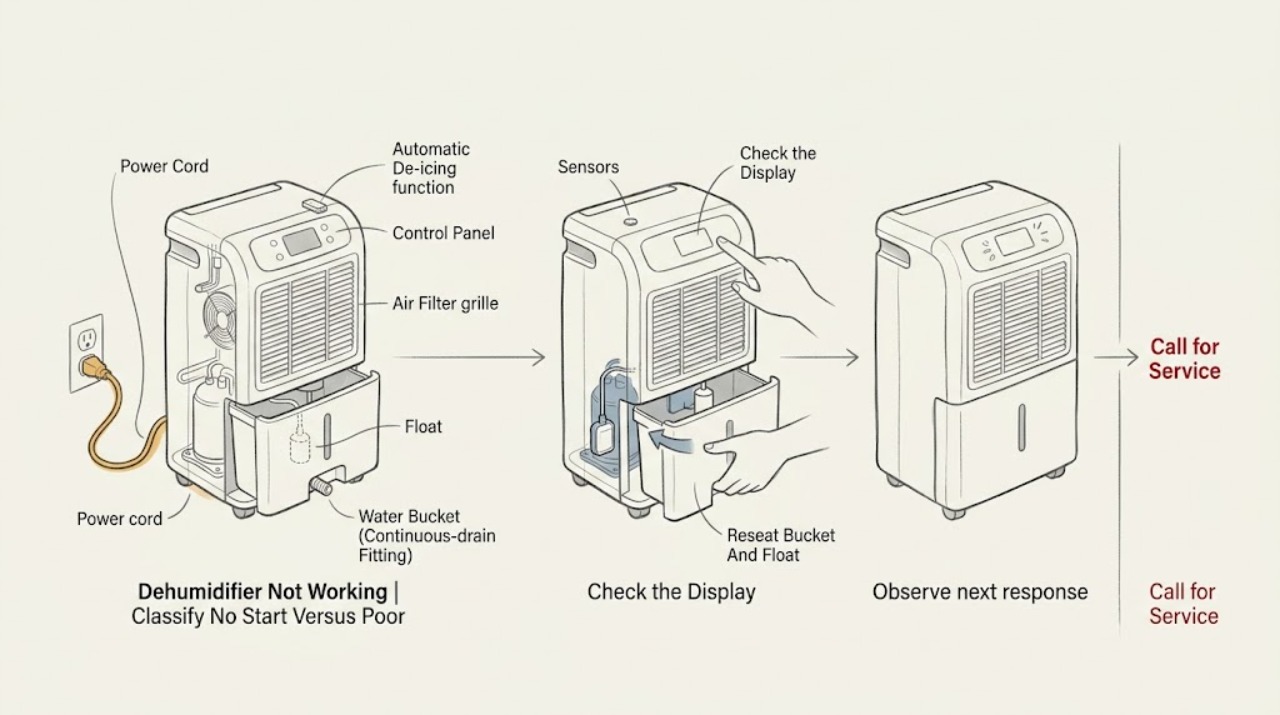
First separate a Hisense dehumidifier that has no display or fan from one that powers on but stops, runs without removing moisture, or shows an error. With the unit off, check the grounded outlet and cord, turn the unit on, and confirm that the bucket is fully seated, empty, and has its float in place; a full or mis-seated bucket can prevent operation. If the display works but the compressor is quiet while the fan runs, automatic de-icing may be temporarily stopping the compressor, and warm discharge air can be normal. Clean an accessible dirty filter and use the model-specific manual for settings and drainage. Do not bypass the bucket/float safety, open the cabinet, perform live tests, or work on the compressor, refrigerant circuit, fan motor, sensors, or wiring. A persistent no-start condition, error code, repeated breaker trip, burning smell, damaged cord, water inside the cabinet, or abnormal heat needs Hisense or qualified service.
Before you begin
Safety first
- The user may make an external power check, operate the documented controls, empty and reseat an intact bucket, verify the float and accessible filter as the exact manual allows, and keep the inlet and outlet clear. Qualified personnel must handle cabinet access, wiring, live testing, interlock or sensor work, fan or compressor service, motor protection, and sealed refrigerant systems.
Work through in order
Diagnostic checks
Use only checks that match the exact appliance or system and its official guide.
-
Check 1
Turn the dehumidifier off and note whether the display is blank, the display lights but the fan does not run, the fan runs without the compressor, or the unit runs while collecting little or no water. Record any code, indicator, recent move, room temperature, bucket status, noise, smell, heat, or breaker event before changing settings.
Expected result: There is no display; the display is on but the fan is silent; the fan runs and the compressor cycles; the unit runs without collecting water; or an error code or warning indicator appears.
Next step: For no display, continue with the external power check. For a lit display or running fan, continue with the bucket/float and filter checks. Photograph or record any code and consult the exact model manual before interpreting it.
Stop if: Stop and unplug when safe for smoke, burning odor, scorching, abnormal heat, a hot or damaged cord or plug, water in the cabinet, or a breaker that trips again.
Why this matters
Why: A no-display symptom prioritizes supply and control checks. A fan-only symptom can be de-icing or a compressor-side fault. A running unit with little water needs filter, setting, environment, and refrigeration-system separation. A code is model-specific and should not be decoded with a generic table.
-
Check 2
With the unit dry and switched off, inspect the cord and plug externally and verify that the plug is fully seated in the correct grounded outlet. Confirm the outlet with a suitable appliance or a qualified electrician, then press the Hisense power control according to the exact manual. Do not use an extension cord, adapter, damaged receptacle, or live meter test as a home workaround.
Expected result: The outlet is dead; the cord or plug is damaged or hot; the household breaker or fuse has tripped; the outlet works but the dehumidifier remains blank; or the display returns and controls respond.
Next step: Use a qualified electrician for a faulty receptacle or a breaker that will not hold. If the outlet and cord are sound but the unit stays blank, keep it unplugged and arrange Hisense or qualified service; do not open the cabinet.
Stop if: Stop immediately for a hot, loose, scorched, wet, or damaged plug or cord, a burning smell, sparks, smoke, or repeated breaker trips.
Why this matters
Why: A dead outlet or repeated supply trip is external to the dehumidifier or may indicate a fault that needs electrical attention. A working outlet with a blank unit makes an internal power, control, or protection fault more likely. A restored display moves the diagnosis to bucket, settings, airflow, or de-icing.
-
Check 3
Unplug the unit before handling the bucket. Empty the bucket, slide it out and back in squarely until it is fully seated, and visually confirm that the water-level float is present and moves as the exact manual permits. Do not tape, wedge, bend, or bypass the float or bucket switch.
Expected result: The bucket is full; it was not fully inserted; the float is displaced, stuck, or missing; the bucket or housing is cracked; or the bucket and float are correctly installed but the unit still will not start.
Next step: Empty and correctly reseat the bucket only if it and the float are intact. Replace or service a damaged bucket or float with model-matched parts. If the warning remains with correct installation, keep the unit off and contact Hisense service.
Stop if: Stop for a cracked bucket, exposed wiring, water inside the cabinet, a float that cannot be safely inspected without disassembly, or any instruction to defeat the interlock.
Why this matters
Why: A full bucket, incomplete seating, or displaced float can make a healthy unit refuse to run or stop during operation. A cracked bucket or missing float is a parts or service issue. A correctly installed bucket with persistent no-start makes a control, sensor, or electrical fault more likely.
-
Check 4
With the dehumidifier unplugged, inspect the user-accessible air filter and inlet/outlet for visible dust or obstruction. Clean and dry the filter only as the exact model guide directs, reinstall it, and review the humidity setting, mode, timer, fan setting, and any continuous-drain arrangement without opening the housing.
Expected result: The filter is clogged; airflow is blocked by furniture or dust; the setting or timer is not calling for dehumidification; the filter and airflow are clear but the unit still runs without collecting water; or a drain hose is fitted incorrectly on a model that supports one.
Next step: Restore clear airflow, clean and dry the accessible filter, and use the model's documented settings. If performance does not return after the unit has had a normal operating opportunity, stop troubleshooting the cabinet and arrange service; do not adjust refrigerant or internal controls.
Stop if: Stop for water or oil inside the cabinet, a damaged filter frame, exposed moving or electrical parts, abnormal heat, burning odor, or any need to remove a cover.
Why this matters
Why: Restricted airflow or a setting that does not request dehumidification can explain weak performance. A clear filter and correct setting with persistent no-water operation makes room conditions, automatic de-icing, a sensor, fan, compressor, or sealed-system fault more likely. Drain arrangements are model-dependent.
-
Check 5
If the fan runs while the compressor is quiet, observe from outside without touching the cabinet and note whether the behavior is a temporary automatic de-icing cycle, whether the compressor later resumes, and whether the discharge air is warm. Do not force a restart, bypass a sensor, tilt the unit, or perform live electrical, compressor, or refrigerant tests.
Expected result: The compressor later resumes and moisture collection returns; the fan runs but the compressor never resumes; the unit repeatedly enters the same state; an error code appears; or there is loud mechanical noise, abnormal heat, smoke, or a burning smell.
Next step: If the documented de-icing behavior resolves and there are no warning signs, continue using the exact model settings and keep airflow clear. Otherwise unplug the unit and provide the model, code, bucket state, fan/compressor behavior, temperature, and prior checks to Hisense or qualified service.
Stop if: Stop immediately for smoke, sparks, flame, strong burning smell, abnormal heat, refrigerant-like leak or oil residue, repeated breaker trips, or a compressor/fan that is binding or making a dangerous noise.
Why this matters
Why: Temporary fan-only operation can be consistent with the manual's automatic de-icing description, and warm discharge air alone is not proof of failure. Failure to recover, repeated cycling, a code, or a safety symptom points beyond user maintenance toward sensor, control, fan, compressor, or sealed-system diagnosis.
Use your observations
Decision map
Find the observation that best matches what you see, then follow the next safe action.
-
PATH 01Safety boundary
What you see
The display is blank, the verified grounded outlet is dead, the cord or plug is damaged, or the breaker trips again when the unit is connected.
Do this next
Use a qualified electrician for the receptacle or circuit. Keep the dehumidifier unplugged and contact Hisense or qualified appliance service when the outlet is sound but the unit remains blank or trips the circuit.
Why this path and its safety boundary
Why it matters: The immediate problem may be the household supply, cord, plug, or an internal electrical/protection fault; the appliance should not be repeatedly energized to distinguish them.
Safety stop: Do not use an adapter or extension cord, bypass grounding or protection, open the cabinet, or reset a breaker repeatedly after a trip.
-
PATH 02Safety boundary
What you see
The display works but the unit will not run or stops with a full, mis-seated, cracked, or incorrectly floated bucket.
Do this next
Unplug, empty and correctly reseat an intact bucket, and verify the float only as the exact manual allows. If the warning persists or the bucket/float is damaged, leave the unit off and arrange service.
Why this path and its safety boundary
Why it matters: The bucket/float safety condition is more likely than a failed compressor, but a missing or damaged float requires model-matched service or replacement.
Safety stop: Never tape down, wedge, remove, or electrically bypass the bucket or float interlock; stop for water inside the cabinet or a cracked housing.
-
PATH 03Safety boundary
What you see
The display and fan work, the compressor is temporarily quiet, and there is no smoke, abnormal heat, or electrical warning.
Do this next
Allow the exact model's normal operation without forcing a restart, clean the accessible filter, and review settings. Persistent fan-only behavior or no-water operation needs Hisense or qualified diagnosis of sensors, controls, fan, compressor, or the sealed system.
Why this path and its safety boundary
Why it matters: Automatic de-icing is a documented possibility, and warm discharge air can be normal. If the compressor never returns or the room stays humid despite correct settings and clear airflow, an internal fault becomes more likely.
Safety stop: Stop for repeated failure to recover, an error code, abnormal noise, smoke, burning odor, abnormal heat, or a breaker trip.
-
PATH 04Safety boundary
What you see
The unit runs but airflow is weak, the filter or inlet is obstructed, the humidity setting/timer is not calling for operation, or a model-specific drain hose is not arranged as its manual requires.
Do this next
Restore airflow, clean and dry the filter, correct only documented settings or hose routing, and reassess. Do not infer a drainage or hose procedure from another Hisense model.
Why this path and its safety boundary
Why it matters: Accessible maintenance, mode, or drainage setup can suppress apparent performance without proving a component failure. A clear filter, correct setting, and correct model-specific drainage with continued poor performance shifts the issue to service diagnosis.
Safety stop: Stop if water enters the cabinet, the hose fitting leaks into the appliance, the unit overheats, or correction would require opening the housing.
-
PATH 05Safety boundary
What you see
Power, bucket, float, airflow, and documented settings are correct, but the unit remains blank, will not start, never recovers from fan-only operation, shows a code, overheats, or repeatedly trips power.
Do this next
Keep the unit unplugged when unsafe or nonfunctional and arrange Hisense warranty or qualified appliance service. Supply the exact model, serial information, code, bucket/float state, fan/compressor behavior, room conditions, and power observations.
Why this path and its safety boundary
Why it matters: A control, sensor, fan motor, compressor, motor protector, wiring, or sealed-system problem is possible; the symptom does not identify a safe replacement part or permit refrigerant work at home.
Safety stop: Do not remove covers, perform live tests, bypass the motor protector or bucket switch, open the sealed system, add refrigerant, or continue operation with smoke, burning odor, water in the cabinet, or abnormal heat.
Helpful context
Understand the symptom
“Not working” is several different symptoms
A blank display or no fan points first to the outlet, cord, controls, bucket interlock, or a protective trip. A lit display with a running fan but no compressor can be a temporary automatic de-icing cycle, while a unit that runs and never collects water may have a dirty filter, unsuitable room conditions, a setting issue, or an internal refrigeration or control fault. Record exactly what the unit does before choosing a repair path.
Start with the bucket and float safety
Hisense's opened dehumidifier manual treats the bucket as part of the run permission: it must be installed all the way, emptied when full, and fitted with the water-level float in place. The float is not a part to tape down or bypass. Continuous-drain hardware, if present on a particular model, must follow that model's manual; do not assume a hose arrangement from another Hisense unit.
A fan without a compressor is not automatically a failed compressor
The DH5022K1W manual says its automatic de-icing function can shut off the compressor while the fan runs, then return the compressor when the operating temperature is correct. Warm air is also described as normal. If the compressor never returns after the model's normal cycle, the unit repeatedly stops, or the display shows a code, stop guessing and use the exact model's support path.
Cleaning is limited to accessible maintenance
A visibly dirty or obstructed filter can reduce dehumidification, so clean it only by the exact Use & Care instructions and reinstall it correctly. Do not spray water into the cabinet, remove covers, bridge the bucket switch, or test energized wiring. Hisense's support pages provide model-specific manuals and service routes because controls, sensors, drainage, and electrical construction vary.
Safety boundary
Stop conditions
- Stop immediately and disconnect power when safe for smoke, sparks, flame, a burning or chemical odor, scorching, abnormal heat, a hot or damaged cord or plug, water inside the cabinet, or repeated breaker trips.
- Do not use an adapter or extension cord, defeat grounding, tape down or bypass the bucket/float interlock, or repeatedly reset a tripped breaker.
- Do not remove the cabinet, perform live measurements, touch energized wiring, replace internal controls or sensors, or work on the fan motor, compressor, motor protector, or sealed refrigerant system as a home procedure.
- Do not infer a continuous-drain hose, error-code meaning, temperature behavior, or replacement-part fit from another Hisense model; use the exact model manual or support page.
- If power, bucket/float, accessible filter, airflow, and documented settings do not restore operation, leave the unit off when unsafe and arrange Hisense or qualified service rather than repeatedly testing it.
Only after diagnosis
Potential parts
- model-matched water bucket or float assembly
Consider only when the bucket is cracked, the float is missing or damaged, or the exact manual identifies a user-replaceable assembly after inspection.
Confirm the complete model and revision; capacity, bucket geometry, float, and interlock arrangement are not interchangeable by appearance. - model-matched air filter
Consider only if the accessible filter is damaged or cannot be restored by the exact model's cleaning instructions; a dirty filter alone does not prove another part has failed.
Verify the exact model and filter dimensions or approved part listing through Hisense support; do not modify a filter or run without the required filter. - model-matched control, sensor, fan, compressor, motor protector, or power component
These parts are relevant only after qualified diagnosis of persistent no-start, fan-only operation, error code, overheating, or repeated power trips; the symptom does not identify a particular part.
Internal electrical and refrigeration parts require qualified service and exact model identification; do not order from a generic listing or open the cabinet.
When checks do not resolve it
Need a professional?
Contact Hisense or qualified service when the dehumidifier remains blank with a verified outlet, will not run after the bucket is correctly seated and the float is in place, repeatedly trips a breaker, displays an error code, fails to recover from a documented fan-only de-icing state, or runs without dehumidifying after the accessible filter, airflow, and exact-model settings are correct. Stop immediately and unplug when safe for smoke, sparks, a burning smell, abnormal heat, a hot or damaged cord or plug, water inside the cabinet, refrigerant or oil evidence, or repeated electrical trips. The user may verify an external outlet, power control, bucket, float, accessible filter, airflow, and model-documented drainage; cabinet electrical work, live testing, sensor or control replacement, fan/compressor work, and sealed-system service belong to qualified personnel.
Safety scope: The user may make an external power check, operate the documented controls, empty and reseat an intact bucket, verify the float and accessible filter as the exact manual allows, and keep the inlet and outlet clear. Qualified personnel must handle cabinet access, wiring, live testing, interlock or sensor work, fan or compressor service, motor protection, and sealed refrigerant systems.
Common questions
FAQ
Why will my Hisense dehumidifier not turn on?
Check the grounded outlet and cord, confirm the power control, empty and fully reseat the bucket, and verify that the water-level float is present as the exact model manual permits. If the outlet is good and the unit remains blank, keep it unplugged and arrange Hisense service rather than opening the cabinet.
Can a full Hisense dehumidifier bucket stop it from running?
Yes. The opened DH5022K1W manual lists an improperly installed or full bucket and a displaced water-level float among the checks for a unit that will not run. Empty and reseat an intact bucket; do not bypass the float or switch.
Why is my Hisense dehumidifier fan running but the compressor is not?
Hisense documents automatic de-icing that can stop the compressor while allowing the fan to run, with the compressor returning when the operating temperature is correct. If it never returns, cycles repeatedly, shows a code, or the unit overheats, arrange service for model-specific diagnosis.
Is warm air from a Hisense dehumidifier normal?
The DH5022K1W manual says air from the dehumidifier can be warm under normal operation. Warm discharge air alone does not prove a fault, but abnormal heat, a burning odor, smoke, or a hot cord or plug is a stop signal.
What if my Hisense dehumidifier runs but does not remove water?
Check the accessible filter and airflow, verify the humidity setting and timer, and follow only the exact model's drainage instructions. A clear filter and correct settings with persistent no-water operation may require sensor, fan, compressor, control, or sealed-system service; do not add refrigerant or open the cabinet.
Read the exact guide
Official sources
- Hisense Energy Star 50 Pint 3-Speed DehumidifierHisense USA · Applies directly to model DH5023KP and demonstrates why features must be checked by model; it is not a universal specification for every Hisense dehumidifier.
- Dehumidifiers FAQ - Common Questions - Hisense USAHisense USA · General family-level support context; it does not replace an exact model manual.
- Hisense Support - For All Your Appliance NeedsHisense USA · General Hisense USA support routing; exact troubleshooting and service instructions remain model-specific.
- DH5022K1W user manualHisense USA · Directly applies to model DH5022K1W; use conditionally for similar Hisense household dehumidifiers only after checking the exact manual.
- Hisense 50-Pint Capacity, 4500 sq. ft. Coverage, 3-Speed Dehumidifier SupportHisense USA · Applies directly to model DH5026K1W; used only to establish model-specific support and not to transfer undocumented internal behavior to other models.
Community feedback
Share a repair observation
Share a plain-text repair observation. Accepted observations are published automatically; this page may take a moment to update.