
On this page
Start here
Quick answer
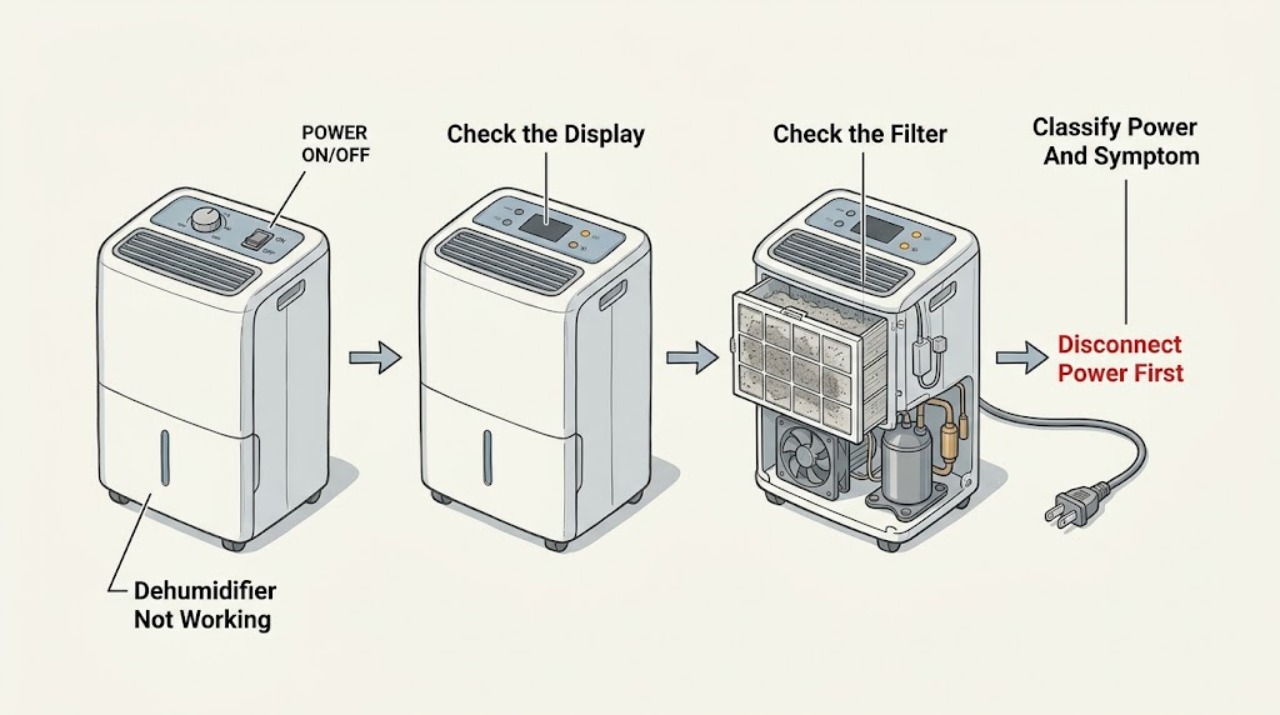
Start with the safe external state, not a part guess. Check whether the display or power indicator works, whether the bucket is empty and securely seated, whether the humidity setting is calling for dehumidification, and whether the air filter and grille are visibly blocked. GE says a dehumidifier may not collect water when room humidity is below the set point, and a compressor may stop while frost is being cleared; temperatures below 41°F can promote coil frost on models without suitable low-temperature operation. If a fault code appears, GE allows one 30-second power disconnect and says a returning code needs the exact model manual and service. Do not open the housing, bypass the bucket/float interlock, or keep resetting a breaker. If the unit remains dead, repeatedly trips protection, has damaged or wet electrical parts, or still will not operate after the model-appropriate external checks, leave it unplugged and arrange qualified service; GE notes that repair-parts availability varies and may be unavailable for some dehumidifiers.
Before you begin
Safety first
- The owner may record the model/code, check a dry accessible plug and outlet, seat the bucket, clean a removable filter/grille while unplugged, and compare conditions with the exact manual. Qualified appliance/electrical service must handle panels, wiring, pump internals, compressor, refrigerant circuit, defrost components, live tests, and bypassed interlocks.
Work through in order
Diagnostic checks
Use only checks that match the exact appliance or system and its official guide.
-
Check 1
From a dry position, record the complete GE model number and observe the display, power indicator, fan sound, compressor behavior if it is externally apparent, bucket-full indicator, and any error code. State whether the concern is no power, no water collection, a fan that stays on, a unit that stops, or a pump/drain symptom.
Expected result: The display is dark, the display works but the unit does not start, the fan runs without water collection, the unit stops with a bucket indication, or a code is shown.
Next step: Keep the record and follow the matching checks below. Do not remove panels or run an extra cycle solely to reproduce an uncertain symptom.
Stop if: Stop if the cord, plug, outlet, or housing is wet, hot, damaged, smoking, sparking, or associated with a repeated breaker/GFCI trip.
Why this matters
Why: These patterns lead to different checks: supply and controls, bucket interlock, humidity/temperature conditions, defrost, or model-specific fault support. The model number determines whether a pump and low-temperature feature exist.
-
Check 2
If the unit is dark or will not start, check the accessible plug, outlet, and household protection device from a dry position. If the display works, confirm the unit is set to a humidity target rather than an idle/off state and follow the exact model's control instructions. Do not use an extension cord or substitute a higher-rated breaker.
Expected result: The plug is loose, the outlet or breaker has no power, the control is off or already satisfied, or safe power and an active humidity setting are present but the unit remains unresponsive.
Next step: Correct only a loose, dry, undamaged plug or model-authorized setting. Use an electrician for a dead, damaged, hot, wet, smoking, sparking, or repeatedly tripping circuit; arrange appliance service for a safe circuit with a dead unit.
Stop if: Do not open the control panel, defeat a GFCI/breaker, change the circuit rating, or perform live voltage tests.
Why this matters
Why: A supply or control setting can explain a dark or idle unit, but a safe outlet with a nonresponsive appliance points toward an internal power/control fault that is not an owner-level diagnosis.
-
Check 3
With power disconnected, empty the water bucket if full and reinstall it exactly as the model manual shows. Confirm it is securely seated, then inspect and clean the accessible air filter and front grille using the model instructions; allow a washed filter to dry completely before replacing it.
Expected result: The bucket was full or not seated, the bucket/float area is visibly obstructed, the filter is clogged, the grille is blocked, or these accessible items are clear and correctly installed.
Next step: Correct only the visible bucket, filter, or grille condition, then use the normal model control. If the unit remains dead, does not collect water, or shows a persistent bucket indication, arrange service.
Stop if: Do not bypass the float/bucket interlock, pour water into the cabinet, spray the electrical compartment, or run the unit with a wet filter.
Why this matters
Why: GE says the bucket must be securely seated for operation and that a clogged filter reduces performance. These checks can explain a stopped or weak unit without proving a pump, fan, compressor, or board failure.
-
Check 4
If the unit powers on but does not seem to work, compare room humidity with the selected target, check that the inlet and outlet are not blocked, and observe room temperature and placement. GE recommends good circulation and at least 18 inches of air space on all sides; below 41°F, coils may freeze unless the exact model supports low-temperature operation.
Expected result: Room humidity is already below the set point, airflow is restricted, the room is below the model's operating range, or the environment is suitable but no water is ever collected.
Next step: Correct only placement, clearance, a blocked grille, or the model-authorized humidity setting. Allow the unit to operate in suitable conditions; if it never collects water or stays warm/abnormal, use the model manual and arrange service.
Stop if: Do not chip coil ice, use a heat source to defrost, change a sealed-system setting, or continue operation if water or frost reaches electrical components.
Why this matters
Why: A satisfied humidity control, restricted airflow, or low-temperature frost can make a working appliance stop or collect little water. GE says a unit that never collects water is not operating correctly after those conditions are excluded.
-
Check 5
If the fan runs while the compressor is quiet, check only the exact model's operating guidance for frost/automatic defrost. If a built-in-pump model shows E0/E01 or P1, inspect only that the pump is enabled, the bucket is securely in place, and the model-approved pump hose is correctly installed; do not access the pump. For any other fault code, photograph it and use the exact manual.
Expected result: The fan is running during visible frost or a known defrost interval, a pump-mode code is present, the code returns after one model-authorized 30-second disconnect, or the unit remains abnormal without a visible external cause.
Next step: Allow only the model-described defrost behavior to complete and keep the air path clear. For a pump-code or returning/unknown code, arrange service with the model, code, hose/bucket observations, and reset result.
Stop if: Do not repeatedly reset, bypass the bucket or pump interlock, open the sealed refrigeration system, remove panels, or perform live compressor/fan/pump tests.
Why this matters
Why: GE says frost can turn the compressor off while the fan runs until defrost completes. GE also limits E0/E01/P1 guidance to built-in-pump models and says returning codes indicate a problem requiring model-specific support.
Use your observations
Decision map
Find the observation that best matches what you see, then follow the next safe action.
-
PATH 01Safety boundary
What you see
The display and indicators are dark, or a safe outlet is available but the GE dehumidifier remains unresponsive.
Do this next
Check only the accessible dry plug/outlet/protection device. Use electrical service for a damaged, hot, wet, smoking, sparking, or repeatedly tripping circuit; arrange appliance service for a safe circuit with a dead unit.
Why this path and its safety boundary
Why it matters: This makes a supply, breaker, plug, or internal power/control problem more likely than a humidity target or frost explanation, but visible checks cannot identify the internal fault.
Safety stop: Do not change the circuit rating, bypass protection, open the control housing, or make live measurements.
-
PATH 02Safety boundary
What you see
The unit has power but stops, shows a full-bucket state, or improves only after the bucket is seated or the air filter/grille is cleared.
Do this next
Empty and securely reinstall the bucket, clean the filter/grille while unplugged, and follow the exact model instructions. If the indication or no-start condition persists, arrange service.
Why this path and its safety boundary
Why it matters: GE identifies secure bucket seating as necessary for operation and a clogged filter as a performance problem. This pattern favors an accessible interlock or airflow condition, not a confirmed failed part.
Safety stop: Do not hold the float down, run without the bucket, use a wet filter, or spray into the cabinet.
-
PATH 03Safety boundary
What you see
The unit runs or the fan operates, but no water is collected.
Do this next
Use the exact model setting, clearance, filter, and temperature guidance. Arrange service if no water is ever collected, cooling behavior is abnormal, or the unit cannot be kept in suitable conditions.
Why this path and its safety boundary
Why it matters: First consider room humidity below the selected target, blocked airflow, unsuitable temperature, or an initial frost/defrost period. If it never collects water after suitable conditions and model checks, GE considers it not operating correctly.
Safety stop: Do not open the refrigeration circuit, chip frost, or infer a compressor charge or part replacement from the symptom.
-
PATH 04Safety boundary
What you see
The fan runs while the compressor is quiet and the room is cold or frost is visible, without an electrical hazard.
Do this next
Allow the model-described defrost behavior and correct only the external temperature/airflow condition. If frost persists, the compressor never resumes, or the cabinet remains abnormal, arrange service.
Why this path and its safety boundary
Why it matters: GE says automatic defrost can turn the compressor off while the fan runs, and low temperature can cause coil frost. Some models have low-temperature operation, so the exact manual matters.
Safety stop: Do not heat the coil, scrape ice, remove covers, or force a compressor restart.
-
PATH 05Safety boundary
What you see
A fault code returns after one model-authorized 30-second disconnect, or E0/E01/P1 appears on a built-in-pump model with a bucket/hose/pump-mode concern.
Do this next
Record the exact code, model, pump setting, bucket/hose observations, and reset result. Use the owner's manual and arrange qualified service if the code persists or water is not removed.
Why this path and its safety boundary
Why it matters: GE says returning codes indicate a dehumidifier problem. Its E0/E01/P1 guidance applies to pump-equipped models and does not establish that the pump, hose, control, or sensor itself has failed.
Safety stop: Do not repeat resets, force the hose, bypass the bucket switch, open the pump or control area, or run a live test.
Helpful context
Understand the symptom
Not working can mean stopped, not collecting, or temporarily defrosting
A dark display is a power question. A powered unit with a full or misplaced bucket is an interlock question. A running fan with no compressor may be defrosting, while a unit that runs without collecting water may simply be below its humidity target. Identify the observed state before assuming the compressor or control has failed.
Temperature and airflow are part of the diagnosis
GE says dehumidifiers perform best with good clearance and air circulation, and that low room temperature can freeze the evaporator coil. A model with low-temperature operation may behave differently, so use the exact manual rather than applying one temperature rule to every GE unit.
Water, refrigerant, and electrical work are professional boundaries
Unplug before cleaning the case, bucket, grille, or filter. Keep water out of the machine compartment. Do not open the housing, handle refrigerant, defeat a float or bucket switch, probe live wiring, or keep operating after a hot cord, burning smell, smoke, sparks, or a repeated protection trip.
When checks do not resolve it
Need a professional?
Arrange qualified service when the GE dehumidifier stays dead on a safe circuit, never collects water after suitable humidity/temperature/airflow and bucket checks, has persistent frost or a compressor that never resumes, shows a returning or unknown code, or needs pump, control, fan, compressor, refrigerant, or wiring access. Use electrical service for a hot/damaged cord or outlet, smoke, sparks, water near electrical equipment, or repeated protection trips. Do not open the housing, bypass the bucket/float interlock, chip frost, or keep resetting power.
Safety scope: The owner may record the model/code, check a dry accessible plug and outlet, seat the bucket, clean a removable filter/grille while unplugged, and compare conditions with the exact manual. Qualified appliance/electrical service must handle panels, wiring, pump internals, compressor, refrigerant circuit, defrost components, live tests, and bypassed interlocks.
Common questions
FAQ
Why is my GE dehumidifier completely dead?
Check the accessible dry plug, outlet, and protection device, then confirm the model control is set to operate. A safe outlet with a dark or unresponsive unit needs service; do not bypass a breaker, open the housing, or perform live tests.
Why does my GE dehumidifier run but collect no water?
GE says no water may be collected when room humidity is below the set point. Also check the exact model's airflow, filter, clearance, and temperature conditions. If it never collects water after those conditions are suitable, GE considers it not operating correctly and it needs support.
Why is the fan running while the compressor is off?
GE says frost can cause automatic defrost on some models: the compressor stops while the fan runs until the coils clear. Low room temperature can promote frost, so follow the exact model's operating range. Persistent frost or failure to resume needs service.
Can a full or misplaced bucket make a GE dehumidifier stop?
Yes. GE says the bucket must be in place and securely seated for the dehumidifier to operate. Unplug the unit, empty the bucket if needed, and reinstall it exactly as the model manual shows; do not hold the float or bucket switch in place.
What should I do if my GE dehumidifier shows an error code?
Record the exact code and model. GE allows a 30-second power disconnect, but a code that returns must be checked against the exact owner's manual. E0/E01/P1 guidance applies only to models with a built-in pump, so do not apply it to another model.
Read the exact guide
Official sources
- Dehumidifier - Air FilterGE Appliances · GE dehumidifier filter location, cleaning, and airflow-performance guidance
- Dehumidifier - Compressor Not OperatingGE Appliances · GE dehumidifier compressor pause and automatic defrost behavior
- Dehumidifier - Not Collecting WaterGE Appliances · GE dehumidifier no-water-collection interpretation and one-time reset/support guidance
- Dehumidifier - Ideal Operating ConditionsGE Appliances · GE dehumidifier placement, clearance, humidity, temperature, and frost conditions
- Dehumidifier - Fault or Error CodesGE Appliances · GE dehumidifier error-code interpretation, 30-second reset, and built-in-pump code conditions
- User Manual & Care for AHW50LLGE Appliances · GE AHW50LL dehumidifier identity and exact-model manual/support routing
- Support for GE Dehumidifiers and Air PurifiersGE Appliances · GE dehumidifier support, FAQ routing, model help, and service guidance
- Dehumidifier - CleaningGE Appliances · GE dehumidifier unplugged cleaning and bucket-seating requirements
- Dehumidifier - Internal Pump Not WorkingGE Appliances · GE dehumidifier built-in pump mode, bucket, and hose checks
Community feedback
Share a repair observation
Share a plain-text repair observation. Accepted observations are published automatically; this page may take a moment to update.