
On this page
Start here
Quick answer
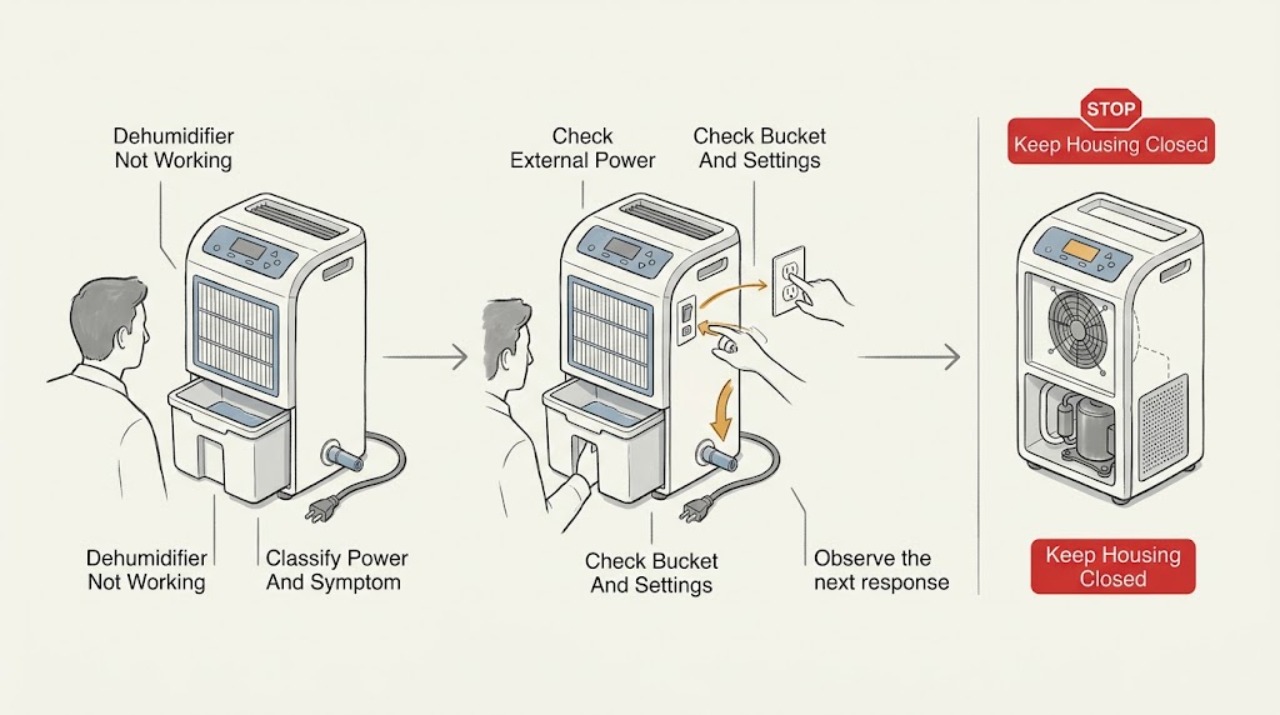
First identify which failure you have: the unit is completely dead, it powers on but removes little or no moisture, or it runs and then stops with a full-bucket, drain, or error indication. For no power, check the correctly installed grounded receptacle, cord and plug condition, breaker, and GFCI/AFCI from outside the appliance; do not use an extension cord or power strip. For a powered unit, empty and reseat the bucket, confirm the humidity setting, clear the front grille and filter, and allow time for a humid room to dry. A continuous-drain model needs the hose connected as its model guide shows and free of kinks; a pump-equipped model may show PU when its pump hose or bucket pickup is blocked. If H3 or E5 appears, give the unit clearance, clean the filter, and let it cool. Stop for a damaged cord, burning smell, smoke, water near the controls, repeated breaker trips, or a fault that remains after these owner-accessible checks; sealed-system, compressor, pump, fan, wiring, and control work needs qualified service.
Before you begin
Safety first
- This article covers symptom classification, safe external power checks, bucket and setting checks, owner-accessible filter and airflow care, model-conditioned drain observations, and a single supervised restart. Electrical internals, pump, fan, compressor, control, sensor, and sealed-system work require qualified service.
Work through in order
Diagnostic checks
Use only checks that match the exact appliance or system and its official guide.
-
Check 1
With the unit in a dry, accessible area, note whether the display or indicators are blank, whether the fan runs, whether the bucket is full, and whether a code such as PU, H3, or E5 is shown.
Expected result: The unit is completely unresponsive; it powers on but does not collect water; it stops with a full-bucket or drain indication; or it shows PU, H3, or E5.
Next step: Follow the matching branch below and write down the exact code and model number before ordering parts or applying a button sequence.
Stop if: Do not open the cabinet, reach through grilles, or probe energized wiring while classifying the symptom.
Why this matters
Why: No indicators points first to the supply path. Indicators or fan operation with little water points to settings, humidity, airflow, bucket, or temperature. A code or stop condition selects a model-specific water or overload branch.
-
Check 2
For a blank or dead unit, inspect the cord and plug from outside for damage. Confirm the appliance is plugged directly into a correctly installed grounded receptacle, check the breaker, and reset a GFCI/AFCI receptacle once if it is safe to do so. Do not use an extension cord or power strip.
Expected result: The breaker or GFCI was tripped and the unit returns; another appliance also fails at the receptacle; the dehumidifier remains dead with a sound receptacle; or the cord, plug, or housing is damaged.
Next step: If the supply was the cause, run one supervised test. If the unit stays dead, the protective device trips again, or damage is present, leave it disconnected and arrange service.
Stop if: Stop immediately for a hot or damaged plug, frayed cord, smoke, burning smell, sparking, water near the outlet, or repeated trips; do not remove electrical covers.
Why this matters
Why: A tripped protective device or dead receptacle can explain a completely blank unit. A sound supply with no response shifts the concern to the cord, internal protection, controls, or wiring; those are not identified by an external reset.
-
Check 3
For a unit that powers on, switch it off, remove and empty the water bucket, and reinstall it fully according to the exact model guide. Confirm the desired relative-humidity setting and that the unit is not intentionally paused by a full-bucket indicator or an unfamiliar mode.
Expected result: The bucket was full or not seated; the unit resumes after emptying and reseating; the setpoint is at or above the room humidity; or the controls show a mode or indicator that the manual explains.
Next step: Run the unit at a reasonable target from the exact manual and observe whether the fan and water collection return. Do not force a bucket, defeat its float, or borrow a bucket from another model.
Stop if: Stop if the bucket is cracked, leaks, cannot seat without force, or water reaches the controls; leave the unit off and arrange service or an exact-model replacement.
Why this matters
Why: Frigidaire says a full bucket prevents proper operation and a full bucket pauses the unit. A setpoint already met can make a working dehumidifier stop without a mechanical failure; controls and indicators vary by model.
-
Check 4
Confirm the front grille and surrounding clearance are not blocked, clean the owner-accessible filter as the exact manual permits, close obvious sources of humid air such as open windows or doors, and note the room temperature. After refitting a dry filter, allow the unit time to work rather than judging collection immediately.
Expected result: The grille was blocked, the filter was dusty, the room is below 41°F (5°C), humidity is already near the selected target, or the room is warm and visibly humid but still produces no water after an extended supervised run.
Next step: Clear only external obstructions, clean and dry the filter, use the exact controls, and reassess. If the environment is suitable and the unit still does not dehumidify, arrange service rather than adjusting refrigerant or opening panels.
Stop if: Do not scrape coils, use a sharp tool, spray liquid into vents, or attempt sealed-system or compressor repair.
Why this matters
Why: Restricted airflow, low room temperature, a low moisture load, or a satisfied target can all look like a failure to collect water. Frigidaire says a high-moisture room may take up to 24 hours to dry; persistent zero collection under warm, humid conditions after these checks is more concerning.
-
Check 5
If the unit is connected to a drain, identify from the exact model guide whether it uses gravity/continuous drain or an optional pump. With power off, inspect only the accessible hose and connection for a secure fit, kink, blockage, or freezing; if the model normally uses the bucket, remove the hose and test only in the documented bucket configuration.
Expected result: The hose is not supported by the model, is kinked or frozen, is loose, or the unit shows full-bucket behavior despite a drain; a pump-equipped model shows PU; or the bucket path works but the connected drain does not.
Next step: Restore the exact manual's hose routing and connection, clear only an accessible obstruction without force, or return to the bucket path for a supervised test. Persistent PU, leakage, or a failed pump needs service.
Stop if: Stop for a split hose, water near electrical parts, a frozen line that will not release safely, leakage inside the cabinet, or any need to remove a pump or panel.
Why this matters
Why: A drain arrangement can make a working unit appear not to work or can back water up until protection stops it. PU specifically indicates a pump-out failure on applicable Frigidaire models; it does not prove every Frigidaire dehumidifier has a pump.
-
Check 6
If H3 or E5 appears, turn the unit off, verify from outside that clearance is adequate, check the filter, and unplug it to let it cool before one restart under normal conditions. Do not repeatedly cycle a hot unit or test its compressor circuit.
Expected result: The code clears after cooling and the unit operates normally; the code returns; the filter was heavily restricted; or the unit becomes unusually hot, noisy, or odorous.
Next step: Leave a repeat-fault unit unplugged and provide the service technician the code, model, room conditions, filter state, and restart behavior.
Stop if: Stop for smoke, burning smell, abnormal heat, repeated code, or a breaker trip; do not open the sealed system or electrical compartment.
Why this matters
Why: Frigidaire defines H3/E5 as compressor overload protection. A return of the code after clearance, filter, and cool-down checks points to a persistent airflow, compressor, sensor, or control problem that cannot be safely separated by an owner reset.
-
Check 7
After the external checks are complete, the bucket or documented drain is correctly fitted, and no hazard is present, perform one brief supervised test with the filter installed. Observe fan movement, control response, water path, noise, and any return of a code.
Expected result: The unit runs and begins removing moisture; it runs but still produces no water in a warm, humid room; it stops again; or a safety or electrical warning returns.
Next step: Stop testing and arrange Frigidaire or qualified appliance service for any persistent fault, giving the full model, code, symptom branch, and checks already completed.
Stop if: Do not keep cycling power, operate with a damaged bucket or missing filter, or perform live electrical, refrigerant, compressor, pump, or control tests.
Why this matters
Why: Recovery after a supply, bucket, setting, airflow, temperature, or hose correction supports that external cause. Persistent no-collection or repeat shutdown makes an internal fan, sensor, pump, compressor, control, or sealed-system fault more likely.
Use your observations
Decision map
Find the observation that best matches what you see, then follow the next safe action.
-
PATH 01Safety boundary
What you see
The display and indicators are blank and the fan does not run.
Do this next
Check the external receptacle, breaker/GFCI, and cord once as described above. If the receptacle is sound or the protective device trips again, leave the unit disconnected and call service.
Why this path and its safety boundary
Why it matters: Supply, cord, internal protection, or control is more likely than humidity or drain settings.
Safety stop: Do not open the unit or continue resets after damage, heat, smell, smoke, water, or repeated trips.
-
PATH 02Safety boundary
What you see
The fan or display operates, but the bucket stays empty and no full-bucket or pump code is present.
Do this next
Check bucket seating, target humidity, grille, filter, room temperature, and time. If warm and humid conditions persist with no collection after the documented checks, arrange service.
Why this path and its safety boundary
Why it matters: Settings, low room humidity, low temperature, restricted airflow, a dirty filter, or a developing refrigeration/control fault are possible; a fan sound alone does not prove dehumidification.
Safety stop: Do not adjust refrigerant, remove panels, or run with obstructed airflow.
-
PATH 03Safety boundary
What you see
The unit stops with a full-bucket indication, leaks, or fails only when a continuous or pump drain is attached.
Do this next
Use the exact bucket/drain architecture. For PU on a pump model, check the accessible connection, hose, and bucket pickup; escalate if it returns or water backs up.
Why this path and its safety boundary
Why it matters: Bucket seating, float detection, hose routing, a gravity-drain blockage, or a model-specific pump issue is more likely than a general power failure.
Safety stop: Stop for internal leakage, water near controls, damaged fittings, or any need to remove the pump or cabinet.
-
PATH 04Safety boundary
What you see
H3 or E5 returns after clearance, filter, cool-down, and a single normal restart.
Do this next
Leave the unit unplugged and schedule qualified service with the code and restart history.
Why this path and its safety boundary
Why it matters: The overload protection is recurring, so an internal airflow, compressor, sensor, or control issue needs diagnosis.
Safety stop: Do not bypass the protection or continue operating a hot, noisy, or odorous unit.
Helpful context
Understand the symptom
“Not working” is not one symptom
A blank panel and a running fan that collects no water require different checks. Record whether the display or indicator lights respond, whether air moves, whether the bucket is full, and whether the unit stops with a code. Frigidaire's owner guidance covers several dehumidifier families, but controls, drain fittings, and pump availability are model-dependent; use the exact Use and Care or installation guide for button names and hose hardware.
A powered unit may be working without filling the bucket
Water collection depends on room humidity, temperature, the selected relative-humidity target, airflow, and time. Frigidaire recommends a comfortable relative humidity range of 40% to 60%; when humidity is already low or the room is cold, little water may be extracted. A full bucket, blocked grille, or dirty filter can also stop or reduce collection.
Drain hardware varies by model
Bucket operation is the baseline path. Some Frigidaire models support gravity or continuous draining, while selected pump models can move water through a pump hose. Do not assume a pump is fitted, add a hose to a model that does not support it, or use another model's bucket or connector. Match the exact manual before changing the drain arrangement.
Safety boundary
Stop conditions
- Stop using the dehumidifier and isolate power from a safe location for smoke, sparking, burning smell, abnormal heat, a damaged cord or plug, water near controls, or repeated breaker/GFCI trips.
- Do not defeat the bucket float, force a bucket or hose, operate with a missing filter, spray liquid into vents, or use an extension cord or power strip.
- Do not open electrical covers, probe live circuits, alter refrigerant or sealed-system components, or disassemble the fan, pump, compressor, or control assembly.
- A persistent no-power condition, repeated PU/H3/E5, internal leak, or no dehumidification after external checks requires Frigidaire or qualified appliance service for the exact model.
When checks do not resolve it
Need a professional?
Arrange Frigidaire or qualified appliance service when the external receptacle and cord are sound but the unit remains dead, when it still removes no moisture in suitable warm and humid conditions after bucket, setting, airflow, filter, and time checks, when PU or H3/E5 returns, or when diagnosis would require internal electrical, pump, fan, compressor, control, or sealed-system access.
Safety scope: This article covers symptom classification, safe external power checks, bucket and setting checks, owner-accessible filter and airflow care, model-conditioned drain observations, and a single supervised restart. Electrical internals, pump, fan, compressor, control, sensor, and sealed-system work require qualified service.
Common questions
FAQ
Why is my Frigidaire dehumidifier running but not collecting water?
Check that the bucket is empty and seated, the humidity target is below the room's current humidity, airflow is clear, and the filter is clean. Low humidity or a cold room can yield little water, and Frigidaire says a very humid room can take up to 24 hours to dry. Persistent zero collection in a warm, humid room after those checks needs service.
What does PU mean on a Frigidaire dehumidifier?
On applicable Frigidaire models, PU indicates a failure to pump out the bucket. Turn the unit off and check the pump hose connection, accessible hose for a blockage, kink, or freeze, and the bucket pickup for dirt or algae. If the code returns, arrange service; do not open the pump housing.
What should I do when H3 or E5 appears?
Frigidaire identifies H3/E5 as compressor overload protection. Check clearance and the filter from outside, unplug the unit, and allow it to cool before one normal restart. A returning code, abnormal heat, smell, or noise is a reason to leave it off and call service.
Can I use an extension cord with a Frigidaire dehumidifier?
No. Frigidaire's no-power guidance says not to use an extension cord or power strip because the connection can be unreliable, overheat, and be hazardous. Use a correctly installed grounded receptacle as specified by the exact manual.
When should I stop troubleshooting?
Stop for a damaged cord or plug, smoke, sparking, a burning smell, water near controls, repeated breaker trips, a cracked or leaking bucket, repeated error codes, or any repair that requires electrical covers, a pump, fan, compressor, sealed system, or control. Leave the unit disconnected and arrange qualified service.
Read the exact guide
Official sources
- Dehumidifier - Not Collecting WaterFrigidaire · Official Frigidaire owner-support article for dehumidifiers; settings and bucket details vary by model.
- Dehumidifier - No PowerFrigidaire · Official Frigidaire owner-support article for dehumidifiers; exact electrical ratings and installation details remain model-specific.
- Dehumidifier Error Code H3 or E5Frigidaire · Official Frigidaire error-code article for dehumidifiers that display H3 or E5; code meanings and operating conditions should be confirmed for the exact model.
- Dehumidifier - Room is not dry enoughFrigidaire · Official Frigidaire owner-support article for dehumidifiers; room conditions and model control behavior still require the exact manual.
- Dehumidifier Error Code PUFrigidaire · Official Frigidaire error-code article for dehumidifier models that display PU and have a pump-out path; do not assume a pump on every model.
- Dehumidifier - Clean and CareFrigidaire · Official Frigidaire owner-support article for dehumidifiers; bucket disassembly and filter procedure must follow the exact manual.
Community feedback
Share a repair observation
Share a plain-text repair observation. Accepted observations are published automatically; this page may take a moment to update.