
On this page
Start here
Quick answer
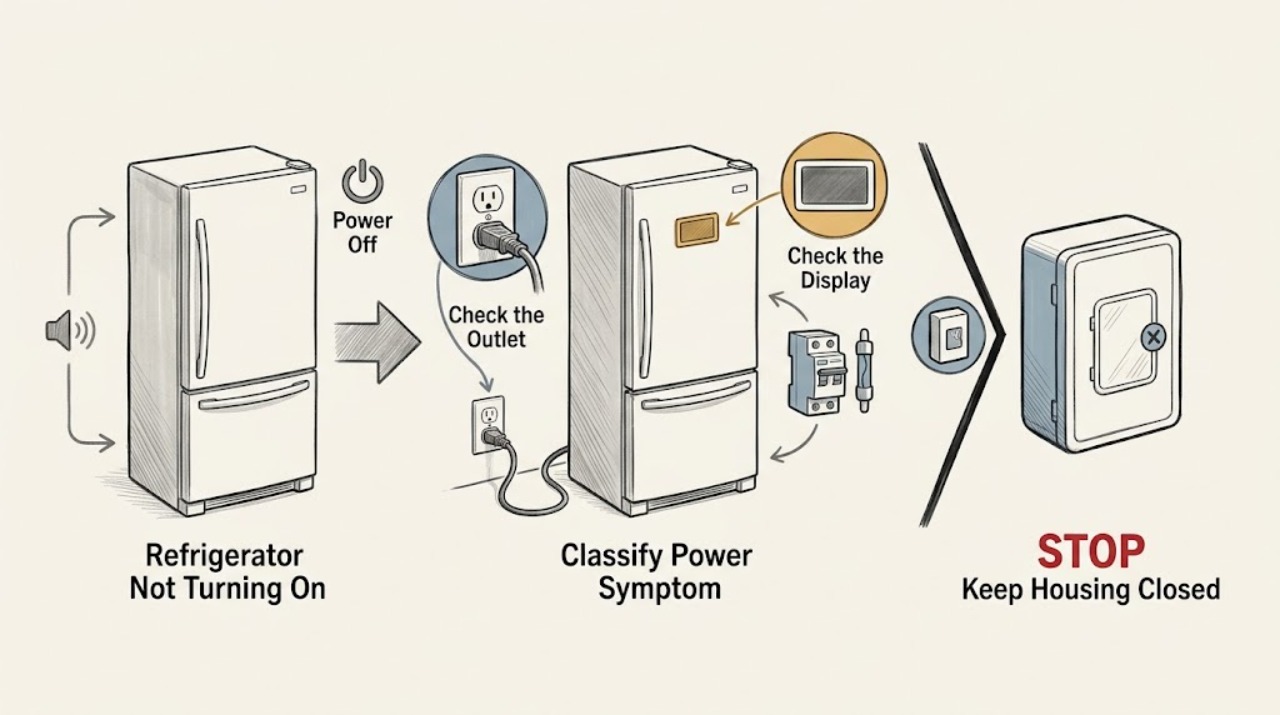
First separate a refrigerator with no light or display from one that has power but is not cooling or is waiting to restart. With the unit dry and undamaged, check that its cord is fully seated in the grounded wall outlet and that the home's breaker or fuse has not opened. Hisense's opened HQD20 manual lists an unplugged cord, breaker or fuse, and defrost mode among causes when the refrigerator does not run; it also says to wait for a defrost cycle and cooling system to restart. Controls vary by model: an opened RS44G1 manual says its regulator position 0 stops cooling without removing electrical power, and gives a 3–5 minute restart delay after power is restored. Do not apply those details to another model without its manual. If the outlet is live but the refrigerator remains completely unresponsive, a breaker trips again, or there is smoke, a burning smell, a hot cord or outlet, water near electrical parts, or visible damage, stop using it and arrange qualified appliance or electrical service. Do not remove panels or perform live tests.
Before you begin
Safety first
- The owner may inspect accessible dry plug and cord condition, check household protection once, identify the model, read the exact manual, and observe operation from outside the cabinet. Qualified personnel must handle panels, internal fuses, controls, wiring, fans, compressors, defrost components, refrigerant, and live diagnosis.
Work through in order
Diagnostic checks
Use only checks that match the exact appliance or system and its official guide.
-
Check 1
With the door open only briefly, check for the interior light, display, alarm, fan sound, and any response to a control touch. Note whether the freezer is cold, whether the compressor was recently running, and when the symptom began.
Expected result: There is no light or display; the display is lit but the compressor or fan is quiet; only one compartment is abnormal; or operation returns intermittently.
Next step: Use the no-response branch for a dark appliance and the powered-but-quiet branch for a lit appliance. Do not label a lit refrigerator as ‘not turning on’ without recording the separate cooling symptom.
Stop if: Stop immediately for smoke, sparks, burning odor, a hot cord or outlet, water near electrical parts, or a damaged plug or cord.
Why this matters
Why: No light and no display make an upstream supply or internal power path more likely. A lit display means the appliance has at least some power and shifts the diagnosis toward mode, defrost/restart delay, fan, compressor, or cooling control rather than a completely dead outlet.
-
Check 2
If the unit is dry and undamaged, confirm the plug is fully seated in its grounded wall outlet and inspect the accessible cord for cuts, crushing, heat, or looseness. Check the household breaker or fuse once according to the home's safe procedure; do not open the plug, outlet, or refrigerator cabinet.
Expected result: The plug was loose; the outlet has no power; a breaker or fuse is open; the cord or outlet is hot or damaged; or the external supply appears normal.
Next step: Correct only a safe, accessible plug connection. If the supply is uncertain, use a qualified electrician; if the supply is good and the refrigerator remains dark, arrange appliance service rather than bypassing protection.
Stop if: Do not touch a hot or wet outlet, exposed conductor, damaged cord, or repeatedly tripped breaker; disconnect power only when doing so is safe.
Why this matters
Why: A loose plug or household supply interruption can explain a dark refrigerator. A repeated trip, heat, damage, or an outlet that will not hold power indicates an electrical safety issue, not a reason to keep resetting the protection.
-
Check 3
Read the rating label and use the exact Hisense manual to check the control position, lock, vacation or demo state, and any displayed indicator. For a dial model, verify that the position is not an intentional cooling-off setting; for a touch model, do not invent a reset sequence from a different series.
Expected result: The control is in a documented cooling-off or special state; the display is locked or shows an error; the panel responds normally; or the model manual cannot be identified.
Next step: Apply only the exact manual's documented exit or setting procedure and record the result. Use Hisense's model lookup if necessary; do not remove the control panel or bypass a lock or sensor.
Stop if: Stop if the display is damaged, the control area is wet, the refrigerator enters an unexplained alarm state, or the required procedure involves exposed wiring or live measurement.
Why this matters
Why: A control state can stop cooling while leaving electrical power present. A panel mismatch or unexplained code prevents a reliable cross-model diagnosis; an unresponsive panel after confirmed supply points toward control or internal power service.
-
Check 4
Record any recent power outage, unplugging, transport, or defrost indication, then wait the exact model manual's restart or defrost interval without repeatedly cycling power. Listen from outside the cabinet for a return of normal fan or compressor operation.
Expected result: The refrigerator resumes after the documented wait; it remains quiet but the display is active; the wait is not specified for this model; or it stops again after starting.
Next step: The RS44G1 manual documents 3–5 minutes after a power failure or unplugging for that model, while the HQD20 manual refers to waiting for defrost and restart. Use only the matching manual's instruction; if no recovery occurs, proceed to service.
Stop if: Do not remove covers, reach toward a fan, defeat a door switch, or keep reconnecting a refrigerator that trips protection or emits an odor.
Why this matters
Why: Recovery after the documented interval supports a temporary restart or defrost state. Persistent silence with a live display, repeated stops, or an unknown interval requires model-specific service rather than a guessed timer or forced reset.
-
Check 5
After the safe external checks and the model-specific wait, document the model, light/display state, outlet and breaker result, control state, freezer temperature trend, fan or compressor behavior, and any leak, trip, heat, or odor. Protect perishable food and arrange qualified service when the fault persists.
Expected result: The refrigerator is fully responsive again; it has partial power but no normal cooling operation; it remains completely dark with a confirmed outlet; or a hazard occurred.
Next step: Give the technician the recorded sequence and exact model. Use appliance service for the refrigerator fault and electrical service for a hot, damaged, or repeatedly tripping household supply; do not continue testing to reproduce the fault.
Stop if: Stop using the appliance for smoke, sparks, burning odor, water near electrical parts, a hot or damaged cord or outlet, repeated protective-device trips, or unsafe food temperatures.
Why this matters
Why: A restored response supports an external supply or temporary state. Confirmed supply with no response, partial power without operation, or any electrical hazard makes an internal power, control, fan, compressor, defrost, or sealed-system fault more likely, but does not identify a safe replacement part.
Use your observations
Decision map
Find the observation that best matches what you see, then follow the next safe action.
-
PATH 01Safety boundary
What you see
The interior light and display are both dark, the plug is seated, and a safe check shows the grounded outlet and household protection are supplying power.
Do this next
Unplug only if safe, keep the refrigerator out of service, and arrange qualified Hisense appliance service. Provide the model and the external power result.
Why this path and its safety boundary
Why it matters: An internal power, fuse, control, or wiring fault is more likely than a loose plug or tripped household breaker.
Safety stop: Do not open the rear cover, replace an internal fuse, bypass a protection device, or make a live voltage measurement.
-
PATH 02Safety boundary
What you see
The refrigerator is dark and the outlet has no power, the breaker or fuse is open, or the cord or plug is visibly damaged or hot.
Do this next
Do not keep resetting the breaker. Use a qualified electrician for the outlet or household circuit, and arrange appliance service for a damaged refrigerator cord or plug.
Why this path and its safety boundary
Why it matters: The immediate problem is an external electrical supply or cord hazard; the refrigerator itself has not yet been isolated as the cause.
Safety stop: Do not touch a wet or hot outlet, exposed wire, damaged plug, or sparking connection; leave the circuit off when necessary for safety.
-
PATH 03Safety boundary
What you see
The display or light works, but the compressor or fan is quiet immediately after an outage, unplugging, or a documented defrost period, and no hazard is present.
Do this next
Wait only the matching Hisense manual's interval and observe from outside the cabinet. The opened RS44G1 manual gives 3–5 minutes for that model, while the HQD20 manual refers to waiting for defrost and restart.
Why this path and its safety boundary
Why it matters: A normal model-specific restart or defrost interval is possible; this is not evidence that the outlet or compressor has failed.
Safety stop: Arrange service if the interval expires without recovery, the unit repeatedly stops, or a trip, odor, heat, leak, or abnormal noise appears.
-
PATH 04Safety boundary
What you see
The panel or light works, the model-approved restart window has passed, and the fan or compressor still does not operate normally or the refrigerator is warming.
Do this next
Protect food and arrange qualified Hisense service with the model, display state, timing, and compartment-temperature observations. Keep panels and wiring closed.
Why this path and its safety boundary
Why it matters: A control, fan, defrost, compressor, or sealed cooling problem is more likely than complete loss of power; the symptom alone cannot select a part.
Safety stop: Do not defeat a door switch, apply power directly to a motor, bypass a sensor, or perform live electrical or refrigerant work.
-
PATH 05Safety boundary
What you see
There is smoke, a burning odor, a spark, a hot or damaged cord or outlet, water near electrical parts, or repeated breaker or fuse operation.
Do this next
Stop operating the refrigerator. Disconnect power only if it can be done without contact with water, heat, sparks, or damaged wiring; otherwise leave it alone and obtain qualified electrical or appliance help.
Why this path and its safety boundary
Why it matters: The situation exceeds a refrigerator restart check and may present shock or fire risk.
Safety stop: Do not reconnect it to see whether the symptom repeats, reset protection repeatedly, touch wiring, or use the appliance until the hazard is assessed.
Helpful context
Understand the symptom
Define what ‘not turning on’ means
Look for an interior light, display, alarm, fan sound, or any response when a door is opened. A dark panel and no light point to the supply or internal power path; a lit panel with a silent compressor is a powered refrigerator problem and should not be diagnosed as a dead outlet. The freezer may also be cold while the fresh-food fan or compressor is temporarily stopped, so record the symptom before changing controls.
Start with the external power path
Without moving a wet or damaged appliance, inspect the plug and cord and confirm the plug is seated in the grounded wall outlet. Check the home's breaker or fuse once, using the household procedure and only with dry hands. Hisense's HQD20 troubleshooting directs the owner to check the power cord and fuse or circuit when the refrigerator does not run. If the protective device opens again, do not keep resetting it; the refrigerator needs qualified diagnosis.
Do not confuse a stopped control state with no electricity
Use the exact model's manual to interpret a dial, touch panel, lock, vacation setting, demo mode, or error display. The opened RS44G1 manual is an example of why this matters: its regulator position 0 stops cooling but does not switch off power. Hisense's current product lines also use different digital control layouts. Do not copy a button sequence or mode label from another refrigerator; if the panel does not match the manual, stop at model identification.
Allow for a documented delay or defrost cycle
A refrigerator may be quiet during automatic defrost or while a compressor protects itself after power is restored. The HQD20 manual tells owners to wait for defrost and the cooling system to restart. The RS44G1 manual gives that model a 3–5 minute restart delay after unplugging or a power failure. Treat both as model-specific evidence: use the matching manual's timing, avoid rapid unplug/replug cycles, and do not remove a panel to prove which component is waiting.
Stop before internal electrical diagnosis
If a known-good dry outlet supplies power but the refrigerator has no light or display, or if the controls respond but the fan or compressor never resumes after the documented wait, the remaining causes can include internal power, control, fan, defrost, or compressor circuits. The opened Hisense manuals reserve repairs beyond the owner checks for qualified service. Unplug only when it is safe to do so, protect perishable food, and provide the model, power observations, display state, recent outage, and any trip or odor history to the technician.
Safety boundary
Stop conditions
- Stop and disconnect power only when safe for smoke, sparks, burning odor, a hot or damaged cord or outlet, water near electrical parts, or repeated protective-device trips.
- Do not repeatedly reset a breaker or fuse, reconnect a refrigerator that trips protection, or bypass a household or appliance safety device.
- Do not remove panels, defeat a door switch, bypass a sensor, replace an internal fuse, apply power directly to a motor, or perform live electrical or sealed-system tests.
- Use only the exact Hisense model manual for control states, button sequences, defrost instructions, and restart timing; do not transfer RS44G1 or HQD20 details to an unidentified model.
- Protect or relocate perishable food when the refrigerator remains off, temperatures are unsafe or unstable, or the freezer and fresh-food compartments are not maintaining safe conditions.
When checks do not resolve it
Need a professional?
Arrange qualified Hisense refrigerator service when the light or display remains off after a confirmed safe outlet, when a powered unit does not resume after the exact model's restart or defrost interval, or when the control, fan, compressor, defrost, or cooling system needs diagnosis. Use a qualified electrician for a dead, hot, damaged, wet, sparking, or repeatedly tripping outlet or household circuit. Stop immediately for smoke, sparks, burning odor, water near electrical parts, a hot or damaged cord or outlet, repeated protective-device trips, or unsafe food temperatures. The owner may identify the model, inspect accessible cord and plug condition, check household protection once, read the model manual, and observe from outside the cabinet. Internal fuses, panels, controls, fans, compressors, wiring, defrost parts, refrigerant, and live testing require qualified service.
Safety scope: The owner may inspect accessible dry plug and cord condition, check household protection once, identify the model, read the exact manual, and observe operation from outside the cabinet. Qualified personnel must handle panels, internal fuses, controls, wiring, fans, compressors, defrost components, refrigerant, and live diagnosis.
Common questions
FAQ
Why is my Hisense refrigerator completely dark?
Check the accessible plug, grounded outlet, and household breaker or fuse once if the unit is dry and undamaged. Hisense's opened HQD20 manual lists an unplugged cord and fuse or circuit problem among no-run causes. If the outlet supplies power but the light and display remain off, stop at the external checks and arrange qualified service; do not open the rear panel.
Does a quiet Hisense refrigerator always mean it is not turning on?
No. A lit display or interior light means at least part of the refrigerator has power. Hisense manuals describe defrost or restart conditions in which the compressor or cooling system may be quiet temporarily. Use the exact model's timing; the RS44G1 manual's 3–5 minute delay is not a universal rule.
Can a Hisense refrigerator control be set to stop cooling without losing power?
On the opened RS44G1 model, yes: its manual says regulator position 0 stops cooling but does not switch off electrical power. Other Hisense models use different panels and modes, so identify the model and follow its manual rather than copying that dial position or a reset sequence.
What should I do if the breaker trips when the refrigerator is plugged in?
Do not repeatedly reset it or keep reconnecting the refrigerator. A repeated trip, hot or damaged cord or outlet, sparks, smoke, burning odor, or water near electrical parts is a stop condition. Leave the circuit or appliance off when needed for safety and obtain qualified electrical or appliance service.
Can I remove a panel to see why my Hisense refrigerator will not start?
No. The owner checks are limited to safe external supply, model-specific controls, and observation. Internal power, wiring, fuses, fans, compressors, defrost parts, and live testing require qualified service. Protect perishable food while the refrigerator is off or temperatures are unsafe.
Read the exact guide
Official sources
- Hisense Support - For All Your Appliance Needs - Hisense USAHisense USA · Official Hisense support hub; it directs owners to select Refrigerators and locate model-specific resources rather than applying a cross-model procedure.
- Hisense HQD20 UM ENv10.inddHisense USA · Opened Hisense manual for the HQD20 model family; its cord, breaker or fuse, defrost, and restart checks are model-specific and are not asserted for every Hisense refrigerator.
- Hisense 29.1 cu. ft. Standard Depth Side by Side RefrigeratorHisense USA · Official product page for one Hisense side-by-side model; it is used only to demonstrate control-layout variation and not to assign controls to an unidentified refrigerator.
- 北美120使用说明书-封面Hisense Company Ltd. · Opened Hisense manual for model RS44G1; the position-0 behavior and 3–5 minute restart timing are used only as model-specific examples, not universal Hisense rules.
Community feedback
Share a repair observation
Share a plain-text repair observation. Accepted observations are published automatically; this page may take a moment to update.