
On this page
Start here
Quick answer
For a Hotpoint refrigerator that appears completely dead, first record the full model or industrial code and separate three states: no light/display at all, lights or display present but no cooling, or a breaker/outlet/cord problem. With the appliance accessible and dry, check that the plug is fully seated and inspect the outlet and breaker externally; do not change a fuse or breaker rating, use a loose/damaged outlet, or remove a rear cover. For models with a temperature control or standby setting, compare the control state with the exact Hotpoint manual. Hotpoint's refrigerator guidance says an appliance that is not working can result from an incompletely seated plug or a blown socket/main fuse, while its manuals and parts pages require model-code matching. If a known-good supply reaches the refrigerator but it remains dark and silent, or a breaker trips again, stop and arrange qualified service: compressor, main/inverter/display board, thermostat, wiring and sealed cooling work are not home diagnostics.
Before you begin
Safety first
- This article covers model identification, external plug/outlet/breaker checks, normal front-panel control checks and visual exterior safety checks. It does not authorize live testing, cover removal, control or thermostat bypass, compressor/start-device work, board replacement, refrigerant handling, or sealed-system repair.
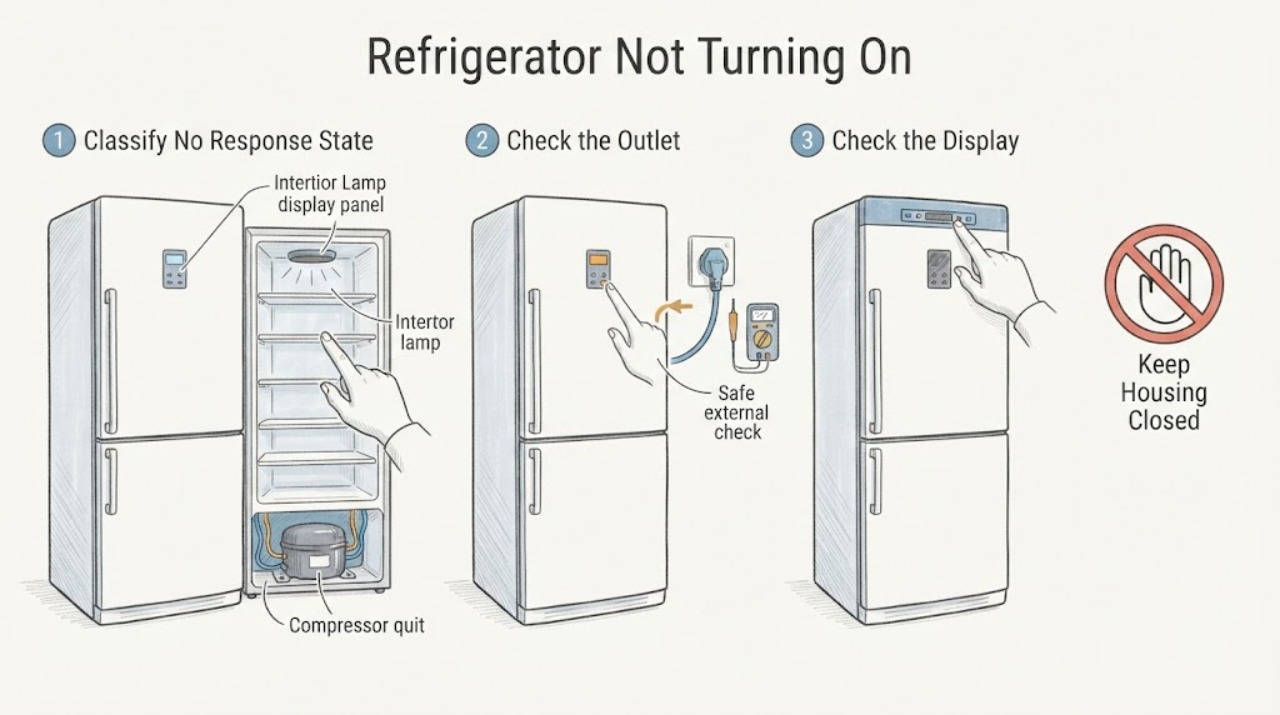
Work through in order
Diagnostic checks
Use only checks that match the exact appliance or system and its official guide.
-
Check 1
Without moving the refrigerator, record the complete Hotpoint model or industrial/product code and note whether the interior light, external display, control buttons, fan and compressor sound are all absent. Also record whether the symptom began after an outage, a move or cleaning.
Expected result: Everything is dark and silent; the light or display works; the appliance clicks or hums; an error code is shown; or the cord/cabinet is damaged.
Next step: Follow the matching branch below and locate the exact manual by model code. Do not begin by removing a rear panel or ordering a compressor.
Stop if: Stop for smoke, burning smell, arcing, a hot or damaged cord/plug, water near electrical parts, a damaged cabinet/cooling pipe or a repeated breaker trip.
Why this matters
Why: Dark and silent is a no-response/power branch, while a light or display means at least part of the electrical supply is present and points toward a standby, control, start or cooling diagnosis. Damage or repeated electrical noise overrides normal checks.
-
Check 2
From outside the appliance, make sure the plug is fully seated in the intended wall socket and inspect the plug, cord and socket for looseness, scorching or heat. If the socket can be checked safely, use a known-safe appliance or have an electrician verify it; inspect the refrigerator's breaker or fuse externally without changing its rating.
Expected result: The plug was loose, the outlet is dead, the main/socket fuse or breaker has opened, the cord or socket is hot/damaged, or the supply tests normally.
Next step: Correct only a safe loose plug. Have an electrician repair a faulty outlet or protective device. If the supply is normal but the refrigerator remains dead, keep it unplugged and arrange qualified appliance service.
Stop if: Do not use a loose or damaged socket, replace a fuse with a different rating, install a larger breaker, use an extension workaround, or keep resetting a trip.
Why this matters
Why: Hotpoint's refrigerator troubleshooting section lists an incompletely seated plug and a blown socket or main fuse as causes of a non-working refrigerator. A supply fault is not proof of a failed refrigerator component, while a normal supply with a dark appliance moves the problem inside the appliance.
-
Check 3
If the outlet is sound and the refrigerator has any light or display, compare the temperature control, standby/on state and any model-specific lock or alarm indication with the exact Hotpoint manual. Use only normal front-panel controls; do not enter a service mode.
Expected result: The manual shows an off/standby or incorrect control state, a model-specific alarm/error is displayed, or the control state is correct but the unit remains unresponsive or warm.
Next step: Correct only the manual-documented user setting. If the display reports E6 or another model-specific code, record it and use the matching manual; if the unit remains dead or warm, arrange qualified service.
Stop if: Do not remove the control panel, bypass a thermostat or lock, short wires, or repeatedly power-cycle a unit that clicks, smells hot or trips the breaker.
Why this matters
Why: A documented control state can make a working refrigerator appear inactive. A persistent display/control fault or correct settings with no compressor/cooling response needs model-specific service rather than a generic reset or a part guess.
-
Check 4
If the interior light or display works, observe the front indicators and listen from the normal operating position for a compressor or fan without touching panels or pipes. Do not mistake a silent interval for a complete no-power condition; compare behavior with the exact manual.
Expected result: The light/display works and the compressor or fan eventually runs; the light/display works but the cabinet stays warm and the compressor remains silent; or an error/alarm appears.
Next step: Use a separate cooling or error-code service path and provide the observed indicators. Do not open the rear cover to inspect the compressor or start circuit.
Stop if: Stop for abnormal clicking with a hot cord, burning smell, smoke, water near electrics, damaged pipes or repeated breaker trips.
Why this matters
Why: Power is reaching at least some functions, so this is not the assigned completely-no-response state. Warm food, no compressor start or a sensor/control error may require a cooling, start or control diagnosis, while a running compressor points away from ‘not turning on’ and toward cooling performance.
-
Check 5
With power disconnected, inspect only the accessible exterior for a crushed cord, damaged plug, water around the base or socket, a damaged cabinet, or visibly damaged cooling pipes. Do not pull an integrated appliance out or remove rear panels; check that doors can close only if doing so does not disturb a damaged unit.
Expected result: There is no visible damage; the cord/plug or cabinet is damaged; water is near electrical parts; or a cooling pipe has been struck or bent.
Next step: Keep the refrigerator unplugged and arrange qualified service for damage, water or pipe concerns. Protect food and floors while waiting; do not attempt to straighten pipes or dry inside electrical housings.
Stop if: Do not touch exposed conductors, cut a cord, bend cooling pipes, use a wet appliance, or move a heavy/integrated refrigerator to reach hidden components.
Why this matters
Why: External damage or liquid near the electrical supply raises shock, fire or refrigerant concerns and can explain a sudden stop, but it cannot be safely diagnosed by a user. An undamaged exterior with a normal supply and no response points toward internal electrical or control service.
-
Check 6
After the external supply, control-state and damage checks are documented, stop user diagnosis if a known-good supply is present but the Hotpoint refrigerator remains dark and silent, or if a protective device trips again. Provide the exact model code and all observations to qualified service.
Expected result: The socket and breaker are normal but there is no light/display or response; the appliance has a recurring trip; or an internal board, thermostat, wiring, compressor or start device is suspected.
Next step: Keep the refrigerator unplugged and arrange authorized or qualified Hotpoint appliance service. Ask for diagnosis using the exact model/product code before any part is selected.
Stop if: Do not remove covers, probe live wiring, bypass a thermostat or board, replace a compressor/start component, handle refrigerant or repeatedly reconnect a tripping appliance.
Why this matters
Why: The remaining fault is inside the appliance or its protected supply. Hotpoint's guidance identifies compressor, cooling circuit, main/inverter/display boards and other components as professional repair territory, and silence alone cannot distinguish them.
Use your observations
Decision map
Find the observation that best matches what you see, then follow the next safe action.
-
PATH 01Safety boundary
What you see
The interior lamp and display are both absent, and the outlet, plug or breaker has not yet been checked.
Do this next
Check the plug, socket and breaker externally. Have an electrician resolve supply faults; if the supply is normal but the refrigerator stays dark, arrange appliance service.
Why this path and its safety boundary
Why it matters: The first unresolved question is whether electricity reaches the appliance. Hotpoint lists an incompletely seated plug and blown socket/main fuse for a refrigerator that is not working.
Safety stop: Do not use a hot/damaged socket or keep resetting a breaker.
-
PATH 02Safety boundary
What you see
The outlet and protective device are normal, but the Hotpoint refrigerator still has no light, display, sound or response.
Do this next
Leave it unplugged and arrange qualified service with the model/product code and external-check results.
Why this path and its safety boundary
Why it matters: An internal power, control, wiring or start-system fault is more likely; the evidence does not identify a single failed part.
Safety stop: Do not open the rear or control panel or perform live measurements.
-
PATH 03Safety boundary
What you see
The interior light or display works, but the compressor/fan does not start or the cabinet is warm.
Do this next
Check only the manual-documented control/standby state, record any code and use a separate cooling service path. Do not diagnose the compressor by opening the cabinet.
Why this path and its safety boundary
Why it matters: The appliance is not completely without power; this is a cooling, standby, sensor, start or control symptom rather than the assigned no-response state.
Safety stop: Stop for burning odor, repeated clicking with heat, water near electrics or a breaker trip.
-
PATH 04Safety boundary
What you see
A display or control is present but the exact Hotpoint model reports an error such as E6, or the controls do not respond normally.
Do this next
Record the complete code and model/product identity and follow only the matching manual. Arrange service for a persistent code or unresponsive control.
Why this path and its safety boundary
Why it matters: Hotpoint labels E6 as a main control-board and display-board fault on its published fridge-freezer code page; other models may use different codes or interfaces.
Safety stop: Do not apply a code from another model, bypass the control or replace a board without professional diagnosis.
-
PATH 05Safety boundary
What you see
The cord/plug/socket is hot or damaged, a breaker trips again, water is near electrical parts, or the cabinet/cooling pipes are damaged.
Do this next
Stop use, unplug only if safe without touching damaged or wet parts, isolate the area and contact an electrician or qualified appliance service as appropriate.
Why this path and its safety boundary
Why it matters: This is a shock, fire, water or refrigerant hazard, not a safe refrigerator reset situation.
Safety stop: Do not reconnect power, dry inside electrical housings, move the appliance to expose pipes, or attempt a cooling-system repair.
Helpful context
Understand the symptom
Confirm that ‘not turning on’ means no response
A refrigerator with a light or display but no cooling is not the same as a refrigerator with no light, display, fan or sound. Record which signs are absent, the exact model or industrial code, and whether the failure began after an outage, move or cleaning. Keep food safety in mind while the appliance is off, and use the exact model manual rather than a generic control or error-code procedure.
Start at the supply, not at the compressor
Hotpoint's refrigerator troubleshooting material identifies a plug that is not fully seated and a blown socket or main fuse as possible causes of a refrigerator that is not working. These are external checks only. A dead outlet, loose connection, hot plug or recurring trip belongs to an electrician or qualified appliance technician; changing protection ratings or opening the refrigerator can create a fire or shock hazard.
A lamp or display changes the diagnosis
If the interior lamp or display works, the refrigerator is receiving at least some power, so the case is no longer a pure no-power symptom. Check only the model-documented temperature or standby state and listen without moving panels. If it stays warm or the compressor never starts, use a cooling/service diagnosis rather than treating the unit as completely dead. Hotpoint lists sensor and display/control faults by model-specific code, including E6 for a main/display-board fault on its published fridge-freezer page.
Do not open the refrigeration system
The Hotpoint manual says end-user repair is limited to specified self-repair parts and identifies the compressor, cooling circuit, main board, inverter board and display board as professional work. Do not remove the rear cover, probe live wiring, bypass a thermostat or board, handle refrigerant pipes, or attempt a compressor/start-device repair. Unplug before any permitted manual-directed self-repair, and stop if the cord, socket, cabinet or cooling pipes are damaged.
Use the model code to make the service call useful
Hotpoint's manual lookup uses the model number or 12NC, and its parts catalog uses the industrial code or model number to identify the correct appliance components. Give the technician the code, whether the light/display works, the outlet and breaker result, the control/standby state, any error code, and whether the plug, cord or cabinet shows damage. Do not infer a compressor or board failure from silence alone.
Safety boundary
Stop conditions
- Stop and isolate the refrigerator for smoke, burning smell, arcing, a hot/damaged cord or plug, repeated breaker trips, water near electrical parts, or damaged cooling pipes.
- Do not change fuse or breaker ratings, use a loose or damaged outlet, repeatedly reset a protective device, or use an extension workaround for a refrigerator fault.
- Do not remove rear or control covers, probe live wiring, bypass a thermostat/board, or handle the compressor, start circuit, inverter, refrigerant pipes or sealed cooling system.
- Unplug before any self-repair that the exact Hotpoint manual explicitly permits; repairs outside the manual's specified self-repair parts require authorized or registered professional service.
- If the appliance has no response on a known-good supply, keep it unplugged and arrange service; if it has a light/display but is warm, use a cooling diagnosis rather than repeatedly treating it as a no-power fault.
Only after diagnosis
Potential parts
- model-specific main/control or display board
Consider only after qualified diagnosis confirms an internal control or display fault on the exact model.
Hotpoint publishes model/product-code lookup and identifies control/display boards as model-dependent; no-response alone does not prove a board failure. - model-specific compressor, start device or inverter assembly
Consider only after qualified service confirms a start or compressor fault and verifies the exact sealed-system configuration.
Hotpoint identifies compressor and cooling-circuit work as professional repair; do not order or fit these parts from silence alone. - model-specific thermostat, sensor, wiring or power component
Consider only after model-matched diagnosis identifies the failed control, sensor, wiring or power component.
The light/display, control state and error-code behavior vary by model; verify the complete industrial code before selecting any part.
When checks do not resolve it
Need a professional?
Arrange qualified Hotpoint or refrigeration service when a known-good outlet and breaker have been confirmed but the refrigerator remains dark and silent; when the plug, cord, cabinet or cooling pipes are damaged; when a breaker trips again; or when a thermostat, control board, compressor, start device, inverter or wiring fault is suspected. If the light/display works but the cabinet is warm, use a separate cooling service path and provide the model-specific code and observed sounds.
Safety scope: This article covers model identification, external plug/outlet/breaker checks, normal front-panel control checks and visual exterior safety checks. It does not authorize live testing, cover removal, control or thermostat bypass, compressor/start-device work, board replacement, refrigerant handling, or sealed-system repair.
Common questions
FAQ
What should I check first when my Hotpoint refrigerator is completely dead?
Confirm that the interior light and display are both absent, then record the model/product code. Check the plug is fully seated and inspect the outlet and breaker externally. Hotpoint's refrigerator manual lists a loose plug and blown socket/main fuse as possible causes. If the supply is normal but the refrigerator remains dark, arrange qualified service instead of opening it.
The light works but my Hotpoint refrigerator is not turning on—is it the same problem?
Not necessarily. A working light or display means at least part of the refrigerator has power. If the cabinet is warm or the compressor does not start, check only the model-documented standby/temperature state and record any code, then use a cooling or service diagnosis. Do not treat a silent compressor as proof of one failed part.
Can I replace the Hotpoint refrigerator compressor or control board myself?
Not as a routine user repair. Hotpoint's refrigerator manual specifically places compressor, cooling-circuit, main-board, inverter-board and display-board repairs with authorized or registered professional repairers. Keep the appliance unplugged and provide the exact model/product code for diagnosis.
What if the breaker trips when I plug in my Hotpoint refrigerator?
Stop repeatedly resetting it. Unplug the appliance if safe, keep away from a hot or damaged cord/socket, and have the supply checked by an electrician or the appliance inspected by qualified service. Do not install a larger breaker or change a fuse rating to keep the refrigerator running.
Why do I need the Hotpoint model or industrial code?
Hotpoint's manuals page uses the model number or 12NC to locate the correct manual, and its spare-parts pages use the industrial code or model number to identify compatible parts. Controls, error codes and repairable components differ across refrigerator models, so brand-only advice is not enough.
Read the exact guide
Official sources
- Hotpoint Fridge Freezer Error CodesHotpoint UK Appliances Limited · Official Hotpoint UK error-code page; codes and interfaces are not universal across all Hotpoint refrigerators.
- Hotpoint Appliance ManualsHotpoint UK Appliances Limited · Official Hotpoint UK manual index covering refrigerators, freezers and fridge freezers; the exact manual must be selected by the appliance identity.
- Hotpoint Refrigerator User Manual – Troubleshooting and Self-Repair SafetyHotpoint UK Appliances Limited · Official Hotpoint-hosted refrigerator manual; model-specific controls and self-repair permissions must be confirmed against the exact product code.
- Shop Fridge Spare Parts & Accessories - HotpointHotpoint UK Appliances Limited · Official Hotpoint UK refrigerator parts catalog; use only for model matching and conditional service discussion.
- Shop Fridge Freezer Spare Parts & Accessories - HotpointHotpoint UK Appliances Limited · Official Hotpoint UK parts catalog; parts and fit vary by industrial code/model and are not a diagnosis or DIY authorization.
Community feedback
Share a repair observation
Share a plain-text repair observation. Accepted observations are published automatically; this page may take a moment to update.