
On this page
Start here
Quick answer
If a KitchenAid gas cooktop will not ignite, first turn the affected knob Off and stop immediately if you smell gas, see an uncontrolled flame, or hear gas without ignition. If there is no gas odor, check whether the igniter clicks, let a recently cleaned or spilled-on burner dry, and make sure the burner cap and base are clean, correctly matched, and seated. A burner that clicks but does not light can have moisture, clogged ports, or a cap out of position; if every burner fails, the cooktop may have lost electrical power or gas supply. Do not keep releasing gas or adjust the burner yourself—persistent failure, abnormal flame, or any gas odor requires qualified service or emergency gas assistance.
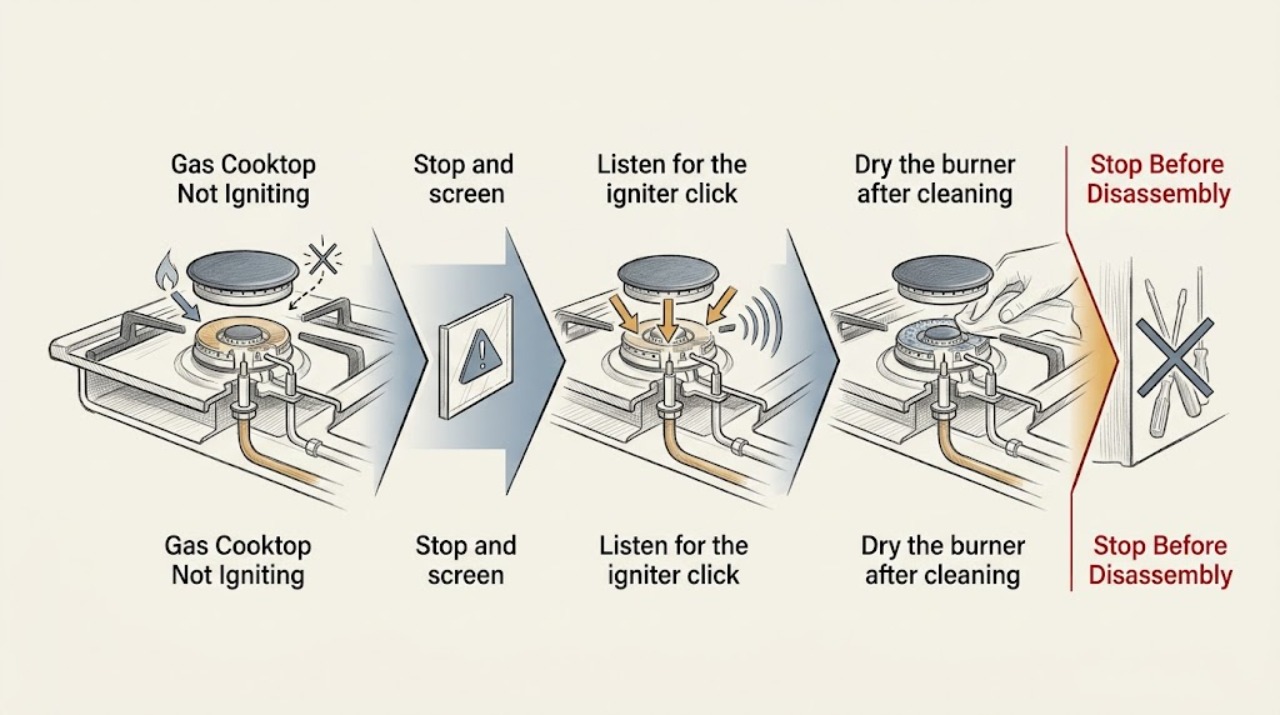
Work through in order
Diagnostic checks
Use only checks that match the exact appliance or system and its official guide.
-
Stop and screen for a gas hazard
Turn the affected burner knob to Off and watch only from a safe position. Do not use a flame to test the gas. If you smell gas, hear gas flowing without ignition, see a flame that will not go out, or see smoke or damage, leave the area without operating electrical switches.
Expected result: There is no gas odor or uncontrolled flame, and the burner is fully Off; or a gas odor, unlit gas flow, persistent flame, smoke, or damage is present.
Next step: For any gas odor, unlit gas flow, persistent flame, or fire risk, leave immediately and contact the appropriate emergency or gas service from a safe location. Otherwise continue with one burner at a time.
Why this matters
Why: An ignition fault is safe to investigate only when gas is not accumulating and the burner can be left Off. A gas or fire warning is an emergency boundary, not a user repair step.
-
Listen for the igniter click
With the area clear and no gas odor, turn one burner knob to its Ignite position only long enough to observe and listen, then return it to Off if the burner does not light. Check whether that burner clicks and whether the other burners behave the same way.
Expected result: The burner clicks but does not light, it makes no click, or all burners fail in the same way.
Next step: If no burner clicks, check the household breaker or fuse indicator without opening the appliance. If only one burner fails, continue with the dry-and-seat checks. If all burners still fail, verify the gas shutoff is open only if it is plainly accessible and safe; otherwise request qualified service.
Why this matters
Why: A click shows that the ignition circuit is attempting to spark; no click can point to power, a control, or an igniter issue. A failure across every burner makes a single cap or port less likely.
-
Dry the burner after cleaning or a spill
Leave the burner Off and let the burner cap, burner base, ports, igniter area, and knob shaft dry thoroughly after a spill or cleaning. Use only cool moving air if needed, and do not heat the area or attempt repeated ignition while it is damp.
Expected result: The burner was visibly wet and later produces a click and a stable flame, or it remains dry but still will not ignite.
Next step: After drying, try one controlled ignition attempt. If the burner remains unsuccessful while dry, inspect the cap, base, and ports; if clicking continues with all knobs Off, stop using the cooktop and arrange service.
Why this matters
Why: KitchenAid notes that moisture can make burners click without lighting and can also make switches click when controls are Off.
-
Reseat the correct burner cap and base
With the burner Off and cool, remove only the loose cap and base pieces intended for user cleaning. Clean their accessible surfaces, put the matching base and cap back in their original position, and align any locating pins so the cap sits flush with minimal side-to-side movement.
Expected result: The cap sits flat and centered and the burner lights normally, or it rocks, does not fit, or the ignition problem remains after correct reseating.
Next step: If the cap does not fit or the problem remains, do not force it or substitute another cap. Leave the burner Off and have the model-specific burner assembly inspected.
Why this matters
Why: KitchenAid says a correctly seated, clean cap and base are required for proper lighting; a wrong or unstable cap can disrupt the flame path.
-
Inspect and clean accessible burner ports
With the gas control Off and the burner cool, look for spill residue or blocked openings in the burner ports. If the owner's manual permits user cleaning, clear an accessible port gently with a straight pin or the specified small tool; do not enlarge, distort, or probe the igniter or gas valve.
Expected result: The ports are open and the burner lights with an even flame, or the flame remains uneven, weak, noisy, or absent.
Next step: Stop if a port cannot be cleared without force or if the flame is abnormal. Do not adjust the burner or conversion hardware; request a trained gas-appliance technician.
Why this matters
Why: A blocked or distorted port can prevent the gas-air pattern from reaching the spark correctly and can create an unstable flame.
-
Check airflow and installation context
If the cooktop uses a downdraft vent, make one controlled ignition attempt with the blower reduced or Off, while keeping the burner knob under direct observation. Note whether the appliance was recently installed or converted between gas types.
Expected result: The flame lights and stays stable when the draft is reduced, or ignition remains unreliable and the flame is too high, low, yellow, flickering, or noisy.
Next step: Use the ventilation and control setting specified by the owner's manual. If the flame remains abnormal, the unit was recently installed or converted, or the burner needs adjustment, stop use and call a qualified gas technician.
Why this matters
Why: KitchenAid says downdraft airflow can pull a flame away from the igniter, while incorrect conversion or flame adjustment needs installation or service review.
Use your observations
Decision map
Find the observation that best matches what you see, then follow the next safe action.
-
PATH 01Next step
What you see
One burner clicks, the cap and base are dry and correctly seated, and the burner lights after an accessible port is cleaned.
Do this next
Use the burner normally while monitoring the flame. Keep the cap seated and stop if the flame becomes unstable or the clicking continues after ignition.
-
PATH 02Next step
What you see
No burner clicks, or every burner fails after a recent power interruption or installation.
Do this next
Check only the visible household power indication and model lockout instructions. If the cause is not obvious, leave the cooktop Off for qualified service rather than opening it.
-
PATH 03Next step
What you see
The burners click but do not light after drying, correct cap placement, and permitted port cleaning.
Do this next
Stop releasing gas and arrange a trained gas-appliance technician to inspect ignition and supply components.
-
PATH 04Next step
What you see
Gas odor, unlit gas flow, a flame that will not extinguish, smoke, sparking, or a visibly damaged burner is present.
Do this next
Leave the area immediately when safe and contact the appropriate emergency or gas service from a safe location. Do not continue troubleshooting.
Helpful context
Understand the symptom
A gas burner needs both a safe gas path and an ignition spark at the correct place. One failed burner after cleaning points toward moisture, a cap or base that is not seated, or a blocked port. All burners failing together points more toward power, lockout, or gas supply. Never use a match or lighter to compensate for a failed igniter.
Gas safety comes first. If the smell of gas is present, do not operate electrical switches or continue troubleshooting; leave the area and contact the local emergency or gas service from a safe location.
When checks do not resolve it
Need a professional?
Call a qualified gas-appliance technician when all burners fail, the igniter does not click after visible power checks, a burner will not light after it is dry and correctly assembled, ports need adjustment, the unit was recently installed or converted, or the flame is abnormal. For gas odor, unlit gas flow, a persistent flame, smoke, or fire risk, leave the area and contact the appropriate emergency or gas service from a safe location.
Common questions
FAQ
Why does my KitchenAid gas burner click but not light?
KitchenAid lists moisture, a cap or base that is not seated, clogged ports, a control lockout, gas supply, and downdraft airflow among the possible causes. Turn the knob Off between attempts and stop for service if it remains unlit.
What should I do if none of the KitchenAid gas burners ignite?
Listen for a click on one controlled attempt, check only visible household power indications, and consider whether the cooktop is locked after a power interruption. If all burners still fail, leave them Off and have the gas and ignition systems inspected.
Can I light a KitchenAid gas cooktop with a match?
Do not use a match or lighter to bypass a failed igniter. A failed ignition system or unlit gas flow needs a safe, model-specific diagnosis by a qualified technician.
Read the exact guide
Official sources
- Gas Burners are Clicking but Not LightingKitchenAid Product Help · KitchenAid gas cooktop burners clicking, lockout, gas supply, moisture, ports, and downdraft ignition guidance
- Gas Burner Flame Level IncorrectKitchenAid Product Help · KitchenAid gas cooktop burner ports, cap and base placement, moisture, and abnormal flame guidance
- Clicking or Ticking - Gas CooktopKitchenAid Product Help · KitchenAid gas cooktop ignition clicking, no-click power check, moisture, and reignition behavior
Community feedback
Share a repair observation
Share a plain-text repair observation. Accepted observations are published automatically; this page may take a moment to update.