
On this page
Start here
Quick answer
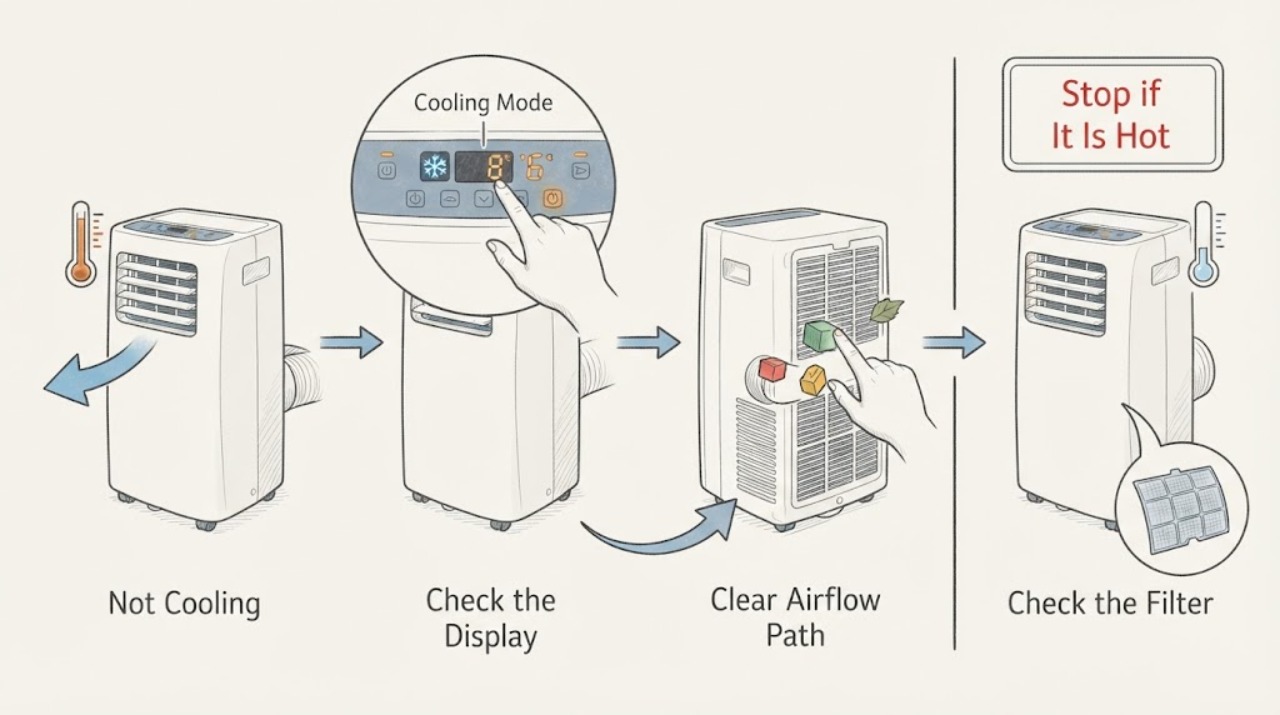
For the LG LP1111WXR, first confirm that the unit is in Cooling mode with a lower target temperature, then check the portable installation: the exhaust hose must discharge outdoors without a kink, blockage, or gap that sends hot air back into the room. This model is a single-hose portable air conditioner with a window installation kit, a washable filter, and a water-full indicator. Turn the unit off and unplug it before cleaning the rear filter or handling collected water, and dry a washed filter fully before reinstalling it. If the compressor does not start, cooling remains weak after the mode, filter, exhaust, and accessible drain checks, or there is ice, smoke, burning odor, water near electrical parts, or a recurring code, stop testing and arrange qualified service.
Work through in order
Diagnostic checks
Use only checks that match the exact appliance or system and its official guide.
-
Check 1
With the unit operating normally and no immediate hazard, verify that the control is set to Cooling, select a lower target temperature, and allow the unit to run long enough for the room and discharge air to respond. Note whether the fan runs, the compressor starts, and the display shows a water-full indication or code.
Expected result: Cold air begins after selecting Cooling, the fan runs but the air stays near room temperature, the compressor never starts, or a water-full indication/code appears.
Next step: If a water-full indication or code appears, stop repeated restarts and follow the model-specific drain or code guidance. If Cooling is selected but the compressor never starts or the air remains warm, continue with the external exhaust and filter checks only.
Stop if: Do not run the unit if there is smoke, burning odor, sparking, water near electrical parts, damaged wiring, or a recurring protection trip.
Why this matters
Why: LG says dehumidification, AI, power-saving, and other modes may not feel cold enough; the model also has a water-full indicator. A correct mode with fan-only or room-temperature discharge points to the next airflow, exhaust, water, or service branch rather than proving a refrigerant failure.
-
Check 2
From outside the unit, trace the single exhaust hose to the window kit. Confirm the hose is connected at both ends, is not kinked or blocked, and vents outdoors without a large gap or a closed outer pane that sends hot air back inside. Keep the air intake and the unit's surrounding area clear.
Expected result: The hose is sharply bent, extended or obstructed, disconnected at a joint, leaking hot air into the room, or the area around the intake is crowded; alternatively, the route is short, open, and clear.
Next step: With power off, correct only an accessible routing, connection, or clearance issue using the model's installation instructions, then retest once in Cooling mode. If the hose or window kit is damaged or cannot be corrected without disassembling the unit, arrange service.
Stop if: Do not open the cabinet, add an unapproved hose extension, force a window panel, or touch hot, energized, or damaged electrical parts.
Why this matters
Why: LG identifies hose curves or extension, blocked exhaust, poor window sealing, and restricted intake as causes of reduced portable cooling. A clear route makes an installation restriction less likely but does not establish that the compressor or refrigerant circuit is healthy.
-
Check 3
Turn the air conditioner off and unplug it. Remove the accessible rear filter as shown for a single-hose portable unit, inspect it for dust, and clean it with a vacuum or soft brush; wash it only if the LP1111WXR manual permits washing, then dry it completely before reinstalling it.
Expected result: The filter is heavily dusty, the filter is clean and dry, or the filter cannot be removed without opening the cabinet.
Next step: Reinstall the filter correctly and test once after the exhaust route is clear. If airflow remains weak, the unit ices, or filter access requires cabinet disassembly, stop user work and request qualified service.
Stop if: Do not run with the filter removed, spray water into the unit, use a wet filter, or open panels to reach an internal filter or coil.
Why this matters
Why: LG says a dusty filter can reduce cooling and provides a portable single-hose filter path. A clean, fully dry filter removes one airflow restriction but does not identify a failed fan, compressor, or sealed system.
-
Check 4
If the display shows the model's water-full indication or water is present, switch the unit off, unplug it, and use the exact LP1111WXR drain instructions with a suitable container. Inspect only the accessible drain plug and hose for an obvious loose connection or kink, keeping the plug and controls dry.
Expected result: The indicator clears after the documented drain, the indicator returns immediately, water leaks, the drain path is blocked, or no water condition is present.
Next step: Retest once only if the drain completed safely and no leak remains. For a returning indication, persistent leak, blocked drain, or unsafe access, leave the unit unplugged and contact LG or qualified appliance service.
Stop if: Do not drain while energized, tilt the unit over electrical parts, force a plug, use compressed air inside the cabinet, or keep restarting a unit that leaks.
Why this matters
Why: The model specification confirms a water-full indicator, while LG's portable guidance requires power isolation before draining. A returning indicator or leak can stop cooling or indicate a drain or internal fault; absence of water sends the diagnosis back to mode, airflow, and service branches.
-
Check 5
After the accessible mode, exhaust, filter, and drain checks, record whether the discharge air becomes cold, whether the compressor cycles, whether ice forms, and whether any code, odor, leak, or unusual noise returns. Use the exact LP1111WXR model record when contacting LG.
Expected result: Cooling returns and remains stable, the fan runs but cooling never returns, ice forms, water leaks, the compressor repeatedly stops, or a code or hazard returns.
Next step: If cooling remains absent or any safety symptom returns, keep the unit off and arrange qualified service. Provide the full model suffix, the timing of compressor and fan operation, filter and hose observations, water indication, and any photos of accessible damage.
Stop if: Do not open the sealed system, add refrigerant, test live wiring, bypass protection, or keep running the unit to see whether it eventually cools.
Why this matters
Why: Improvement after a mode, exhaust, filter, or drain correction supports that operating condition as a contributor. Persistent warm discharge after the external checks, recurring ice, repeated stops, or a hazard cannot be assigned safely to a replaceable part from symptoms alone; LG directs users to support and qualified repair for unresolved product issues.
Use your observations
Decision map
Find the observation that best matches what you see, then follow the next safe action.
-
PATH 01Next step
What you see
Cooling begins after the mode is changed from dehumidification, AI, fan-only, or another non-cooling setting.
Do this next
Leave the unit in Cooling at the desired safe setting and monitor normal operation. If the problem returns, inspect the exhaust and filter rather than repeatedly changing modes.
Why this path and its safety boundary
Why it matters: The prior operating mode explains why the discharge did not feel cold; it does not establish a component failure.
-
PATH 02Next step
What you see
The fan runs but the room stays warm, and the exhaust hose is kinked, blocked, disconnected, or allowing hot air to recirculate indoors.
Do this next
Power off and correct the accessible hose, window-kit seal, or clearance issue according to the model instructions, then perform one Cooling test. Escalate if the route cannot be corrected safely.
Why this path and its safety boundary
Why it matters: A portable installation or heat-rejection restriction is more likely than a control setting. LG specifically links poor exhaust and restricted intake to reduced cooling.
-
PATH 03Next step
What you see
The filter is dusty, or the filter is wet after washing, and airflow is weak.
Do this next
Unplug the unit, clean the accessible filter as the model manual permits, dry it fully in the shade, reinstall it, and retest once. Persistent weak airflow needs service.
Why this path and its safety boundary
Why it matters: Dust can restrict intake and reduce cooling; a wet filter is not ready for operation and can create odor or mold concerns.
-
PATH 04Next step
What you see
A water-full indication returns after the documented drain, or water leaks from the unit while cooling remains weak.
Do this next
Keep the unit unplugged, protect the surrounding area from water, and contact LG or qualified appliance service. Do not keep resetting the indicator or add refrigerant yourself.
Why this path and its safety boundary
Why it matters: A drain or internal water-handling condition may be interrupting operation. LG also notes that weak cooling with leakage can require professional diagnosis, including when the refrigerant circuit is not circulating correctly.
-
PATH 05Safety boundary
What you see
The mode, exhaust route, filter, and accessible drain are normal, but discharge air stays warm, ice persists, the compressor repeatedly stops, or a code or hazard returns.
Do this next
Stop user testing and request qualified LG or appliance service with the exact model and observation record. Keep the unit disconnected when there is ice that does not clear, smoke, odor, water near electrics, damaged wiring, or repeated protection operation.
Why this path and its safety boundary
Why it matters: The remaining possibilities include internal control, fan, compressor, sealed-system, or protection faults that cannot be identified safely from external symptoms.
Safety stop: Do not open the cabinet or sealed system, test live electrical parts, bypass protection, or order a compressor, board, or refrigerant service from the symptom alone.
Helpful context
Understand the symptom
Start with the portable unit's heat path
The LP1111WXR is an all-in-one portable air conditioner. Its specification lists an outdoor exhaust connection and a window installation kit, so the hot condenser air has to leave the room through that path. Inspect the hose from outside the unit without opening the cabinet: look for a sharp bend, foreign material, a loose window connection, or hot air returning through a window gap. LG says that restricted or recirculating exhaust can reduce cooling, and that the exhaust hose itself can feel hot during normal operation.
Clean only the accessible air path
Turn the air conditioner off and unplug it before removing the rear filter. LG's portable cleaning guidance allows an accessible ultra-fine filter to be cleaned with a vacuum or soft brush; if washing is allowed for that filter, use neutral detergent and dry it completely in the shade before reinstalling it. Do not spray water onto the cabinet or assume that every functional filter is washable. A dirty filter can reduce airflow and cooling, but cleaning it does not diagnose a sealed-system or compressor fault.
Use the water-full indication as a separate branch
The LP1111WXR specification includes a water-full indicator. If that indicator appears, or if the unit stops after operating while the room is humid, treat collected water as a separate operating condition instead of repeatedly restarting the compressor. Power the unit off and unplug it before following the model manual's drain procedure. Keep water away from the plug and controls, and arrange service if the indicator returns immediately, water leaks from the cabinet, or the drain path cannot be handled safely.
Common questions
FAQ
Why does my LG LP1111WXR blow warm air instead of cold air?
Confirm Cooling mode first, then inspect the single exhaust hose and window kit for a kink, blockage, loose connection, or hot-air recirculation. Clean the accessible rear filter with power disconnected and dry it fully. If the external checks are normal and the unit still does not cool, arrange service rather than opening the cabinet.
Does the LP1111WXR need an exhaust hose to cool?
Yes. LG's specification identifies the LP1111WXR as a portable air conditioner with an outdoor exhaust and window installation kit. The hose must discharge outdoors; a kink, blockage, or gap that returns hot air indoors can reduce cooling.
What should I do when the LP1111WXR shows a water-full indication?
Turn the unit off and unplug it before following the exact model drain procedure. Keep water away from the plug and controls. If the indication returns immediately, water leaks, or the drain cannot be handled safely, leave the unit disconnected and contact LG or qualified appliance service.
Can I add refrigerant or replace the compressor if the LP1111WXR still blows warm air?
No. Warm discharge after the external checks does not identify a refrigerant or compressor fault. Sealed-system and electrical work require qualified service, especially if the unit has ice, a leak, an odor, damaged wiring, or a recurring code.
Read the exact guide
Official sources
- LG Air Conditioner: Why Is Water Dripping or Condensation Forming?LG Electronics USA · General LG water and weak-cooling guidance; drain locations and procedures vary by model.
- LG Air Conditioner: Portable Heat Is GeneratedLG Electronics USA · General LG portable guidance; it explains why an all-in-one unit emits condenser heat indoors if exhaust is not routed outside.
- LP1111WXR Portable Air Conditioner Specification SheetLG Electronics U.S.A., Inc. · Exact LP1111WXR specification sheet; lists a washable air filter, window installation kit, water-full indicator, outdoor exhaust, 115 V/60 Hz input, and 11,000 BTU performance.
- LG Air Conditioner for Cooling: Cooling operation fails. No cold airLG Electronics USA · General LG cooling guidance; use the LP1111WXR manual when model-specific instructions differ.
- LG Air Conditioner Cleaning: PortableLG Electronics USA · General LG portable cleaning guidance; the article states that images and content may differ by model.
- LG AC Filter: How do I clean and replace the filter?LG Electronics USA · General LG filter guidance; it specifically separates single-hose portable filter access and warns that instructions vary by model.
- LP1111WXR.AWYAOSH: Support, Manuals, Warranty & MoreLG Electronics USA · Exact LP1111WXR model support page, with the regional suffix LP1111WXR.AWYAOSH.
- LG Air Conditioner - Troubleshooting Poor CoolingLG Electronics USA · General LG guidance that includes portable cooling conditions; images and details may vary by model.
Community feedback
Share a repair observation
Share a plain-text repair observation. Accepted observations are published automatically; this page may take a moment to update.