
On this page
Start here
Quick answer
Check the LG dryer in this order: look for the drum light, confirm the outlet and cord are secure from a dry safe position, check whether the dedicated breaker has tripped, then use the model's normal Power and Start controls. If the display has power but Start is ignored, check Child Lock and the touch-button press method, and make sure the door is fully closed. LG documents a model-specific hard reset after power is safely disconnected; if the dryer still has no display or light, or the light is on but the controls do not respond, service is required. Stop immediately for a burning smell, smoke, sparks, abnormal heat, a hot or damaged cord or outlet, or a breaker that trips again; do not open the cabinet or test live wiring.
Before you begin
Safety first
- This article supports ordinary-access observation and the exact model's documented controls or reset only. Do not open panels, test live circuits, access internal components, bypass the door switch or breaker, or re-energize a dryer with a fire, heat, smoke, spark, or electrical hazard.
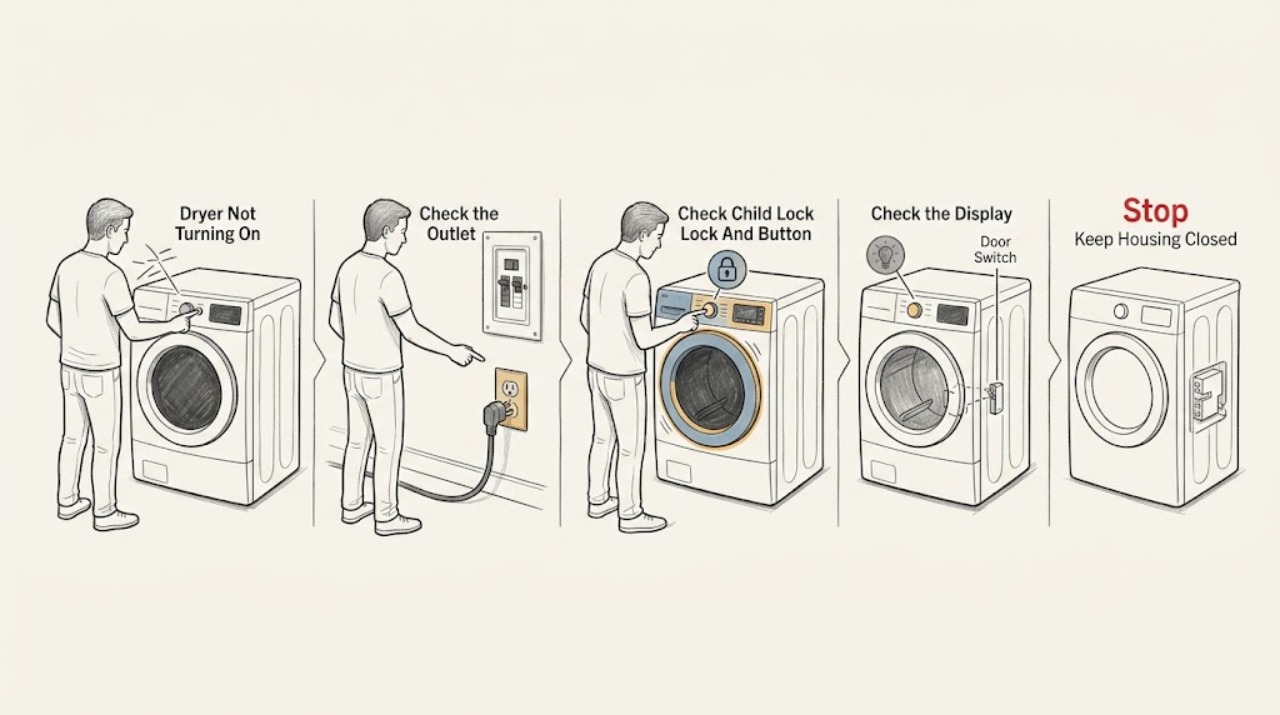
Work through in order
Diagnostic checks
Use only checks that match the exact appliance or system and its official guide.
-
Check 1
With the dryer cool and the area dry, open the door and look at the drum light and control display without reaching behind the machine. Press Power once using the center of the button if the model has a touch panel, then stop if there is no response.
Expected result: Record whether the drum light is on, the display or indicators illuminate, the panel responds, the door light stays off, or the dryer shows smoke, sparks, abnormal heat, or a burning odor.
Next step: Follow the no-power or power-on-but-will-not-run branch below; keep the dryer off for any safety warning and request qualified service.
Stop if: Do not open the cabinet, touch the terminal block, reach into the drum while it is moving or hot, or keep pressing controls after a burning, smoke, spark, or overheating sign.
Why this matters
Why: A light or display with no start response means the appliance has some power and the next checks are controls, Child Lock, door state, or an internal fault. No light or display moves the diagnosis to the outlet, cord, breaker, or power supply. Smoke, sparks, heat, or burning odor is an immediate stop condition.
-
Check 2
If the light and display are dark, inspect the plug and accessible outlet face from a dry position for a secure connection, scorch mark, looseness, or damage. Check whether a wall switch controls the outlet and whether the dedicated dryer breaker is tripped; operate the breaker only once if the area and equipment are dry and there is no odor, heat, smoke, or visible damage.
Expected result: Record a working outlet and stable breaker, an outlet controlled by a switch, a tripped breaker that resets once, a breaker that will not reset or trips again, or a damaged or hot cord, plug, or outlet.
Next step: If the outlet or building supply is faulty, ask a qualified electrician to inspect it. If the supply is stable but the dryer remains dark, proceed to the documented LG reset only when safe; otherwise request LG service.
Stop if: Do not use an extension cord, overloaded power strip, adapter, larger fuse or breaker, damaged outlet, scorched plug, or hot cord; do not reset a breaker repeatedly.
Why this matters
Why: A restored light after a safe supply correction supports an external power interruption. A dark light with a known-good outlet points toward the dryer or its internal power path. A recurring trip or damaged electrical equipment is a fault condition, not proof that a larger breaker or extension lead is appropriate.
-
Check 3
If the display or drum light is on but the dryer will not start, read the panel for a Child Lock or control-lock indication and check the exact model manual for the unlock gesture. If the panel is touch-sensitive, dry your hands and the panel and press the center of Power or hold Start for the model's documented interval.
Expected result: Record whether Child Lock clears, Power and Start respond, only one button responds, the display remains locked, or an error code appears when a cycle is selected.
Next step: Close the door fully and follow the model's error or door guidance once. If the controls remain unresponsive or the dryer still will not run, isolate it safely and request service rather than removing the panel.
Stop if: Do not force the door, bridge a door switch, pry a button, spray liquid into controls, or access control wiring.
Why this matters
Why: A cleared lock or recognized button gesture explains a no-start without a power failure. A responsive display with a door or error indication needs the corresponding model instruction; a panel that remains unresponsive despite power and correct gestures suggests a control, door-switch, or internal fault.
-
Check 4
With no hazard present, verify that the dryer door closes completely without clothing caught in the opening, select a normal cycle, and use the model's Start or Start/Pause gesture once. Observe from outside; do not open the door to feel heat or reach into the drum as a test.
Expected result: Record whether the cycle begins and the drum turns, the display shows a countdown or error, the door is reported open, the drum stays still, or the dryer remains silent despite a lit display.
Next step: Use the exact model's error-code guidance if one is shown. If the cycle does not begin after the door and control checks, perform the documented reset only if safe and then request service if the symptom returns.
Stop if: Do not defeat the door interlock, run with a damaged door or seal, place hands in a moving drum, or continue operation after smoke, burning smell, sparks, or abnormal heat.
Why this matters
Why: A door not recognized or a Child Lock can block starting even when power is present. A countdown with no drum movement, an error code, or a silent dryer with a closed door suggests a motor, switch, control, or other service-level fault rather than an outlet problem.
-
Check 5
If the dryer has no hazard, the supply is stable, and the manual or LG support page for the model permits a reset, disconnect power from the accessible plug or dedicated breaker, then perform only the documented Power/Start and Play/Pause reset sequence while the dryer remains without power. Restore power once and observe the drum light and display.
Expected result: Record whether the dryer powers on and starts normally, powers on but still will not run, remains dark, shows an error, or trips the breaker again.
Next step: Leave the dryer off and request an LG service inspection when it remains unpowered, will not start, shows an unresolved error, or trips the breaker again. Have an electrician inspect the building supply when the outlet or breaker is implicated.
Stop if: Do not reset repeatedly, restore power after smoke or burning odor, open panels, test live voltage, replace a fuse with a larger rating, or bypass a safety device.
Why this matters
Why: A one-time recovery after a safe reset supports a control-state or power interruption, but a recurrence, persistent dark display, error, or breaker trip indicates a fault requiring service. A reset does not prove a cord, outlet, motor, heater, or control is safe.
Use your observations
Decision map
Find the observation that best matches what you see, then follow the next safe action.
-
PATH 01Safety boundary
What you see
The drum light and display are dark and there is no smoke, heat, sparks, burning smell, or visible electrical damage.
Do this next
Check the accessible cord and outlet, check the dedicated breaker once if safe, and use the model-approved reset. Request service if the light remains off with a stable supply.
Why this path and its safety boundary
Why it matters: An outlet, wall switch, plug, breaker, power outage, or internal power path may be preventing the dryer from turning on.
Safety stop: Do not use a damaged outlet or cord, extension cord, overloaded strip, larger fuse, or repeated breaker reset.
-
PATH 02Safety boundary
What you see
The drum light or display is on but Power, Start, or cycle selection is ignored.
Do this next
Dry the panel and hands, use the exact model's Child Lock and press or hold procedure, close the door fully, and request service if the control still does not respond.
Why this path and its safety boundary
Why it matters: Child Lock, a touch-button gesture, door recognition, an error state, or a control fault is more likely than a total power failure.
Safety stop: Do not pry controls, bridge a door switch, open the panel, or access wiring.
-
PATH 03Safety boundary
What you see
The breaker will not reset, trips again when the dryer is used, the outlet is dead, or the cord or outlet is hot, damaged, or scorched.
Do this next
Keep the dryer off, leave the breaker off if it is unsafe or keeps tripping, and request qualified electrical or LG appliance inspection.
Why this path and its safety boundary
Why it matters: An electrical supply, overload, short-circuit, or appliance fault may be present; continuing to reset or increase capacity can create a fire or shock risk.
Safety stop: Do not reset repeatedly, use an extension or adapter, bypass protection, increase fuse or breaker capacity, or touch damaged electrical equipment.
-
PATH 04Safety boundary
What you see
After a safe, documented reset, the drum light and display return and the dryer completes a normal start without a hazard.
Do this next
Monitor without opening the cabinet, keep the dryer on its proper dedicated supply, and request service if the no-start returns or any code, heat, odor, or breaker event appears.
Why this path and its safety boundary
Why it matters: A temporary control state or supply interruption may have caused the no-start, but recurrence still needs diagnosis.
Safety stop: Do not treat a temporary recovery as permission to continue after burning smell, smoke, sparks, abnormal heat, or a repeated trip.
-
PATH 05Safety boundary
What you see
The supply is stable, controls and door are used correctly, and the dryer remains dark or will not start after the model-approved reset.
Do this next
Keep the dryer off and request an LG service inspection; provide the model, light and display behavior, breaker result, button response, and reset result.
Why this path and its safety boundary
Why it matters: An internal power, control, door-switch, motor, or other component fault is possible and requires service-level testing.
Safety stop: Do not open the cabinet, test live circuits, replace internal parts, or bypass interlocks.
-
PATH 06Safety boundary
What you see
A burning smell, smoke, sparks, abnormal heat, a hot or damaged cord or outlet, or a breaker trip occurs while trying to power or start the dryer.
Do this next
Stop using the dryer, keep clear of smoke or energized equipment, and request qualified emergency, appliance, or electrical help as appropriate. Do not re-energize it to confirm the diagnosis.
Why this path and its safety boundary
Why it matters: The event may involve a fire, shock, short-circuit, heater, motor, or supply hazard and is not a routine no-start.
Safety stop: Do not touch hot or damaged equipment, reset the breaker as a test, open the cabinet, use an extension lead, or bypass a protective device.
Helpful context
Understand the symptom
Separate no power from power-on but no start
A dark display and drum light indicate a power path question; a lit drum or display with no response points toward controls, Child Lock, the door state, or an internal fault. LG's own troubleshooting separates these cases. Check only what is visible from a dry, safe position and use the model manual for button names and electrical requirements.
Use the correct control gesture before calling it dead
Some LG dryers use touch-sensitive controls that require a deliberate press or press-and-hold, and wet hands or liquid on the panel can prevent a reliable response. Child Lock can also make the display appear unresponsive. Dry the panel and hands, use the documented control gesture, and do not pry the panel or spray cleaner into it.
A breaker trip or burning sign changes the decision
One safe inspection of the outlet and dedicated breaker may identify a supply interruption, but a breaker that trips again, a hot or damaged cord, smoke, sparks, abnormal heat, or a burning smell is not a reset opportunity. Keep the dryer off and obtain qualified electrical or appliance service. Do not increase fuse capacity, bypass a breaker, or open the rear terminal area.
Safety boundary
Stop conditions
- Stop immediately for smoke, sparks, abnormal heat, a burning smell, a hot or damaged cord or outlet, or a breaker that trips again; keep the dryer off and obtain qualified help.
- Do not reset a breaker repeatedly, increase fuse or breaker capacity, use an extension cord or overloaded power strip, or bypass electrical protection.
- Do not open the cabinet, terminal block, control panel, heater, motor, or wiring; do not test live voltage or bridge the door interlock.
- Do not run the dryer with a damaged door, cord, plug, outlet, or cabinet, and do not reach into a moving or hot drum.
- Do not treat a one-time reset recovery as proof that a recurring no-start or hazard is safe; request service when the symptom returns.
Only after diagnosis
Potential parts
- dryer power cord or terminal connection
Consider this category only when qualified inspection confirms a damaged cord or connection and the supply and installation requirements for the exact model are known.
Confirm the exact LG model, fuel type, supply configuration, and installation specification with a qualified electrician or LG technician; do not access a terminal area yourself. - dryer door switch or latch
Consider this category only after diagnosis confirms that the door is mechanically closed but the safety switch or latch is not being recognized.
Confirm exact model fit and safety function before ordering; never bypass the door interlock to make the dryer run. - dryer control panel or user-interface assembly
Consider this category only when stable power, correct button operation, Child Lock, and the door state are confirmed and service diagnosis identifies a failed control interface.
Confirm the exact model and control revision through LG or qualified service; wet or unresponsive controls are not proof that a part should be replaced. - dryer main control or power component
Consider this category only after qualified testing confirms an internal control or power component fault following safe supply checks and the documented reset.
Confirm the exact model, revision, electrical specification, and manufacturer's fit information; do not test or replace internal electronics as a household step.
When checks do not resolve it
Need a professional?
Request LG appliance service when the drum light is on but the dryer will not power or start, the light and display remain dark with a known-good supply, Child Lock and the correct touch-button procedure do not restore response, the door or an error state remains unresolved, the documented reset fails, or the problem returns. Request qualified electrical inspection for a dead, damaged, hot, or scorched outlet, cord, or recurring breaker trip. Treat smoke, sparks, abnormal heat, or a burning smell as stop-now conditions.
Safety scope: This article supports ordinary-access observation and the exact model's documented controls or reset only. Do not open panels, test live circuits, access internal components, bypass the door switch or breaker, or re-energize a dryer with a fire, heat, smoke, spark, or electrical hazard.
Common questions
FAQ
Why is my LG dryer not turning on at all?
Check whether the drum light and display are dark. If they are, inspect the accessible plug and outlet, check the dedicated breaker once if safe, and use the model-approved reset. A stable supply with a dark dryer, or a drum light that is on but the controls remain dead, needs LG service.
What if my LG dryer has power but will not start?
Check Child Lock, dry the touch panel and hands, use the correct Power or Start press-and-hold gesture, and close the door fully. If the display still ignores controls, shows an unresolved code, or the drum does not respond, stop and request service.
Can I reset an LG dryer that will not turn on?
LG documents a hard reset for certain dryer situations: disconnect power safely, follow the exact model sequence, restore power once, and check the drum light and display. Do not reset repeatedly or restore power after smoke, burning smell, sparks, abnormal heat, or a recurring breaker trip.
Why does my LG dryer breaker keep tripping?
A supply overload, outlet issue, cord problem, or dryer fault may be involved. Keep the dryer off, do not increase the breaker or fuse rating, and have the electrical supply or appliance inspected when the breaker will not reset or trips again.
When is an LG dryer no-start an emergency?
Stop immediately for smoke, sparks, abnormal heat, a burning smell, a hot or damaged cord or outlet, or a breaker that trips again. Do not touch damaged electrical equipment, open the dryer, or re-energize it to test; obtain qualified emergency, electrical, or appliance help as appropriate.
Read the exact guide
Official sources
- TROUBLESHOOTINGLG USA · LG dryer manual for the identified product family; other LG models can have different controls and parts.
- [LG Dryer power] The power turns off during use, or there is no power supplyLG USA Support · LG USA all-model power guidance; images and control details may differ from the assigned dryer.
- Power On, Wont Run - Laundry DryerLG USA Support · LG USA support guidance for dryers whose controls have power but the cycle does not run; exact model behavior may differ.
- [LG Dryer Button] The power/operation button is difficult to pressLG USA Support · LG USA guidance for models with touch-sensitive controls; button behavior differs on mechanical panels.
- Power Issues - Laundry DryerLG USA Support · LG USA support guidance for laundry dryers; buttons, reset sequence, and electrical installation vary by model.
- [LG Dryer power] The circuit breaker suddenly trippedLG USA Support · LG USA troubleshooting guidance for dryer breaker events; local electrical requirements and the exact model rating control.
Community feedback
Share a repair observation
Share a plain-text repair observation. Accepted observations are published automatically; this page may take a moment to update.