
On this page
Start here
Quick answer
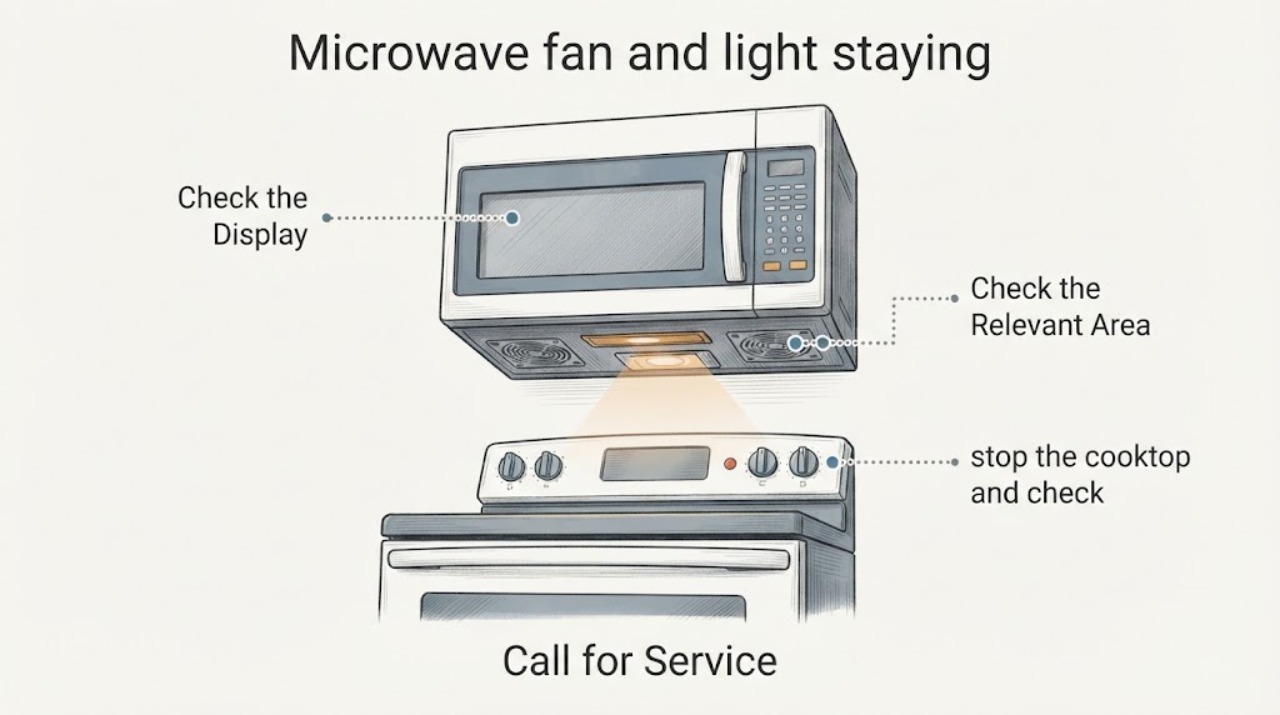
First identify which light is on and whether the fan is in an automatic cooling or hood-sync cycle. LG says its Auto Cooling fan can run temporarily after cooking and show Cool; an opened LG LMV1680 manual also says a hot over-the-range unit can run the vent fan for up to an hour and that this safety fan cannot be turned off manually. On that documented LMV1680 control layout, the LIGHT control cycles bright, night-light, and off, but that sequence is only for the matching model family. Stop cooking, use the exact model's documented fan and light controls, and allow an indicated cooling cycle to finish. If the fan and light remain on with no cooking, no cooling indication, and no active hood or ThinQ sync, disconnect power only at an accessible plug or breaker and arrange qualified microwave service. Do not open the cabinet, test the high-voltage circuit, or bypass door interlocks.
Work through in order
Diagnostic checks
Use only checks that match the exact appliance or system and its official guide.
-
Check 1
Stop cooking and identify the illuminated item: the cooktop or night light under an over-the-range unit, the oven-cavity light, or only a display indicator. Read the exact LG model number before using a button sequence.
Expected result: The light is a separate cooktop/night light, the cavity light follows door operation, or the model and light type cannot be confirmed.
Next step: If the panel matches LMV1680WW/BB/ST, use that manual's LIGHT control sequence; otherwise use the exact model manual. If the light type or model is uncertain, stop button experiments and arrange service if it remains on.
Why this matters
Why: The light and vent controls are not necessarily the same circuit or function. The opened LMV1680 manual documents separate VENT and LIGHT controls, so a light complaint should not be diagnosed as a fan-switch failure without identifying the light.
-
Check 2
Check the display and recent use for an automatic cooling state. After cooking or extended operation, leave the door and controls alone while the indicated cooling cycle completes; do not force the fan off during that state.
Expected result: Cool is displayed, the fan has run only briefly after cooking, or the fan continues well beyond the documented model behavior with no cooling indication.
Next step: If the fan stops when cooling ends, no repair is indicated. If it continues with no cooking, no heat, and no cooling indication, continue only with external control checks and prepare for qualified service.
Why this matters
Why: LG says Auto Cooling can run temporarily after cooking and show Cool; the LMV1680 manual gives a separate heat-protection example of a vent fan that may run up to an hour and cannot be manually stopped. A persistent fan outside those conditions needs diagnosis.
-
Check 3
If the microwave is an over-the-range or ThinQ-synced installation, stop the cooktop and check whether a hood or microwave-sync mode is active. Use only the exact appliance or app instructions to change that mode.
Expected result: The fan and light turn on with active cooktop use or a documented sync mode, or they remain on after the cooktop and sync state are off.
Next step: If the pair follows the active cooktop or sync state, use the matching controls or app setting. If it remains on with no active trigger, do not infer a failed relay; move to the power-isolation and service boundary.
Why this matters
Why: LG describes Hood and Microwave Sync as automatically turning the fan and light on while cooking and off when done. A fan/light pair that remains on after the documented trigger ends is different from normal synchronized operation.
-
Check 4
When the fan and light stay on after cooking, cooling, and any documented sync state have ended, stop using the microwave. If the plug or breaker is safely accessible, disconnect power without removing a panel, then arrange qualified microwave service.
Expected result: Power isolation stops the fan/light, or the fan/light behavior persists, the microwave is damaged, the door does not close correctly, or a safety interlock is involved.
Next step: Leave the unit disconnected and do not restore power for repeated tests if the behavior returns. Do not open the cabinet, defeat an interlock, or test internal wiring; provide the model, light type, display state, and timing to qualified service.
Why this matters
Why: A persistent paired output is outside the normal user-control and cooling conditions established by the opened LG materials. Microwave door, interlock, control, and high-voltage work is a professional boundary.
Use your observations
Decision map
Find the observation that best matches what you see, then follow the next safe action.
-
PATH 01Next step
What you see
The fan runs briefly after cooking, or the display shows Cool and the fan ends when the cooling operation finishes.
Do this next
Allow the cooling operation to finish and do not force the fan off. Use the exact model manual if its timing or display differs.
Why this path and its safety boundary
Why it matters: This matches LG's documented automatic cooling behavior rather than a confirmed failed control.
-
PATH 02Next step
What you see
The unit is hot after extended cooking and its behavior matches the LMV1680 manual's over-the-range vent arrangement.
Do this next
Leave the fan running while the unit cools. If the fan never stops after the documented cooling scenario, stop using the microwave and arrange qualified service.
Why this path and its safety boundary
Why it matters: That manual describes a low vent-fan run of up to an hour as an overheating-protection feature that cannot be turned off manually.
-
PATH 03Next step
What you see
The cooktop or ThinQ sync is active and the fan and light turn on together, then stop when the documented cooking trigger ends.
Do this next
Use the exact cooktop, microwave, or app instructions to change sync behavior; do not open the microwave or diagnose a relay.
Why this path and its safety boundary
Why it matters: This is consistent with LG's described Hood and Microwave Sync behavior.
-
PATH 04Next step
What you see
The fan and light remain on with no cooking, no cooling indication, no active sync, or an incorrect light-control response; the door, cord, cabinet, or interlock is damaged.
Do this next
Disconnect power only at an accessible plug or breaker, keep the cabinet closed, and arrange qualified service. Do not defeat interlocks or perform internal tests.
Why this path and its safety boundary
Why it matters: The behavior is outside the verified normal conditions and may involve an internal control or safety fault that cannot be identified from the symptom alone.
Helpful context
Understand the symptom
A running fan is not automatically a failed switch
LG documents more than one normal reason for a fan to remain on. Its current Auto Cooling guide says the ring fan can continue temporarily after cooking and can show Cool. The opened LMV1680WW/LMV1680BB/LMV1680ST manual says a hot over-the-range microwave can turn the vent fan on at low speed for up to an hour and that this safety fan cannot be turned off manually. The task does not include a model, so use the exact display and manual for the appliance rather than borrowing a time or button sequence from another LG microwave.
The light may be a separate cooktop or oven control
On the opened LMV1680 manual, the VENT control and LIGHT control are separate: the vent has high, low, and off settings, while the light cycles bright, night-light, and off. That is a control-layout example for the named LMV1680 models, not a universal LG sequence. First determine whether the complaint is about the cooktop surface light, the cavity light, or a display indicator, then follow the matching model's instructions.
Do not open a microwave to chase a relay or switch
If the fan and light remain on after the documented cooling period and the controls do not turn them off, treat that as a service symptom. The opened LG manual warns not to defeat door safety interlocks and says adjustment or repair belongs to qualified service personnel. Keep the cabinet closed and do not test or replace an internal switch, relay, control board, lamp wiring, or high-voltage component as a home check.
When checks do not resolve it
Need a professional?
Arrange qualified microwave service when the fan and light remain on after cooking, automatic cooling, and any documented hood or ThinQ sync state have ended; when the model's controls do not respond as documented; or when the door, latch, seal, cord, cabinet, or interlock is damaged. Do not open the microwave or try to identify a relay, control board, switch, or high-voltage component from this symptom.
Common questions
FAQ
Is an LG microwave fan staying on after cooking always a failure?
No. LG documents temporary Auto Cooling after cooking, and an opened LMV1680 manual documents a heat-protection vent-fan run that may last up to an hour and cannot be turned off manually. If the fan continues with no cooling indication or active trigger, arrange service rather than opening the microwave.
Why are the microwave fan and cooktop light turning on together?
On LG over-the-range or ThinQ-synced installations, LG describes Hood and Microwave Sync as turning the fan and light on while cooking and off when cooking ends. Confirm that the cooktop and sync mode are actually off. If the pair stays on without that trigger, use qualified service.
How do I turn off the LG microwave light?
Use the exact model's LIGHT control. The opened LMV1680WW/BB/ST manual cycles the light from bright to night light to off, but that sequence is model-specific. If the matching control does not turn the light off, stop repeated button tests and arrange service.
Can I remove the microwave cover to check a fan switch or relay?
No. The opened LG manual says not to tamper with door safety interlocks and says adjustment or repair should be done by qualified service personnel. Disconnect power at an accessible plug or breaker if needed, keep the cabinet closed, and arrange service.
Read the exact guide
Official sources
- Microwaves & Cooking: Countertop, Built-In & Over-the-RangeLG USA · Supports only the feature-level statement that selected LG Hood or Over-the-Range Microwave installations with ThinQ Sync can turn the fan and light on while cooking and off when done. It is not a repair or internal-switch diagnosis.
- LG Microwave - How to Use the Auto Cool FeatureLG USA Support · The opened guide states that it was created for all models and supports the temporary post-cooking ring-fan behavior, Cool display, and non-interruptible Auto Cooling. It does not define a persistent fan/light fault or an internal component.
- LG Microwave Oven – Troubleshooting No Power IssueLG USA Support · Supports only external power and service steps: secure outlet connection, GFCI/breaker checks, and service when the issue persists. It does not support opening a microwave or diagnosing a fan/light component.
- MICROWAVE OVEN OWNER’S MANUAL & COOKING GUIDELG Electronics U.S.A., Inc. · This is a model-family manual for LMV1680WW/BB/ST. It supports the VENT and LIGHT controls, the documented heat-protection fan behavior, and the qualified-service/interlock boundary only when the appliance matches that family; it is not a universal LG control sequence.
Community feedback
Share a repair observation
Share a plain-text repair observation. Accepted observations are published automatically; this page may take a moment to update.