
On this page
Start here
Quick answer
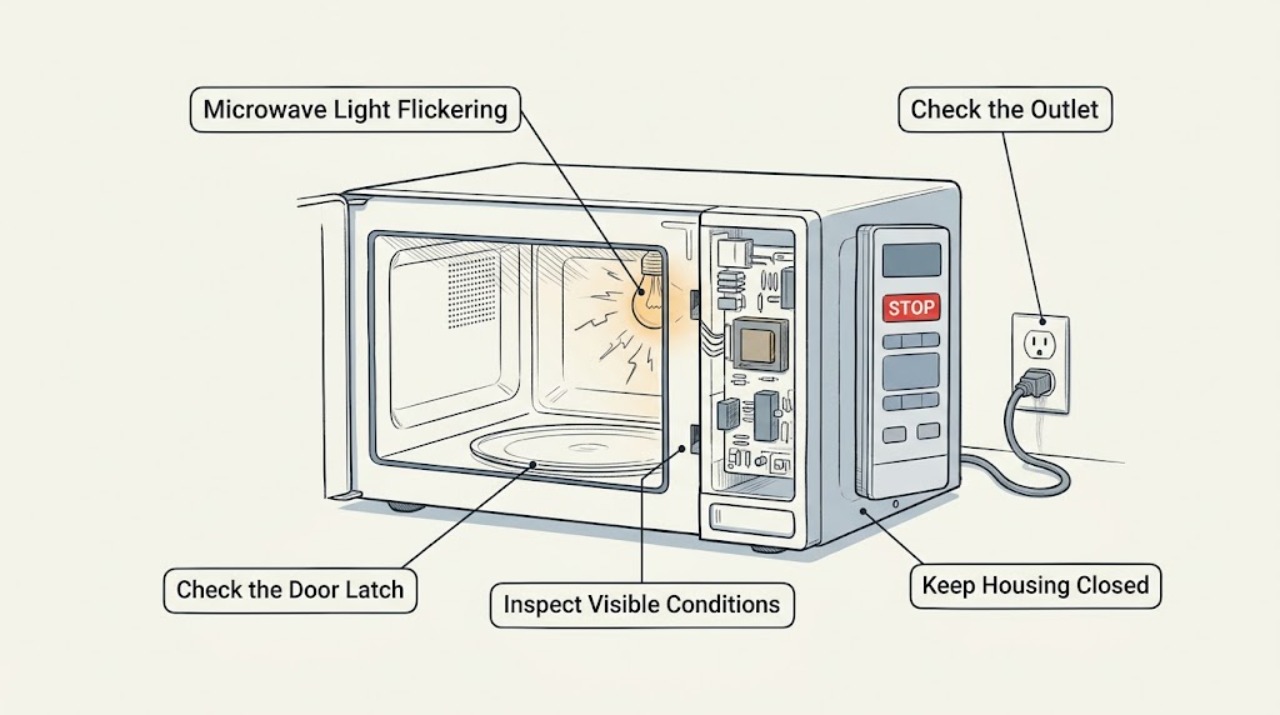
Watch whether the cavity lamp flickers only when the door moves, during cooking, or while the microwave is idle. Check the door area and control display without opening the cabinet. A lamp that flickers with smoke, sparks, a hot plug, repeated power loss, or a damaged door is a stop condition requiring qualified service.
Before you begin
Safety first
- Do not remove the outer cover or handle the lamp socket or high-voltage circuit.
Work through in order
Diagnostic checks
Use only checks that match the exact appliance or system and its official guide.
-
Check 1
With the unit unplugged only when safe, inspect the visible door edge, hinges, latch area, and cavity lamp cover for food residue, cracks, or an obstruction; do not flex the door or remove the cover.
Expected result: The door closes normally and the lamp cover is intact, or damage/gaps are visible.
Next step: Stop using the microwave for door or lamp-cover damage and arrange service; otherwise continue by observing the trigger.
Why this matters
Why: A sound visible door does not prove the interlock is healthy, but damage or an abnormal fit makes continued use unsafe.
-
Check 2
Observe the lamp with the door opening, door closing, idle display, and a brief normal cycle using the model instructions; note whether the display or fan changes at the same moment.
Expected result: Flicker occurs only with door movement, only during cooking, or together with display/power changes.
Next step: Record the trigger and stop testing if arcing, smoke, buzzing, or a hot cord appears.
Why this matters
Why: The trigger distinguishes a door/lamp symptom from a wider supply or control symptom without requiring cabinet access.
-
Check 3
Check that the power cord is firmly seated in the wall outlet and that no multi-outlet strip or loose connection is being used; note any breaker trip or other appliance interruption.
Expected result: The outlet is loose/dead, the breaker trips, or only the lamp flickers while the display and cooking remain stable.
Next step: Do not repeatedly reset a breaker. Arrange electrical or appliance service for recurring interruptions or isolated flicker.
Why this matters
Why: Supply interruption can affect the light and display; isolated lamp behavior is more likely local to the lamp or control circuit.
Use your observations
Decision map
Find the observation that best matches what you see, then follow the next safe action.
-
PATH 01Next step
What you see
The lamp flickers only as the door moves and the door does not close cleanly
Do this next
Keep the unit off and request service; never bypass the interlock.
-
PATH 02Next step
What you see
The lamp flickers during cooking while display and power remain stable
Do this next
Stop if the flicker is accompanied by sparks, smoke, or a burnt smell; otherwise arrange qualified diagnosis if it repeats.
-
PATH 03Next step
What you see
The lamp and display flicker together or the breaker trips
Do this next
Stop using the microwave and have the outlet/circuit and appliance assessed safely.
Helpful context
Understand the symptom
The trigger is more useful than the brightness
A light that changes when the door is opened or closed points toward the door switch or lamp connection, while a light that flickers with the display or cooking can involve power or control behavior. Do not remove the microwave cover to inspect the lamp.
When checks do not resolve it
Need a professional?
Give the technician the trigger pattern and any display or breaker symptoms.
Safety scope: Do not remove the outer cover or handle the lamp socket or high-voltage circuit.
Common questions
FAQ
Can I replace the microwave lamp myself?
Do not open the cabinet or access the lamp socket yourself. A qualified technician should diagnose repeated flicker and any associated power symptom.
What does flicker with a breaker trip mean?
Treat it as a supply or appliance fault. Stop using the microwave and have the circuit and appliance checked safely.
Read the exact guide
Official sources
- LG Microwave Owner's ManualLG Electronics · LG microwave operating and safety troubleshooting
- LG Microwave - Troubleshooting the Start Button Not WorkingLG USA Support · LG microwave door, latch, control, and service checks
- LG Microwave - What should I do when a product stops and display turns off?LG USA Support · LG microwave power cord and display power behavior
Community feedback
Share a repair observation
Share a plain-text repair observation. Accepted observations are published automatically; this page may take a moment to update.