
On this page
Start here
Quick answer
Check the LG microwave door for an obstruction, confirm the latch engages, and see whether other buttons produce a chime or display response. A control lock, a door-state problem, or a power interruption can prevent starting. If the door is damaged, an error remains, or the unit still will not start after one documented reset, stop and arrange service.
Before you begin
Safety first
- Never bypass the door interlock or remove the outer microwave cover.
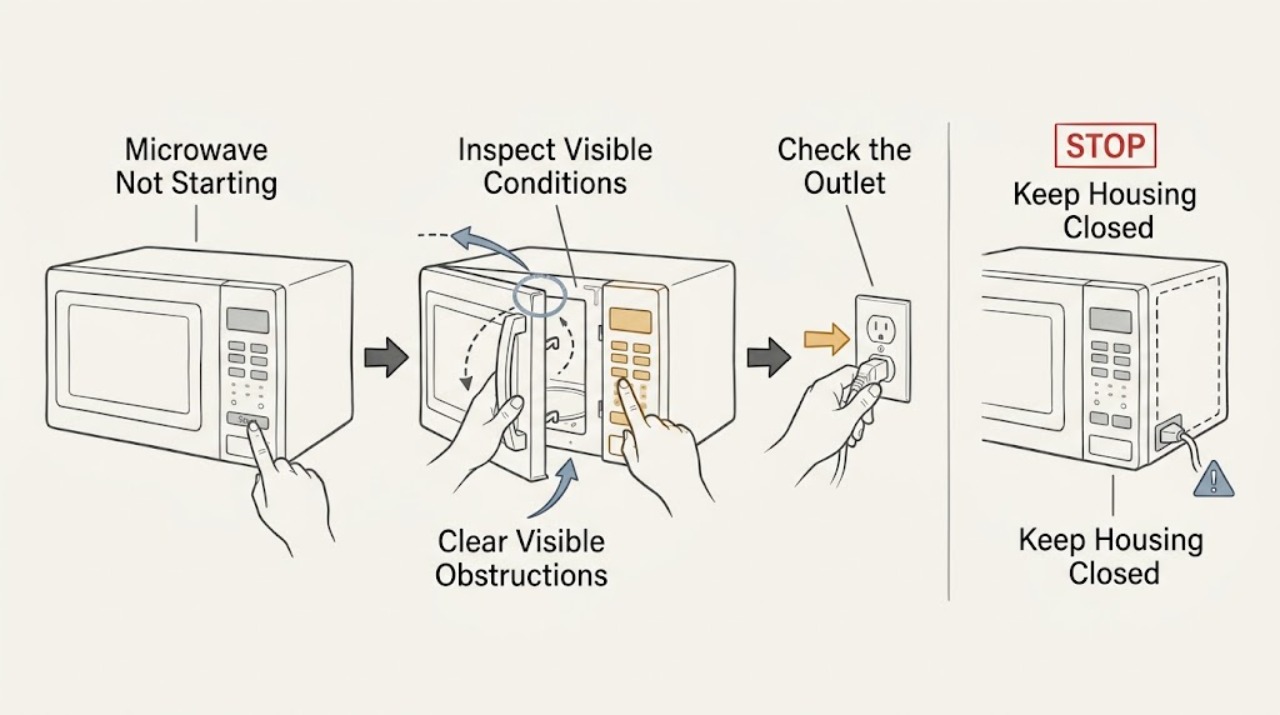
Work through in order
Diagnostic checks
Use only checks that match the exact appliance or system and its official guide.
-
Check 1
Open and close the door two or three times gently, then inspect the latch area and sealing surfaces for food, packaging, or another visible obstruction.
Expected result: The door closes flush and Start responds, or it remains loose, misaligned, or unresponsive.
Next step: Remove only a visible obstruction. Stop using the unit and request service for a gap, damage, or a door that will not latch normally.
Why this matters
Why: LG says debris or an improperly engaged door can prevent a safe start; a damaged door is not a user adjustment.
-
Check 2
Press a non-Start control and observe the display and chime; if the lock indicator is present, use the exact model procedure to clear Control Lock.
Expected result: Other controls respond, or no button changes the display or makes a chime.
Next step: Clear the lock only as the model manual shows. Do not force the keypad or spray liquid into it.
Why this matters
Why: LG identifies Control Lock as a reason for unresponsive pads; a completely dead panel also requires a power check.
-
Check 3
Verify the power cord is firmly seated in the wall outlet and check whether the household breaker has tripped; reset a breaker only once if safe and permitted.
Expected result: The outlet is dead, the breaker trips again, or the display returns but Start still fails.
Next step: Do not keep resetting a tripping breaker. Arrange electrical or appliance service for recurring loss or continued no-start.
Why this matters
Why: A supply interruption can explain a blank display; a repeat trip or persistent no-start moves the problem to service diagnosis.
Use your observations
Decision map
Find the observation that best matches what you see, then follow the next safe action.
-
PATH 01Next step
What you see
The door had an obstruction and the microwave starts after it is removed
Do this next
Keep the door and sealing surfaces clean and do not slam or lift the door.
-
PATH 02Next step
What you see
The display is active but every key is locked or silent
Do this next
Follow the exact LG manual to clear it; service is needed if the panel remains unresponsive.
-
PATH 03Next step
What you see
The door is sound and unlocked but the microwave still will not start, or the breaker trips again
Do this next
Keep the microwave off and arrange qualified service; never bypass its interlocks.
Helpful context
Understand the symptom
A silent Start button is not enough to identify the fault
If other keys respond but Start does not, the oven may not be recognizing a closed door. If no key responds, the lock or power path deserves attention first. These checks avoid repeated pressing that can hide the useful symptom.
When checks do not resolve it
Need a professional?
Tell the technician whether other buttons work and whether the display and breaker changed.
Safety scope: Never bypass the door interlock or remove the outer microwave cover.
Common questions
FAQ
Why does only Start fail on an LG microwave?
The oven may not recognize the door as closed. Remove visible obstructions and close it gently; a persistent failure or damaged door needs service.
Can I keep resetting the breaker?
No. Reset once only when safe. If it trips again, stop and have the circuit or appliance assessed.
Read the exact guide
Official sources
- LG Microwave - What should I do when a product stops and display turns off?LG USA Support · LG microwave power cord and display behavior
- LG Microwave - Troubleshooting the Start Button Not WorkingLG USA Support · LG microwave door, control lock, reset, and no-start guidance
Community feedback
Share a repair observation
Share a plain-text repair observation. Accepted observations are published automatically; this page may take a moment to update.