
On this page
Start here
Quick answer
If the display is lit but a Samsung microwave will not begin a cooking cycle, check that the control lock is off, the door and latch close fully, and the panel registers a normal bare-finger press. Confirm that you selected a cooking cycle rather than a timer. If the display is completely dark, use the separate power-supply checks for a microwave that will not turn on; if the panel remains unresponsive after one 60-second power cycle, request service.
Before you begin
Safety first
- Use only documented controls and external cleaning; internal control and door-interlock diagnosis requires a qualified technician.
Work through in order
Diagnostic checks
Use only checks that match the exact appliance or system and its official guide.
-
Check 1
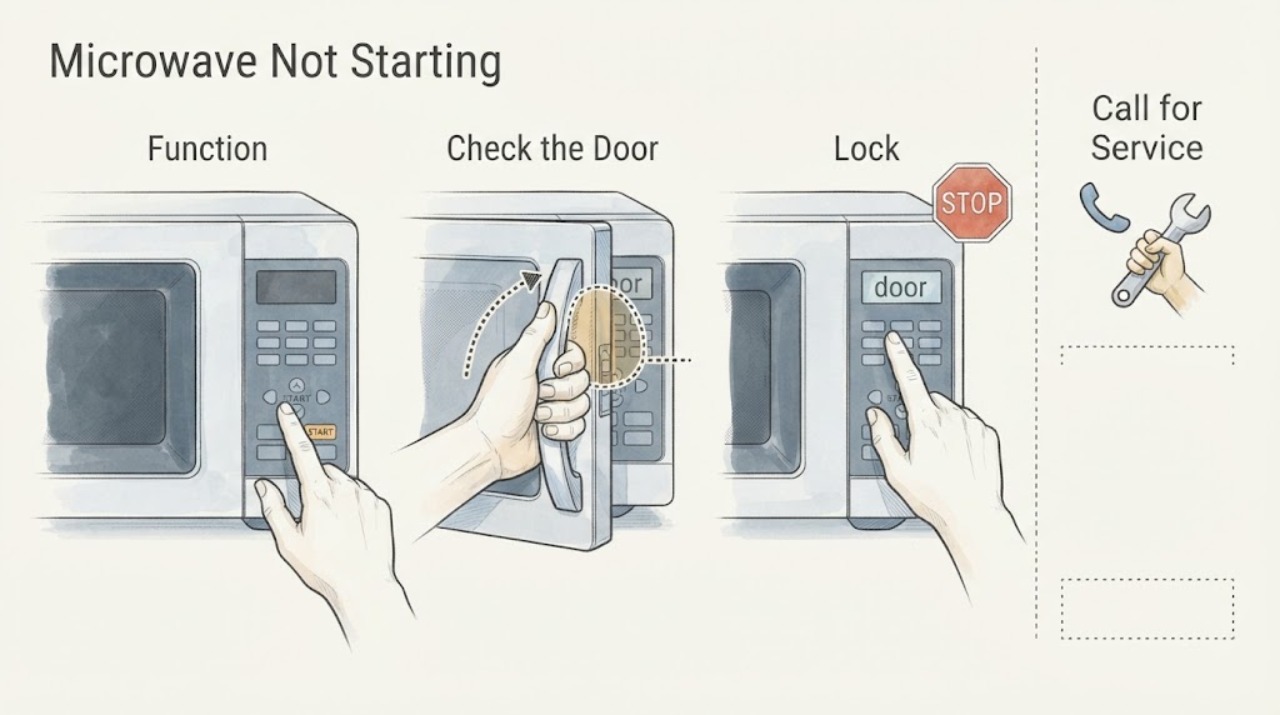
Select a normal microwave cooking function, enter a short time, and press Start once; verify that Kitchen Timer or another non-cooking function was not selected.
Expected result: The cooking countdown begins, or the timer remains idle and the display otherwise works.
Next step: Stop pressing repeatedly and continue with the lock and door checks.
Why this matters
Why: A correct cooking function responds differently from a timer-only function; an idle display after the correct command shifts attention to lock, door, or controls.
-
Check 2
Check the display and exact model manual for Control Lock or Child Lock, then clear it only with the documented model-specific control.
Expected result: The lock indicator clears and Start works, or the panel remains locked/unresponsive.
Next step: Request service if the lock cannot be cleared using the exact model instructions or if the panel activates by itself.
Why this matters
Why: Samsung says an enabled control lock prevents other buttons from responding; continued failure after the documented control is not a user repair.
-
Check 3
Open the door, wipe the latch area and frame with a soft damp cloth, dry them, and close the door fully without forcing it.
Expected result: The microwave starts after the door is cleaned and fully closed, or it remains unable to start or the latch is visibly damaged.
Next step: Do not bypass or adjust the latch. Stop using the microwave and request service for a damaged or unreliable door.
Why this matters
Why: The door interlock must detect a fully closed door before a cooking cycle can begin; visible damage or persistent failure needs service.
-
Check 4
Wipe the control panel with a lightly damp cloth, dry it, and touch the controls with a bare finger using normal pressure.
Expected result: Start responds normally, only some keys respond, or the panel behaves as if a key is held down.
Next step: Power cycle once for 60 seconds if the panel is merely unresponsive. If behavior persists, stop using the unit and request service.
Why this matters
Why: Samsung notes that residue, insufficient contact, control lock, or a self-activating panel can affect response; a key that needs excessive force or activates itself points to service.
Use your observations
Decision map
Find the observation that best matches what you see, then follow the next safe action.
-
PATH 01Next step
What you see
The display is lit, a lock indicator or non-cooking timer was selected, and the microwave starts after the documented setting is cleared.
Do this next
Use the exact model's cooking function and lock controls in future cycles.
Why this path and its safety boundary
Why it matters: A control state or function selection was the likely start blocker.
-
PATH 02Next step
What you see
The microwave starts only after the door or latch area is cleaned and the door is fully closed.
Do this next
Keep the latch and frame clean and arrange service if the door becomes loose or unreliable.
Why this path and its safety boundary
Why it matters: An external door-closure condition was more likely than a failed control.
-
PATH 03Next step
What you see
The display remains lit but the panel ignores normal touches, requires excessive force, activates by itself, or still will not start after one 60-second power cycle.
Do this next
Stop using the microwave and request service; do not open the cabinet or bypass the door switches.
Why this path and its safety boundary
Why it matters: Samsung's external control checks are exhausted and a control or interlock fault remains possible.
Helpful context
Understand the symptom
A lit display narrows the problem
When the clock or other display is lit, power is reaching the controls. The useful question is whether the command is blocked by a lock, door state, touch-panel response, or an incorrect function, rather than whether the household outlet has power.
When checks do not resolve it
Need a professional?
Provide the model, whether the display is lit, any lock indicator, the selected function, and which buttons respond.
Safety scope: Use only documented controls and external cleaning; internal control and door-interlock diagnosis requires a qualified technician.
Common questions
FAQ
Why is my Samsung microwave powered on but not starting?
Check that you selected a cooking cycle, clear Control Lock if present, ensure the door closes fully, and clean/dry the control panel. If Start still does not respond after one 60-second reset, request service.
Is not starting the same as not turning on?
No. Not starting means the display has power but a cooking command does not begin. A dark display is a power-supply symptom and follows separate checks.
Read the exact guide
Official sources
- Samsung microwave control panel does not respondSamsung · Samsung microwave controls; exact model instructions govern lock controls
- Samsung Microwave FAQsSamsung · Samsung microwave FAQ; exact model controls vary
- Samsung microwave does not heatSamsung · Samsung microwave operation and no-heat troubleshooting
- How to clean a Samsung microwaveSamsung · Samsung microwave cleaning guidance
Community feedback
Share a repair observation
Share a plain-text repair observation. Accepted observations are published automatically; this page may take a moment to update.