
On this page
Start here
Quick answer
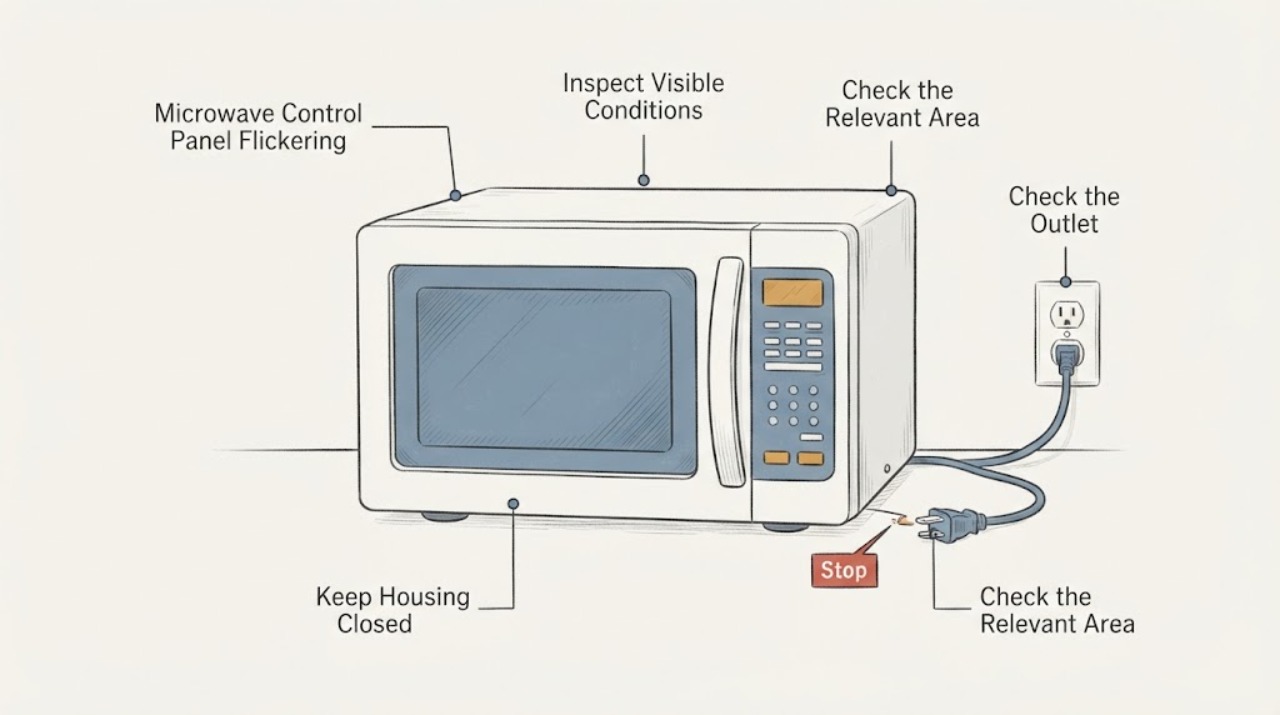
First determine whether the LG microwave display is only going dark after sitting idle or is actually flickering while you use the controls. LG says some microwave displays turn off after five minutes of inactivity as an energy-saving feature and can return when the door is opened or closed; a panel that flickers during input, remains unstable after one safe reset, or is accompanied by smoke, burning, arcing or a hot plug should be taken out of service. With the unit cool and disconnected, record the model, inspect only the accessible power connection, and wipe visible surface residue or moisture from the touch panel with a dry cloth. Do not open the microwave cabinet, touch high-voltage parts or perform energized tests; arrange LG or qualified appliance service if the behavior persists.
Work through in order
Diagnostic checks
Use only checks that match the exact appliance or system and its official guide.
-
Check 1
If the panel is flickering now, stop cooking and look for smoke, sparks, a burning odor, melted plastic, a hot plug or a hot outlet. If any is present, stop using the microwave, disconnect it only if this can be done without touching a hot or damaged connection, and otherwise switch off the circuit from a safe location.
Expected result: There is smoke, arcing, burning odor, heat damage, or an unusually hot plug or outlet; or the panel is only flashing without any heat or odor warning.
Next step: Keep the microwave out of service and arrange qualified appliance/electrical help; use emergency services for active smoke or fire. If no warning sign is present, continue with the unit disconnected.
Why this matters
Why: A heat or electrical warning is a stop-use condition. Flicker without those signs still does not identify a safe internal repair, but it permits only the low-risk checks below while the unit is cool and disconnected.
-
Check 2
Observe when the display changes without trying to recreate a fault: only after the microwave has sat unused for about five minutes, when the door is opened or closed, while a key is pressed, during cooking, or at random intervals.
Expected result: The display goes dark only after inactivity and returns when the door or a control is used; or it flickers during active input/cooking or returns and disappears unpredictably.
Next step: For an idle-only blank display, check the model manual for its energy-saving setting. For active or random flicker, stop testing and continue with identification and one controlled reset only if there are no hazard signs.
Why this matters
Why: The first pattern can match LG's energy-saving display behavior, although the exact timing and controls vary by model. The latter patterns are not established as normal by the no-model task and should be treated as a continuing control/display symptom.
-
Check 3
With the microwave unplugged or its circuit safely off, check that the accessible power cord is firmly seated and that the outlet or multi-outlet connection is not loose, wet or visibly damaged. Do not remove trim, pull out an over-the-range unit or open a wall box.
Expected result: The accessible connection is loose or visibly damaged, or it looks secure with no external damage.
Next step: Leave a damaged or wet connection unused and have it assessed. If it looks normal, keep the microwave disconnected while you record the symptom and model for service.
Why this matters
Why: A loose or damaged external connection can interrupt power, but a normal-looking connection does not clear the microwave or the circuit. Hidden wiring and the microwave power section remain unverified.
-
Check 4
After the unit is disconnected and cool, wipe only the accessible touch-panel surface with a dry, soft cloth. Remove visible food residue or moisture around the buttons; do not spray cleaner into seams or use a tool to lift the panel.
Expected result: Visible foreign material or moisture is present and the panel becomes stable after it is removed, or the surface is clean and the flicker remains.
Next step: If the problem remains, stop operating the microwave and arrange inspection. Do not open the panel to clean or reseat internal parts.
Why this matters
Why: LG's F3 guidance links foreign substances around the touch-button panel with that specific displayed error, so surface contamination is a bounded check, not proof that every flicker is an F3 or a keypad failure. Persistence after a dry external clean requires service.
-
Check 5
Record the complete LG model number from the rating label, the type of microwave (countertop or over-the-range), whether the display responds to keys or gives a chime, any visible code or lock indicator, and whether the symptom began after an outage, cleaning or moisture exposure. Do not infer a code from the appearance of a flashing display.
Expected result: The model and symptom sequence are available, or the model, display pattern or timing remains uncertain.
Next step: Use the exact model manual or give the recorded information to LG service. If the identity or display pattern cannot be confirmed, keep the unit out of service rather than applying another model's key sequence.
Why this matters
Why: LG control-lock behavior, display energy saving and error guidance vary by model; a generic flashing panel does not establish a particular code or failed part.
-
Check 6
Only if there is no smoke, heat damage, burning odor, arcing or damaged connection, perform one controlled reset by unplugging the microwave or switching off its circuit for two to three minutes, then restore power once. Do not repeat the cycle to chase an intermittent flicker.
Expected result: The panel is stable after the one reset, or it flickers again, stays unresponsive or shows a code.
Next step: If the symptom returns or the panel remains unresponsive, stop using the microwave and request LG or qualified appliance service. Do not open the cabinet or test the high-voltage section.
Why this matters
Why: LG presents a short power reset as a way to clear temporary control-panel communication issues, but a recurring symptom or code is not proof of a consumer-replaceable component.
Use your observations
Decision map
Find the observation that best matches what you see, then follow the next safe action.
-
PATH 01Next step
What you see
The display goes dark only after the microwave sits unused and returns when the door or a control is used, with no active flicker while cooking.
Do this next
Check the exact LG manual for the display setting; no cabinet repair is indicated by this observation alone.
Why this path and its safety boundary
Why it matters: That pattern is consistent with the energy-saving behavior LG documents, subject to the exact model's settings and manual.
-
PATH 02Next step
What you see
The control panel flickers during key presses or cooking, returns after power is restored, or remains unstable after one controlled reset.
Do this next
Keep the microwave unplugged or switched off and arrange LG or qualified appliance service. Do not repeat resets or attempt cabinet-level diagnosis.
Why this path and its safety boundary
Why it matters: The symptom is outside the bounded idle-display explanation. It may involve the control interface, power path or another appliance fault, but the no-model evidence does not identify which part.
-
PATH 03Next step
What you see
Smoke, arcing, burning odor, melting, a hot plug/outlet or a damaged cord appears with the flicker.
Do this next
Stop use, isolate power from a safe location and obtain qualified electrical/appliance service; use emergency services for active smoke or fire.
Why this path and its safety boundary
Why it matters: This is an electrical or fire-safety condition, not a control-lock or display-setting problem.
-
PATH 04Next step
What you see
Visible surface residue or moisture is present around the touch panel and the exact display shows a documented code such as F3.
Do this next
With power disconnected, wipe the accessible surface dry and follow the exact model's manual; if the symptom or code returns, request service without opening the microwave.
Why this path and its safety boundary
Why it matters: LG's F3 article gives a surface foreign-substance check for that code, but it does not turn an unspecified flicker into an F3 diagnosis.
Helpful context
Understand the symptom
Separate a normal blank display from a flickering panel
The symptom matters. LG's microwave guidance says the display can turn off after five minutes without use to save energy, and its owner manual describes the display and control-lock behavior for a particular model family. That is different from characters or keys flashing while the microwave is being operated, controls changing without a deliberate press, or a panel that repeatedly loses and regains power. Without an LG model number, keep the result at safe external checks and service routing rather than naming a board, keypad or high-voltage part.
Microwave cabinet and high-voltage boundary
Do not remove the microwave cover, reach behind the control panel, probe terminals, bypass a door interlock or make an energized measurement. The public LG guidance supports unplugging the unit for a short reset and sending a persistent control-panel problem for service; it does not authorize a consumer to diagnose the high-voltage section. Stop immediately for smoke, arcing, burning odor, heat damage or a warm plug or outlet.
When checks do not resolve it
Need a professional?
Arrange LG or qualified appliance service when the panel flickers during operation, remains unstable after one controlled reset, stays unresponsive, or displays a recurring code., Call a qualified electrician for a damaged, loose, wet or overheating outlet, plug or circuit connection., Stop immediately and use emergency services for active smoke, fire or ongoing arcing.
Have this ready
- complete LG model number and microwave type
- whether the display is blank only after inactivity or flickers during input/cooking
- whether controls chime/respond and any exact displayed code or lock indicator
- power-outage, cleaning/moisture and visible cord/outlet history
- any smoke, odor, arcing, heat or damage observed
Common questions
FAQ
Is a display that turns off always a failed LG microwave panel?
No. LG documents an energy-saving behavior in which some microwave displays turn off after about five minutes without use and return when the door is opened or closed. A display that flickers during use or behaves unpredictably needs the exact model checked and may require service.
Can I open the LG microwave to check the control board or high-voltage parts?
No. Keep the cabinet closed. Use only the accessible, disconnected checks described here and arrange qualified service for a persistent flicker, recurring code or electrical warning.
Should I keep unplugging the microwave until the flicker stops?
If there are no hazard signs, LG documents one short two-to-three-minute reset for control-panel communication issues. Do not repeatedly reset or operate the unit to chase an intermittent fault; if the flicker returns, leave it disconnected and request service.
Does an F3 code prove that the panel itself is defective?
No. LG's F3 guidance gives a touch-panel foreign-substance check for that specific code and says persistent or other errors need inspection. Do not infer F3 from an unspecified flicker or transfer the code meaning from another model.
Read the exact guide
Official sources
- LG Microwave - What should I do when a product stops and display turns off?LG Electronics USA · Opened LG USA microwave troubleshooting article. It identifies display shutoff after five minutes of non-use as an energy-saving feature and says opening/closing the door can deactivate it; it also instructs checking the accessible power-cord connection.
- LG Microwave - Troubleshooting an F3 ErrorLG Electronics USA · Opened LG USA F3 support article. It specifically associates F-3 with foreign substances around the touch-button panel, recommends wiping the surface and inspection for persistent symptoms, and warns that other errors can involve short circuit, communication or overcurrent conditions. This article uses that source only for the bounded F3/surface observation, not as a universal flicker diagnosis.
- LG Microwave - Troubleshooting the Start Button Not WorkingLG Electronics USA · Opened LG USA support article for microwaves. It covers control-lock and door checks, a two-to-three-minute unplug or breaker reset, and service when the control panel remains unresponsive; it does not authorize internal repair.
- en-us_main.book.bookLG Electronics USA · Opened the official LG USA owner manual PDF and verified the MSER2090/MSER1590 cover and operation section. It is used only for its explicit display/control-lock and power-resume behavior, not to claim that the unspecified task is one of those models or to provide cabinet repair steps.
Community feedback
Share a repair observation
Share a plain-text repair observation. Accepted observations are published automatically; this page may take a moment to update.