
On this page
Start here
Quick answer
If a Liebherr refrigerator will not turn on, start at the controls and wall connection: verify that it is switched on, the plug is fully inserted, and the outlet fuse or breaker has not tripped. Do not repeatedly reset a breaker or open the appliance. If the outlet is live but the refrigerator remains dead, or if power causes a smell, heat, or repeated trip, leave it off and call qualified service.
Before you begin
Safety first
- Do not open covers, probe mains wiring, move a heavy refrigerator to reach its rear, or keep resetting a protective device.
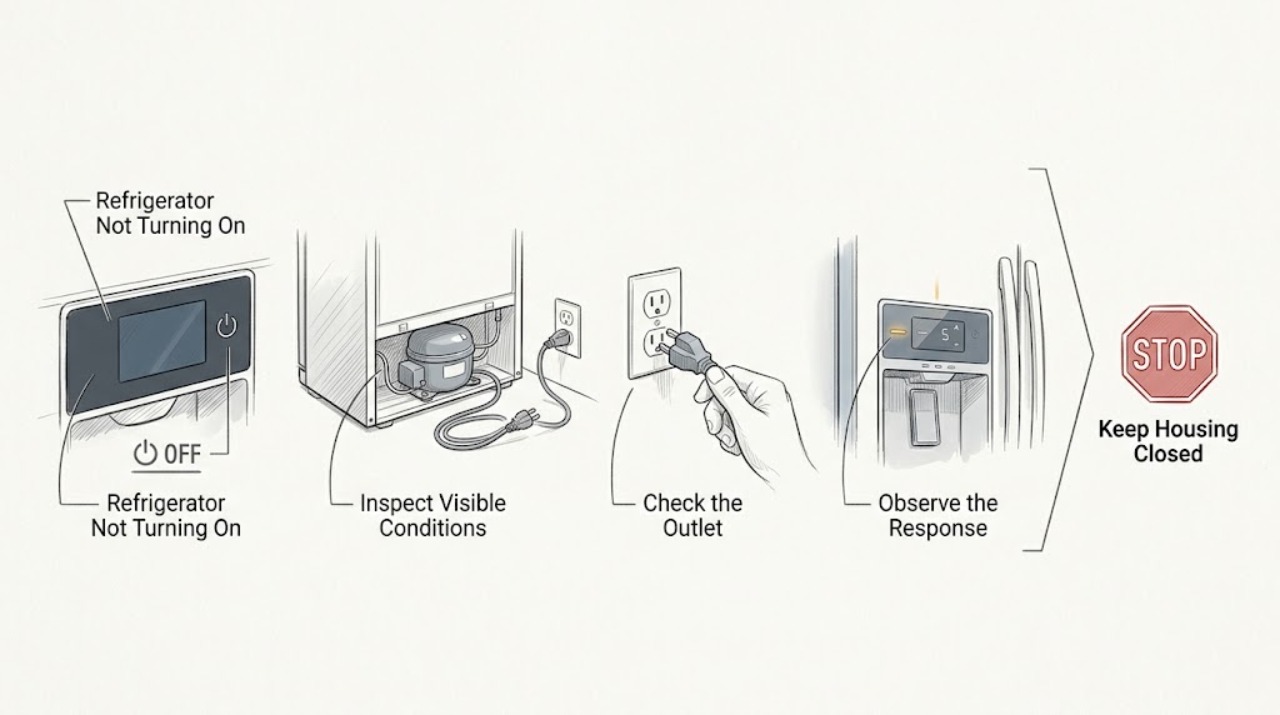
Work through in order
Diagnostic checks
Use only checks that match the exact appliance or system and its official guide.
-
Check 1
Look at the display and interior light, then verify the refrigerator's visible On or control setting without removing any cover.
Expected result: The display and light are both dark, or the display is present but cooling has not started.
Next step: Continue with the plug and outlet check only when no electrical hazard is present.
Why this matters
Why: A completely dark appliance points first to power delivery; a live display points to a control or cooling symptom rather than total loss of supply.
-
Check 2
With dry hands and no sign of damage, confirm that the power plug is fully seated in the wall outlet and that the cord is not pinched, hot, or cut.
Expected result: The plug was loose or the cord and plug look intact and seated.
Next step: Reseat an intact plug once; do not use a damaged cord or attempt a cord repair.
Why this matters
Why: Liebherr identifies an improperly inserted plug as a direct no-operation cause; visible cord or plug damage is a safety stop.
-
Check 3
Check the outlet's fuse or breaker from the consumer panel and note whether it is tripped, shared with another load, or trips again when the refrigerator is connected.
Expected result: The protective device is tripped, the outlet is dead, or the device trips again after reset.
Next step: Reset only once if safe and permitted; stop immediately on a repeat trip and arrange electrical or appliance service.
Why this matters
Why: A faulty outlet fuse can stop the appliance; a repeated trip is not a reason to keep resetting and may indicate a circuit or appliance fault.
-
Check 4
After a safe single power check, observe whether the display returns and whether the compressor starts normally, without moving the appliance or touching rear components.
Expected result: The display returns, remains dead despite a live outlet, or power is accompanied by heat, smoke, or an electrical smell.
Next step: Keep the appliance off for the second and third patterns and provide the timing and protective-device behavior to service.
Why this matters
Why: Recovery after a connection issue supports external power interruption; persistent dead operation or a hazard symptom requires qualified diagnosis.
Use your observations
Decision map
Find the observation that best matches what you see, then follow the next safe action.
-
PATH 01Next step
What you see
The plug was loose and the refrigerator returns normally after one safe reseating
Do this next
Monitor without disturbing the cord and arrange service if it drops out again.
Why this path and its safety boundary
Why it matters: The immediate cause was likely connection rather than a proven internal failure.
-
PATH 02Next step
What you see
The outlet or fuse is dead but the appliance shows no hazard sign
Do this next
Do not dismantle the refrigerator; restore safe supply before appliance diagnosis.
Why this path and its safety boundary
Why it matters: The wall supply remains unresolved and should be checked by a qualified electrician if other loads also fail.
-
PATH 03Next step
What you see
The breaker trips again, the appliance stays dead on a confirmed live outlet, or there is heat or electrical odor
Do this next
Leave it off and arrange qualified electrical or appliance service.
Why this path and its safety boundary
Why it matters: This is beyond a safe external reset and may be an electrical fault.
Helpful context
Understand the symptom
Confirm power without opening the cabinet
A dead display can be a control state, a plug or outlet issue, or an appliance fault. The safe sequence ends at the wall connection and fuse or breaker. Internal electrical diagnosis is not a user check.
When checks do not resolve it
Need a professional?
Arrange qualified Liebherr service when external power checks do not restore operation or any electrical hazard appears.
Safety scope: Do not open covers, probe mains wiring, move a heavy refrigerator to reach its rear, or keep resetting a protective device.
Have this ready
- Provide the display and light state, plug condition, outlet and breaker result, repeat-trip behavior, and any smell or heat.
Common questions
FAQ
Should I keep resetting the Liebherr refrigerator breaker?
No. A single safe check may identify an external interruption, but a repeat trip is a stop condition. Leave the appliance off and request qualified help.
What if the display is on but the refrigerator is not cooling?
That is not a total no-power symptom. Check the temperature and alarm information, then use the cooling diagnosis or arrange service if the appliance remains warm.
Read the exact guide
Official sources
- MalfunctionLiebherr-Hausgeräte · Liebherr refrigerator no-operation power, plug, fuse, and service guidance
Community feedback
Share a repair observation
Share a plain-text repair observation. Accepted observations are published automatically; this page may take a moment to update.